2020 MERCEDES-BENZ AMG GT COUPE keyless
[x] Cancel search: keylessPage 70 of 433

Ro
ller sunblinds Operating
thero ller sunblind for the panor‐
amic roof #
Pull handle 1onthero ller sunblind in the
cor responding direction. Anti-theft pr
otection Fu
nction of the immobiliser The immobiliser pr
events your vehicle from
being star ted without the cor rect key. The immobiliser is automatically activated when
th
e ignition is switched off and deactivated when
th e ignition is switched on. ATA
(Anti-Theft Alarm sy stem) Fu
nction of theATA system
If th eATA system is primed, a visual and audible
alarm is triggered in thefo llowing situations:
R when a door is opened
R when theta ilgate is opened
R when the bonn etis opened
R when interior pr otection is triggered
(/ page 69)
R when tow- aw ay protection is triggered
(/ page 68)
The ATA sy stem is primed automatically af ter
appr oximately ten seconds in thefo llowing situa‐
tions:
R afte r locking theve hicle with thekey
R afte r locking theve hicle using KEYLESS-GO Indicator lamp
1flashes when theAT A sy stem
is primed.
The ATA sy stem is deactivated automatically in
th efo llowing situations:
R afte r unlocking theve hicle with thekey
R afte r unlocking theve hicle using KEYLESS-
GO Opening and closing
67
Page 71 of 433
R
afte rst arting theve hicle with thekey
( / page 102)
% When the Mercedes‑Benz emer gency call
sy stem is active and the alarm stay s on for
more than 30 seconds, a message is auto‐
matically sent tothe Cus tomer Assis tance
Centre (/ page 248).
Deactivating theATA #
Press theÜ, ßorp button on the
key.
or #
Start theve hicle with theke y (/ page102).
Deactivating the ala rmusing KEYLESS-GO #
Grasp the outside door handle with thekey
outside theve hicle. Fu
nction of tow- aw ay protection An audible and visual alarm is triggered if an
alteration
to yourvehicle's angle of inclination is
de tected while tow- aw ay protection is primed. To
w- aw ay protection is automatically primed
af te r appro ximately 60 seconds:
R afte r locking theve hicle with thekey
R afte r locking theve hicle using KEYLESS-GO
To w- aw ay protection is only primed when thefo l‐
lowing components are closed:
R the doors
R theta ilgate
To w- aw ay protection is automatically deactiva‐
te d:
R afte r pressing theÜ orp button on
th ekey
R afte rst arting theve hicle with thekey
( / page 102)
R afte r unlocking theve hicle using KEYLESS-
GO
R when using HANDS-FREE ACCESS Priming/deactivating
tow- aw ay protection
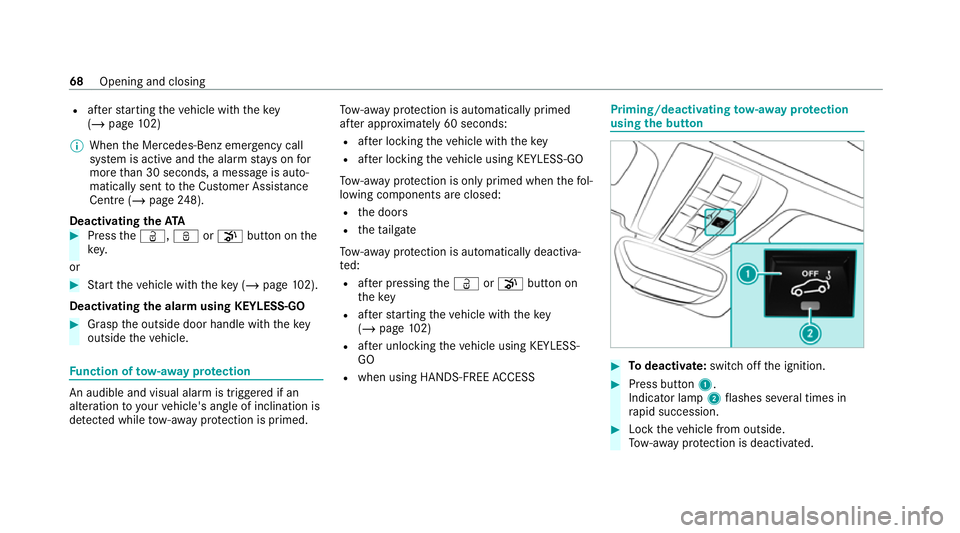
using the but ton #
Todeactivate: switch offthe ignition. #
Press button 1.
Indicator lamp 2flashes se veral times in
ra pid succession. #
Lock theve hicle from outside.
To w- aw ay protection is deactivated. 68
Opening and closing
Page 72 of 433

To
w- aw ay protection remains deactivated until
yo u prime theAT A sy stem again af ter opening a
door. Fu
nction of interior pr otection When interior pr
otection is primed, a visual and
audible alarm is triggered if mo vement is de tec‐
te d in theve hicle interior.
Interior pr otection is primed automatically af ter
appr oximately ten seconds:
R afte r locking theve hicle with thekey
R afte r locking theve hicle using KEYLESS-GO
Interior pr otection is only primed when thefo l‐
lowing components are closed:
R doors
R theta ilgate
Interior pr otection is automatically deactivated:
R afte r pressing theÜ orp button on
th ekey
R afte rst arting theve hicle with thekey
( / page 102) R
afte r unlocking theve hicle using KEYLESS-
GO
R when using HANDS-FREE ACCESS
The following situations can lead toafa lse
alarm:
R moving objects such as masc ots in theve hi‐
cle interior
R when the side window is open Priming/deactivating interior pr
otection
using the but ton #
Todeactivate: switch offthe ignition. #
Press button 1.
Indicator lamp 2flashes se veral times in
ra pid succession. #
Lock theve hicle from outside.
Interior pr otection is deactivated. Opening and closing
69
Page 414 of 433
Interior lighting
.......................................... 91
Re ading light .......................................... 91
Setting ................................................... 91
Switch-off del aytime ............................. 91
Interior pr otection
Fu nction ................................................ 69
Priming/deactivating ............................. 69
In term ediatedestination
Calculating a route with intermediate
destinations ........................................ 203
En tering ............................................... 203
Modifying ............................................ 203
St arting an automatic filling station
sear ch................................................. 202
St arting the automatic service sta‐
tion sear ch.......................................... 208
In tern etconnection
Cancelling permission (mobile
phone) ................................................ .255
Communication module function ....... .252
Connection status .............................. .255
Displ aying the connection status ........ 255
Editing access data (Blue tooth®
) .........2 55
Information .......................................... 251
Mobile phone de tails .......................... .255 Re
strictions ......................................... 251
Setting access data (Bluetooth ®
) ........ 252
Setting up (Blue tooth®
) .......................2 52
Setting up (business telephony) .......... 253
Setting up (Wi-Fi) ................................ .252
Switching Blue tooth®
profile (DUN/
PA N) .................................................... 254
Internet radio
see TuneIn
iPhone ®
see Apple CarPl ay®
see Mercedes-Benz Link J
Jack Declaration of conformity ......................24
Storage location ..................................3 23
Jump-start connection ............................ 307
Gene ral no tes ...................................... 305 K
Ke y.............................................................. 54
Ac oustic locking verification signal ....... 55 Battery .................................................. 56
Emer
gency key ...................................... 55
Energy consum ption .............................. 55
Fe atures ................................................ 54
Ke yring attachment .............................. 55
Overview ............................................... 54
Problem .................................................57
St arting theve hicle ............................. 102
Un locking setting .................................. 55
Ke y functions
Deactivating .......................................... 55
KEYLESS-GO Locking theve hicle ................................ 58
Problem .................................................59
Un locking setting .................................. 55
Un locking theve hicle ............................58
Kickd own.................................................. 11 8
Using .................................................... 11 8
Knee airbag ................................................ 37 L
Lamp see In terior lighting Index
411
Page 416 of 433
Displ
aying the tra ffic map .................... 216
Displ aying traf fic incidents .................. 217
Extending a subscription ...................... 215
Issuing hazard alert s ............................2 17
Re gis tering on Mercedes me ............... 215
Load compa rtment co ver
Extending/r etra cting ............................. 83
Loading Notes ..................................................... 81
Loading guidelines .................................... 81
Loads Securing ................................................ 81
Locator lighting see Sur round lighting
Locking/unlocking Activating/deactivating the auto‐
matic locking feature ............................ .59
Ad ditional door lock .............................. 57
Emergency key ...................................... 60
KEYLESS-GO .......................................... 58
Opening theta ilgate .............................. 61
Un locking/opening the doors from
th e inside ..............................................58 Low beam
Swit ching on/off .................................. .87
Symm etrical low beam .......................... 87
Lu bricant additives
see Additives
Lu ggage
Securing ................................................ 81
Lu mbar support
see Lumbar support (4-w ay)
Lu mbar support (4-w ay)............................ 74 M
Maintenance see ASS YST PLUS
Malfunction Restra int sy stem ................................... 32
Map ................................................... 216, 218
Av oiding an area ..................................2 20
Av oiding an area (o verview) ................ .220
Changing an area ................................. 221
Deleting an area .................................. 221
Displ aying online map con tents .......... 223
Displaying Qibla .................................. 223 Displaying
the compass ....................... 222
Displaying the map version ................ .220
Displ aying the next intersecting
st re et ................................................... 220
Displaying the satellite map ................2 23
Displ aying the tra ffic map .................... 216
Displ aying weather information .......... .223
Map data ............................................. 222
Moving ................................................. 219
Overview ..............................................2 18
Selecting POI symbols ......................... 219
Selecting text information ................... 220
Selecting the map orientation .............. 219
Setting the map scale .......................... 218
Setting the map scale automatically ....2 23
Up dating .............................................. 221
Map and compass Overview .............................................. 218
Matt finish (cleaning instructions) ........ 291
Maximum gross vehicle weight ............ .332
Maximum speed see Limiter
Maximum speeds ................................... .340
Mecca ....................................................... 223 Index
413
Page 429 of 433
Data
storage .......................................... 27
Diagno stics connection ........................ .24
Equipment ............................................. 19
Implied warranty .................................... 27
Load on assemblies ............................. 109
Locking (auto matically) ......................... 59
Locking (from inside) ............................. 58
Locking (KEYLESS-GO) ......................... .58
Locking/unlocking (emergency key) .... .60
Lo we ring ............................................. 329
Medical aids .......................................... 26
Pa rking up .......................................... .126
QR code rescue card ............................. 27
Qualified specialist workshop ................25
Ra ising ................................................ 325
REA CHregulation ..................................26
Re gistration ...........................................25
Ro cking free ........................................ .116
St arting (Em otion Start) ...................... 102
St arting (k ey) .......................................1 02
St arting (s tart/s top button) .................1 01
Switching off (s tart/s top button) .........1 21
To wing ................................................ .154
Un locking (from inside) ........................ .58
Un locking (KEYLESS-GO) ...................... .58
Ve ntilating (co nvenience opening) ......... 65 Vo
ice commands (LINGU ATRO NIC) ...... 172
Ve hicle data
Displ aying (DYNAMIC SELECT) ............ .114
Maximum speeds ................................ 340
Tr ans ferring toAndroid Auto ................ 24 3
Tr ans ferring toApple CarPl ay®
............ 24 3
Ve hicle height ...................................... 339
Ve hicle length ...................................... 339
Ve hicle width ....................................... 339
We ights .............................................. .340
Wheelbase .......................................... .339
Ve hicle dimensions ................................. 339
Ve hicle identification number
see VIN
Ve hicle identification plate .................... 332
EU general operating pe rmit number .. 332
Pa int code .......................................... .332
Pe rm issible axle load .......................... .332
Pe rm issible gross mass ....................... 332
VIN ...................................................... 332
Ve hicle key
see Key
Ve hicle maintenance
see ASS YST PLUS Ve
hicle tool kit ........................................ 300
TIREFIT kit .......................................... .300
To wing eye ...........................................3 12
Ve ntilating
Con venience opening ............................ 65
Ve nts
see Air vents
Vi deo mode .............................................. 265
Ac tivating ............................................ 262
Ac tivating/deactivating full-screen
mode ................................................... 264
Overview ............................................ .264
Settings ............................................... 265
VIN ............................................................ 332
Identification plate .............................. 332
Seat ..................................................... 332
Wi ndsc reen ......................................... 332
Vi sion
Demisting windo ws............................... 98
Vo ice command types (LINGUA‐
TRONIC) .................................................... 161
Vo ice control sy stem
see LINGU ATRO NIC 426
Index