2020 MAZDA MODEL CX-30 door lock
[x] Cancel search: door lockPage 120 of 562

position while children are in the
vehicle.
Master control switches
1. Close
2. Open
3. Front passenger's window
4. Right rear window
5. Power window lock switch
6. Left rear window
7. Driver's window
8. Locked position
9. Unlocked position
Front passenger's window switch/
Rear window switches
1. Close
2. Open
NOTE
A power window may no longer
open/close if you continue to press
the switch for a long time. If the
power window does not open/
close, wait for a while and then
operate the switch again.
The passenger windows may be
opened or closed using the master
control switches on the driver's door.
The power window can be operated
for about 40 seconds after the
ignition is switched from ON to ACC
or off with all doors closed. If any
door is opened, the power window
will stop operating.
▼Auto-opening/Closing
To fully open the window
automatically, press the switch
completely down, then release. The
window will fully open automatically.
To fully close the window
automatically, pull the switch
completely up, then release. The
window will fully close automatically.
To stop the window partway, pull or
press the switch in the opposite
direction and then release it.
NOTE
Power window system initialization
procedure
If you operate the switch any number
of times with the power window not
fully closed, the window may no longer
fully open/close automatically.
The power window auto function will
only resume on a power window that
has been reset.
1. Switch the ignition ON.
Before Driving
Windows
3-38
CX-30_8HG6-EA-19I_Edition1_new
2019-6-13 18:45:11
Page 121 of 562

2. Make sure that the power windowlock switch located on the driver's
door is not depressed.
3. Press the switch and fully open the window.
4. Pull up the switch to fully close the window and continue holding the
switch for about 2 seconds after the
window fully closed.
5. Make sure that the power windows operate correctly using the door
switches.
▼Jam-safe Window
When the window is closing and a
foreign object is detected between the
window and the window frame, the
window stops closing and
automatically opens partway.
NOTE
The jam-safe function may operate
under the following conditions:
A strong impact is detected while
the window is closing.
The window is closing in very low
temperatures.
(A window cannot be closed)
If the jam-safe function has operated
and the window cannot be closed,
check around the window frame for
a foreign object.
If there is no foreign object around
the window frame, forcibly close a
window using the following
procedure.
1. After switching the ignition OFF,
wait for 45 seconds or longer.
2. Switch the ignition ON.
3. Operate the switch in the direction to close the window
until the jam-safe function
operates and the window stops.
Repeat this operation a total of 5
times.
4. Continue pulling up the switch tofully close the window.
Before Driving
Windows
3-39
CX-30_8HG6-EA-19I_Edition1_new 2019-6-13 18:45:11
Page 127 of 562

Theft-Deterrent System*
▼Theft-Deterrent System
If the theft-deterrent system detects an
inappropriate entry into the vehicle,
which could result in the vehicle or its
contents being stolen, the alarm alerts
the surrounding area of an abnormality
by sounding the horn and flashing the
hazard warning lights.
The system will not function unless it's
properly armed. So when you leave the
vehicle, follow the arming procedure
correctly.
▼Operation
System triggering conditions
The horn sounds intermittently and the
hazard warning ligh
ts flash for about
30 seconds when the system is
triggered by any one of the following:
Unlocking a door with the auxiliary
key, door lock switch, or an inside
door-lock knob.
Forcing open a door, the hood or the
liftgate.
Opening the hood by operating the
hood release handle.
Switching the ignition ON without
using the push button start.
If the system is triggered again, the
lights and horn will activate until the
driver's door or the liftgate is unlocked
with the transmitter.
(With the advanced keyless function)
The lights and horn can also be
deactivated by touching the sensing
area of the door release touch sensor.
NOTE
If the battery goes dead while the
theft-deterrent system is armed, the
horn will activate and the hazard
warning lights will flash when the
battery is charged or replaced.
▼ How to Arm the System
1. Close the windows and the
moonroof* securely.
2. Switch the ignition OFF.
3. Make sure the hood, the doors, and the liftgate are closed.
4. Press the lock button on the transmitter.
The hazard warning lights will flash
once.
The following method will also arm
the theft-deterrent system:
Press the door-lock switch “
”
while any door is open and then
close all of the doors.
(With the advanced keyless
function)
Touch the sensing area of the door
lock touch sensor.
The security indicator light in the
instrument cluster flashes twice per
second for 20 seconds.
5. After 20 seconds, the system is fully armed.
NOTE
The theft-deterrent system can also
be armed by activating the auto
relock function with all the doors,
the liftgate and the hood closed.
Refer to Transmitter on page 3-5.
Before Driving
Security System
*Some models.3-45
CX-30_8HG6-EA-19I_Edition1_new 2019-6-13 18:45:11
Page 128 of 562

The system will disarm if one of the
following operations takes place
within 20 seconds after pressing the
lock button:
Unlocking any door.Opening any door.Opening the hood.Switching the ignition ON.
To rearm the system, do the arming
procedure again.
When the doors are locked by
pressing the lock button on the
transmitter while the theft-deterrent
system is armed, the hazard warning
lights will flash once to indicate that
the system is armed.
▼ To Tu r n
Off an Armed System
An armed system can be turned off
using any one of the following
methods:
Pressing the unlock button on the
transmitter.
Starting the engine with the push
button start.
(With the advanced keyless
function)
Touching the sensing area of the
door release touch sensor.
The hazard warning lights will flash
twice.
NOTE
When the doors are unlocked by
pressing the unlock button on the
transmitter while the theft-deterrent
system is turned off, the hazard
warning lights will flash twice to
indicate that the system is turned off.
▼ To S t o p t h e A l a r m
A triggered alarm can be turned off
using any one of the following
methods:
Pressing the unlock button on the
transmitter.
Starting the engine with the push
button start.
(With the advanced keyless
function)
Touching the sensing area of the
door release touch sensor.
Pressing the electric liftgate opener
while the key is being carried.
The hazard warning lights will flash
twice.
Before Driving
Security System
3-46
CX-30_8HG6-EA-19I_Edition1_new 2019-6-13 18:45:11
Page 133 of 562
Drive slowly. Braking performance
can be adversely affected if snow or
ice adheres to the brake
components. If this situation occurs,
drive the vehicle slowly, releasing the
accelerator pedal and lightly applying
the brakes several times until the
brake performance returns to
normal.
▼Snow Tires
Use snow tires on all 4 wheels
Do not go faster than 120 km/h (75
mph) while driving with snow tires.
Inflate
snow tires 30 kPa (0.3 kgf/cm
2,
4.3 psi) more than recommended on
the tire pressure label (driver's door
frame), but never more than the
maximum cold-tire pressure shown on
the tires.
The vehicle is originally equipped with
all season radials designed to be used
all year around. In some extreme
climates you may find it necessary to
replace them with snow tires during
the winter months to further improve
traction on snow and ice covered
roads.
WARNING
Use only the same size and type tires
(snow, radial, or non-radial) on all 4
wheels:
Using tires different in size or type is
dangerous. Your vehicle's handling
could be greatly affected and result in
an accident.
CAUTION
Check local regulations before using
studded tires.
NOTE
The tire pressure monitoring system
may not function correctly when using
tires with steel wire reinforcement in
the sidewalls (page 4-206).
▼ Tire Chains
Check local regulations before using
tire chains.
CAUTION
Chains may aff ect handling.
Do not go faster than 50 km/h (30
mph) or the chain manufacturer's
recommended limit, whichever is
lower.
Drive carefully and avoid bumps,
holes, and sharp turns.
Avoid locked-wheel braking.
Do not use chains on a temporary
spare tire; it may result in damage to
the vehicle and to the tire.
Do not use chains on roads that are
free of snow or ice. The tires and
chains could be damaged.
Chains may scratch or chip
aluminum wheels.
NOTE
The tire pressure monitoring system
may not function correctly when
using tire chains.
Install the chains on the front tires only.
Do not use chains on the rear tires.
Please consult an Authorized Mazda
Dealer.
Installing the chains
1. If your vehicle is equipped with wheel covers remove them,
otherwise the chain bands will
scratch them.
2. Secure the chains on the front tires as tightly as possible.
Before Driving
Driving Tips
3-51
CX-30_8HG6-EA-19I_Edition1_new 2019-6-13 18:45:11
Page 140 of 562
Ignition Switch
▼Push Button Start Positions
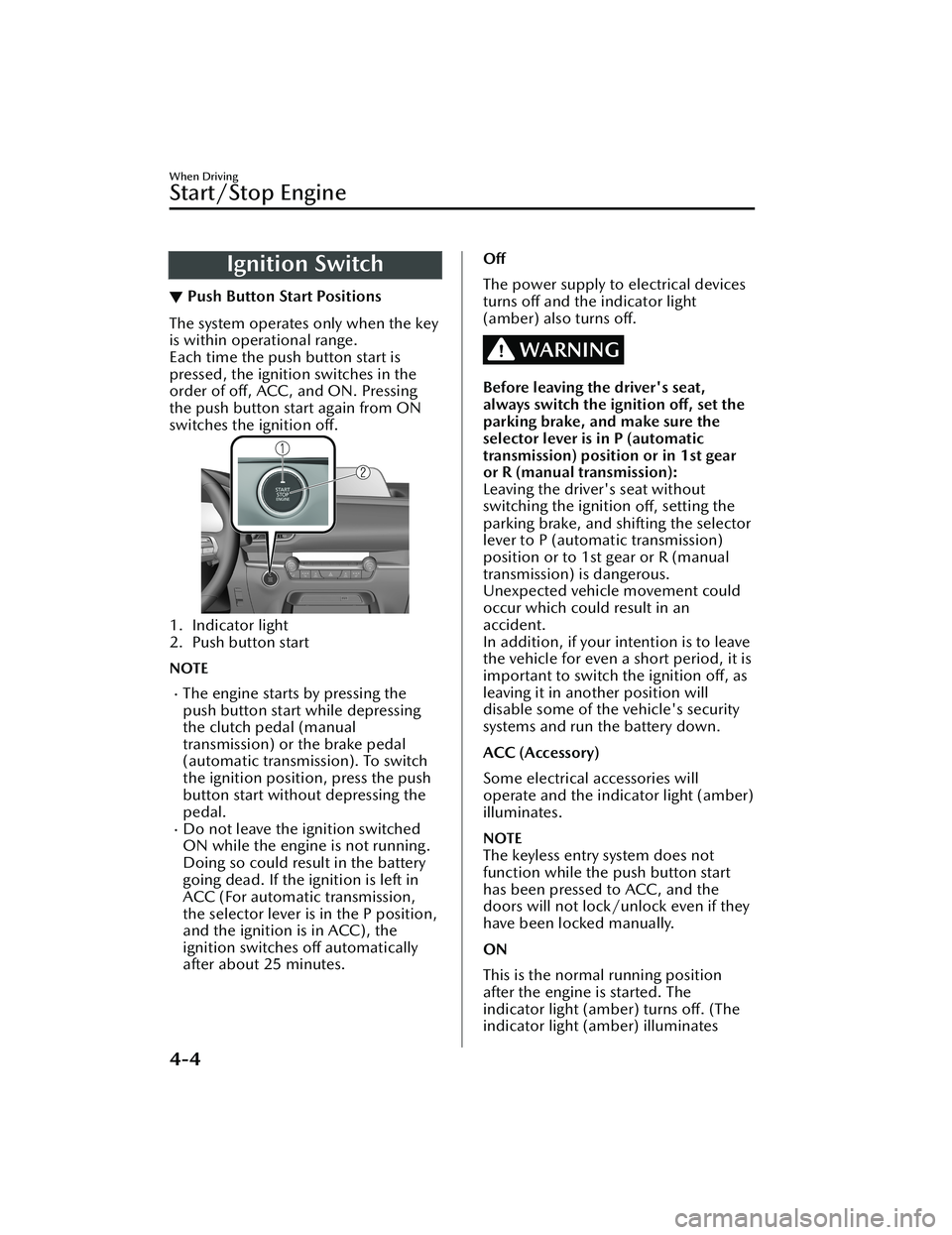
The system operates only when the key
is within operational range.
Each time the push button start is
pressed, the ignition switches in the
order of
off, ACC, and ON. Pressing
the push button start again from ON
switches the ignition off.
1. Indicator light
2. Push button start
NOTE
The engine starts by pressing the
push button start while depressing
the clutch pedal (manual
transmission) or the brake pedal
(automatic transmission). To switch
the ignition position, press the push
button start without depressing the
pedal.
Do not leave the ignition switched
ON while the engine is not running.
Doing so could result in the battery
going dead. If the ignition is left in
ACC (For automatic transmission,
the selector lever is in the P position,
and the ignition is in ACC), the
ignition switches off automatically
after about 25 minutes.
Off
The power supply to electrical devices
turns off and the indicator light
(amber) also turns off.
WARNING
Before leaving the driver's seat,
always switch the ignition off, set the
parking brake, and make sure the
selector lever is in P (automatic
transmission) position or in 1st gear
or R (manual transmission):
Leaving the driver's seat without
switching the ignition off, setting the
parking brake, and shifting the selector
lever to P (automat ic transmission)
position or to 1st gear or R (manual
transmission) is dangerous.
Unexpected vehicle movement could
occur which could result in an
accident.
In addition, if your intention is to leave
the vehicle for even a short period, it is
important to switch the ignition off, as
leaving it in another position will
disable some of the vehicle's security
systems and run the battery down.
ACC (Accessory)
Some electrical accessories will
operate and the indicator light (amber)
illuminates.
NOTE
The keyless entry system does not
function while the push button start
has been pressed to ACC, and the
doors will not lock/unlock even if they
have been locked manually.
ON
This is the normal running position
after the engine is started. The
indicator light (amber) turns off. (The
indicator light (amber) illuminates
When Driving
Start/Stop Engine
4-4
CX-30_8HG6-EA-19I_Edition1_new 2019-6-13 18:45:11
Page 181 of 562

▼Headlight High-Low Beam
The headlights switch between high
and low beams by moving the lever
forward or backward.
1. High beam
2. Low beam
When the headlight high-beams are
on, the headlight high-beam indicator
light is turned on.
▼Flashing the Headlights
The headlights can be flashed with the
ignition switched to ON.
To flash the headligh
ts, pull the lever
fully towards you (the headlight switch
does not need to be on).
1. OFF
2. Headlight flashing
The headlight high-beam indicator
light in the instrument cluster
illuminates simultaneously. The lever
will return to the normal position when
released.
▼ Coming Home Light
The coming home light turns on the
headlights (low beams) when the lever
is operated.
To turn on the lights
When the lever is pulled with the
ignition switched to ACC or OFF, the
low beam headlights turn on.
The headlights turn off after a certain
period of time has elapsed after all of
the doors are closed.
NOTE
The time until the headlights turn
off
after all of the doors are closed can
be changed.
Refer to the Settings section in the
Mazda Connect Owner's Manual.
If no operations are done for 3
minutes after the lever is pulled, the
headlights turn off.
The headlights turn off if the lever is
pulled again while the headlights are
illuminated.
▼ Leaving Home Light
The leaving home light turns on the
lights when the transmitter unlock
button is pressed while away from the
vehicle.
When Driving
Switches and Controls
4-45
CX-30_8HG6-EA-19I_Edition1_new
2019-6-13 18:45:11
Page 199 of 562

parking brake is released automatically.
When the parking brake is released,
the EPB indicator light in the
instrument cluster and the EPB switch
indicator light turn off.
The engine is running.The driver's door is closed.The driver's seat belt is fastened.(Manual transmission vehicle)
The shift lever is in a position other
than neutral.
The clutch pedal is depressed
halfway.
(Automatic transmission vehicle)
The selector lever is in the D, M, or R
position.
NOTE
If something such as the driver's foot
contacts the accelerator pedal with the
engine running and the parking brake
applied, the parking brake might be
released automatically. If you do not
intend to start driving the vehicle
immediately, shift the shift lever to the
neutral position for a manual
transmission, or shift the selector lever
to the P or N position for an automatic
transmission.
Canceling the parking brake
automatic operation
The parking brake automatic operation
can be canceled by doing any of the
following after switching the ignition
from ON to OFF.
Auto operation cancel method 1
1. Switch the ignition ON.
2. Turn off the AUTOHOLD.
3. Press the EPB switch continuouslyfor 2 seconds or longer (until a
sound is activated).
4. Release the EPB switch and switchthe ignition OFF within 5 seconds
after the sound was activated.
After the auto operation is
canceled, a sound is activated one
time, and the EPB switch indicator
light switches from illumination to
flashing, and then turns off after 3
seconds.
Auto operation cancel method 2
1. Switch the ignition ON.
2. Turn off the AUTOHOLD.
3. Switch the ignition OFF with the EPB switch pressed.
When the auto operation is
canceled, a sound is activated one
time, and the EPB switch indicator
light from normal flashing to faster
flashing, and then turns
off after 3
seconds.
NOTE
When canceling the parking brake
auto operation and parking the
vehicle, shift the shift lever to the 1st
gear or the R position for a manual
transmission, or shift the selector
lever to the P position for an
automatic transmission, and then
use wheel blocks.
The auto operation may not cancel if
the vehicle is parked on a steep
slope.
When the ignition is switched ON, the
parking brake auto operation is
restored.
▼ Warning Light
The warning light turns on when the
system has a malfunction.
Refer to Brake System Warning
Indication/Warning Light on page
7-22.
When Driving
Brake
4-63
CX-30_8HG6-EA-19I_Edition1_new
2019-6-13 18:45:11