2020 MAZDA MODEL CX-30 brakes
[x] Cancel search: brakesPage 270 of 562

The vehicle is driven on roads with
lane lines other than white (yellow)
lines, such as an expressway.
Do not get out of the vehicle while
the stop hold control is operating.
(Automatic transmission vehicle)
Getting out of the vehicle while the
stop hold control is operating is
dangerous as the vehicle may move
unexpectedly and result in an accident.
Before getting out of the vehicle,
switch the TJA off, apply the parking
brake, and then shift the selector lever
to the P position.
CAUTION
Turn the system off when the vehicle is
running on a chassis roller.
Heed the following cautions so that
the TJA can operate normally.
Turn the system off when the vehicle
is running on a chassis roller.
Do not modify the vehicle's
suspensions.
Always use wheels of the specified
size for the front and rear wheels.
Consult an Authorized Mazda Dealer
for tire replacement.
NOTE
The headway control does not detect
the following as physical objects.
Vehicles approaching in the
opposite direction
Pe de st ri a nsStationary objects (stopped
vehicles, obstructions)
If a vehicle ahead is traveling at an
extremely low speed, the system may
not detect it correctly.
If there is a structure on the road or
an object (such as a monorail) at a
low height off the ground in front of
the vehicle, the system may operate.
Therefore, do not use the TJA.
Do not use the TJA under conditions
in which close proximity warnings
are frequently activated.
If it is necessary to accelerate for a
lane change or the vehicle ahead
brakes suddenly causing you to close
in on the vehicle rapidly, accelerate
using the accelerator pedal or
decelerate using the brake pedal
depending on the conditions.
While the TJA is in use, any intended
engine braking does not occur even
if you shift the shift lever (manual
transmission) or th e selector lever
(automatic transmission). If
deceleration is required, lower the
vehicle speed setting or depress the
brake pedal.
While braking by the TJA control is
operating , you might hear an
operation sound, however, this does
not indicate a problem.
The brake lights turn on while
braking by the TJA control is
operating, however, they may not
turn on while the vehicle is on a
down slope at the set vehicle speed
or traveling at a constant speed and
following a vehicle ahead.
Under the following conditions, the
TJA may not be able to detect white
(yellow) lines or vehicles ahead
correctly and the TJA may not
operate normally.
The forward sensing camera (FSC)
cannot recognize the area in front
of the vehicle due to soiling or fog.
When Driving
i-ACTIVSENSE
4-134
CX-30_8HG6-EA-19I_Edition1_new 2019-6-13 18:45:11
Page 273 of 562

Inactive
Active (vehicle ahead)
Active (lane line)
If there is a problem with the TJA, a
message is displayed on the
multi-information display. Check the
details of the problem on the center
display and then have your vehicle
inspected by an Authorized Mazda
Dealer.
Refer to If a Warning Light Turns On or
Flashes on page 7-22.
▼Close Proximity Warning
If your vehicle rapidly closes in on the
vehicle ahead while you are traveling
under headway control, the warning
sound is activated and the brake
warning is indicated on the display.
Keep a safe distance between your
vehicle and a vehicle ahead.
1. “Depress Brake Pedal” message is
displayed
NOTE
In the following cases, the warnings
and brakes may not operate even if
your vehicle starts closing in on the
vehicle ahead.
You are driving your vehicle at the
same speed as the vehicle ahead.
Directly after the TJA operates.Directly after the accelerator pedal is
released.
Another vehicle cuts into the driving
lane in front of you.
When Driving
i-ACTIVSENSE
4-137
CX-30_8HG6-EA-19I_Edition1_new 2019-6-13 18:45:11
Page 285 of 562

Active driving display
NOTE
When the driver operates the steering
wheel while the steering wheel
operation assist is operating, the
steering wheel operation assistance is
canceled.
▼System Canceling
The LAS can be set to inoperable.
(If only the LAS is turned
off)
Refer to the Settings section in the
Mazda Connect Owner's Manual.
(If the LAS is turned off by operating
the i-ACTIVSENSE switch)
Refer to i-ACTIVSENSE Switch on
page 4-85.
NOTE
If the ignition is switched OFF while
you have canceled the system using the
i-ACTIVSENSE switch, the system is
automatically enabled the next time
the ignition is switched ON. However,
if the system is canceled using the
personalization features, the system is
not automatically enabled.
Smart Brake Support
(SBS)
*
▼Smart Brake Support (SBS)
The SBS alerts the driver of a possible
collision using the warning indications
in the display and a warning sound if
the front radar sensor and Forward
Sensing Camera (FSC) determine that
there is the possibility of a collision
with a vehicle ahead, pedestrian, or a
bicycle. Furthermore, if a collision is
unavoidable, the automatic brake
control is performed to reduce damage
in the event of a collision. In addition,
when the driver depresses the brake
pedal, the brakes are applied firmly
and quickly to assist.
(Vehicles with Driver Monitoring
(DM))
When the SBS determines that the
driver is not paying attention to the
road using the driver monitoring
camera and it determines that there is
the possibility of a collision with an
obstruction, the SBS activates the
collision warning earlier than normal.
WARNING
Do not rely completely on the
SBS:
The SBS is only designed to reduce
damage in the event of a collision.
The ability to detect obstructions is
limited depending on the obstructions,
weather conditions, or traffic
conditions. Over reliance on the
system leading to the accelerator pedal
or brake pedal being mistakenly
operated could result in an accident.
When Driving
i-ACTIVSENSE
*Some models.4-149
CX-30_8HG6-EA-19I_Edition1_new 2019-6-13 18:45:11
Page 291 of 562
![MAZDA MODEL CX-30 2020 Owners Manual Multi-information display
1. “BRAKE!” message is displayed
Active driving display
1. “BRAKE!” message is displayed
▼Stopping the Smart Brake Support
[Rear] (SBS-R) System Operation
The SBS](/manual-img/28/40985/w960_40985-290.png "MAZDA MODEL CX-30 2020 Owners Manual Multi-information display
1. “BRAKE!” message is displayed
Active driving display
1. “BRAKE!” message is displayed
▼Stopping the Smart Brake Support
[Rear] (SBS-R) System Operation
The SBS")
Multi-information display
1. “BRAKE!” message is displayed
Active driving display
1. “BRAKE!” message is displayed
▼Stopping the Smart Brake Support
[Rear] (SBS-R) System Operation
The SBS-R can be changed to
inoperable.
Refer to the Settings section in the
Mazda Connect Owner's Manual.
When the SBS-R is canceled, the SBS
OFF indicator light turns on.
NOTE
When the ignition is switched OFF
while the SBS-R is canceled, the
SBS-R is automatically enabled the
next time the ignition is switched
ON.
When the SBS-R is canceled, the
Smart Brake Support [Rear Crossing]
(SBS-RC) is also canceled.
Smart Brake Support
[Rear Crossing] (SBS-RC)
*
▼ Smart Brake Support [Rear
Crossing]
(SBS-RC)
The SBS-RC is a system designed to
assist the driver in avoiding collisions
and to reduce damage in the event of
a collision by applying the brakes if
there is the possibili ty of collision with
a vehicle approaching from the rear
while you are reversing out of parking
space.
The SBS-RC system detects vehicles
approaching from the rear left and
right sides of the vehicle, and the rear
of the vehicle while the vehicle is being
reversed out of a parking space, the
system reduces damage in the event of
a collision by operating the brake
control when the system determines
that a collision is unavoidable.
SBS-RC operation
1. The SBS-RC system operates when the shift lever (manual
transmission) or the selector lever
(automatic transmission) is shifted
to the reverse (R) position.
2. If there is the possibility of a collision with an approaching
vehicle, the SBS-RC system applies
brake and displays “BRAKE!” on the
active driving display and the
multi-information display.
When Driving
i-ACTIVSENSE
*Some models.4-155
CX-30_8HG6-EA-19I_Edition1_new 2019-6-13 18:45:11
Page 415 of 562

Maintenance ItemNormal Driving Scheduled Maintenance Intervals
1st 2nd 3rd 4th 5th 6th 7th 8th
Brake and clutch fluid level IIIIIIII
Brake fluid With electri-
cal boosterRRRR
Disc brakes IIIIIIII
Tire rotation Rotate every 16,000 km (10,000 miles).
Tire inflation pressure and tire wear
*4IIIIIIII
Steering operation and linkages II II
Front and rear suspension, ball joints and
wheel bearing axial play IIII
Rear differential oil
*5
Tra n s f e r o i l*5
Driveshaft dust boot II II
Bolts and nuts on chassis and body TTT T
Exhaust system and heat shields II
Emergency flat tire repair kit (if equipped)
*6Inspect annually.
Cabin air filter Replace every 48,000 km (30,000 miles) or 24 months.
Function of all lights IIIIIIII
Chart symbols:
I: Inspect: Inspect and clean, repair, adjust, fill up, or replace if necessary.
R: Replace
T: Tighten
Remarks:
*1 Reset the engine oil data whenever replacing the engine oil regardless of the message/wrench indicator light display.
*2 Use of FL-22 is recommended when replacing engine coolant. Using engine coolant other than FL-22
may cause serious damage to the engine and cooling system.
*3 According to state/provincial and federal regulations, failure to perform maintenance on these items
will not void your emissions warranties. However, Mazda recommends that all maintenance services
be performed at the recommended time or mileage/kilometer period to ensure long-term reliability.
*4 Inspect a spare tire if installed.*5 If this component has been submerged in water, the oil should be replaced.*6 Check the tire repair fluid expiration date every year when performing the periodic maintenance.Replace the tire repair fluid bottle with new one before the expiration date.
Maintenance and Care
Scheduled Maintenance
6-5
CX-30_8HG6-EA-19I_Edition1_new
2019-6-13 18:45:11
Page 417 of 562

Maintenance IntervalNumber of months or kilometers
(miles), whichever comes first.
Months 6 1218243036424854606672
×1000 km 8 1624324048566472808896
×1000 miles 5 10 15 20 25 30 35 40 45 50 55 60
Engine coolant level IIIIIIIIIIII
Engine coolant
*4Replace at first 192,000 km (120,000 miles) or 120
months; after that, every 96,000 km (60,000 miles) or 60 months.
Fuel lines & hoses
*5III
Hoses and tubes for emission
*5I
Brake lines, hoses and connections III
Vacuum brake booster and
hose With vacuum
booster
IIIIII
Brake fluid With electri-
cal booster RRR
Disc brakes I
C/LII/C/LIC/LII/C/L
Tire rotation Rotate every 8,000 km (5,000 miles).
Tire inflation pressure and tire wear
*6IIIIIIIIIIII
Steering operation and linkages III
Front and rear suspension, ball joints and
wheel bearing axial play III
Rear differential oil
*7
Tra n s f e r o i l*7
Body condition inspection for rust, corro-
sion and perforation IIIIII
Driveshaft dust boot I I I
Bolts and nuts on chassis and body TTT
Exhaust system and heat shields I
Emergency flat tire repair kit (if equipped)
*8Inspect annually.
Cabin air filter Replace every 40,000 km (25,000 miles) or 24 months.
Chart symbols:
I: Inspect: Inspect and clean, repair, adjust, fill up, or replace if necessary.
R: Replace
C: Clean
L: Lubricate
T: Tighten
Maintenance and Care
Scheduled Maintenance
6-7
CX-30_8HG6-EA-19I_Edition1_new 2019-6-13 18:45:11
Page 419 of 562
3. Driving for long periods in cold temperatures or driving regularly for short distan-
ces only.
4. Driving under extremely high temperature conditions.
5. Driving continuously in mountainous regions.
If you are following the Severe Driving Scheduled Maintenance (5,000 km or 3
months oil replacement interval), set the vehicle status monitor manually.
Refer to the Information section in th e Mazda Connect Owner's Manual. Please
contact an Authorized Mazda Dealer if necessary.
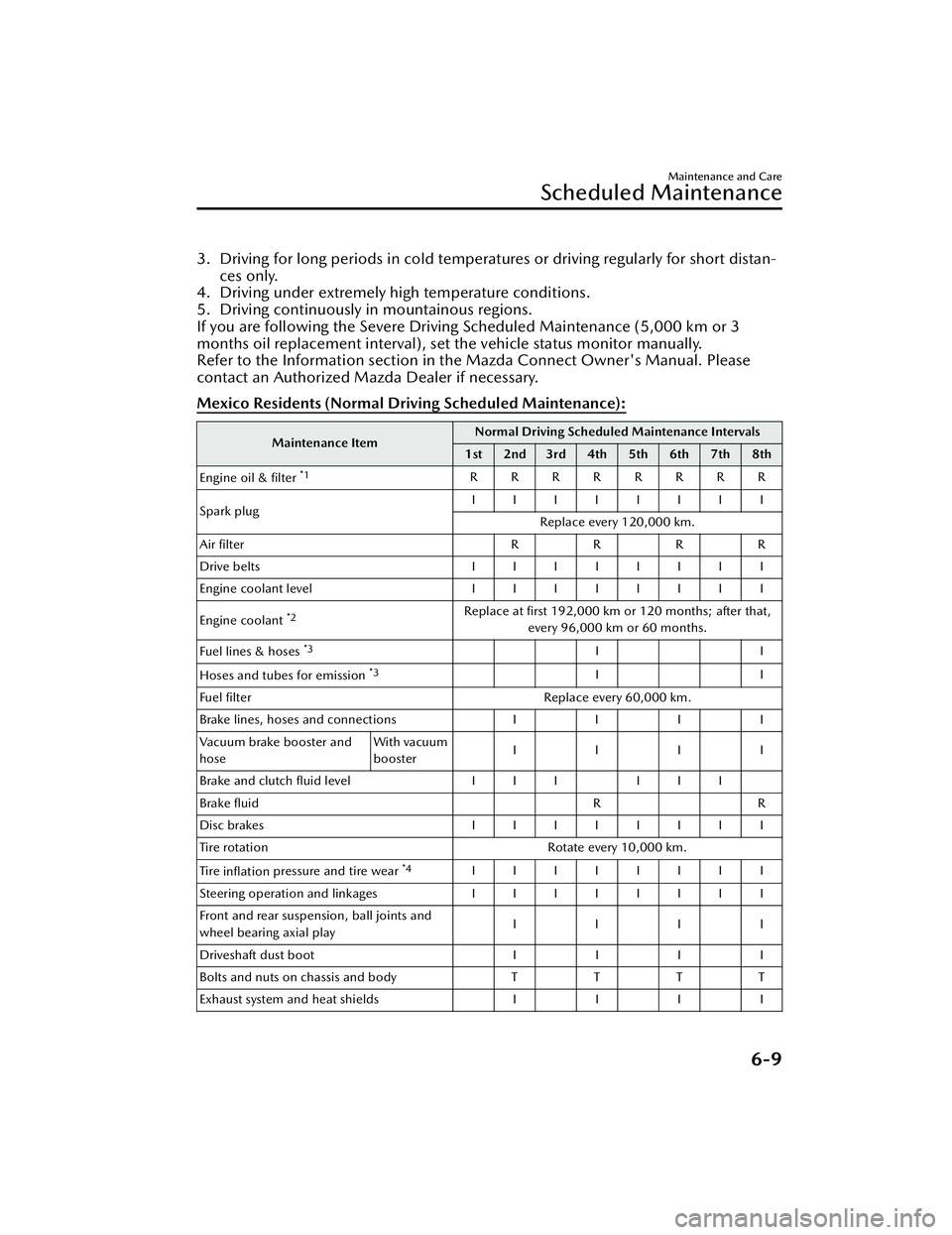
Mexico Residents (Normal Driv ing Scheduled Maintenance):
Maintenance Item Normal Driving Scheduled Maintenance Intervals
1st 2nd 3rd 4th 5th 6th 7th 8th
Engine oil & filter
*1RRRRRRRR
Spark plug IIIIIIII
Replace every 120,000 km.
Air filter RR RR
Drive belts IIIIIIII
Engine coolant level IIIIIIII
Engine coolant
*2Replace at first 192,000 km or 120 months; after that, every 96,000 km or 60 months.
Fuel lines & hoses
*3II
Hoses and tubes for emission
*3II
Fuel filter Replace every 60,000 km.
Brake lines, hoses and connections II II
Vacuum brake booster and
hose With vacuum
booster
IIII
Brake and clutch fluid level III III
Brake fluid RR
Disc brakes IIIIIIII
Tire rotation Rotate every 10,000 km.
Tire inflation pressure and tire wear
*4IIIIIIII
Steering operation and linkages IIIIIIII
Front and rear suspension, ball joints and
wheel bearing axial play IIII
Driveshaft dust boot II II
Bolts and nuts on chassis and body TTT T
Exhaust system and heat shields II II
Maintenance and Care
Scheduled Maintenance
6-9
CX-30_8HG6-EA-19I_Edition1_new 2019-6-13 18:45:11
Page 428 of 562

If the “FL22” mark is shown on or
near the cooling system cap, use of
FL-22 is recommended when
replacing engine coolant. Using
engine coolant other than FL-22 may
cause serious damage to the engine
and cooling system.
If the coolant reservoir is empty or new
coolant is required frequently, consult
an Authorized Mazda Dealer.
Brake/Clutch Fluid
▼ Inspecting Brake/Clutch Fluid
Level
WARNING
If the brake/clutch fluid level is low,
have the brakes inspected:
A low brake/clutch fluid level is
dangerous.
A low level could indicate brake lining
wear or a brake system leak which
could cause the brakes to fail and lead
to an accident.
The brakes and clutch draw fluid from
the same reservoir.
Inspect the fluid level in the reservoir
regularly. It should be kept between
the MAX and MIN lines.
The level normally drops with
accumulated distance, a condition
associated with wear of brake and
clutch linings. If it is excessively low,
have the brake/clutch system
inspected by an Authorized Mazda
Dealer.
Maintenance and Care
Owner Maintenance
6-18
CX-30_8HG6-EA-19I_Edition1_new
2019-6-13 18:45:11