2020 MAZDA MODEL 3-SEDAN park assist
[x] Cancel search: park assistPage 146 of 598

Power Steering................................. 4-82Power Steering............................4-82
i-ACTIVSENSE............................... 4-83 i-ACTIVSENSE
*........................4-83
Adaptive Front Lighting System
(AFS)
*........................................ 4-88
High Beam Control System
(HBC)
*........................................4-88
Lane Departure Warning System
(LDWS)
*.................................... 4-90
Blind Spot Monitoring (BSM)
*.........
.................................................... 4-94
Traffic Sign Recognition System
(TSR)
*........................................ 4-99
Distance & Speed Alert (DSA)
*........
.................................................. 4-106
Driver Attenti on Alert (DAA)
*..........
.................................................. 4-107
Driver Monitoring (DM)
*.........4-109
Front Cross Traffic Alert
(FCTA)
*.................................... 4-111
Rear Cross Traffic Alert (RCTA)
*.....
.................................................. 4-114
Mazda Radar Cruise Control
(MRCC) (Manual Transmission)
*.....
.................................................. 4-118
Mazda Radar Cruise Control with
Stop & Go function (MRCC with
Stop & Go function) (Automatic
Transmission)
*.......................... 4-126
Traffic Jam Assist (TJA)
*.........4-137
Lane-keep Assist System (LAS)*......
.................................................. 4-151
Smart Brake Support (SBS)
*.... 4-155
Smart Brake Support [Rear] (SBS-
R)
*............................................ 4-157
Smart Brake Support [Rear
Crossing] (SBS-RC)
*............... 4-161
360° View Monitor
*................. 4-166
Forward Sensing Camera (FSC)
*......
.................................................. 4-200
Front Radar Sensor
*................. 4-204
Front Side Radar Sensor
*......... 4-206
Rear Side Radar Sensor
*.......... 4-208
Rear/Rear corner/Rear Side
Ultrasonic Sensor
*....................4-209
Front Camera/Side Cameras/Rear
Camera
*.................................... 4-210
Driver Monitoring Camera
*......4-211
Cruise Control............................... 4-212 Cruise Control
*.........................4-212
Tire Pressure Monitoring System
(TPMS)........................................... 4-216 Tire Pressure Monitoring System
(TPMS)..................................... 4-216
Rear View Monitor....................... 4-220 Rear View Monitor
*................. 4-220
Parking Sensor System................. 4-235 Parking Sensor System
*........... 4-235
4-2*Some models.
Mazda3_8HZ1-EA-19G_Edition3_old 2020-1-15 14:30:08
Page 170 of 598

SignalIndicator Refer to
Turn Signal/Hazard Warning Indicator Lights Turn and
Lane-Change Signals
4-50
Hazard Warning Flasher4-58
Electric Parking Brake (EPB ) Indication/Indicator Light*1*27-30
AUTOHOLD Active Indicator Light*14-71
*Mazda Radar Cruise Control with Stop & Go func tion (MRCC with Stop
& Go function) indicator Light 4-136
*Traffic Jam Assist (TJA) indicator Light
4-150
TCS/DSC Indication/Indicator Light*1
Traction Control
System (TCS) 4-76
Dynamic Stabil‐ ity Control(DSC)4-77
Turns on 7-32
DSC OFF Indicator Light*14-78
*Select Mode Indicator Light 4-80
(White)
i-ACTIVSENSE Status Symbol (Warning/Risk Avoidance Support Syst em) 4-85
(Green)
(Amber)
i-ACTIVSENSE OFF Symbol (Warning/Risk Avoidance Support System) 4-85
When Driving
Instrument Cluster and Display
4-26*Some models.
Mazda3_8HZ1-EA-19G_Edition3_old 2020-1-15 14:30:08
Page 171 of 598

SignalIndicator Refer to
(Green)
*High Beam Control System (HBC) Indicator Light 4-89
(White)
*Mazda Radar Cruise Control (MRCC) Standby Indication
4-122
*Mazda Radar Cruise Control with
Stop & Go function (MRCC with Stop
& Go function) Standby Indication 4-131
*Traffic Jam Assist (TJA) Standby Indication
4-143
(Green)
*Mazda Radar Cruise Control (MRCC) Set Indication4-122
*Mazda Radar Cruise Control with
Stop & Go function (MRCC with Stop
& Go function) Set Indication 4-131
*Traffic Jam Assist (TJA) Set Indication
4-143
*Smart Brake Support (SBS) OFF Indicator Light*1
Smart Brake
Support (SBS) 4-157
Smart Brake
Support [Rear] (SBS-R)
4-160
Smart Brake
Support [Rear Crossing]
(SBS-RC) 4-165
(White)
*Cruise Standby Indication 4-212
(Green)
*Cruise Set Indication4-212
*1 The light turns on when the ignition is switched on for an ope
ration check, and turns off
a few seconds later or when the engine is started. If the light does not turn on or remains
turned on, have the vehicle inspected at an Authorized Mazda De aler.
*2 The light turns on continuously when the parking brake is appl ied.
When Driving
Instrument Cluster and Display
*Some models.4-27
Mazda3_8HZ1-EA-19G_Edition3_old 2020-1-15 14:30:08
Page 211 of 598
NOTE
When canceling the parking brake auto
operation and parking the vehicle, shift
the shift lever to the 1st gear or the R
position for a manual transmission, or
shift the selector lever to the P position
for an automatic transmission, and then
use wheel blocks.
The auto operation may not cancel if the
vehicle is parked on a steep slope.
When the ignition is switched ON, the
parking brake auto operation is restored.
▼ Warning Light
The warning light turns on when the
system has a malfunction.
Refer to Brake System Warning
Indication/Warning Li
ght on page 7-27.
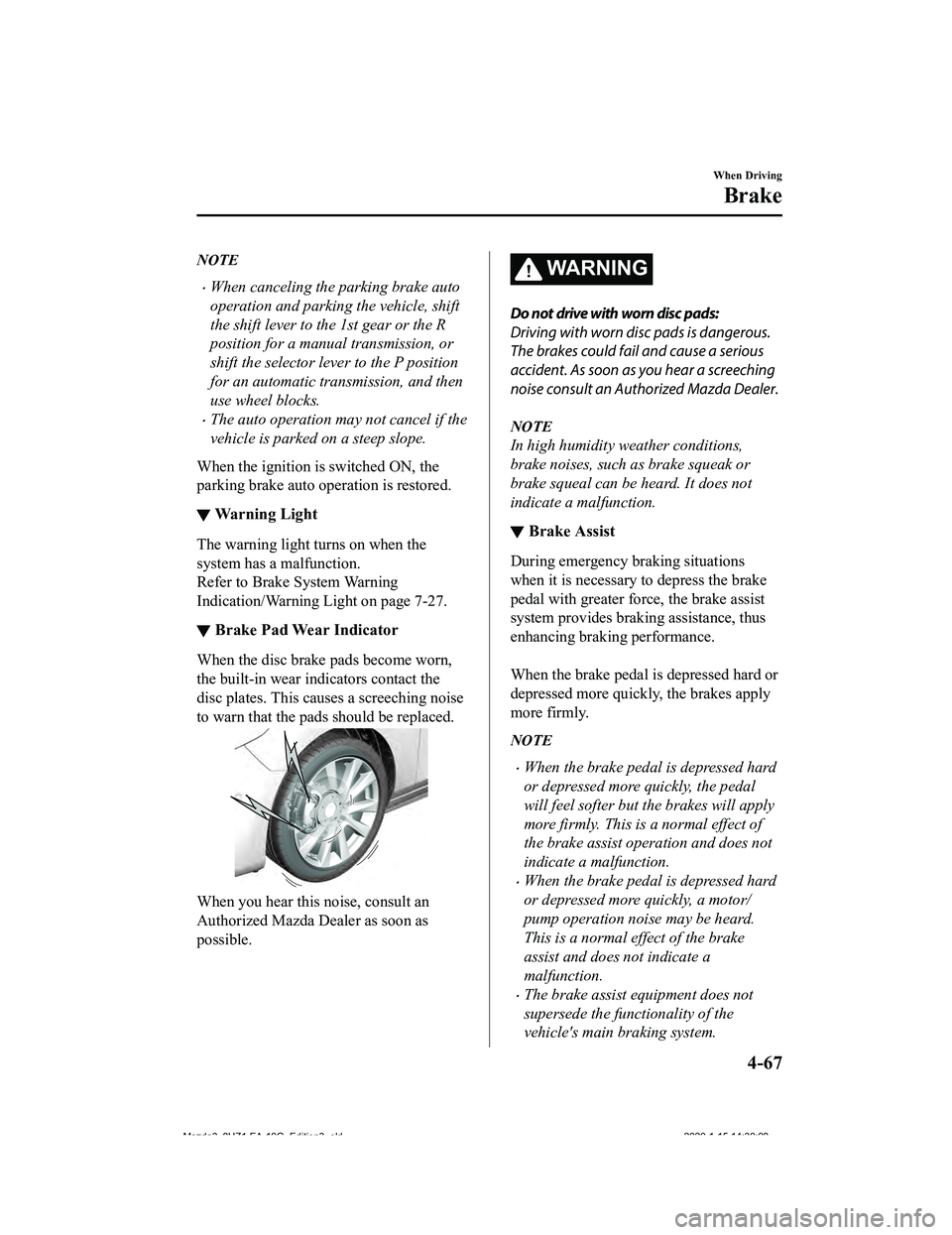
▼Brake Pad Wear Indicator
When the disc brake pads become worn,
the built-in wear indicators contact the
disc plates. This causes a screeching noise
to warn that the pads should be replaced.
When you hear this noise, consult an
Authorized Mazda Dealer as soon as
possible.
WA R N I N G
Do not drive with worn disc pads:
Driving with worn disc pads is dangerous.
The brakes could fail and cause a serious
accident. As soon as you hear a screeching
noise consult an Authorized Mazda Dealer.
NOTE
In high humidity weather conditions,
brake noises, such as brake squeak or
brake squeal can be heard. It does not
indicate a malfunction.
▼Brake Assist
During emergency braking situations
when it is necessary to depress the brake
pedal with greater force, the brake assist
system provides braking assistance, thus
enhancing braking performance.
When the brake pedal is depressed hard or
depressed more quickly, the brakes apply
more firmly.
NOTE
When the brake pedal is depressed hard
or depressed more quickly, the pedal
will feel softer but
the brakes will apply
more firmly. This is a normal effect of
the brake assist operation and does not
indicate a malfunction.
When the brake pedal is depressed hard
or depressed more quickly, a motor/
pump operation noise may be heard.
This is a normal effect of the brake
assist and does not indicate a
malfunction.
The brake assist equipment does not
supersede the functionality of the
vehicle's main braking system.
When Driving
Brake
4-67
Mazda3_8HZ1-EA-19G_Edition3_old 2020-1-15 14:30:08
Page 213 of 598

AUTOHOLD
▼AUTOHOLD
The AUTOHOLD function automatically holds the vehicle stopped,
even if you take your
foot off the brake pedal. This function can be best used while stopped in traffic or at a traffic
light. The brakes are released w hen you start driving the vehicle.
WA R N I N G
Do not rely completely on the AUTOHOLD function:
The AUTOHOLD function is only designed to assist the brake operation while the vehicle is
stopped. Neglecting to operate the brakes and relying only on the AUTOHOLD system is
dangerous and could result in an unexpected accident if the vehicle were to suddenly move.
Operate the brakes appr opriately in accordance with the road and surrounding conditions.
Do not release your foot from the brake pedal while the vehicle is stopped on a steep grade:
Because there is a possibility of the vehicle no t being held in the stopped position by the
AUTOHOLD function, the vehicle may move unexpectedly and result in an accident.
Do not use the AUTOHOLD function on slippery roads such as icy or snow-covered roads, or
unpaved roads:
Even if the vehicle is held in the stopped posi tion by the AUTOHOLD function, the vehicle may
move unexpectedly and result in an accident. Operate the accelerator pedal, brakes, or
steering wheel appropriately as necessary.
Immediately depress the brake pedal in the following cases:
Because the AUTOHOLD function is canceled forcibly, the vehicle may move unexpectedly
and result in an accident.
“Depress Brake Pedal. Brake Hold Disabled” is displayed in the multi-information display
and the warning sound is activated at the same time.
Always apply the parking brake when parking the vehicle:
Not applying the parking brake when parking the vehicle is dangerous as the vehicle may
move unexpectedly and result in an accident . When parking the vehicle, shift the selector
lever to the P position (automatic transmi ssion vehicle) and apply the parking brake.
When Driving
Brake
4-69
Mazda3_8HZ1-EA-19G_Edition3_old 2020-1-15 14:30:08
Page 214 of 598

CAUTION
If you stop operating the accelerator pedal before the vehicle starts moving, the force holding
the vehicle in the stopped position may weaken. Firmly depress the brake pedal or depress the
accelerator pedal to accelerate the vehicle.
NOTE
Under the following conditions, a problem wi th the AUTOHOLD is occurring. Have your
vehicle inspected at an Authorized Mazda Dealer as soon as possible.
A message is indicated on the multi-information display and a warning sound is
activated for about 5 seconds while the AUTOHOLD is operating or when you press the
AUTOHOLD switch.
If you switch the ignition OFF while the AUTOHOLD is operating, the parking brake is
applied automatically to assist you with parking the vehicle.
The AUTOHOLD is canceled when the selector lever/shift lever is shifted to R position
while the vehicle is on level ground, or facing up a hill or grade (as shown below).
Vehicle posture and road surface gradient AUTOHOLD operation status
Vehicle tilts forward
Operates
Level ground
Does not operate, canceled
Vehicle tilts rearward
Does not operate, canceled
: Reverse driving (selector lever/sh ift lever in the reverse (R) position)
When Driving
Brake
4-70
Mazda3_8HZ1-EA-19G_Edition3_old 2020-1-15 14:30:08
Page 217 of 598

If the AUTOHOLD switch is pressed
without depressing the brake pedal
while AUTOHOLD is operating
(AUTOHOLD active indicator light in
instrument cluster is turned on), the
message “Depress Brake Pedal and
Operate Switch to Release” is indicated
on the multi-information display to
notify the driver to depress the brake
pedal.
If any of the follow ing conditions occurs
while the AUTOHOLD function is
operating (AUTOHOLD active indicator
light is turned on), the parking brake is
applied automatically and the
AUTOHOLD function turns off. For the
Electric Parking Brake (EPB)
operation, refer to the Electric Parking
Brake (EPB) on page 4-64.
The ignition is switched OFF.
There is a problem with the
AUTOHOLD function.
Hill Launch Assist (HLA)
▼ Hill Launch Assist (HLA)
The HLA functions to assist in
accelerating the vehicle from a stop on
slopes. When releasing the brake pedal
and depressing the accelerator pedal to
accelerate the vehicle from a stop while on
a slope, the function prevents the vehicle
from rolling. The HLA also operates when
reversing on a slope.
The braking force is maintained
automatically after releasing the brake
pedal on a steep slope.
For manual transmission vehicles, the
HLA operates when the vehicle is tilted
rearward with the shift lever in a forward
gear, and operates when the vehicle is
tilted forward with th
e shift lever in the R
position.
For automatic transmi ssion vehicles, the
HLA operates when the vehicle is tilted
rearward with the s elector lever in a
forward gear, and operates when the
vehicle is tilted forward with the selector
lever in the R position.
WA R N I N G
Do not rely completely on HLA:
HLA is an auxiliary device for accelerating
from a stop on a slope. The system only
operates for about 2 seconds and
therefore, relying only on the system, when
accelerating from a stop is dangerous
because the vehicle may move (roll)
unexpectedly and cause an accident.
When Driving
Brake
4-73
Mazda3_8HZ1-EA-19G_Edition3_old 2020-1-15 14:30:08
Page 227 of 598

i-ACTIVSENSE*
▼i-ACTIVSENSE
i-ACTIVSENSE is a collective term
covering a series of advanced safety and
driver support systems which make use of
cameras and sensors. T
he systems consist
of active safety and pre-crash safety
systems.
These systems are designed to assist the
driver in safer driving by reducing the load
on the driver and helping to avert
collisions or reduce their severity.
However, because each system has its
limitations, always dri ve carefully and do
not rely solely on the systems.
▼ Active Safety Technology
Active Safety Technology supports safer
driving by helping the driver to recognize
potential hazards and avert accidents.
Driver awareness support systems
Nighttime visibility
Adaptive Front Lighting System
(AFS)...........................................page 4-88
High Beam Control System (HBC) ............
.....................................................page 4-88
Left/right side and rear side detection
Lane Departure Warning System
(LDWS).......................................page 4-90
Blind Spot Monitoring (BSM) ....................
.....................................................page 4-94
Road sign recognition
Traffic Sign Recognition System
(TSR)...........................................page 4-99
Inter-vehicle dist
ance recognition
Distance & Speed Alert (DSA)...................
...................................................page 4-106
Front obstruction detection when
passing cross
Front Cross Traffic Alert (FCTA) ...............
................................................... page 4-111
Rear obstruction detection when leaving
a parking space
Rear Cross Traffic Alert (RCTA)................
...................................................page 4-114
Full-surround recognition
360°View Monitor.................... page 4-166
Driver fatigue detection
Driver Attention Alert (DAA) ....................
...................................................page 4-107
Driver Monitoring (DM).......... page 4-109
Driver support systems
Inter-vehicle distance
Mazda Radar Cruise Control
(MRCC).................................... page 4-118
Mazda Radar Cruise Control with Stop &
Go function (MRCC with Stop & Go
function)....................................page 4-126
Lane departure
Lane-keep Assist System (LAS) .................
...................................................page 4-151
Inter-vehicle distan ce and lane keeping
Traffic Jam Assist (TJA).......... page 4-137
When Driving
i-ACTIVSENSE
*Some models.4-83
Mazda3_8HZ1-EA-19G_Edition3_old 2020-1-15 14:30:08