2020 LINCOLN NAVIGATOR tires
[x] Cancel search: tiresPage 546 of 622
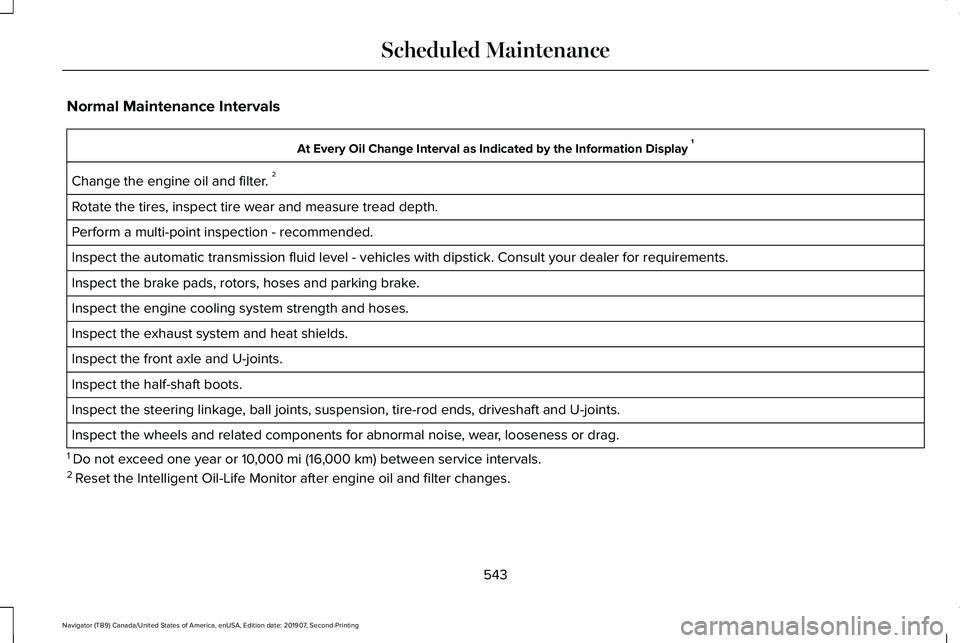
Normal Maintenance Intervals
At Every Oil Change Interval as Indicated by the Information Display
1
Change the engine oil and filter. 2
Rotate the tires, inspect tire wear and measure tread depth.
Perform a multi-point inspection - recommended.
Inspect the automatic transmission fluid level - vehicles with dipstick.\
Consult your dealer for requirements.
Inspect the brake pads, rotors, hoses and parking brake.
Inspect the engine cooling system strength and hoses.
Inspect the exhaust system and heat shields.
Inspect the front axle and U-joints.
Inspect the half-shaft boots.
Inspect the steering linkage, ball joints, suspension, tire-rod ends, driveshaft and U-joints.
Inspect the wheels and related components for abnormal noise, wear, looseness or drag.
1 Do not exceed one year or 10,000 mi (16,000 km) between service intervals.
2 Reset the Intelligent Oil-Life Monitor after engine oil and filter change\
s.
543
Navigator (TB9) Canada/United States of America, enUSA, Edition date: 201907, Second-Printing Scheduled Maintenance
Page 550 of 622

Operating in Dusty or Sandy Conditions (Such as Unpaved or Dusty Roads)
Replace engine air filter.
Inspect frequently, service
as required
Replace cabin air filter.
Inspect the wheels and related components for abnormal noise, wear, looseness or drag.
Every 5,000 mi (8,000 km)
Rotate tires, inspect tires for wear and measure tread depth.
Change engine oil and filter. 1
Every
5,000 mi (8,000 km)
or six months
Change transfer case fluid (Four-wheel drive vehicles).
Every
60,000 mi
(96,000 km)
1 Reset your Intelligent Oil-Life Monitor after each engine oil and filter \
change. Off-road Operation
Inspect steering linkage, ball joints and U-joints. Lubricate if equipped with grease fittings.
Inspect frequently, service
as required
Replace engine air filter.
Replace cabin air filter.
Change engine oil and filter.1
Every
5,000 mi (8,000 km)
or six months
Inspect the wheels and related components for abnormal noise, wear, looseness or drag.
547
Navigator (TB9) Canada/United States of America, enUSA, Edition date: 201907, Second-Printing Scheduled Maintenance
Page 551 of 622

Off-road Operation
Rotate tires, inspect tires for wear and measure tread depth.
Change transfer case fluid (Four-wheel drive vehicles).
Every 60,000 mi
(96,000 km)
1 Reset your Intelligent Oil-Life Monitor after each engine oil and filter \
change.
Exceptions
There are several exceptions to the Normal
Schedule.
Axle and Transfer Case Maintenance
Axle(s) and transfer case (Four-wheel drive
vehicles) fluid changes or level checks are
not required unless a leak is suspected or
the assembly has been submerged in water.
Contact an authorized dealer for service. California Fuel Filter Replacement
If you register your vehicle in California, the
California Air Resources Board has
determined that the failure to perform this
maintenance item does not nullify the
emission warranty or limit recall liability
before the completion of your vehicle's
useful life. The Lincoln Motor Company,
however, urges you to have all
recommended maintenance services
performed at the specified intervals and to
record all vehicle service.Hot Climate Oil Change Intervals
Vehicles operating in the Middle East, North
Africa, Sub-Saharan Africa or locations with
similar climates using an American Petroleum
Institute (API) Certified for Gasoline Engines
(Certification mark) oil of SM or SN quality,
the normal oil change interval is
3,000 mi
(4,800 km).
If the available API SM or SN oils are not
available, then the oil change interval is
1,800 mi (2,900 km)
.
Engine Air Filter Replacement
The life of the engine air filter is dependent
on exposure to dusty and dirty conditions.
Vehicles operated in these conditions
require frequent inspection and replacement
of the engine air filter.
548
Navigator (TB9) Canada/United States of America, enUSA, Edition date: 201907, Second-Printing Scheduled Maintenance
Page 620 of 622
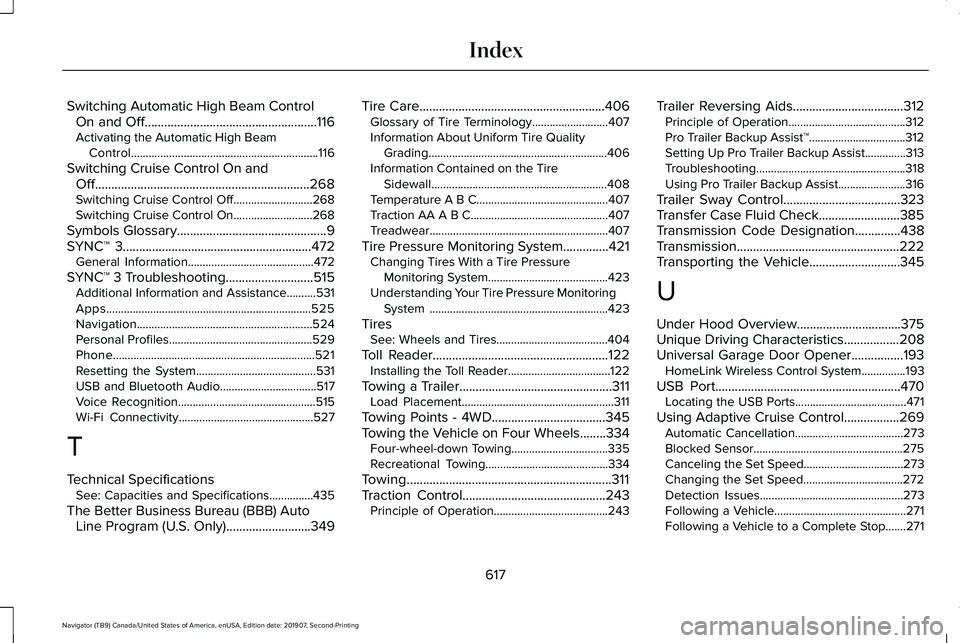
Switching Automatic High Beam Control
On and Off.....................................................116
Activating the Automatic High Beam Control................................................................116
Switching Cruise Control On and Off..................................................................268
Switching Cruise Control Off...........................268
Switching Cruise Control On...........................268
Symbols Glossary..............................................9
SYNC™ 3
..........................................................472
General Information...........................................472
SYNC™ 3 Troubleshooting...........................515 Additional Information and Assistance..........531
Apps......................................................................525
Navigation............................................................524
Personal Profiles.................................................529
Phone.....................................................................521
Resetting the System.........................................531
USB and Bluetooth Audio.................................517
Voice Recognition...............................................515
Wi-Fi Connectivity..............................................527
T
Technical Specifications See: Capacities and Specifications...............435
The Better Business Bureau (BBB) Auto Line Program (U.S. Only)
..........................349 Tire Care
.........................................................406
Glossary of Tire Terminology..........................407
Information About Uniform Tire Quality
Grading.............................................................406
Information Contained on the Tire Sidewall............................................................408
Temperature A B C.............................................407
Traction AA A B C...............................................407
Treadwear.............................................................407
Tire Pressure Monitoring System..............421 Changing Tires With a Tire Pressure
Monitoring System.........................................423
Understanding Your Tire Pressure Monitoring System .............................................................423
Tires See: Wheels and Tires......................................404
Toll Reader......................................................122 Installing the Toll Reader...................................122
Towing a Trailer
...............................................311
Load Placement....................................................311
Towing Points - 4WD...................................345
Towing the Vehicle on Four Wheels........334 Four-wheel-down Towing.................................335
Recreational Towing..........................................334
Towing...............................................................311
Traction Control
............................................243
Principle of Operation.......................................243 Trailer Reversing Aids
..................................312
Principle of Operation........................................312
Pro Trailer Backup Assist™.................................312
Setting Up Pro Trailer Backup Assist..............313
Troubleshooting...................................................318
Using Pro Trailer Backup Assist.......................
316
Trailer Sway Control....................................323
Transfer Case Fluid Check.........................385
Transmission Code Designation
..............438
Transmission..................................................222
Transporting the Vehicle
............................345
U
Under Hood Overview
................................375
Unique Driving Characteristics.................208
Universal Garage Door Opener................193 HomeLink Wireless Control System...............193
USB Port.........................................................470 Locating the USB Ports......................................471
Using Adaptive Cruise Control.................269 Automatic Cancellation.....................................273
Blocked Sensor...................................................275
Canceling the Set Speed..................................
273
Changing the Set Speed..................................272
Detection Issues.................................................273
Following a Vehicle.............................................271
Following a Vehicle to a Complete Stop.......271
617
Navigator (TB9) Canada/United States of America, enUSA, Edition date: 201907, Second-Printing Index
Page 621 of 622

Hilly Condition Usage........................................273
Overriding the Set Speed................................272
Park Brake Application......................................273
Resuming the Set Speed..................................273
Setting the Adaptive Cruise Speed...............270
Setting the Adaptive Cruise Speed When Your
Vehicle is Stationary......................................270
Setting the Gap Distance..................................271
Switching Adaptive Cruise Control Off.........273
Switching Adaptive Cruise Control On.........270
Switching to Normal Cruise Control..............276
System Not Available........................................275
Using Four-Wheel Drive.............................228 4X4 Indicator Lights ...........................................228
4X4 Modes...........................................................228
Driving Off-Road with Truck and Utility Vehicles.............................................................231
How Your Vehicle Differs from Other Vehicles............................................................230
Operating 4WD Vehicles with Spare or Mismatched Tires..........................................230
Using Hill Descent Control........................246 Hill Descent Modes...........................................246
Using MyKey With Remote Start Systems...........................................................81
Using Power Running Boards.....................98 Automatic Power Deploy....................................98
Automatic Power Stow........................................98 Bounce-back..........................................................99
Enabling and Disabling.......................................99
Manual Power Deploy.........................................99
Using Snow Chains.....................................420
Using Stability Control................................245 Stability Control and Traction Control with Roll
Stability Control™ (RSC™)...............................245
Using the Backup Starting Passcode........76
Using the Valet Mode....................................75
Using Traction Control................................243 Switching the System On and Off..................243
System Indicator Lights and Messages........243
Using Voice Recognition
............................474
Audio Voice Commands...................................476
Climate Voice Commands................................477
Mobile App Voice Commands........................482
Navigation Voice Commands.........................480
Phone Voice Commands..................................478
SiriusXM Traffic and Travel Link Voice
Commands......................................................483
Voice Settings Commands...............................483
Utilizing the Mediation/Arbitration Program (Canada Only)
.............................................350
V
Vehicle Care
..................................................393
General Information...........................................393 Vehicle Certification Label.........................437
Vehicle Identification Number
...................437
Vehicle Identification...................................453
Vehicle Storage.............................................401 Body........................................................................\
401
Brakes...................................................................402
Cooling system...................................................402
Disconnecting Your 12 Volt Battery...............402
Engine....................................................................401
Fuel system..........................................................402
General..................................................................401
Miscellaneous.....................................................402
Plugging in Your HYBRID.................................
402
Removing Vehicle From Storage...................402
Tires.......................................................................402
Vehicle Wi-Fi Hotspot
..................................458
Ventilated Seats.............................................191 Automatic Climate Controlled Seats..............192
Ventilation See: Climate Control..........................................165
VIN See: Vehicle Identification Number...............437
Voice Control
...................................................101
W
Warning Lamps and Indicators..................128 Adaptive Cruise Control Indicator..................128
618
Navigator (TB9) Canada/United States of America, enUSA, Edition date: 201907, Second-Printing Index
Page 622 of 622

Anti-Lock Brake System Warning Lamp........128
Auto Hold Active.................................................128
Auto Hold Unavailable.......................................128
Automatic Headlamp High Beam Indicator............................................................128
Auto-Start-Stop Indicator...................................128
Battery....................................................................129
Blind Spot Monitor..............................................129
Brake System Warning Lamp...........................129
Cruise Control Indicator....................................129
Direction Indicator...............................................129
Door Ajar...............................................................130
Electric Park Brake..............................................130
Engine Coolant Temperature Warning Lamp..................................................................130
Engine Oil..............................................................130
Fasten Rear Seatbelt..........................................130
Fasten Seatbelt Warning Lamp.......................
130
Four-Wheel Drive Indicators.............................130
Front Airbag..........................................................130
Headlamp High Beam Indicator......................
130
Hill Descent............................................................131
Hood Ajar...............................................................131
Liftgate Ajar............................................................131
Low Beam Malfunction Warning Lamp...........
131
Low Fuel Level Warning Lamp..........................131
Low Tire Pressure Warning Lamp....................131
Low Washer Fluid Level Warning Lamp..........131 Parking Lamps.......................................................131
Powertrain Fault....................................................131
Service Engine Soon...........................................131
Stability Control and Traction Control
Indicator............................................................132
Stability Control and Traction Control Off Warning Lamp..................................................132
Tow Haul Indicator..............................................132
Washer Fluid Check....................................390
Washers See: Cleaning the Exterior...............................394
See: Wipers and Washers.................................105
Waxing............................................................395
Welcome Lighting..........................................113
What Is 911 Assist............................................67
What Is Automatic High Beam Control............................................................116
What Is Cruise Control................................268
What Is Phone As a Key................................75
Wheel Nuts See: Changing a Road Wheel.........................
426
Wheels and Tires.........................................404 General Information...........................................404
Technical Specifications...................................433
Windows and Mirrors....................................118
Windshield Washers.....................................107 Front Camera Washer........................................107 Windshield Wipers
........................................105
Intermittent Wipe.................................................105
Speed Dependent Wipers................................105
Wiper Blades See: Checking the Wiper Blades....................391
Wipers and Washers....................................105
Wireless Accessory Charging....................198
619
Navigator (TB9) Canada/United States of America, enUSA, Edition date: 201907, Second-Printing Index