2020 LINCOLN NAVIGATOR hood open
[x] Cancel search: hood openPage 376 of 622

GENERAL INFORMATION
Have your vehicle serviced regularly to help
maintain its roadworthiness and resale value.
There is a large network of authorized
dealers that are there to help you with their
professional servicing expertise. We believe
that their specially trained technicians are
best qualified to service your vehicle properly
and expertly. They are supported by a wide
range of highly specialized tools developed
specifically for servicing your vehicle.
If your vehicle requires professional service,
an authorized dealer can provide the
necessary parts and service. Check your
warranty information to find out which parts
and services are covered.
Use only recommended fuels, lubricants,
fluids and service parts conforming to
specifications. Motorcraft® parts are
designed and built to provide the best
performance in your vehicle.
Precautions
•
Do not work on a hot engine.
• Make sure that nothing gets caught in
moving parts.
• Do not work on a vehicle with the engine
running in an enclosed space, unless you
are sure you have enough ventilation.
• Keep all open flames and other burning
material (such as cigarettes) away from
the battery and all fuel related parts.
Working with the Engine Off
1. Set the parking brake and shift the transmission to park (P).
2. Switch off the engine.
3. Block the wheels.
Working with the Engine On WARNING: To reduce the risk of
vehicle damage and personal burn injuries,
do not start your engine with the air
cleaner removed and do not remove it
while the engine is running. 1. Set the parking brake and shift the
transmission to park (P).
2. Block the wheels.
OPENING AND CLOSING THE
HOOD
1. Inside the vehicle, pull the hood release handle located under the left-hand side
of the instrument panel. 373
Navigator (TB9) Canada/United States of America, enUSA, Edition date: 201907, Second-Printing MaintenanceE250815
Page 377 of 622
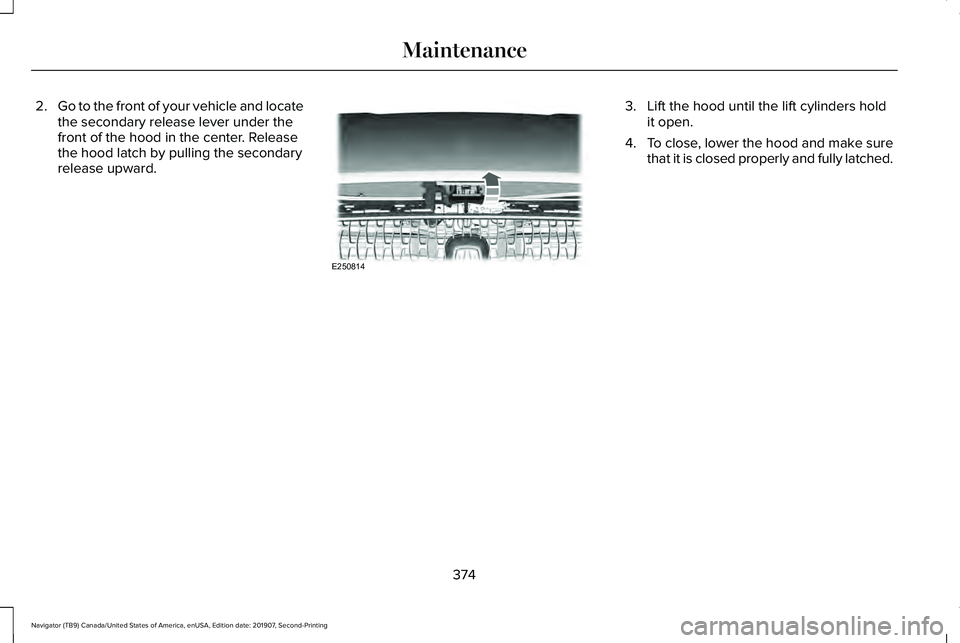
2.
Go to the front of your vehicle and locate
the secondary release lever under the
front of the hood in the center. Release
the hood latch by pulling the secondary
release upward. 3. Lift the hood until the lift cylinders hold
it open.
4. To close, lower the hood and make sure
that it is closed properly and fully latched.
374
Navigator (TB9) Canada/United States of America, enUSA, Edition date: 201907, Second-Printing MaintenanceE250814
Page 380 of 622

ENGINE OIL DIPSTICK
MINA
MAXB
ENGINE OIL CHECK
To check the engine oil level consistently
and accurately, do the following:
1. Make sure the parking brake is on. Make
sure the transmission is in park (P) or
neutral (N). 2. Run the engine until it reaches normal
operating temperature.
3. Make sure that your vehicle is on level ground.
4. Switch the engine off and wait 15 minutes
for the oil to drain into the oil pan.
Checking the engine oil level too soon
after you switch the engine off may result
in an inaccurate reading.
5. Open the hood. See Opening and
Closing the Hood (page 373).
6. Remove the dipstick and wipe it with a clean, lint-free cloth.
See Under Hood
Overview (page 375).
7. Reinstall the dipstick and remove it again
to check the oil level.
See Engine Oil
Dipstick (page 377).
8. Make sure that the oil level is between the maximum and minimum marks. If the
oil level is at the minimum mark, add oil
immediately.
See Capacities and
Specifications (page 439).
9. If the oil level is correct, replace the dipstick and make sure it is fully seated. Note:
Do not remove the dipstick when the
engine is running.
Note: If the oil level is between the
maximum and minimum marks, the oil level
is acceptable. Do not add oil.
Note: The oil consumption of new engines
reaches its normal level after approximately
3,000 mi (5,000 km)
.
Adding Engine Oil WARNING:
Do not remove the filler
cap when the engine is running.
Do not use supplemental engine oil additives
because they are unnecessary and could
lead to engine damage that may not be
covered by the vehicle Warranty.
377
Navigator (TB9) Canada/United States of America, enUSA, Edition date: 201907, Second-Printing MaintenanceE146429
Page 381 of 622

Only use oils certified for gasoline engines
by the American Petroleum Institute (API).
An oil with this trademark symbol conforms
to the current engine and emission system
protection standards and fuel economy
requirements of the International Lubricants
Specification Advisory Committee (ILSAC).
To top up the engine oil level do the
following:
1. Clean the area surrounding the engine
oil filler cap before you remove it.
2. Remove the engine oil filler cap. See
Under Hood Overview (page 375). Turn
it counterclockwise and remove it. 3. Add engine oil that meets our
specifications.
See Capacities and
Specifications (page 439). You may have
to use a funnel to pour the engine oil into
the opening.
4. Recheck the oil level.
5. If the oil level is correct, replace the dipstick and make sure it is fully seated.
6. Replace the engine oil filler cap. Turn it clockwise until you feel a strong
resistance.
Note: Do not add oil further than the
maximum mark. Oil levels above the
maximum mark may cause engine damage.
Note: Make sure you install the oil filler cap
correctly.
Note: Soak up any spillage with an
absorbent cloth immediately.
OIL CHANGE INDICATOR RESET
Use the information display controls on the
steering wheel to reset the oil change
indicator. From the main menu scroll to: Action and description
Message
Press the right arrow button,
then from this menu scroll to
the following message.
Settings
Press the right arrow button,
then from this menu scroll to
the following message.
Vehicle
Press the right arrow button,
then from this menu scroll to
the following message.
Oil Life
Press and hold the OK button
until the instrument cluster
displays the following
message.
Hold OK to
Reset
Reset Successful
When the oil change indicator
resets the instrument cluster
displays 100%.
Remaining Life
{00}%
378
Navigator (TB9) Canada/United States of America, enUSA, Edition date: 201907, Second-Printing MaintenanceE142732
Page 393 of 622

2. Measure the height from the center of
your headlamp (indicated by a dimple at
the center of the outboard projector lens)
to the ground and mark an 8 ft (2.4 m)
horizontal reference line on the vertical
wall or screen at this height (a piece of
masking tape works well).
Note: To see a clearer light pattern for
adjusting, you may want to block the light
from one headlamp while adjusting the
other.
3. Switch on the low beam headlamps to illuminate the wall or screen and open
the hood. Cover one of the headlamps
so no light hits the wall. 4.
For halogen or LED headlamps: On the
wall or screen you will observe a light
pattern with a distinct horizontal edge
toward the right. If this edge is not at the
horizontal reference line, you will need
to adjust the beam so the edge is at the
same height as the horizontal reference
line. 5. Locate the vertical adjuster on each
headlamp. Use a #2 Phillips screwdriver
to turn the adjuster either
counterclockwise or clockwise in order
to adjust the vertical aim of the
headlamp. 6. Repeat Steps 3 through 7 to adjust the
other headlamp.
7. Close the hood and turn off the lamps.
Horizontal Aim Adjustment
Horizontal aim is not required for this vehicle
and is not adjustable.
WASHER FLUID CHECK WARNING:
If you operate your
vehicle in temperatures below 41.0°F (5°C),
use washer fluid with antifreeze protection.
Failure to use washer fluid with antifreeze
protection in cold weather could result in
impaired windshield vision and increase
the risk of injury or accident.
Note: The front and rear washer systems
are supplied from the same reservoir.
Add fluid to fill the reservoir if the level is low.
Only use a washer fluid that meets our
specifications.
See Capacities and
Specifications (page 435).
390
Navigator (TB9) Canada/United States of America, enUSA, Edition date: 201907, Second-Printing MaintenanceE167358 E163806
Page 405 of 622

Fuel system
•
Fill the fuel tank with high-quality fuel
until the first automatic shutoff of the fuel
pump nozzle.
Cooling system
• Protect against freezing temperatures.
• When removing your vehicle from
storage, check coolant fluid level.
Confirm that there are no cooling system
leaks and that fluid is at the
recommended level.
Disconnecting Your 12 Volt Battery
• Check and recharge as necessary. Keep
connections clean.
• If storing your vehicle for more than 30
days without recharging the battery, we
recommend that you disconnect the
battery cables to maintain battery charge
for quick starting.
Note: It is necessary to reset memory
features if you disconnect the battery cables. Plugging in Your HYBRID
We recommend the following options for
your plug-in vehicle (PHEV) :
•
Leave your vehicle plugged in. The 12
volt battery maintains power if left
plugged in. However, this periodically
uses electricity from the household
outlet.
• Connect a battery charger to your 12 volt
battery and leave it on a continuous, slow
charge.
• Disconnect the 12 volt battery. If your 12
volt battery is located in the luggage
compartment, do not fully shut the
luggage compartment after
disconnecting the 12 volt battery. Only
leave the luggage compartment open if
your vehicle is stored in a locked
location.
Brakes
• Make sure the brakes and parking brake
release fully. Tires
•
Maintain recommended air pressure.
Miscellaneous
• Make sure all linkages, cables, levers and
pins under your vehicle are covered with
grease to prevent rust.
• Move vehicles at least 25 ft (7.5 m) every
15 days to lubricate working parts and
prevent corrosion.
Removing Vehicle From Storage
When your vehicle is ready to come out of
storage, do the following:
• Wash your vehicle to remove any dirt or
grease film build-up on window surfaces.
• Check windshield wipers for any
deterioration.
• Check under the hood for any foreign
material that may have collected during
storage such as mice or squirrel nests.
• Check the exhaust for any foreign
material that may have collected during
storage.
402
Navigator (TB9) Canada/United States of America, enUSA, Edition date: 201907, Second-Printing Vehicle Care
Page 609 of 622

Audio Unit.......................................................461
Adjusting the Volume.........................................461
Changing Radio Stations...................................461
Locking the Rear Audio Controls...................462
Rear Passenger Audio Controls - Vehicles
with: Second Row Center Console...........463
Rear Seat Audio Controls - Vehicles without: Second Row Center Console.....................462
Selecting the Audio Modes.............................462
Switching the Audio Unit On and Off............462
Using Seek, Fast Forward and Reverse.......462
Auto Hold
........................................................241
Using Auto Hold.................................................242
Autolamps........................................................110 Windshield Wiper Activated Headlamps.......110
Automatic Climate Control
.........................165
Accessing Rear Climate Controls...................165
Accessing the Climate Control Menu............165
Setting the Blower Motor Speed....................165
Setting the Temperature...................................165
Switching Auto Mode On and Off...................
165
Switching Defrost On and Off..........................166
Switching Maximum Air Conditioning On and Off.......................................................................167
Switching Recirculated Air On and Off..........167
Switching the Air Conditioning On and Off.......................................................................166
Switching the Heated Seats On and Off.......
167 Switching the Ventilated Seats On and
Off.......................................................................167
Automatic High Beam Control
....................116
Automatic High Beam Control Indicators.......................................................117
Automatic Transmission
.............................222
Automatic Transmission Adaptive
Learning............................................................227
Brake-Shift Interlock Override........................226
If Your Vehicle Gets Stuck In Mud or Snow.................................................................227
SelectShift™ Automatic Transmission............225
Understanding the Shift Positions of your Automatic Transmission...............................222
Automatic Transmission Fluid Check............................................................384
Auto-Start-Stop.............................................208 Disabling Auto-Start-Stop.................................210
Enabling Auto-Start-Stop..................................208
Autowipers......................................................106 Autowipers Settings...........................................106
Auxiliary Power Points
..................................197
110 Volt AC Power Point.....................................197
12 Volt DC Power Point......................................197
USB Port and Power Point Locations.............197 B
Battery
See: Changing the 12V Battery.......................
387
Blind Spot Information System.................284 ........................................................................\
.........284
Blind Spot Information System with Trailer
Tow....................................................................285
Switching the System On and Off..................288
System Errors......................................................288
Using the Blind Spot Information System..............................................................284
BLIS See: Blind Spot Information System..............284
Body Styling Kits...........................................403
Bonnet Lock See: Opening and Closing the Hood............
373
Booster Seats..................................................39 Types of Booster Seats.......................................39
Brake Fluid Check
........................................385
Brake Fluid Service Interval.............................386
Brakes ..............................................................
237
General Information...........................................237
Breaking-In.....................................................338
Bulb Specification Chart
.............................450
606
Navigator (TB9) Canada/United States of America, enUSA, Edition date: 201907, Second-Printing Index
Page 614 of 622

General Information on Radio
Frequencies..................................................69
Intelligent Access.................................................69
General Maintenance Information...........537 Multi-Point Inspection.......................................540
Owner Checks and Services...........................538
Protecting Your Investment..............................537
Why Maintain Your Vehicle?.............................537
Why Maintain Your Vehicle at Your
Dealership?......................................................537
Getting Assistance Outside the U.S. and Canada..........................................................351
Getting the Services You Need.................347 Away From Home...............................................347
Global Opening and Closing.......................119 Closing the Windows..........................................119
Opening the Windows........................................119
H
Hazard Flashers.............................................341
Headlamp Adjusting See: Adjusting the Headlamps.......................389
Headlamp Exit Delay......................................111
Headlamp Leveling
........................................112
Headrest See: Head Restraints..........................................173 Head Restraints
..............................................173
Adjusting the Head Restraint............................173
Front Seat Manual Head Restraints................173
Head Up Display
............................................161
Configuring The Head Up Display..................162
Head Up Display (HUD)......................................161
Head Up Display Information............................161
Maintaining Your Head Up Display.................164
Heated Exterior Mirrors...............................170
Heated Rear Window
...................................170
Heated Seats...................................................191 Automatic Climate Controlled Seats...............191
Front Seats.............................................................191
Second Row Heated Seats................................191
Heated Steering Wheel...............................103
Heated Windshield.......................................170 Windshield Wiper De-Icer.................................170
Heating See: Climate Control..........................................165
Hill Descent Control....................................246 Principle of Operation.......................................246
Hill Start Assist..............................................240 Switching the System On and Off..................240
Using Hill Start Assist........................................240
Hints on Controlling the Interior Climate..........................................................167
Defogging the Side Windows in Cold Weather.............................................................168 General Hints........................................................167
Quickly Cooling the Interior..............................168
Quickly Heating the Interior.............................168
Recommended Settings for Cooling..............168
Recommended Settings for Heating..............168
Hints on Driving With Anti-Lock Brakes...........................................................238
Hood Lock See: Opening and Closing the Hood............
373
Horn..................................................................103
I
In California (U.S. Only)...............................348
Information Display Control........................102
Information Displays
.....................................133
General Information............................................133
Information Messages..................................138 Active Park............................................................139
Adaptive Cruise Control....................................139
Adaptive Headlamps..........................................140
Alarm......................................................................140
Automatic Engine Shutdown............................140
Battery and Charging System...........................
141
Blind Spot Information and Cross Traffic Alert System...............................................................142
Doors and Locks..................................................143
Driver Alert............................................................143
611
Navigator (TB9) Canada/United States of America, enUSA, Edition date: 201907, Second-Printing Index