2020 LINCOLN MKZ HYBRID power
[x] Cancel search: powerPage 5 of 544

MyKey – Troubleshooting
...........................65
Doors and Locks
Locking and Unlocking .................................
67
Power Decklid ..................................................
71
Keyless Entry ...................................................
73
Interior Luggage Compartment Release ........................................................................\
.
75
Security
Passive Anti-Theft System ...........................
77
Anti-Theft Alarm .............................................
78
Steering Wheel
Adjusting the Steering Wheel - Vehicles With: Manual Adjustable Steering
Column .........................................................
80
Adjusting the Steering Wheel - Vehicles With: Power Adjustable Steering Column
........................................................................\
80
Audio Control .................................................
82
Voice Control ..................................................
82
Cruise Control - Vehicles With: Adaptive Cruise Control With Stop and Go ..........
82Cruise Control - Vehicles With: Cruise
Control .........................................................
83
Information Display Control ........................
83
Heated Steering Wheel ...............................
83
Horn ..................................................................
83
Wipers and Washers
Windshield Wipers ........................................
84
Autowipers ......................................................
85
Windshield Washers .....................................
86
Lighting
General Information ......................................
87
Lighting Control ..............................................
87
Autolamps .......................................................
88
Instrument Lighting Dimmer .......................
89
Headlamp Exit Delay ....................................
89
Daytime Running Lamps - Vehicles With: Daytime Running Lamps (DRL) ..............
89
Daytime Running Lamps - Vehicles With: Configurable Daytime Running Lamps
........................................................................\
89
Adaptive Headlamps ....................................
90
Direction Indicators .......................................
90Welcome Lighting
...........................................
91
Interior Lamps ..................................................
91
Ambient Lighting ...........................................
92
Automatic High Beam Control
What Is Automatic High Beam Control ........................................................................\
.
93
Switching Automatic High Beam Control On and Off ...................................................
93
Automatic High Beam Control Indicators ........................................................................\
.
94
Overriding Automatic High Beam Control ........................................................................\
.
94
Windows and Mirrors
Power Windows .............................................
95
Global Opening and Closing ......................
96
Exterior Mirrors ...............................................
96
Interior Mirror ..................................................
98
Sun Visors .......................................................
99
Sun Shades .....................................................
99
Moonroof .........................................................
99
2
MKZ (CC9) Hybrid Electric Vehicle (HEV), Canada/United States of America, enUSA, Edition date: 201905, Second-Printing Table of Contents
Page 6 of 544

Instrument Cluster
Gauges
...........................................................102
Warning Lamps and Indicators .................
104
Audible Warnings and Indicators .............
109
Information Displays
General Information .....................................
110
Information Messages .................................
121
Climate Control
Automatic Climate Control ..........................
141
Hints on Controlling the Interior Climate .......................................................................
143
Heated Rear Window ..................................
144
Heated Exterior Mirrors ..............................
144
Cabin Air Filter ..............................................
145
Remote Start ..................................................
145
Seats
Sitting in the Correct Position ...................
146
Head Restraints .............................................
147
Power Seats ...................................................
148
Memory Function .........................................
152Rear Seats
......................................................
153
Heated Seats .................................................
154
Climate Controlled Seats ...........................
155
Garage Door Opener
Universal Garage Door Opener ...............
157
Auxiliary Power Points
Auxiliary Power Points ................................
163
Storage Compartments
Center Console ............................................
165
Overhead Console ......................................
165
Rear Seat Armrest ........................................
165
Starting and Stopping the Engine
General Information .....................................
167
Keyless Starting ............................................
167
Starting a Hybrid Electric Vehicle System .......................................................................
168
Engine Block Heater .....................................
171Unique Driving Characteristics
Hybrid Vehicle Operation
...........................
173
EcoSelect ........................................................
175
Hybrid Vehicle Frequently Asked Questions ...................................................
176
Fuel and Refueling
Safety Precautions .......................................
179
Fuel Quality ...................................................
180
Fuel Filler Funnel Location .........................
181
Running Out of Fuel .....................................
181
Refueling ........................................................
182
Fuel Consumption ........................................
185
Engine Emission Control
Emission Law .................................................
187
Catalytic Converter ......................................
188
High Voltage Battery
General Information ......................................
191
High Voltage Shutoff Switch .....................
192
3
MKZ (CC9) Hybrid Electric Vehicle (HEV), Canada/United States of America, enUSA, Edition date: 201905, Second-Printing Table of Contents
Page 12 of 544

Windshield defrosting system
Interior luggage compartment
release
Jack
Keep out of reach of children
Lighting control
Low tire pressure warning
Maintain correct fluid level
Note operating instructions
Horn control Panic alarm
Parking aid
Parking brake
Power steering fluid
Power windows front/rear
Power window lockout
Requires registered technician
Safety alert
See Owner's Manual See Service Manual
Service engine soon
Passenger airbag activated
Passenger airbag deactivated
Side airbag
Shield the eyes
Stability control
Hill descent control
Trail control
Windshield wiping system
9
MKZ (CC9) Hybrid Electric Vehicle (HEV), Canada/United States of America, enUSA, Edition date: 201905, Second-Printing Introduction E161353 E270945 E139213 E231159 E231158 E270849 E270850 E167012 E138639 E163957 E272858 E270969
Page 59 of 544

•
SYNC must be powered and working
properly at the time of the incident and
throughout feature activation and use.
• The 911 Assist feature must be set on
before the incident.
• You must pair and connect a Bluetooth
enabled and compatible cell phone to
SYNC.
• A connected Bluetooth enabled phone
must have the ability to make and
maintain an outgoing call at the time of
the incident.
• A connected Bluetooth enabled phone
must have adequate network coverage,
battery power and signal strength.
• The vehicle must have battery power and
be located in the U.S., Canada or in a
territory in which 911 is the emergency
number.
Note: If any user sets 911 Assist to on or off,
that setting applies for all paired phones. If
911 Assist is switched off and the phone is
connected to SYNC, an icon displays on the
status bar. Note:
Every phone operates differently.
While SYNC 911 Assist works with most
cellular phones, some may have trouble
using this feature.
EMERGENCY CALL LIMITATIONS
The SYNC 911 Assist feature only operates
in the U.S., Canada or in a territory in which
911 is the emergency number.
• Your cellular phone or 911 Assist
hardware sustains damage in a crash.
• The vehicle's battery or the SYNC system
has no power.
• The phone(s) thrown from your vehicle
are the ones paired and connected to
the system.
56
MKZ (CC9) Hybrid Electric Vehicle (HEV), Canada/United States of America, enUSA, Edition date: 201905, Second-Printing 911 Assist
Page 61 of 544

The intelligent access keys operate the
power locks and the remote start system.
The key must be in your vehicle to use the
push button start. Note:
Your vehicle keys came with a
security label that provides important key
cut information. Keep the label in a safe
place for future reference.
Removable Key Blade
The intelligent access key also contains a
removable key blade that you can use to
unlock your vehicle. Push the release button and pull the key
blade out.
Replacing the Battery
Note:
Refer to local regulations when
disposing of transmitter batteries.
Note: Do not wipe off any grease on the
battery terminals or on the back surface of
the circuit board.
58
MKZ (CC9) Hybrid Electric Vehicle (HEV), Canada/United States of America, enUSA, Edition date: 201905, Second-Printing Keys and Remote ControlsE305198 E151795 E305199
Page 64 of 544

Remote Starting your Vehicle
Note:
You must press each button within
three seconds of each other. If you do not
follow this sequence, your vehicle does not
start remotely, the direction indicators do
not flash twice and the horn does not sound. 1. Press the lock button to lock all the
doors.
2. Press the remote start button twice. The
exterior lamps flash twice.
A tone sounds if the system fails to start.
Note: You must press the push button
ignition switch on the instrument panel once
while applying the brake pedal before
driving your vehicle. The power windows do not work during
remote start and the radio does not turn on
automatically.
The parking lamps remain on and your
vehicle will run for 5, 10 or 15 minutes,
depending on the setting.
Extending the Engine Running Time
To extend the engine running time duration
of your vehicle during remote start, repeat
steps 1 and 2 while the engine is running. If
the duration is set to 15 minutes, the duration
extends by another 15 minutes. For example,
if your vehicle had been running from the
first remote start for 5 minutes, your vehicle
continues to run now for a total of 30
minutes. You can extend the engine running
time duration to a maximum of 30 minutes.
Wait at least five seconds before remote
starting after the engine stops running.
Turning Your Vehicle Off After Remote
Starting
Press the button once. Your
vehicle and the parking lamps turn
off.You may have to be closer to your vehicle
than when starting due to ground reflection
and the added noise of your running vehicle.
You can switch this feature on or off in the
information display. See General
Information (page 110).
Memory Feature
You can program your intelligent access key
to recall memory positions.
See Memory
Function (page 152).
REPLACING A LOST KEY OR
REMOTE CONTROL
Replacement keys or remote controls can
be purchased from an authorized dealer.
Authorized dealers can program remote
controls for your vehicle.
61
MKZ (CC9) Hybrid Electric Vehicle (HEV), Canada/United States of America, enUSA, Edition date: 201905, Second-Printing Keys and Remote ControlsE138626 E138625
Page 70 of 544
LOCKING AND UNLOCKING
You can use the power door lock control or
the remote control to lock and unlock your
vehicle.
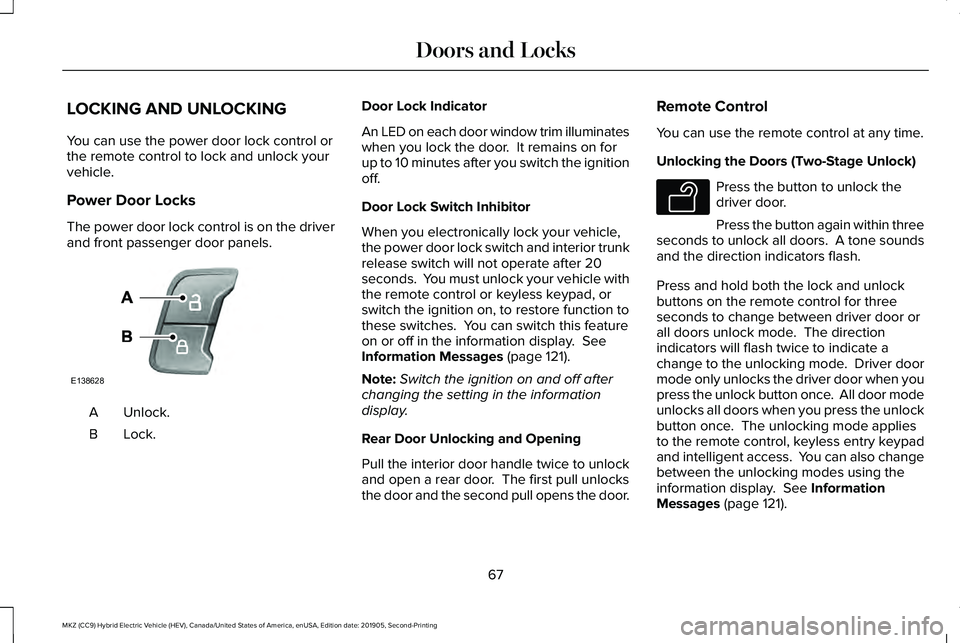
Power Door Locks
The power door lock control is on the driver
and front passenger door panels.
Unlock.
A
Lock.B Door Lock Indicator
An LED on each door window trim illuminates
when you lock the door. It remains on for
up to 10 minutes after you switch the ignition
off.
Door Lock Switch Inhibitor
When you electronically lock your vehicle,
the power door lock switch and interior trunk
release switch will not operate after 20
seconds. You must unlock your vehicle with
the remote control or keyless keypad, or
switch the ignition on, to restore function to
these switches. You can switch this feature
on or off in the information display. See
Information Messages (page 121).
Note: Switch the ignition on and off after
changing the setting in the information
display.
Rear Door Unlocking and Opening
Pull the interior door handle twice to unlock
and open a rear door. The first pull unlocks
the door and the second pull opens the door. Remote Control
You can use the remote control at any time.
Unlocking the Doors (Two-Stage Unlock) Press the button to unlock the
driver door.
Press the button again within three
seconds to unlock all doors. A tone sounds
and the direction indicators flash.
Press and hold both the lock and unlock
buttons on the remote control for three
seconds to change between driver door or
all doors unlock mode. The direction
indicators will flash twice to indicate a
change to the unlocking mode. Driver door
mode only unlocks the driver door when you
press the unlock button once. All door mode
unlocks all doors when you press the unlock
button once. The unlocking mode applies
to the remote control, keyless entry keypad
and intelligent access. You can also change
between the unlocking modes using the
information display.
See Information
Messages (page 121).
67
MKZ (CC9) Hybrid Electric Vehicle (HEV), Canada/United States of America, enUSA, Edition date: 201905, Second-Printing Doors and LocksE138628 E138629
Page 73 of 544

When you open one of the front doors and
lock your vehicle using the power door lock
control, all doors will lock then unlock if:
•
The ignition is on.
• The ignition is off and the transmission
is not in park (P).
Autolock (If Equipped)
Autolock locks all the doors when:
• All doors are closed.
• The ignition is on.
• You shift into any gear putting your
vehicle in motion.
• Your vehicle reaches a speed greater
than
12 mph (20 km/h).
Autolock repeats when:
• You open then close any door while the
ignition is on and your vehicle speed is
9 mph (15 km/h)
or lower.
• Your vehicle reaches a speed greater
than
12 mph (20 km/h). Autounlock
Autounlock unlocks all the doors when:
•
The ignition is on, all the doors are
closed, and your vehicle has been
moving at a speed greater than
12 mph
(20 km/h).
• Your vehicle comes to a stop and you
switch the ignition off or to the accessory
position.
• You open the driver door within 10
minutes of switching the ignition off or to
accessory.
Note: The doors will not autounlock if you
electronically lock your vehicle after you
switch the ignition off and before you open
the driver door.
Enabling or Disabling Autounlock
You can enable or disable the autounlock
feature in the information display or an
authorized dealer can do it for you.
See
General Information (page 110). Illuminated Entry
The interior lamps and some exterior lamps
illuminate when you unlock the doors with
the remote control.
The illuminated entry system turns off the
lights if:
•
The ignition is on.
• You press the remote control lock button.
• After 25 seconds of illumination.
The lights do not turn off if:
• You turn them on with the lamp control.
• Any door is open.
Illuminated Exit
The interior lamps and some exterior lamps
illuminate when all doors are closed and you
switch the ignition off.
The lamps turn off when all the doors remain
closed and:
• 25 seconds have elapsed.
• You press the push button ignition
switch.
70
MKZ (CC9) Hybrid Electric Vehicle (HEV), Canada/United States of America, enUSA, Edition date: 201905, Second-Printing Doors and Locks