2020 LINCOLN MKZ HYBRID keyless entry
[x] Cancel search: keyless entryPage 5 of 544

MyKey – Troubleshooting
...........................65
Doors and Locks
Locking and Unlocking .................................
67
Power Decklid ..................................................
71
Keyless Entry ...................................................
73
Interior Luggage Compartment Release ........................................................................\
.
75
Security
Passive Anti-Theft System ...........................
77
Anti-Theft Alarm .............................................
78
Steering Wheel
Adjusting the Steering Wheel - Vehicles With: Manual Adjustable Steering
Column .........................................................
80
Adjusting the Steering Wheel - Vehicles With: Power Adjustable Steering Column
........................................................................\
80
Audio Control .................................................
82
Voice Control ..................................................
82
Cruise Control - Vehicles With: Adaptive Cruise Control With Stop and Go ..........
82Cruise Control - Vehicles With: Cruise
Control .........................................................
83
Information Display Control ........................
83
Heated Steering Wheel ...............................
83
Horn ..................................................................
83
Wipers and Washers
Windshield Wipers ........................................
84
Autowipers ......................................................
85
Windshield Washers .....................................
86
Lighting
General Information ......................................
87
Lighting Control ..............................................
87
Autolamps .......................................................
88
Instrument Lighting Dimmer .......................
89
Headlamp Exit Delay ....................................
89
Daytime Running Lamps - Vehicles With: Daytime Running Lamps (DRL) ..............
89
Daytime Running Lamps - Vehicles With: Configurable Daytime Running Lamps
........................................................................\
89
Adaptive Headlamps ....................................
90
Direction Indicators .......................................
90Welcome Lighting
...........................................
91
Interior Lamps ..................................................
91
Ambient Lighting ...........................................
92
Automatic High Beam Control
What Is Automatic High Beam Control ........................................................................\
.
93
Switching Automatic High Beam Control On and Off ...................................................
93
Automatic High Beam Control Indicators ........................................................................\
.
94
Overriding Automatic High Beam Control ........................................................................\
.
94
Windows and Mirrors
Power Windows .............................................
95
Global Opening and Closing ......................
96
Exterior Mirrors ...............................................
96
Interior Mirror ..................................................
98
Sun Visors .......................................................
99
Sun Shades .....................................................
99
Moonroof .........................................................
99
2
MKZ (CC9) Hybrid Electric Vehicle (HEV), Canada/United States of America, enUSA, Edition date: 201905, Second-Printing Table of Contents
Page 23 of 544

Direction indicators. See Direction Indicators (page 90).
A
Instrument cluster.
See Gauges (page 102). See Warning Lamps and Indicators (page 104).
B
Wiper lever.
See Wipers and Washers (page 84).
C
Information and entertainment display.
D
Audio unit.
See Audio Unit (page 382).
E
Hazard warning flasher switch.
See Hazard Flashers (page 266).
F
Parking aid switch.
See Parking Aids (page 208).
G
Heated rear window switch.
See Heated Rear Window (page 144).
H
Climate controls.
See Climate Control (page 141).
I
Start button.
See Keyless Entry (page 73).
J
Entertainment, navigation and phone.
K
Voice control.
See Voice Control (page 82).
L
Horn.M
Steering wheel adjustment.
See Adjusting the Steering Wheel (page 80).
N
Cruise control switches.
See What Is Cruise Control (page 226).
O
Information display controls.
See Information Displays (page 110).
P
Parking brake.
See Electric Parking Brake (page 199).
Q
Lighting control.
See Lighting Control (page 87). Instrument lighting dimmer. See Instrument Lighting Dimmer (page 89).
R
20
MKZ (CC9) Hybrid Electric Vehicle (HEV), Canada/United States of America, enUSA, Edition date: 201905, Second-Printing At a Glance
Page 70 of 544
LOCKING AND UNLOCKING
You can use the power door lock control or
the remote control to lock and unlock your
vehicle.
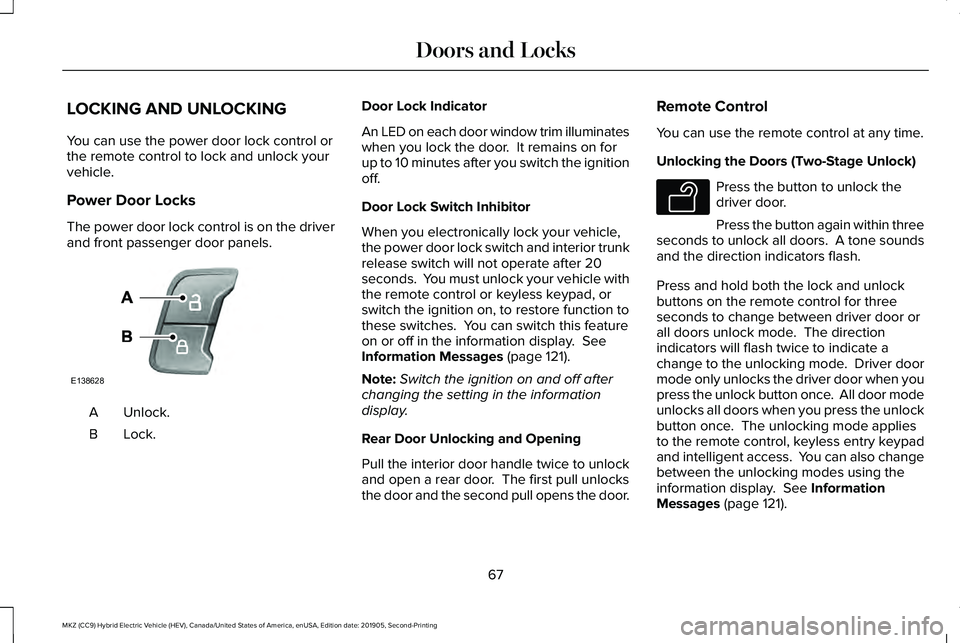
Power Door Locks
The power door lock control is on the driver
and front passenger door panels.
Unlock.
A
Lock.B Door Lock Indicator
An LED on each door window trim illuminates
when you lock the door. It remains on for
up to 10 minutes after you switch the ignition
off.
Door Lock Switch Inhibitor
When you electronically lock your vehicle,
the power door lock switch and interior trunk
release switch will not operate after 20
seconds. You must unlock your vehicle with
the remote control or keyless keypad, or
switch the ignition on, to restore function to
these switches. You can switch this feature
on or off in the information display. See
Information Messages (page 121).
Note: Switch the ignition on and off after
changing the setting in the information
display.
Rear Door Unlocking and Opening
Pull the interior door handle twice to unlock
and open a rear door. The first pull unlocks
the door and the second pull opens the door. Remote Control
You can use the remote control at any time.
Unlocking the Doors (Two-Stage Unlock) Press the button to unlock the
driver door.
Press the button again within three
seconds to unlock all doors. A tone sounds
and the direction indicators flash.
Press and hold both the lock and unlock
buttons on the remote control for three
seconds to change between driver door or
all doors unlock mode. The direction
indicators will flash twice to indicate a
change to the unlocking mode. Driver door
mode only unlocks the driver door when you
press the unlock button once. All door mode
unlocks all doors when you press the unlock
button once. The unlocking mode applies
to the remote control, keyless entry keypad
and intelligent access. You can also change
between the unlocking modes using the
information display.
See Information
Messages (page 121).
67
MKZ (CC9) Hybrid Electric Vehicle (HEV), Canada/United States of America, enUSA, Edition date: 201905, Second-Printing Doors and LocksE138628 E138629
Page 72 of 544
With your intelligent access key within 3 ft
(1 m) of your vehicle, touch the outer door
handle lock sensor for approximately one
second to lock, being careful to not touch
the unlock sensor on the back of the door
handle at the same time. After locking, you
can immediately pull on the door handle to
confirm locking occurred without
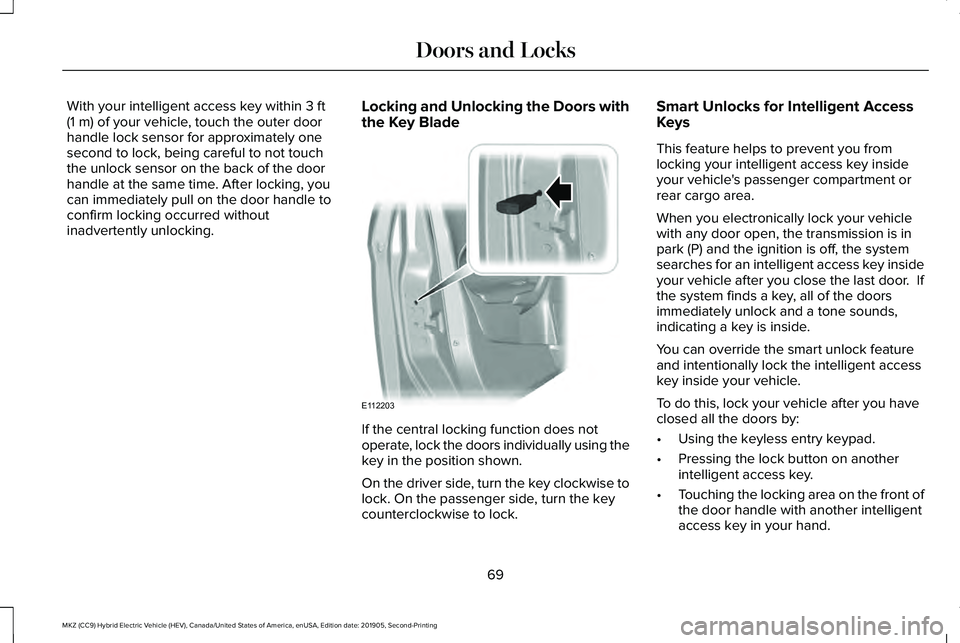
inadvertently unlocking. Locking and Unlocking the Doors with
the Key Blade If the central locking function does not
operate, lock the doors individually using the
key in the position shown.
On the driver side, turn the key clockwise to
lock. On the passenger side, turn the key
counterclockwise to lock.Smart Unlocks for Intelligent Access
Keys
This feature helps to prevent you from
locking your intelligent access key inside
your vehicle's passenger compartment or
rear cargo area.
When you electronically lock your vehicle
with any door open, the transmission is in
park (P) and the ignition is off, the system
searches for an intelligent access key inside
your vehicle after you close the last door. If
the system finds a key, all of the doors
immediately unlock and a tone sounds,
indicating a key is inside.
You can override the smart unlock feature
and intentionally lock the intelligent access
key inside your vehicle.
To do this, lock your vehicle after you have
closed all the doors by:
•
Using the keyless entry keypad.
• Pressing the lock button on another
intelligent access key.
• Touching the locking area on the front of
the door handle with another intelligent
access key in your hand.
69
MKZ (CC9) Hybrid Electric Vehicle (HEV), Canada/United States of America, enUSA, Edition date: 201905, Second-Printing Doors and LocksE112203
Page 76 of 544

Note:
Before driving your vehicle, check the
instrument cluster for a trunk ajar or door
ajar message or warning indicator. Failure
to do this could result in unintentionally
leaving the decklid open while driving.
The decklid will stop and three chimes will
sound if it detects an obstacle while opening.
Remove the obstacle to operate the decklid.
Resetting the Power Decklid
The decklid may not operate correctly and
you may need to reset it if:
• The vehicle battery charge is low.
• You disconnect the battery.
• You manually close the decklid and leave
it unlatched.
To reset the power decklid:
1. Disconnect the battery for 20 seconds then reconnect the battery.
2. Manually close the decklid making sure it is fully closed.
3. Power open the decklid using the remote
control or instrument panel button. KEYLESS ENTRY
SECURICODE™ KEYLESS ENTRY
KEYPAD
The keypad is located near the driver
window. It is invisible until you touch it, then
it lights up so you can see and touch the
appropriate buttons.
Note:
If you enter your entry code too fast
on the keypad, the unlock function may not
work. Re-enter your entry code more slowly. You can use the keypad to:
•
Lock or unlock the doors.
• Program and erase personal entry codes.
• Arm and disarm the anti-theft alarm.
• Release the trunk.
Note: The keypad does not operate a power
decklid.
73
MKZ (CC9) Hybrid Electric Vehicle (HEV), Canada/United States of America, enUSA, Edition date: 201905, Second-Printing Doors and LocksE138637
Page 81 of 544

You must have two previously programmed
intelligent access keys inside your vehicle
and the new unprogrammed intelligent
access keys readily accessible. See an
authorized dealer to have the spare key
programmed if two previously programmed
keys are not available.
Make sure that your vehicle is off before
beginning this procedure. Make sure that
you close all the doors before beginning and
that they remain closed throughout the
procedure. Perform all steps within 30
seconds of starting the sequence. Stop and
wait for at least one minute before starting
again if you perform any steps out of
sequence.
Read and understand the entire procedure
before you begin.
1.
Remove the rubber covering (A) from the
cupholder. With the buttons facing
upwards and the unlock button facing
the front of the vehicle, place the first
intelligent access in the backup slot (B).
2. Press the push button ignition switch.
3. Wait five seconds and then press the push button ignition switch again.
4. Remove the intelligent access key.
5. Within 10 seconds, place a second programmed intelligent access key in the
backup slot. Press the push button
ignition switch. 6. Wait five seconds and then press the
push button ignition switch again.
7. Remove the intelligent access key.
8. Place the unprogrammed intelligent access key in the backup slot and press
the push button ignition switch.
Programming is now complete. Verify the
remote control functions operate and your
vehicle starts with the new intelligent access
key.
If programming was not successful, wait 10
seconds and repeat Steps 1 through 7. If you
are still unsuccessful, take your vehicle to
your authorized dealer.
ANTI-THEFT ALARM
The system will warn you of an unauthorized
entry to your vehicle. It will be triggered if
any door, the luggage compartment or the
hood is opened without using the key,
remote control or keyless entry keypad.
The direction indicators will flash and the
horn will sound if unauthorized entry is
attempted while the alarm is armed.
78
MKZ (CC9) Hybrid Electric Vehicle (HEV), Canada/United States of America, enUSA, Edition date: 201905, Second-Printing SecurityE155835
Page 82 of 544

Take all remote controls to an authorized
dealer if there is any potential alarm problem
with your vehicle.
Arming the Alarm
The alarm is ready to arm when there is not
a key in your vehicle. Electronically lock your
vehicle to arm the alarm.
Disarming the Alarm
Disarm the alarm by any of the following
actions:
•
Unlock the doors or luggage
compartment with the remote control or
keyless entry keypad.
• Switch your vehicle on or start your
vehicle.
• Use a key in the driver door to unlock
your vehicle, then switch your vehicle on
within 12 seconds.
Note: Pressing the panic button on the
remote control will stop the horn and signal
indicators, but will not disarm the system.
79
MKZ (CC9) Hybrid Electric Vehicle (HEV), Canada/United States of America, enUSA, Edition date: 201905, Second-Printing Security
Page 130 of 544

Action
Message
Displays when the door switches have been disabled.
Switches Inhibited Security Mode
Displays when there is a system malfunction with the child locks. Contac\
t your authorized dealeras soon as possible.
Child Lock Malfunction Service Required
Displays the factory keypad code after the keypad has been reset. See Keyless Entry (page
73).
Factory Keypad Code {X X X X X}
Driver Alert Action
Message
Stop and rest as soon as it is safe to do so.
Driver Alert Warning Rest Now
Take a rest soon.
Driver Alert Warning Rest Suggested
Fuel Action
Message
Displayed as an early reminder of a low fuel condition.
Fuel Level Low
Displayed when the fuel fill inlet may not be properly closed.
Check Fuel Fill Inlet
Wait for up to 15 seconds while the fuel system depressurizes.
Fuel Door Opening
127
MKZ (CC9) Hybrid Electric Vehicle (HEV), Canada/United States of America, enUSA, Edition date: 201905, Second-Printing Information Displays