2020 LINCOLN MKZ HYBRID reset
[x] Cancel search: resetPage 451 of 544
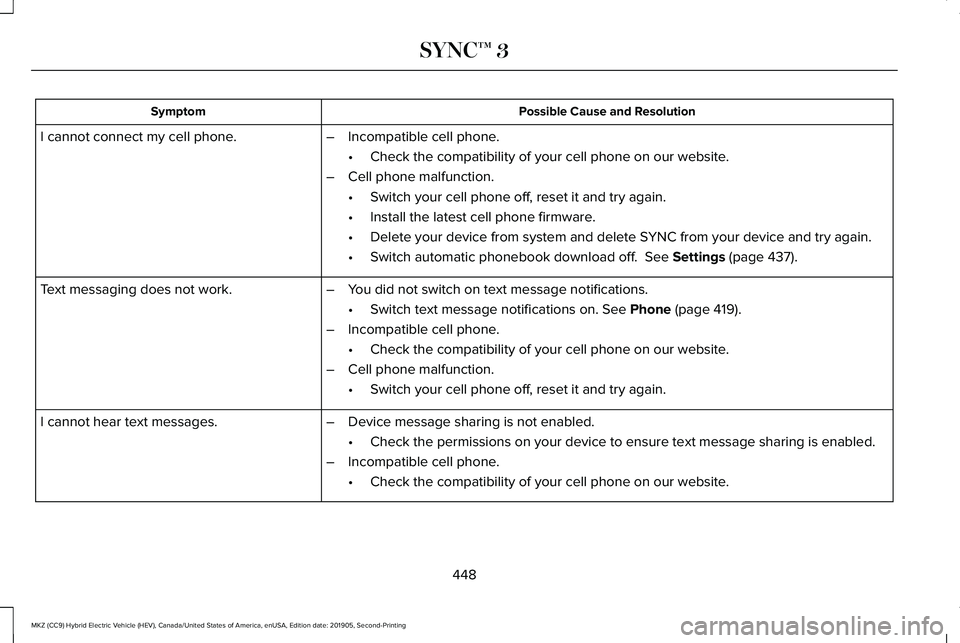
Possible Cause and Resolution
Symptom
–Incompatible cell phone.
•Check the compatibility of your cell phone on our website.
– Cell phone malfunction.
•Switch your cell phone off, reset it and try again.
• Install the latest cell phone firmware.
• Delete your device from system and delete SYNC from your device and try again.
• Switch automatic phonebook download off. See Settings (page 437).
I cannot connect my cell phone.
Text messaging does not work.
–You did not switch on text message notifications.
•Switch text message notifications on.
See Phone (page 419).
– Incompatible cell phone.
•Check the compatibility of your cell phone on our website.
– Cell phone malfunction.
•Switch your cell phone off, reset it and try again.
– Device message sharing is not enabled.
•Check the permissions on your device to ensure text message sharing is e\
nabled.
– Incompatible cell phone.
•Check the compatibility of your cell phone on our website.
I cannot hear text messages.
448
MKZ (CC9) Hybrid Electric Vehicle (HEV), Canada/United States of America, enUSA, Edition date: 201905, Second-Printing SYNC™ 3
Page 458 of 544

Possible Cause and Solution
Symptom
You did not create a personal profile.
My profile will not recall. Personal Profiles is turned off.
The profile you requested is already active.
You did not link the memory button you are using to a profile.
You did not link the remote control you are using to a profile.
You are using the wrong remote control.
You are pressing a button other than the unlock or remote start on a link\
ed remote control.
You deleted the personal profile.
You switched the personal profiles off.
My preset positions recall, but my profile does
not.
The vehicle is in motion.
My profile recalls but my preset positions do
not. The preset positions are the same as the guest or previously active prof\
ile.
Unlink and relink your remote control in the Personal Profiles menu. You may need to see
your authorized dealer.
I lost a remote control.
You erased and reprogrammed the remote controls. This could happen if you\
let a dealership
add a new remote control to replace a lost one.
I lost all profiles.
Someone performed a master reset without your knowledge.
455
MKZ (CC9) Hybrid Electric Vehicle (HEV), Canada/United States of America, enUSA, Edition date: 201905, Second-Printing SYNC™ 3
Page 459 of 544
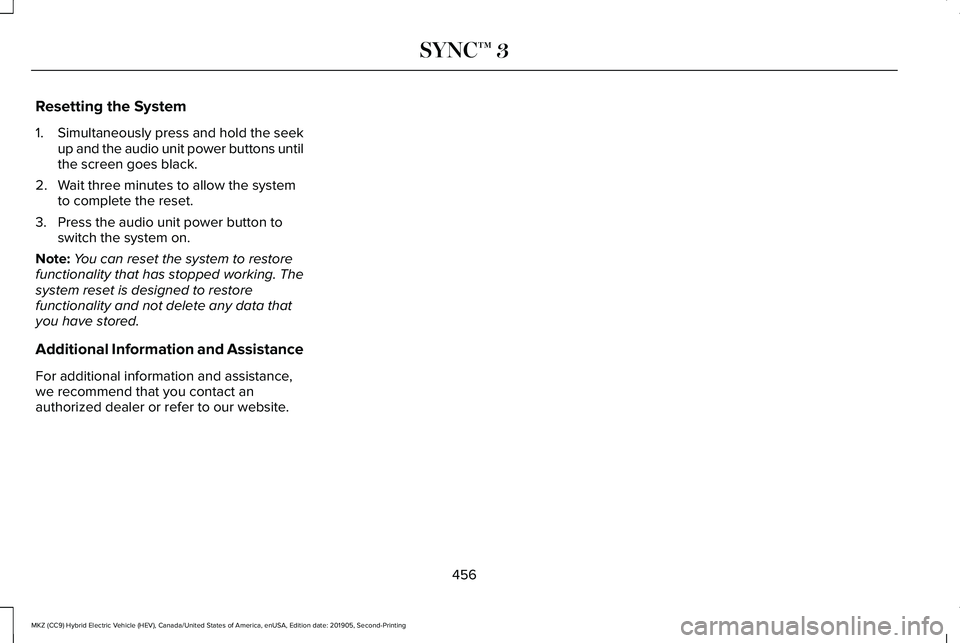
Resetting the System
1.
Simultaneously press and hold the seek
up and the audio unit power buttons until
the screen goes black.
2. Wait three minutes to allow the system to complete the reset.
3. Press the audio unit power button to switch the system on.
Note: You can reset the system to restore
functionality that has stopped working. The
system reset is designed to restore
functionality and not delete any data that
you have stored.
Additional Information and Assistance
For additional information and assistance,
we recommend that you contact an
authorized dealer or refer to our website.
456
MKZ (CC9) Hybrid Electric Vehicle (HEV), Canada/United States of America, enUSA, Edition date: 201905, Second-Printing SYNC™ 3
Page 466 of 544

Your vehicle is equipped with an information
display, which indicates the proper oil
change interval. This interval may be up to
one year or 10,000 mi (16,000 km).
When
ENGINE OIL CHANGE DUE or OIL
CHANGE REQUIRED appears in the
information display, it is time for an oil
change. Make sure you perform the oil
change within two weeks or 500 mi (800 km)
of the
ENGINE OIL CHANGE DUE or OIL
CHANGE REQUIRED message appearing.
Make sure you reset the oil monitoring
system after each oil change.
See Oil
Change Indicator Reset (page 305).
If your information display resets
prematurely, becomes inoperative or the
vehicle battery becomes discharged or
disconnected, the oil monitoring system
resets to 100% oil life. You should change
your engine oil one year or
10,000 mi
(16,000 km) from the previous oil change.
Never exceed one year or 10,000 mi
(16,000 km) between oil change intervals. Your vehicle is very sophisticated and built
with multiple, complex, performance systems.
Every manufacturer develops these systems
using different specifications and
performance features. That is why it is
important to rely upon your dealership to
properly diagnose and repair your vehicle.
Ford Motor Company has recommended
maintenance intervals for various parts and
component systems based upon engineering
testing. Ford Motor Company relies upon this
testing to determine the most appropriate
mileage for replacement of oils and fluids to
protect your vehicle at the lowest overall cost
to you and recommends against
maintenance schedules that deviate from
the scheduled maintenance information.
We strongly recommend the use of only
genuine Ford, Motorcraft or Ford-authorized
re-manufactured replacement parts
engineered for your vehicle.
Additives and Chemicals
This owner's manual and the Ford Workshop
Manual list the recommended additives and
chemicals for your vehicle. We do not
recommend using chemicals or additives not
approved by us as part of your vehicle
’s
normal maintenance. Please consult your
warranty information.
Oils, Fluids and Flushing
In many cases, fluid discoloration is a normal
operating characteristic and, by itself, does
not necessarily indicate a concern or that the
fluid needs to be changed. However, a
qualified expert, such as the factory-trained
technicians at your dealership, should
inspect discolored fluids that also show signs
of overheating or foreign material
contamination immediately.
463
MKZ (CC9) Hybrid Electric Vehicle (HEV), Canada/United States of America, enUSA, Edition date: 201905, Second-Printing Scheduled Maintenance
Page 470 of 544

NORMAL SCHEDULED MAINTENANCE
Normal Scheduled Maintenance
1
Change the engine oil and filter. 2
Every 12 months or
10,000 mi (16,000 km). The
oil monitoring system
displays a message in the
information display. Rotate the tires, inspect tire wear and measure tread depth.
Inspect the automatic transmission fluid level. Consult dealer for requi\
rements.
Inspect the brake pads, rotors, hoses and parking brake.
Inspect the engine and motor electronics coolant level/strength and hose\
s.
Inspect the exhaust system and heat shields.
Inspect the half-shaft boots.
Inspect the steering linkage, ball joints, suspension and tie-rod ends.
Inspect the wheels and related components for abnormal noise, wear, looseness or drag.
1 Do not exceed one year or
10,000 mi (16,000 km) between service intervals. We recommend performing a multi-point inspection.
2 Reset the oil monitoring system after engine oil and filter changes.
See Oil Change Indicator Reset (page 305).
467
MKZ (CC9) Hybrid Electric Vehicle (HEV), Canada/United States of America, enUSA, Edition date: 201905, Second-Printing Scheduled Maintenance
Page 539 of 544

Lighting Control...............................................87
Flashing the Headlamp High Beam.................88
Headlamp High Beam.........................................88
Lighting
..............................................................87
General Information..............................................87
Lincoln Automotive Financial Services......14
Lincoln Protect..............................................459 Lincoln Protect (CANADA ONLY)...................
460
Lincoln Protect Extended Service Plans (U.S. Only)..................................................................459
Load Carrying
................................................256
Load Limit.......................................................256
Special Loading Instructions for Owners of
Pick-up Trucks and Utility-type
Vehicles............................................................260
Vehicle Loading - with and without a Trailer................................................................256
Locking and Unlocking..................................67 Activating Intelligent Access.............................68
Autolock..................................................................70
Battery Saver...........................................................71
Illuminated Entry...................................................70
Illuminated Exit......................................................70
Locking and Unlocking the Doors with the
Key Blade...........................................................69
Luggage Compartment........................................71
Power Door Locks................................................67
Remote Control.....................................................67 Smart Unlocks for Intelligent Access
Keys.....................................................................69
M
Maintenance...................................................301 General Information............................................301
Memory Function..........................................152 Easy Entry and Exit Feature..............................153
Linking a PreSet Position to your Remote
Control or Intelligent Access Key Fob.......153
Saving a PreSet Position...................................152
Message Center See: Information Displays..................................110
Mirrors See: Windows and Mirrors.................................95
Mobile Communications Equipment..........16
Moonroof..........................................................99 Opening and Closing..........................................101
Type 1.....................................................................100
Type 2....................................................................100
Motorcraft Parts
............................................360
MyKey – Troubleshooting............................65
MyKey™..............................................................62 Principle of Operation.........................................62 N
Navigation.......................................................421
Changing the Format of the Map...................425
cityseeker.............................................................427
Michelin Travel Guide........................................428
Navigation Map Accuracy and Updates.......428
Route Guidance..................................................425
Setting a Destination.........................................423
SiriusXM Traffic and Travel Link......................428
Zoom.....................................................................425
Network Connectivity..................................375 Connecting the Vehicle to a Mobile
Network............................................................375
Network Connectivity – Troubleshooting.........................................376
Normal Scheduled Maintenance..............467
O
Oil Change Indicator Reset
.......................305
Oil Check See: Engine Oil Check......................................304
Opening and Closing the Hood
................301
Closing the Hood...............................................302
Opening the Hood..............................................301
536
MKZ (CC9) Hybrid Electric Vehicle (HEV), Canada/United States of America, enUSA, Edition date: 201905, Second-Printing Index
Page 540 of 544

Ordering Additional Owner's
Literature......................................................279
Obtaining a French Owner’ s Manual............279
Overhead Console.......................................165
Overriding Automatic High Beam Control............................................................94
P
Parking Aids..................................................208 Principle of Operation.......................................
208
Passive Anti-Theft System............................77 SecuriLock...............................................................77
PATS See: Passive Anti-Theft System.........................77
Perchlorate........................................................14
Personal Safety System ™
..............................44
How Does the Personal Safety System
Work?...................................................................44
Phone...............................................................419 Android Auto........................................................421
Apple CarPlay.......................................................421
Pairing Your Cell Phone for the First
Time....................................................................419
Text Messaging...................................................420
Using Your Cell Phone......................................420
Post-Crash Alert System..............................271 Power Decklid
...................................................71
Obstacle Detection...............................................72
Opening and Closing the Power Decklid.......72
Resetting the Power Decklid..............................
73
Power Door Locks See: Locking and Unlocking..............................67
Power Seats....................................................148 Adjusting the Four-Way Lumbar
Support..............................................................150
Adjusting the Lumbar Support.........................150
Adjusting the Multi-Contour Front Seats With Active Motion ..................................................150
Power Windows
..............................................95
Accessory Delay...................................................96
Bounce-Back..........................................................95
One-Touch Down..................................................95
One-Touch Up.......................................................95
Window Lock.........................................................96
Pre-Collision Assist
......................................250
Adjusting the Pre-Collision Assist
Settings............................................................252
Blocked Sensors................................................252
Distance Indication and Alert...........................251
Using the Pre-Collision Assist System..........250
Protecting the Environment
..........................18 R
Rear Parking Aid...........................................208
Object Distance Indicator.................................210
Rear Seat Armrest
.........................................165
Rear Seats.......................................................153
Rear View Camera.......................................222
Using the Rear View Camera System...........223
Rear View Camera See: Rear View Camera...................................222
Reduced Engine Performance
..................262
Refueling.........................................................182 Fuel Filler Door Manual Override Lever........185
System Warnings.................................................184
Remote Control
...............................................57
Car Finder...............................................................60
Intelligent Access Key..........................................57
Remote Start..........................................................60
Replacing the Battery..........................................58
Sounding the Panic Alarm..................................60
Remote Start
...................................................145
Automatic Settings..............................................145
Heated and Cooled Features..........................145
Last Settings.........................................................145
Repairing Minor Paint Damage.................325
Replacement Parts Recommendation........15 Collision Repairs....................................................15
537
MKZ (CC9) Hybrid Electric Vehicle (HEV), Canada/United States of America, enUSA, Edition date: 201905, Second-Printing Index
Page 542 of 544

Special Operating Conditions Scheduled
Maintenance...............................................469
Exceptions.............................................................471
Speed Control See: Cruise Control...........................................226
Stability Control............................................205 Principle of Operation.......................................205
Starting a Hybrid Electric Vehicle System...........................................................168
Automatic Shutdown..........................................169
Fast Restart...........................................................169
Guarding Against Exhaust Fumes...................170
Important Ventilating Information....................170
Switching Off Your Vehicle When It Is Moving...............................................................170
Switching Off Your Vehicle When It Is Stationary..........................................................170
Starting and Stopping the Engine.............167 General Information............................................167
Steering..........................................................249 Adaptive Learning..............................................249
Electric Power Steering....................................249
Steering Wheel................................................80
Storage Compartments...............................165
Sunroof See: Moonroof.......................................................99
Sun Shades
......................................................99 Sun Visors
.........................................................99
Illuminated Vanity Mirror.....................................99
Supplementary Restraints System.............45 Principle of Operation..........................................45
Switching Automatic High Beam Control On and Off.....................................................93
Activating the Automatic High Beam Control................................................................93
Switching Cruise Control On and Off
..................................................................226
Switching Cruise Control Off...........................226
Switching Cruise Control On...........................226
Symbols Glossary
..............................................7
SYNC™ 3..........................................................390 General Information...........................................390
SYNC™ 3 Troubleshooting
..........................440
Additional Information and Assistance.........456
Apps.......................................................................450
Navigation............................................................449
Personal Profiles.................................................454
Phone....................................................................446
Resetting the System........................................
456
USB and Bluetooth Audio................................442
Voice Recognition..............................................440
Wi-Fi Connectivity..............................................452 T
Technical Specifications
See: Capacities and Specifications...............359
The Better Business Bureau (BBB) Auto Line Program (U.S. Only)..........................275
Tire Care.........................................................336 Glossary of Tire Terminology...........................337
Information About Uniform Tire Quality
Grading.............................................................336
Information Contained on the Tire Sidewall............................................................338
Temperature A B C.............................................337
Traction AA A B C...............................................337
Treadwear.............................................................337
Tire Inflation When Punctured See: Tire Sealant and Inflator Kit....................
329
Tire Pressure Monitoring System..............351 Changing Tires With a Tire Pressure
Monitoring System.........................................353
Understanding Your Tire Pressure Monitoring System .............................................................353
Tire Repair Kit See: Tire Sealant and Inflator Kit....................
329
Tire Sealant and Inflator Kit.......................329 First Stage: Reinflating the Tire with Sealing
Compound and Air.........................................331
General Information...........................................329
539
MKZ (CC9) Hybrid Electric Vehicle (HEV), Canada/United States of America, enUSA, Edition date: 201905, Second-Printing Index