2020 LINCOLN CORSAIR alarm
[x] Cancel search: alarmPage 133 of 591
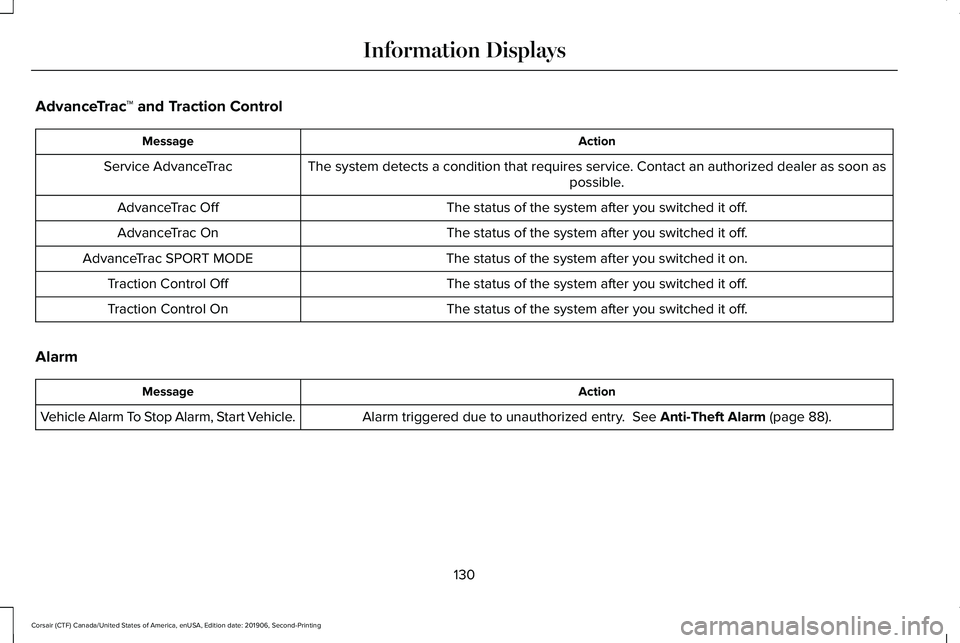
AdvanceTrac
™ and Traction Control Action
Message
The system detects a condition that requires service. Contact an authorized dealer as soon as possible.
Service AdvanceTrac
The status of the system after you switched it off.
AdvanceTrac Off
The status of the system after you switched it off.
AdvanceTrac On
The status of the system after you switched it on.
AdvanceTrac SPORT MODE
The status of the system after you switched it off.
Traction Control Off
The status of the system after you switched it off.
Traction Control On
Alarm Action
Message
Alarm triggered due to unauthorized entry. See Anti-Theft Alarm (page 88).
Vehicle Alarm To Stop Alarm, Start Vehicle.
130
Corsair (CTF) Canada/United States of America, enUSA, Edition date: 201906, Second-Printing Information Displays
Page 250 of 591

Hilly Condition Usage
You should select a lower gear when the
system is active in situations such as
prolonged downhill driving on steep grades,
for example in mountainous areas. The
system needs additional engine braking in
these situations to reduce the load on the
vehicle
’s regular brake system to prevent it
from overheating.
Note: An audible alarm sounds and the
system shuts down if it applies brakes for an
extended period of time. This allows the
brakes to cool. The system functions
normally again after the brakes cool.
ADAPTIVE CRUISE CONTROL
LIMITATIONS - VEHICLES WITH:
ADAPTIVE CRUISE CONTROL
WITH LANE CENTERING
Adaptive cruise control limitations apply to
lane centering unless stated otherwise or
contradicted by a lane centering limitation.
See Adaptive Cruise Control Limitations
(page 247). The system may not correctly operate in any
of the following conditions:
•
Your vehicle is not centered in the lane.
• The lane is too narrow or wide.
• The system does not detect at least one
lane marking or when lanes merge or
split.
• You switch the direction indicator on.
• Limited steering torque input is applied.
• Areas under construction or new
infrastructure.
• When modifications to the steering
system have been made.
• When using a spare tire.
Note: The assistance steering torque is
limited and may not be sufficient for all
driving situations.
Note: In exceptional conditions, the system
may deviate from the center line. ADAPTIVE CRUISE CONTROL
LIMITATIONS - VEHICLES WITH:
ADAPTIVE CRUISE CONTROL
WITH STOP AND GO
Sensor Limitations WARNING:
On rare occasions,
detection issues can occur due to the road
infrastructures, for example bridges,
tunnels and safety barriers. In these cases,
the system may brake late or
unexpectedly. At all times, you are
responsible for controlling your vehicle,
supervising the system and intervening, if
required. WARNING:
If the system
malfunctions, have your vehicle checked
as soon as possible. WARNING: Large contrasts in outside
lighting can limit sensor performance.
247
Corsair (CTF) Canada/United States of America, enUSA, Edition date: 201906, Second-Printing Adaptive Cruise Control
(If Equipped)
Page 482 of 591
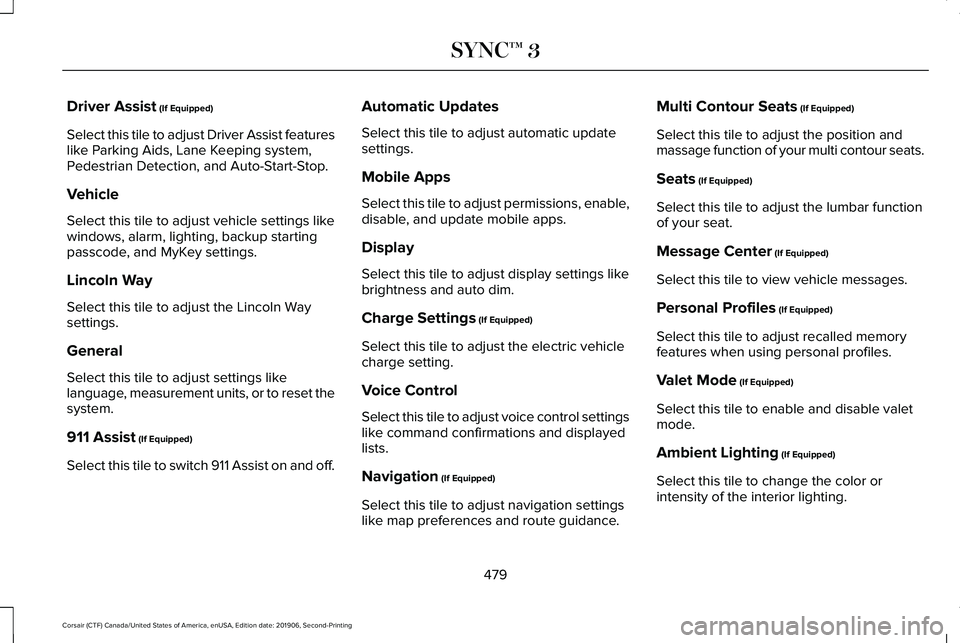
Driver Assist (If Equipped)
Select this tile to adjust Driver Assist features
like Parking Aids, Lane Keeping system,
Pedestrian Detection, and Auto-Start-Stop.
Vehicle
Select this tile to adjust vehicle settings like
windows, alarm, lighting, backup starting
passcode, and MyKey settings.
Lincoln Way
Select this tile to adjust the Lincoln Way
settings.
General
Select this tile to adjust settings like
language, measurement units, or to reset the
system.
911 Assist
(If Equipped)
Select this tile to switch 911 Assist on and off. Automatic Updates
Select this tile to adjust automatic update
settings.
Mobile Apps
Select this tile to adjust permissions, enable,
disable, and update mobile apps.
Display
Select this tile to adjust display settings like
brightness and auto dim.
Charge Settings
(If Equipped)
Select this tile to adjust the electric vehicle
charge setting.
Voice Control
Select this tile to adjust voice control settings
like command confirmations and displayed
lists.
Navigation
(If Equipped)
Select this tile to adjust navigation settings
like map preferences and route guidance. Multi Contour Seats
(If Equipped)
Select this tile to adjust the position and
massage function of your multi contour seats.
Seats
(If Equipped)
Select this tile to adjust the lumbar function
of your seat.
Message Center
(If Equipped)
Select this tile to view vehicle messages.
Personal Profiles
(If Equipped)
Select this tile to adjust recalled memory
features when using personal profiles.
Valet Mode
(If Equipped)
Select this tile to enable and disable valet
mode.
Ambient Lighting
(If Equipped)
Select this tile to change the color or
intensity of the interior lighting.
479
Corsair (CTF) Canada/United States of America, enUSA, Edition date: 201906, Second-Printing SYNC™ 3
Page 500 of 591
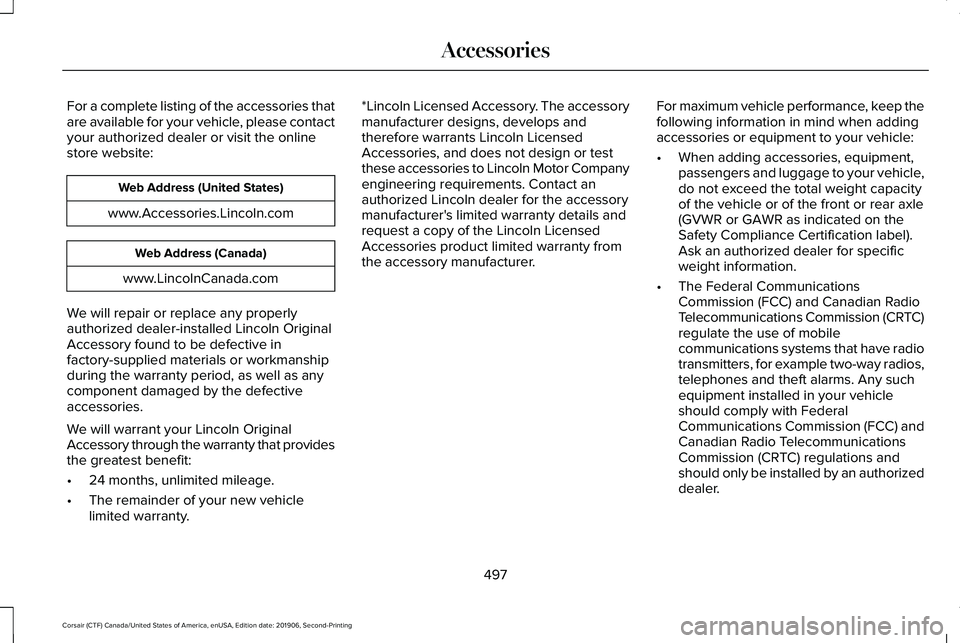
For a complete listing of the accessories that
are available for your vehicle, please contact
your authorized dealer or visit the online
store website:
Web Address (United States)
www.Accessories.Lincoln.com Web Address (Canada)
www.LincolnCanada.com
We will repair or replace any properly
authorized dealer-installed Lincoln Original
Accessory found to be defective in
factory-supplied materials or workmanship
during the warranty period, as well as any
component damaged by the defective
accessories.
We will warrant your Lincoln Original
Accessory through the warranty that provides
the greatest benefit:
• 24 months, unlimited mileage.
• The remainder of your new vehicle
limited warranty. *Lincoln Licensed Accessory. The accessory
manufacturer designs, develops and
therefore warrants Lincoln Licensed
Accessories, and does not design or test
these accessories to Lincoln Motor Company
engineering requirements. Contact an
authorized Lincoln dealer for the accessory
manufacturer's limited warranty details and
request a copy of the Lincoln Licensed
Accessories product limited warranty from
the accessory manufacturer.
For maximum vehicle performance, keep the
following information in mind when adding
accessories or equipment to your vehicle:
•
When adding accessories, equipment,
passengers and luggage to your vehicle,
do not exceed the total weight capacity
of the vehicle or of the front or rear axle
(GVWR or GAWR as indicated on the
Safety Compliance Certification label).
Ask an authorized dealer for specific
weight information.
• The Federal Communications
Commission (FCC) and Canadian Radio
Telecommunications Commission (CRTC)
regulate the use of mobile
communications systems that have radio
transmitters, for example two-way radios,
telephones and theft alarms. Any such
equipment installed in your vehicle
should comply with Federal
Communications Commission (FCC) and
Canadian Radio Telecommunications
Commission (CRTC) regulations and
should only be installed by an authorized
dealer.
497
Corsair (CTF) Canada/United States of America, enUSA, Edition date: 201906, Second-Printing Accessories
Page 577 of 591

Air Filter
See: Changing the Engine Air Filter..............332
Alarm See: Anti-Theft Alarm...........................................88
All-Wheel Drive.............................................209
Ambient Lighting...........................................104 Adjusting the Brightness...................................105
Changing the Color............................................105
Switching Ambient Lighting Off.......................
105
Switching Ambient Lighting On.......................105
Anti-Theft Alarm
..............................................88
Arming the Alarm..................................................88
Disarming the Alarm............................................88
Appendices
....................................................535
Apps.................................................................475 SiriusXM Traffic and Travel Link......................
477
Using Apps on an Android Device................476
Using Apps on an iOS Device.........................
476
Using Mobile Navigation on an Android Device...............................................................476
At a Glance........................................................21
Audible Warnings and Indicators..............122 Headlamps On Warning Chime
.......................122
Keyless Warning Alert........................................122
Parking Brake On Warning Chime..................122
Audio Control..................................................92 You can operate the following functions with
the control:.........................................................92 Audio System
................................................420
General Information...........................................420
Audio Unit.......................................................421 Adjusting the Volume.........................................421
Changing Radio Stations...................................421
Selecting the Audio Modes..............................
421
Switching the Audio Unit On and Off............422
Switching the Display On and Off..................422
Using Seek, Fast Forward and Reverse.......
422
Auto Hold
........................................................218
Auto Hold Indicator.............................................219
Switching Auto Hold On and Off.....................218
Using Auto Hold..................................................218
Autolamps
........................................................99
Windshield Wiper Activated Headlamps........99
Automatic Climate Control
.........................152
Accessing the Air Distribution Controls........152
Accessing the Climate Control Menu............
152
Setting the Blower Motor Speed....................152
Setting the Temperature...................................152
Switching Auto Mode On and Off...................152
Switching Maximum Air Conditioning On and Off.......................................................................153
Switching Maximum Defrost On and Off.......154
Switching Recirculated Air On and Off..........154
Switching the Air Conditioning On and Off.......................................................................153 Switching the Climate Control On and
Off.......................................................................153
Automatic High Beam Control...................106
Automatic High Beam Control Indicators......................................................107
Automatic Transmission.............................203 Automatic Transmission Adaptive
Learning...........................................................208
If Your Vehicle Gets Stuck in Mud or Snow.................................................................208
Manual Park Release.........................................206
SelectShift™ Automatic Transmission............205
Understanding the Shift Positions of your Automatic Transmission...............................203
Automatic Transmission Fluid Check............................................................338
Auto-Start-Stop..............................................189 Disabling Auto-Start-Stop.................................190
Enabling Auto-Start-Stop...................................189
Autowipers.......................................................96 Autowipers Settings.............................................96
Low Temperature Wipe Inhibit..........................96
Auxiliary Power Points
..................................178
110 Volt AC Power Point.....................................178
12 Volt DC Power Point......................................178
USB Port and Power Point Locations.............178
AWD See: All-Wheel Drive.........................................209
574
Corsair (CTF) Canada/United States of America, enUSA, Edition date: 201906, Second-Printing Index
Page 583 of 591
Head Restraints.............................................159
Folding the Rear Seat Outermost Head
Restraint............................................................160
Installing the Head Restraint.............................161
Lowering the Head Restraint...........................160
Raising the Head Restraint...............................
160
Removing the Head Restraint..........................160
Tilting the Front Seat Head Restraint............160
Head Up Display...........................................148 Configuring The Head Up Display..................148
Head Up Display Overview..............................149
Maintaining Your Head Up Display..................151
Heated Exterior Mirrors...............................155
Heated Rear Window
...................................155
Heated Seats..................................................170
Front Seats............................................................170
Rear Seats..............................................................171
Heated Steering Wheel.................................94
Heated Windshield
.......................................155
Windshield Wiper De-Icer.................................155
Heating See: Climate Control..........................................152
Hill Start Assist...............................................217 Switching the System On and Off...................218
Using Hill Start Assist.........................................218 Hints on Controlling the Interior
Climate..........................................................154
Defogging the Side Windows in Cold Weather.............................................................155
General Hints........................................................154
Quickly Cooling the Interior.............................155
Quickly Heating the Interior.............................155
Recommended Settings for Cooling..............
155
Recommended Settings for Heating..............155
Hints on Driving With Anti-Lock Brakes...........................................................215
Hood Lock See: Opening and Closing the Hood............327
Horn
....................................................................94
How Does Adaptive Cruise Control With Stop and Go Work
.....................................245
I
In California (U.S. Only)...............................306
Information Display Control
.........................94
Information Displays.....................................123
General Information............................................123
Information Messages.................................128 Active Park............................................................128
Adaptive Cruise Control....................................129
Adaptive Headlamps..........................................129
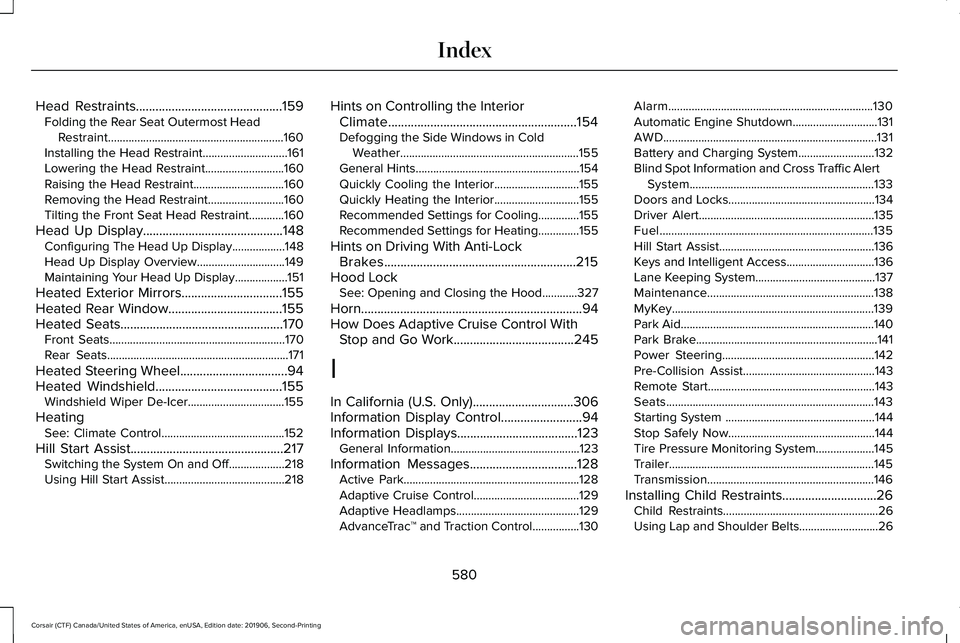
AdvanceTrac ™ and Traction Control................
130Alarm......................................................................130
Automatic Engine Shutdown.............................
131
AWD........................................................................\
.131
Battery and Charging System..........................132
Blind Spot Information and Cross Traffic Alert System...............................................................133
Doors and Locks..................................................134
Driver Alert............................................................135
Fuel........................................................................\
.135
Hill Start Assist.....................................................136
Keys and Intelligent Access..............................136
Lane Keeping System.........................................137
Maintenance.........................................................138
MyKey.....................................................................139
Park Aid..................................................................140
Park Brake..............................................................141
Power Steering....................................................142
Pre-Collision Assist.............................................143
Remote Start.........................................................143
Seats.......................................................................143
Starting System ...................................................144
Stop Safely Now..................................................144
Tire Pressure Monitoring System....................145
Trailer......................................................................145
Transmission.........................................................146
Installing Child Restraints.............................26 Child Restraints.....................................................26
Using Lap and Shoulder Belts...........................26
580
Corsair (CTF) Canada/United States of America, enUSA, Edition date: 201906, Second-Printing Index
Page 586 of 591

Obstacle Detection..............................................84
Opening and Closing the Liftgate....................82
Setting the Liftgate Open Height.....................84
Stopping the Liftgate Movement......................84
Switching the Power Liftgate On or Off..........85
Power Seats.....................................................161 10-Way Seat Controls..........................................161
24-Way Seat Controls........................................162
Adjusting the Multi-Contour Front Seats With
Active Motion ..................................................165
Power Steering Fluid Check......................339
Power Windows
.............................................108
Accessory Delay..................................................109
Bounce-Back........................................................108
One-Touch Down................................................108
One-Touch Up......................................................108
Rear Window Lock..............................................108
Pre-Collision Assist
......................................273
Adjusting the Pre-Collision Assist
Settings.............................................................276
Blocked Sensors.................................................277
Distance Indication and Alert..........................275
Evasive Steering Assist.....................................276
Using the Pre-Collision Assist System..........274
Programming Your Phone.............................67
Protecting the Environment.........................20
Puncture See: Changing a Road Wheel.........................376 R
Rear Parking Aid...........................................227
Object Distance Indicator................................
229
Rear Seats.......................................................168 Folding the Power Seat Backrest....................170
Folding the Seat Backrest.................................
169
Moving the Seats Backward and Forward.............................................................168
Recline Adjustment.............................................169
Unfolding the Seat Backrest............................169
Rear Under Floor Storage...........................281 Cargo Management System.............................281
Rear View Camera
.......................................237
Using the Rear View Camera System...........237
Rear View Camera See: Rear View Camera....................................
237
Rear Window Wiper and Washers..............97 Rear Window Washer...........................................97
Rear Window Wiper..............................................97
Recommended Towing Weights..............289
Refueling ..........................................................
194
Refueling System Overview.............................194
Refueling System Warning................................
196
Refueling Your Vehicle.......................................195
Remote Control
................................................61
Car Finder...............................................................64
Intelligent Access Key..........................................61 Remote Start..........................................................64
Replacing the Battery..........................................
62
Sounding the Panic Alarm..................................64
Remote Start
...................................................156
Automatic Settings..............................................156
Removing a Headlamp
...............................345
Repairing Minor Paint Damage.................352
Replacement Parts Recommendation
........17
Collision Repairs.....................................................17
Scheduled Maintenance and Mechanical
Repairs..................................................................17
Warranty on Replacement Parts.........................17
Replacing a Lost Key or Remote Control............................................................66
Reporting Safety Defects (Canada Only)...............................................................312
Reporting Safety Defects (U.S. Only)
.......312
Resuming the Set Speed............................244 Resuming the Set Speed from a Complete
Stop...................................................................252
Reverse Braking Assist Indicators............221
Reverse Braking Assist Precautions.......220
Reverse Braking Assist...............................220 Reverse Braking Assist –
Troubleshooting.............................................222
583
Corsair (CTF) Canada/United States of America, enUSA, Edition date: 201906, Second-Printing Index