Page 103 of 609
To switch the system on, switch the lighting
control to any position except headlamps.
ADAPTIVE HEADLAMPS
The headlamp beams move in the same
direction as the steering wheel. This provides
more visibility when driving around curves.
A. Without adaptive headlamps.
B. With adaptive headlamps.
The system only works with the lighting
control in the autolamp position. You can
switch this feature on or off in the information
display.Note:
There is a delay of two to five seconds
before the system operates when you drive
your vehicle.
Note: The system is only active at speeds
above 3 mph (5 km/h).
System Check
(If Equipped)
The system has a power-up movement check
feature. When you start your vehicle, the
lamps track left to right, then back to center
to alert the driver that the system is working
properly.
DIRECTION INDICATORS 100
Continental (CPL) Canada/United States of America, enUSA, Edition date: 201907, Second-Printing LightingE161714
B
A E273180
Page 116 of 609

On (white light): Illuminates when the
adaptive cruise control system is turned on.
Turns off when the speed control system is
turned off.
Engaged (green light): Illuminates when the
adaptive cruise control system is engaged.
Turns off when the speed control system is
disengaged.
Adaptive Steering (If Equipped)
The adaptive steering system
indicator illuminates if the system
detects a fault during the
continuous diagnostic checks.
Adaptive Steering Initialization (yellow,
flashing): The adaptive steering system
detects a difference between steering wheel
angle and the desired road wheel angle. The
steering wheel adjusts itself to correct this
difference. This adjustment is part of normal
system operation. Adaptive Steering Off (yellow, solid): The
adaptive steering system is off. It is possible
that the steering wheel may not be straight
when you drive straight ahead. If this
message persists, see an authorized dealer.
Adaptive Steering Loss (red, solid): The
adaptive steering system integrity cannot be
verified. Do not drive the vehicle and contact
an authorized dealer immediately.
See
Steering (page 264).
Anti-Lock Braking System If it illuminates when you are
driving, this indicates a
malfunction. You continue to have
the normal braking system (without ABS)
unless the brake system warning lamp is also
illuminated. Have the system checked by
your authorized dealer.
Autohold Active Illuminates when the system holds
your vehicle stationary.Autohold Unavailable Illuminates when the system is on,
but unavailable to hold your
vehicle stationary.
Automatic Headlamp High Beam Illuminates when this feature is on.
Battery It illuminates when you switch the
ignition on.
If it illuminates when the engine is
running this indicates a malfunction. Have
your vehicle checked as soon as possible.
Blind Spot Monitor
(If Equipped) It illuminates when you switch this
feature off or in conjunction with a
message.
See Blind Spot
Information System (page 257).
113
Continental (CPL) Canada/United States of America, enUSA, Edition date: 201907, Second-Printing Instrument ClusterE223375 E197933 E197934 E151262
Page 120 of 609
GENERAL INFORMATION
WARNING: Driving while distracted
can result in loss of vehicle control, crash
and injury. We strongly recommend that
you use extreme caution when using any
device that may take your focus off the
road. Your primary responsibility is the safe
operation of your vehicle. We recommend
against the use of any hand-held device
while driving and encourage the use of
voice-operated systems when possible.
Make sure you are aware of all applicable
local laws that may affect the use of
electronic devices while driving.
You can control various systems on your
vehicle using the quick action menu (QAM)
buttons on the right-hand side of the steering
wheel. The information display provides the
corresponding information.
Note: Some options may appear slightly
different or not at all if the items are optional. Note:
Some MyKey menu options only
appear if MyKey is enabled and at least one
MyKey is programmed.
Note: Speedometer, driving aid information,
and distance to empty information (if
enabled) moves to the left information group
when a menu is opened. This icon gives you the ability to
switch a feature on or off. A check
in the box indicates the feature is
enabled, and unchecked indicates the
feature is disabled.
117
Continental (CPL) Canada/United States of America, enUSA, Edition date: 201907, Second-Printing Information DisplaysE204495
Page 130 of 609

Adaptive Headlamps
Action
Message
Displays when a fault with the system has occurred. Contact an authorize\
d dealer as soon as possible.
Check Headlamp System See Manual
Adaptive Steering Action
Message
The adaptive steering system detects a difference between steering wheel\
angle and the desired
road wheel angle. The steering wheel adjusts itself to correct this difference. This adjustment is part of normal system operation.
Adaptive Steering Initialization
The adaptive steering system is off. It is possible that the steering wheel may not be straight
when you drive the vehicle straight ahead. If this message persists, see\
an authorized dealer.
Adaptive Steering Fault Service Required
The adaptive steering system integrity cannot be verified. Do not drive \
the vehicle and contactan authorized dealer immediately.
Adaptive Steering Loss Do Not Drive
Airbag Action
Message
Objects are by the passenger seat. After the objects are moved away from\
the seat, if the warningstays on or continues to come on contact an authorized dealer as soon as\
possible.
Occupant Sensor BLOCKED Remove
Objects Near Passenger Seat
127
Continental (CPL) Canada/United States of America, enUSA, Edition date: 201907, Second-Printing Information Displays
Page 131 of 609
Alarm
Action
Message
The alarm has been triggered due to unauthorized entry. See Anti-Theft Alarm (page 89).
Vehicle Alarm To Stop Alarm, Start Vehicle.
Automatic Engine Shutdown Action
Message
The engine is getting ready to shut off.
Vehicle Shuts Off In {seconds:#0} Seconds
The engine has shut off to help increase fuel economy.
Vehicle Shut Off to Save Energy
The engine is getting ready to shut off. You can press OK on the left steering wheel button tooverride the shut down.
Vehicle Shuts Off in {seconds:#0} Seconds
Press Ok to Override
128
Continental (CPL) Canada/United States of America, enUSA, Edition date: 201907, Second-Printing Information Displays
Page 138 of 609

Lane Keeping System
Action
Message
The system has malfunctioned. Contact an authorized dealer as soon as po\
ssible.
Lane Keeping Sys. Malfunction Service
Required
The system has detected a condition that has caused the system to be tem\
porarily unavailable.
Front Camera Temporarily Not Available
The system has detected a condition that requires the windshield to be c\
leaned to operateproperly.
Front Camera Low Visibility Clean Screen
The system has malfunctioned. Contact an authorized dealer as soon as po\
ssible.
Front Camera Malfunction Service
Required
The system requests the driver to keep their hands on the steering wheel.
Keep Hands on Steering Wheel
Maintenance Action
Message
Stop your vehicle as soon as safely possible, turn off the engine. Check the oil level. If the warningstays on or continues to come on with your engine running, contact an au\
thorized dealer as soon as possible.
Low Engine Oil Pressure
The engine oil life remaining is 10% or less.
Change Engine Oil Soon
The oil life left reaches 0%.
Oil Change Required
135
Continental (CPL) Canada/United States of America, enUSA, Edition date: 201907, Second-Printing Information Displays
Page 142 of 609
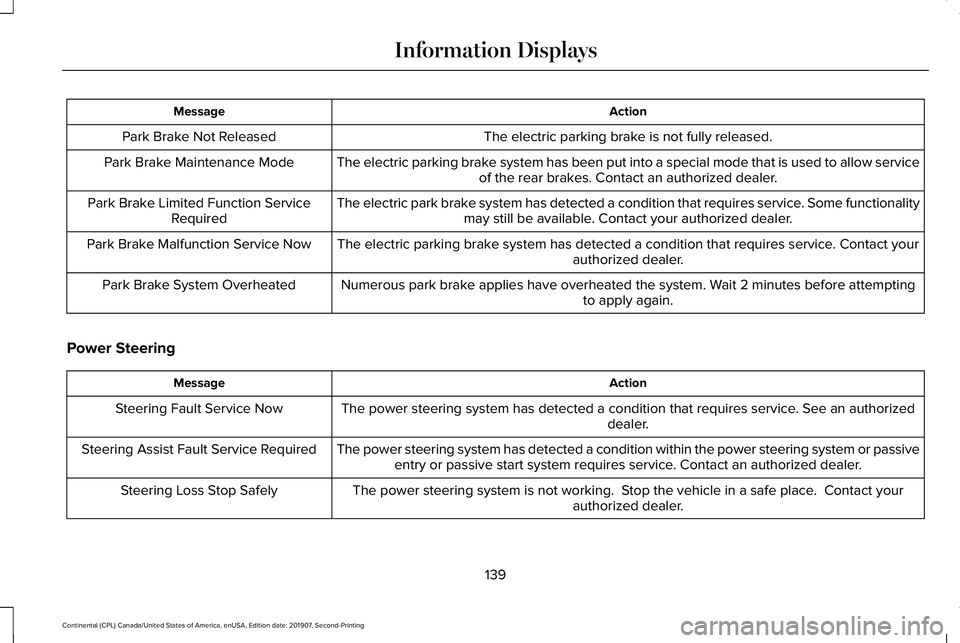
Action
Message
The electric parking brake is not fully released.
Park Brake Not Released
The electric parking brake system has been put into a special mode that is used to allow serviceof the rear brakes. Contact an authorized dealer.
Park Brake Maintenance Mode
The electric park brake system has detected a condition that requires service. Some functionalitymay still be available. Contact your authorized dealer.
Park Brake Limited Function Service
Required
The electric parking brake system has detected a condition that requires service. Contact your authorized dealer.
Park Brake Malfunction Service Now
Numerous park brake applies have overheated the system. Wait 2 minutes before attemptingto apply again.
Park Brake System Overheated
Power Steering Action
Message
The power steering system has detected a condition that requires service\
. See an authorized dealer.
Steering Fault Service Now
The power steering system has detected a condition within the power stee\
ring system or passiveentry or passive start system requires service. Contact an authorized dealer.
Steering Assist Fault Service Required
The power steering system is not working. Stop the vehicle in a safe place. Contact yourauthorized dealer.
Steering Loss Stop Safely
139
Continental (CPL) Canada/United States of America, enUSA, Edition date: 201907, Second-Printing Information Displays
Page 148 of 609

Navigation Display Area.
D
Status Bar.
E
Speedometer Display Area.
F
Signaling and Traffic Indication
Displays direction indicators, blind spot
information (if direction indicators are active)
and cross traffic alert.
Left Information Group
Displays incoming call information.
ADAS Display Area
Displays ACC and lane keeping system
status and warnings.
Navigation Display Area
Displays navigation next turn instructions. Status Bar
Displays distance to empty (DTE), time and
outside air temperature. Next to DTE, the
fuel gauge fill color changes to yellow in low
fuel conditions. You can switch off the status
bar in the HUD settings menu.
Speedometer Display Area
Displays current vehicle speed, speed limit
(if available in the map database) and your
transmission gear selection.
Configuring The Head Up Display
You can control the system's options through
the information display by using the HUD,
OK and arrow buttons on the right-hand side
of your steering wheel.
See General
Information (page 117). You can adjust the
display according to your height to make
viewing the content easier. You can also
adjust what content displays and the
brightness of the content. The system's
options appear in the instrument cluster
while the updates happen in the HUD. Note:
If HUD On is unchecked, other options
of the system are hidden.
Note: The HUD menu automatically closes
after a certain period of inactivity.
Note: The HUD image brightness
automatically adjusts to the brightness of
the ambient environment. You have the
ability to adjust the brightness further
according to your preference.
Note: In some instances, sunlight can cause
some reflections in and around the HUD
image.
145
Continental (CPL) Canada/United States of America, enUSA, Edition date: 201907, Second-Printing Information Displays

