Page 126 of 609
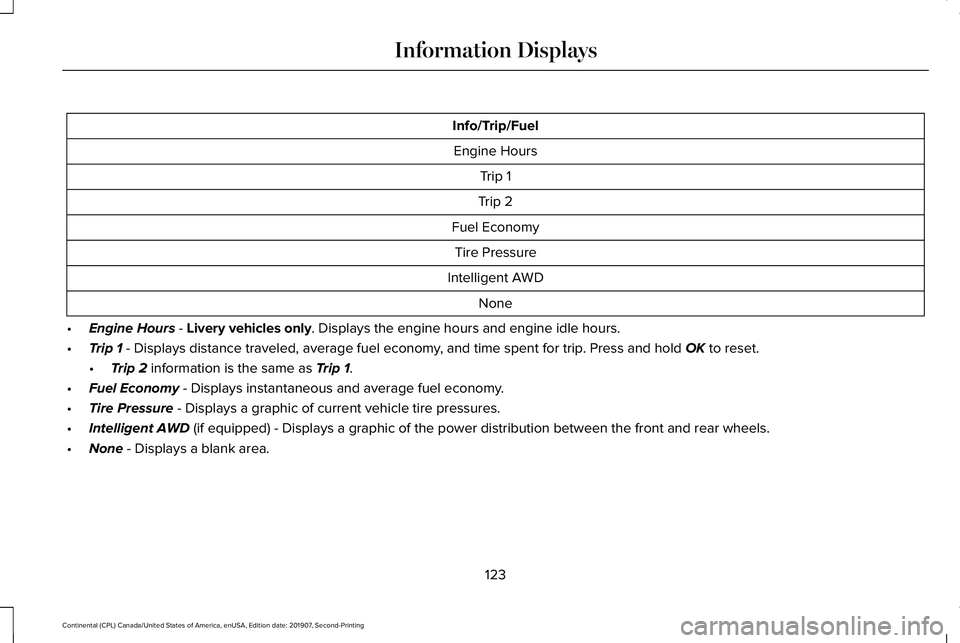
Info/Trip/Fuel
Engine Hours Trip 1
Trip 2
Fuel Economy Tire Pressure
Intelligent AWD None
• Engine Hours - Livery vehicles only. Displays the engine hours and engine idle hours.
• Trip 1
- Displays distance traveled, average fuel economy, and time spent for trip. Press and hold OK to reset.
• Trip 2
information is the same as Trip 1.
• Fuel Economy
- Displays instantaneous and average fuel economy.
• Tire Pressure
- Displays a graphic of current vehicle tire pressures.
• Intelligent AWD
(if equipped) - Displays a graphic of the power distribution between \
the front and rear wheels.
• None
- Displays a blank area.
123
Continental (CPL) Canada/United States of America, enUSA, Edition date: 201907, Second-Printing Information Displays
Page 127 of 609

Gauges
There are three gauge modes:
Speedometer, Fuel Economy and Tach and
Gauges. The following table describes the
display options in each mode. Gauges
Right Group
Left Group
HUD Off
HUD Off
HUD On
HUD Off
HUD On with Status
Bar On HUD On, Status Bar Off and
Navigation Not Available
HUD On, Status Bar Off and
Navigation Available
HUD On and Status Bar Off
Graphic Compass
Compass Direction and
Street Name
Blank
DTE
Blank
Speedometer
Average and Instant FuelEconomy / DTE
Average and
Instant Fuel Economy
Fuel Economy
Turbo and Temp Gauge
Turbo and Temp Gauges
Turbo and Temp
Gauge
Tachometer / DTE
Tachometer
Tach and Gauges
Average Fuel Economy displays instead of Turbo if your vehicle has a3.7L V6 TiVCT Engine.
DTE
Shows the approximate distance your vehicle
can travel before running out of fuel. Average Fuel Economy
Shows the average fuel usage based on
time.
Instant Fuel Economy
Shows your instantaneous fuel usage.
124
Continental (CPL) Canada/United States of America, enUSA, Edition date: 201907, Second-Printing Information Displays
Page 128 of 609

Tachometer
Indicates the engine speed in revolutions
per minute. Driving with your tachometer
pointer continuously at the top of the scale
may damage the engine.
Turbo Gauge (If Equipped)
Indicates the amount of manifold air pressure
in the engine.
Temperature Gauge
Indicates engine coolant temperature. At
normal operating temperature, the level
indicator will be in the normal range. If the
engine coolant temperature exceeds the
normal range, stop your vehicle as soon as
safely possible, switch off the engine and let
the engine cool.
WARNING: Do not remove the
coolant reservoir cap when the engine is
on or the cooling system is hot. Wait 10
minutes for the cooling system to cool
down. Cover the coolant reservoir cap with
a thick cloth to prevent the possibility of
scalding and slowly remove the cap.
Failure to follow this instruction could result
in personal injury.
Head Up Display
(If Equipped)
See
Head Up Display (page 144).
Phone
See
General Information (page 444).
Audio
See
General Information (page 444).
Navigation
(If Equipped)
See
General Information (page 444). INFORMATION MESSAGES
Note:
Depending on your vehicle options
and instrument cluster type, not all of these
messages may be available and certain
messages may be abbreviated or shortened. Press the
OK button to acknowledge and
remove some messages from the information
display. Other messages will be removed
automatically after a short time.
Certain messages need to be confirmed
before you can access the menus.
125
Continental (CPL) Canada/United States of America, enUSA, Edition date: 201907, Second-Printing Information DisplaysE222314
Page 131 of 609
Alarm
Action
Message
The alarm has been triggered due to unauthorized entry. See Anti-Theft Alarm (page 89).
Vehicle Alarm To Stop Alarm, Start Vehicle.
Automatic Engine Shutdown Action
Message
The engine is getting ready to shut off.
Vehicle Shuts Off In {seconds:#0} Seconds
The engine has shut off to help increase fuel economy.
Vehicle Shut Off to Save Energy
The engine is getting ready to shut off. You can press OK on the left steering wheel button tooverride the shut down.
Vehicle Shuts Off in {seconds:#0} Seconds
Press Ok to Override
128
Continental (CPL) Canada/United States of America, enUSA, Edition date: 201907, Second-Printing Information Displays
Page 133 of 609

Action
Message
The battery management system determines that the 12V battery is at a lo\
w state of charge.
Start the engine to charge the battery or charge the battery using an aft\
ermarket battery charger.
This message clears once you restart your vehicle and the battery state \
of charge has recovered.
Battery State of Charge Low
The battery management system determines that the battery is at a low st\
ate of charge. Turn
the ignition off as soon as possible to protect the battery. This message will clear once the vehicle
has been started and the battery state of charge has recovered. Turning off unnecessary electrical loads will allow faster battery state-of-charge recovery.
Turn Power Off To Save Battery
Displayed when the battery management system detects an extended low-vol\
tage condition.Various vehicle features will be disabled to help preserve the battery. Turn off as many of the electrical loads as soon as possible to improve system voltage. If the system voltage has recovered, the disabled features will operate again as normal.
Low Battery Features Temporarily Turned
Off
130
Continental (CPL) Canada/United States of America, enUSA, Edition date: 201907, Second-Printing Information Displays
Page 134 of 609

Blind Spot Information and Cross Traffic Alert System
Action
Message
A fault with the system has occurred. Contact an authorized dealer as so\
on as possible.
Blindspot System Fault
The system sensors are blocked. Contact an authorized dealer as soon as possible. See Blind
Spot Information System (page 257).
Blindspot Not Available Sensor Blocked
See Manual
The system detects a vehicle.
See Blind Spot Information System (page 257).
Vehicle Coming From X
The blind spot information system and cross traffic alert system sensors\
are blocked. See BlindSpot Information System
(page 257).
Cross Traffic Not Available Sensor Blocked
See Manual
A fault with the system has occurred. Contact an authorized dealer as so\
on as possible.
Cross Traffic System Fault
Doors and Locks Action
Message
The door listed is not completely closed.
X Door Ajar
The driver’s door is opened, your vehicle is in park and the engine is on.
Engine ON
Displays when the hood is not completely closed.
Hood Ajar
Displays when the door switches have been disabled.
Switches Inhibited Security Mode
There is a system malfunction with the child locks. Contact an authorize\
d dealer as soon as possible.
Child Lock Malfunction Service Required
131
Continental (CPL) Canada/United States of America, enUSA, Edition date: 201907, Second-Printing Information Displays
Page 136 of 609
Fuel
Action
Message
An early reminder of a low fuel condition.
Fuel Level Low
The fuel fill inlet may not be properly closed.
Check Fuel Fill Inlet
Hill Start Assist Action
Message
Displays when hill start assist is not available. Contact your authorized dealer. See Hill Start
Assist (page 215).
Hill Start Assist Not Available
Keys and Intelligent Access Action
Message
A reminder to press the brake while starting your vehicle.
To START Press Brake
The system does not detect the key.
See Keyless Starting (page 180).
No Key Detected
The Start Stop button is pressed to shut off the engine and an Intelligent Access k\
ey is notdetected inside your vehicle.
Restart Now or Key is Needed
Your vehicle is in the accessory ignition state.
Full Accessory Power Active
133
Continental (CPL) Canada/United States of America, enUSA, Edition date: 201907, Second-Printing Information Displays
Page 138 of 609

Lane Keeping System
Action
Message
The system has malfunctioned. Contact an authorized dealer as soon as po\
ssible.
Lane Keeping Sys. Malfunction Service
Required
The system has detected a condition that has caused the system to be tem\
porarily unavailable.
Front Camera Temporarily Not Available
The system has detected a condition that requires the windshield to be c\
leaned to operateproperly.
Front Camera Low Visibility Clean Screen
The system has malfunctioned. Contact an authorized dealer as soon as po\
ssible.
Front Camera Malfunction Service
Required
The system requests the driver to keep their hands on the steering wheel.
Keep Hands on Steering Wheel
Maintenance Action
Message
Stop your vehicle as soon as safely possible, turn off the engine. Check the oil level. If the warningstays on or continues to come on with your engine running, contact an au\
thorized dealer as soon as possible.
Low Engine Oil Pressure
The engine oil life remaining is 10% or less.
Change Engine Oil Soon
The oil life left reaches 0%.
Oil Change Required
135
Continental (CPL) Canada/United States of America, enUSA, Edition date: 201907, Second-Printing Information Displays