Page 148 of 609

Lane Keeping System
Action
Message
The system has malfunctioned. Contact an authorized dealer as soon as po\
ssible.
Lane Keeping Sys. Malfunction Service
Required
The system has detected a condition that has caused the system to be tem\
porarily unavailable.
Front Camera Temporarily Not Available
The system has detected a condition that requires the windshield to be c\
leaned to operateproperly.
Front Camera Low Visibility Clean Screen
The system has malfunctioned. Contact an authorized dealer as soon as po\
ssible.
Front Camera Malfunction Service
Required
The system requests the driver to keep their hands on the steering wheel.
Keep Hands on Steering Wheel
Maintenance Action
Message
Stop your vehicle as soon as safely possible and turn off the engine. Check the oil level. If the
warning stays on or continues to come on with your engine running, conta\
ct an authorized dealer as soon as possible.
Low Engine Oil Pressure
The engine oil life remaining is 10% or less.
Change Engine Oil Soon
The oil life left reaches 0%.
Oil Change Required
145
Aviator (CTV) Canada/United States of America, enUSA, Edition date: 201902, Third-Printing- Information Displays
Page 152 of 609

Park Brake
Action
Message
The parking brake is set, the engine is running and you drive your vehicle more than 3 mph
(5 km/h). If the warning stays on after the parking brake is released, contact an authorized dealer as soon as possible.
Park Brake Engaged
The electric parking brake is set and a manual release is attempted without the brake pedal being pressed.
To Release: Press Brake and Switch
The electric parking brake is set and an automatic release is attempted but cannot be performed.Perform a manual release.
Park Brake Use Switch to Release
The electric parking brake is set and your vehicle speed exceeds 3 mph (5 km/h)
. Release park
brake before continued driving.
Release Park Brake
The electric parking brake is not fully applied.
Park Brake Not Applied
The electric parking brake is not fully released.
Park Brake Not Released
The electric parking brake system has been put into a special mode that is used to allow serviceof the rear brakes. Contact an authorized dealer.
Park Brake Maintenance Mode
149
Aviator (CTV) Canada/United States of America, enUSA, Edition date: 201902, Third-Printing- Information Displays
Page 154 of 609
Pre-Collision Assist
Action
Message
You have a blocked sensor due to bad weather, ice, mud or water in front of the radar sensor.
You can typically clean the sensor to resolve.
Pre-Collision Assist Not Available Sensor
Blocked
A fault with the system has occurred. Contact an authorized dealer as so\
on as possible.
Pre-Collision Assist Not Available
Remote Start Action
Message
Displays as a reminder to apply the brake and push the gear shift button to drive the vehicle after a remote start.
To Drive: Press Brake and Gear Shift
Button
Seats Action
Message
Objects are by the passenger seat. After the objects are moved away from\
the seat, if the warningstays on or continues to come on contact an authorized dealer as soon as\
possible.
Occupant Sensor BLOCKED Remove
Objects Near Passenger Seat
Displays as a reminder that memory seats are not available while driving\
.
Memory Recall Not Permitted While Driving
Displays to show where your memory setting has been saved.
Memory X Saved
151
Aviator (CTV) Canada/United States of America, enUSA, Edition date: 201902, Third-Printing- Information Displays
Page 155 of 609

Starting System
Action
Message
Displays when starting the vehicle as a reminder to apply the brake.
To START Press Brake
Displays when the starter has exceeded its cranking time in attempting to start the vehicle.
Cranking Time Exceeded
Displays when the starter is attempting to start the vehicle.
Engine Start Pending Please Wait
Displays when the pending start has been cancelled.
Pending Start Cancelled
Tire Pressure Monitoring System Action
Message
One or more tires on your vehicle have low tire pressure. See Tire Pressure Monitoring System (page 405).
Tire Pressure Low
The tire pressure monitoring system is malfunctioning. If the warning st\
ays on or continues tocome on, contact an authorized dealer.
See Tire Pressure Monitoring System (page 405).
Tire Pressure Monitor Fault
A tire pressure sensor is malfunctioning, or your spare tire is in use. For more information on
how the system operates under these conditions, See Tire Pressure Monitoring System (page
405
). If the warning stays on or continues to come on, contact an authorized \
dealer as soon as possible.
Tire Pressure Sensor Fault
152
Aviator (CTV) Canada/United States of America, enUSA, Edition date: 201902, Third-Printing- Information Displays
Page 162 of 609

Signaling and Traffic Indication
Displays direction indicators and blind spot
information (if direction indicators are active).
Navigation Display Area
Displays navigation next turn instructions.
ADAS Display Area
Displays Adaptive Cruise Control (ACC), Lane
centering aid and lane keeping system status
and warnings.
System Message Display Area
Displays system messages and notifications
including an incoming phone call.
ADAS Message Display Area
Displays ADAS messages and image
adjustment prompts.
Status Bar
Displays Distance To Empty (DTE), time and
outside air temperature. Next to DTE, the
fuel gauge fill color changes to yellow in low
fuel conditions. You can switch off the status
bar in the HUD settings menu.
Note:
For Hybrid vehicles, the status bar also
displays your EV Range.
Speed Limit Display Area
Displays your speed limit information (if
available in the map database or detected
by the camera).
Speedometer Display Area
Displays your current vehicle speed and your
transmission gear selection. Maintaining Your Head Up Display
•
Do not place objects onto the transparent
cover, as they may block you from seeing
portions of the image. These objects
could also damage the cover and affect
the quality of the projected image.
• The system uses a special windshield
designed to provide the optimum image
quality. You must replace the windshield
in a vehicle with this system with a
certified original equipment
manufactured (OEM) head up display
windshield. Replacing this system's
windshield with a non-head up display
windshield causes a double image or
distorted image. Have an authorized
dealer or authorized repair facility replace
the windshield.
• Light conditions such as oncoming
headlamps, sunrise, sunset or reflections
off road surfaces can affect the driver's
ability to see the HUD image.
• Clean the windshield often for optimal
HUD performance. See Cleaning the
Windows and Wiper Blades (page 381).
159
Aviator (CTV) Canada/United States of America, enUSA, Edition date: 201902, Third-Printing- Information Displays
Page 173 of 609
SITTING IN THE CORRECT
POSITION
WARNING: Sitting improperly, out of
position or with the seatback reclined too
far can take weight off the seat cushion
and affect the decision of the passenger
sensing system, resulting in serious injury
or death in the event of a crash. Always sit
upright against your seat back, with your
feet on the floor. WARNING: Do not recline the
seatback too far as this can cause the
occupant to slide under the seatbelt,
resulting in serious injury in the event of a
collision. WARNING:
Do not place objects
higher than the top of the seat backrest.
Failure to follow this instruction could result
in personal injury or death in the event of
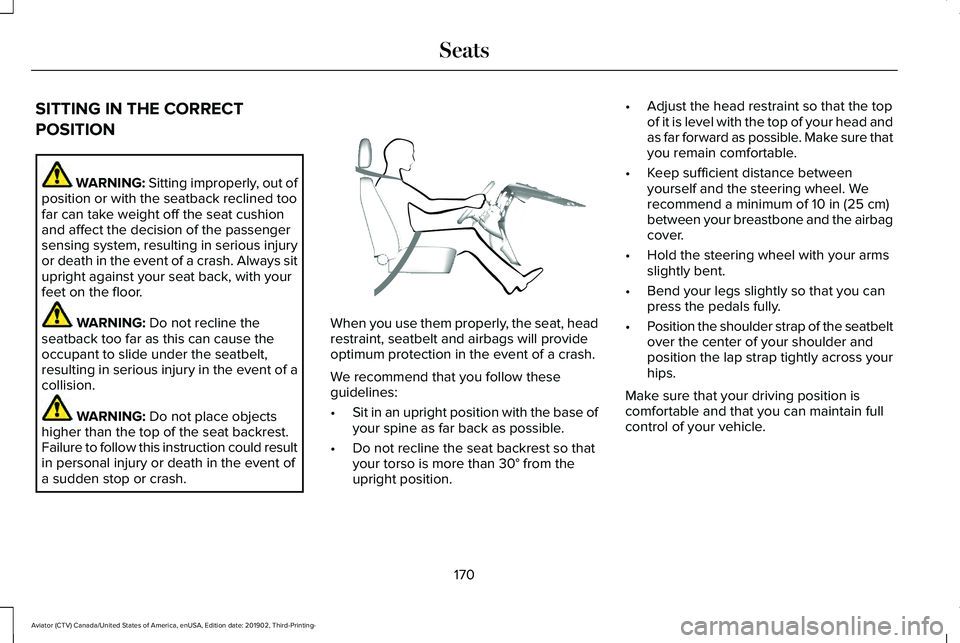
a sudden stop or crash. When you use them properly, the seat, head
restraint, seatbelt and airbags will provide
optimum protection in the event of a crash.
We recommend that you follow these
guidelines:
•
Sit in an upright position with the base of
your spine as far back as possible.
• Do not recline the seat backrest so that
your torso is more than
30° from the
upright position. •
Adjust the head restraint so that the top
of it is level with the top of your head and
as far forward as possible. Make sure that
you remain comfortable.
• Keep sufficient distance between
yourself and the steering wheel. We
recommend a minimum of
10 in (25 cm)
between your breastbone and the airbag
cover.
• Hold the steering wheel with your arms
slightly bent.
• Bend your legs slightly so that you can
press the pedals fully.
• Position the shoulder strap of the seatbelt
over the center of your shoulder and
position the lap strap tightly across your
hips.
Make sure that your driving position is
comfortable and that you can maintain full
control of your vehicle.
170
Aviator (CTV) Canada/United States of America, enUSA, Edition date: 201902, Third-Printing- SeatsE68595
Page 174 of 609

HEAD RESTRAINTS
WARNING: Fully adjust the head
restraint before you sit in or operate your
vehicle. This will help minimize the risk of
neck injury in the event of a crash. Do not
adjust the head restraint when your vehicle
is moving. WARNING:
The head restraint is a
safety device. Whenever possible it should
be installed and properly adjusted when
the seat is occupied. Failure to adjust the
head restraint properly could reduce its
effectiveness during certain impacts.
Note: Adjust the seat backrest to an upright
driving position before adjusting the head
restraint. Adjust the head restraint so that
the top of it is level with the top of your head
and as far forward as possible. Make sure
that you remain comfortable. If you are
extremely tall, adjust the head restraint to
its highest position. Adjusting the Head Restraint
Front Seat Head Restraints
The head restraints consist of:
An energy absorbing head
restraint.
A
Two steel stems.
B
Guide sleeve adjust and release
button.
C
Guide sleeve unlock and remove
button.
D Raising the Head Restraint
Pull the head restraint up.
Lowering the Head Restraint
1. Press and hold button C.
2. Push the head restraint down.
Removing the Head Restraint
1.
Pull the head restraint up until it reaches
its highest position.
2. Press and hold buttons C and D.
3. Pull the head restraint up.
Installing the Head Restraint
Align the steel stems into the guide sleeves
and push the head restraint down until it
locks.
171
Aviator (CTV) Canada/United States of America, enUSA, Edition date: 201902, Third-Printing- SeatsE138642
Page 177 of 609
POWER SEATS
WARNING: Do not adjust the driver
seat or seat backrest when your vehicle is
moving. This may result in sudden seat
movement, causing the loss of control of
your vehicle. WARNING:
Do not place cargo or
any objects behind the seatback before
returning it to the original position.
10-Way and 12-Way Seat Controls
The power seat controls are on the door. Recline.
A
Lumbar control.
B Memory function.
C
Seat adjust (forward, backward,
height and tilt).
D Press this button to access the
lumbar menu on the touchscreen.
174
Aviator (CTV) Canada/United States of America, enUSA, Edition date: 201902, Third-Printing- SeatsE285258 E285278
