Page 419 of 636
LX570_OM_OM60R61U_(U)
4195-3. Using the air conditioning system and defogger
5
Interior features
■Using the automatic mode
Press the .
Adjust the temperature setting.
To stop the operation, press the .
■If the system is operated manually in automatic mode
If the fan speed setting or air flow modes are operated, the automatic mode
indicator goes off. However, automati c mode for functions other than that
operated are maintained.
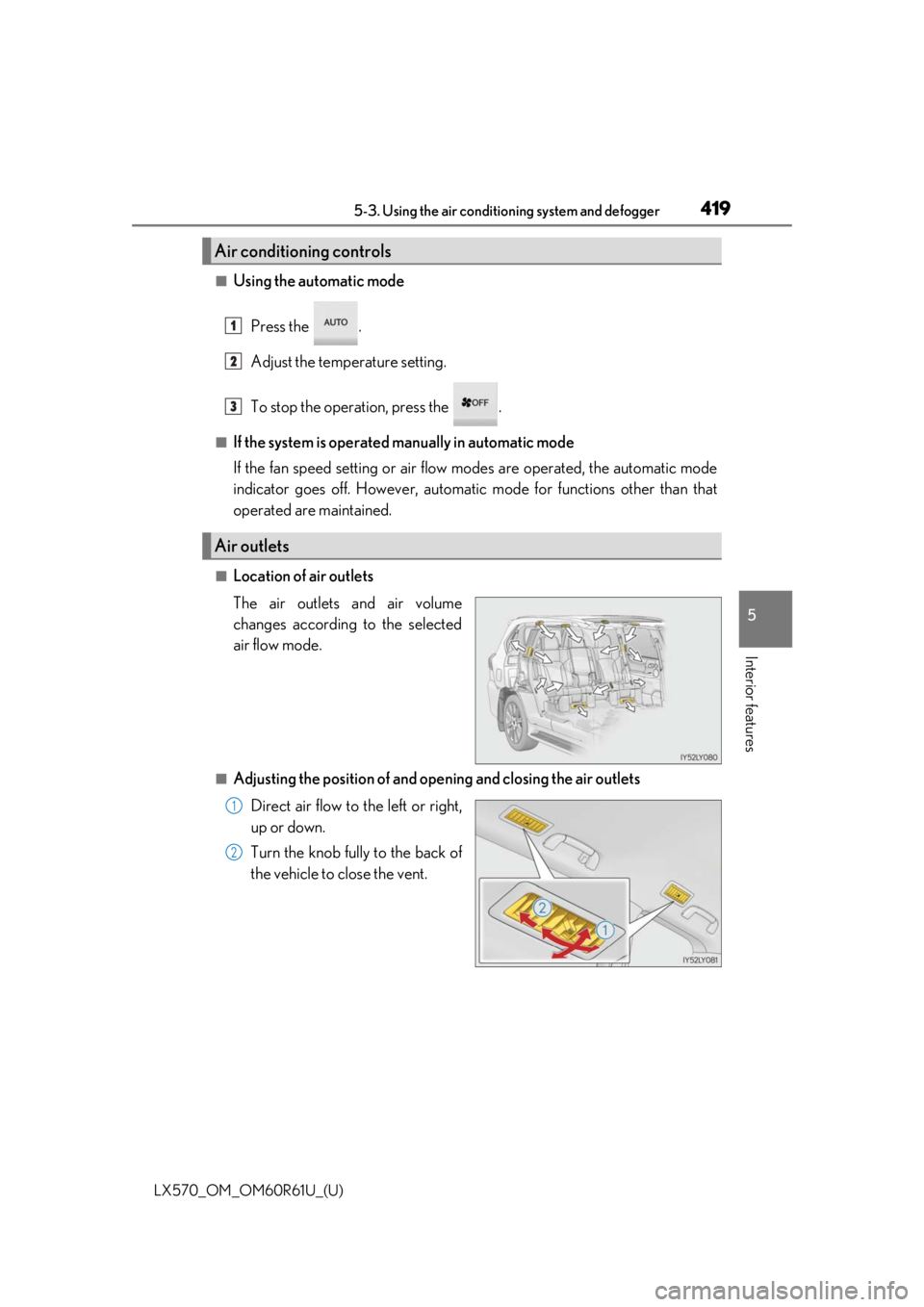
■Location of air outlets
The air outlets and air volume
changes according to the selected
air flow mode.
■Adjusting the position of and opening and closing the air outlets
Direct air flow to the left or right,
up or down.
Turn the knob fully to the back of
the vehicle to close the vent.
Air conditioning controls
Air outlets
1
2
3
1
2
Page 420 of 636
4205-3. Using the air conditioning system and defogger
LX570_OM_OM60R61U_(U)
NOTICE
■To prevent battery discharge
Do not leave the air conditioni ng system on longer than necessary when the engine is
not running.
Page 422 of 636

4225-3. Using the air conditioning system and defogger
LX570_OM_OM60R61U_(U)
Automatic operation
Operates automatically according to
the outside and cabin temperature
when “CLIMATE CONCIERGE”
switch is on. ( P. 406) Automatic
operation can be turned off using the
switch.
The indicator light comes on when the
heated steering wheel is operating.
Manual operation
Turns the heated steering wheel on/off
The indicator light comes on when the heated steering wheel is operating.
■The heated steering wheel can be used when
The engine switch is in IGNITION ON mode.
■Timer function
Automatic operation: Operates for a maximum of 30 minutes.
(Turns off according to outside and cabin temperature.)
Manual operation: Turns off after approximately 30 minutes.
■If the indicator light flashes
Press the switch to turn the heated steering wheel off and then press the switch again. If
the indicator light still flashes, a malfunction may be occurri ng. Turn the heated steering
wheel off and have the vehicle inspected by your Lexus dealer.
■Customization
The automatic turning on/off of the heated steering wheel can be customized. (Custom-
izable features P. 586)
Heated steering wheel (if equipped)
Page 423 of 636
LX570_OM_OM60R61U_(U)
4235-3. Using the air conditioning system and defogger
5
Interior featuresSeat heater switches
The indicator light (yellow) on the switch comes on when the seat heater is operating.
Seat ventilator switches (if equipped)
The indicator light (green) on the switch co mes on when the seat ventilator is operat-
ing.
Level indicator lights
The seat heater temperature level or the seat ventilator fan speed level (if equipped) is
displayed.
“AUTO” indicator lights
Seat heaters and ventilators (if equipped)
Front seatsSecond outboard seats
1
2
3
4
Page 424 of 636
4245-3. Using the air conditioning system and defogger
LX570_OM_OM60R61U_(U)
■Modes and indicators
The mode can be changed by pressing the switch.
*: When automatic mode is selected, the leve l automatically changes depending on the
air conditioning settings.
■The seat heaters/seat vent ilators can be used when
The engine switch is in IGNITION ON mode.
■Replacing the air filters
Filters are installed in the se at ventilators. For replacement of the filters, contact your
Lexus dealer.
■Customization
The automatic mode settings for the seat heaters and ventilators can be changed.
(Customizable features: P. 586)
Mode“AUTO” indicator lightLevel indicator lights
OffOffOff
Automatic*On3 to 1, or off
HiOff3
MidOff2
LoOff1
Page 438 of 636
438
LX570_OM_OM60R61U_(U)5-6. Using the other interior features
Other interior features
While the engine is running, the cool box, which is cooled by the air conditioning,
can be used.
Press the button to open the lid.
Turns the cool box on/off
When on, the indicator light comes on.
■While the cool box is on
The front air conditioning sy stem cannot be turned off.
■When the outside temperature is 32 F (0 C) or below
The cool box may not operate.
Cool box (if equipped)
1
2
WARNING
Keep the cool box closed while driving.
Injuries may result in the event of sudden braking, sudden swerving or an accident.
NOTICE
To prevent battery discharge, do not leave the cool box on longer than necessary when
the engine is not running.
Page 450 of 636

450
LX570_OM_OM60R61U_(U)5-6. Using the other interior features
WARNING
■Conditions in which the func
tion may not operate correctly
In the following conditions, the wirele ss charger may not operate correctly
●The portable device is fully charged
●There is foreign matter between the charge area and portable device
●The temperature of the portable device gets higher from charging
●The charging surface of the portable device is facing up
●The placement of the portable device is out of alignment with the charge area
●Near a TV tower, electric power plant, gas station, radio station, large display, airport
or other facility that generates strong radio wa ves or electrical noise
●When the electronic key is in contact with , or is covered by the following metallic
objects
• Cards to which aluminum foil is attached
• Cigarette boxes that ha ve aluminum foil inside
• Metallic wallets or bags
•Coins
• Hand warmers made of metal
• Media such as CDs and DVDs
●When other wireless keys (that emit radio waves) are being used nearby
In addition, excluding the above-mentioned, when the charger does not perform nor-
mally or the operation indicator light is flashi ng continuously, it is considered that the
wireless charger is malfunctioni ng. Contact your Lexus dealer.
■To prevent failure or damage to data
●Do not bring magnetic cards, such as credit cards, or magnetic recording media, etc.,
close to the charger while charging, otherw ise, data may disappear under the influ-
ence of magnetism. Also, do not bring pr ecision instruments such as wrist watches,
etc., close to the charger, as such objects may break.
●Do not leave portable devices in the cab in. The temperature inside the cabin may
become high, when under the sun, and cause damage to the device.
■To prevent battery discharge
When the engine is stopped, do not use the wireless charger for a long time.
Page 461 of 636
461
LX570_OM_OM60R61U_(U)
6Maintenance and care
6-1. Maintenance and careCleaning and protecting the vehicle exterior ................ 462
Cleaning and protecting the vehicle interior.................. 465
6-2. Maintenance Maintenance requirements ............................468
General maintenance.............. 470
Emission inspection and maintenance (I/M)
programs .................................... 473
6-3. Do-it-yourself maintenance Do-it-yourself service precautions................................ 474
Hood ............................................... 476
Engine compartment ............... 477
Tires .................................................490
Tire inflation pressure............... 499
Wheels ...........................................503
Air conditioning filter .............. 505
Electronic key battery .............. 507
Checking and replacing fuses ..............................................509
Light bulbs...................................... 512