Page 78 of 636

781-2. Lexus Enform
LX570_OM_OM60R61U_(U)
■Emergency Assistance Button (“SOS”)
In the event of an emergency on the road, push the “SOS” button to reach the
Safety Connect response center. Th e answering agent will determine your
vehicle’s location, assess the emergency, and dispatch the necessary assis-
tance required.
If you accidentally press the “SOS” button, tell the response-center agent that you
are not experiencing an emergency.
■Enhanced Roadside Assistance
Enhanced Roadside Assistance adds GP S data to the already included war-
ranty-based Lexus roadside service.
Subscribers can press the “SOS” button to reach a Safety Connect response-
center agent, who can help with a wide range of needs, such as: towing, flat
tire, fuel delivery, etc. For a descript ion of the Roadside Assistance services
and their limitations, please see the Safety Connect Terms and Conditions,
which are available at Lexus.com.
Important! Read this informatio n before using Safety Connect.
■Exposure to radio frequency signals
The Safety Connect system installed in your vehicle is a low-power radio\
transmitter and receiver. It receives and also sends out radio frequency (RF)
signals.
In August 1996, the Federal Commu nications Commission (FCC) adopted
RF exposure guidelines with safety levels for mobile wireless phones. Those
guidelines are consistent with the safe ty standards previously set by the fol-
lowing U.S. and internat ional standards bodies.
●ANSI (American National Stan dards Institute) C95.1 [1992]
●NCRP (National Council on Radiation Protection and Measurement)
Report 86 [1986]
●ICNIRP (International Commission on Non-Ionizing Radiation Protection)
[1996]
Those standards were based on comprehensive and periodic evaluations of
the relevant scientific literature. Over 120 scientists, engineers, and physi-
cians from universities, and governme nt health agencies and industries
reviewed the available body of rese arch to develop the ANSI Standard
(C95.1).
The design of Safety Connect complies wi th the FCC guidelines in addition to
those standards.
Safety information for Safety Connect
Page 86 of 636
86
LX570_OM_OM60R61U_(U)2. Instrument cluster
Warning lights and indicators
The units used on the speedometer an
d some indicators may differ depending
on the target region.
The warning lights and indicators on th e instrument cluster and center panel
inform the driver of the status of the vehicle’s various systems.
For the purpose of explanation, the following illustration display all warning
lights and indicators illuminated.
Page 87 of 636

LX570_OM_OM60R61U_(U)
872. Instrument cluster
2
Instrument cluster
Warning lights inform the driver of malfunctions in any of the vehicle’s systems.
Warning lights
*1
(U.S.A.)
Brake system warning light
( P. 525)*1Automatic headlight
leveling system warning
light ( P. 526)
*1
(Canada)
Brake system warning light
( P. 525)*2Low speed four-wheel
drive indicator light
( P. 527)
*1Charging system warning
light ( P. 525)*2Center differential lock
indicator light ( P. 527)
*1
(U.S.A.)
Malfunction indicator lamp
( P. 525) Open door warning light
(
P. 527)
*1
(Canada)
Malfunction indicator lamp
( P. 525) Low fuel level warning light
(
P. 527)
*1SRS warning light
( P. 525) Driver’s seat belt reminder
light (
P. 527)
*1
(U.S.A.)
ABS warning light
( P. 525)*3Front passenger’s seat belt
reminder light ( P. 527)
*1
(Canada)
ABS warning light
( P. 525)*1Master warning light
( P. 527)
*1, 4
(if equipped)
PCS warning light
( P. 526)*1Tire pressure warning light
( P. 527)
*1Slip indicator light
( P. 526)*2
(U.S.A.)
Parking brake indicator
( P. 527)
Page 88 of 636
88
LX570_OM_OM60R61U_(U)2. Instrument cluster
*1: These lights turn on when the engine switch is turned to IGNITION ON mode to
indicate that a system check is being perfor med. They will turn off after the engine is
on, or after a few seconds. There may be a ma lfunction in a system if the lights do not
turn on, or turn off. Have the vehicle inspected by your Lexus dealer.
*2: The light flashes to indicate a malfunction.
*3: This light illuminates on the center panel.
*4: The light flashes or illumina tes to indicate a malfunction.
*5: This light is displayed on the multi-information display.
*2
(Canada)
Parking brake indicator
( P. 527)*1Power steering system
warning light ( P. 527)
*1Brake system warning light
( P. 528)*5Brake Override System
warning light ( P. 181)
Page 89 of 636

LX570_OM_OM60R61U_(U)
892. Instrument cluster
2
Instrument cluster
The indicators inform the driver of the operating state of the vehicle’s various sys-
tems.
Indicators
Turn signal indicator
( P. 224)
(if equipped)
LDA indicator ( P. 268)
(U.S.A.)
Headlight indicator
( P. 228)*1, 2
Slip indicator ( P. 385)
(Canada)
Tail light indicator
( P. 228) *1VSC OFF indicator
( P. 385)
Headlight high beam
indicator ( P. 229) Multi-terrain Select
indicator (
P. 319)
Automatic High Beam
indicator ( P. 231)
*1Crawl Control indicator
( P. 314)
Fog light indicator
( P. 236) Automatic transmission
second start indicator
(
P. 217)
*1Eco Driving Indicator
Light ( P. 91) Low speed four-wheel
drive indicator light
(
P. 310)
Cruise control indicator
( P. 288, 276) Center differential lock
indicator (
P. 311)
Cruise control “SET”
indicator ( P. 288, 276)
*1Easy access mode
indicator ( P. 302)
(if equipped)
Dynamic radar cruise
control indicator
( P. 276) Intuitive parking assist
indicator (
P. 294)
Page 90 of 636

90
LX570_OM_OM60R61U_(U)2. Instrument cluster
*1: These lights turn on when the engine switch is turned to IGNITION ON mode to
indicate that a system check is being perfor med. They will turn off after the engine is
on, or after a few seconds. There may be a ma lfunction in a system if the lights do not
turn on, or turn off. Have the vehicle inspected by your Lexus dealer.
*2: The light flashes to indicate that the system is operating.
*3: The light turns on when the system is turned off.
*4: In order to confirm operation, the BSM outside rear view mirror indicators illumi-
nate in the following situations:
• When the engine switch is turned to IGNITION ON mode while the system is set to on.
• When the system is set to on while the engine switch is in IGNITION ON mode.
If the system is functioning correctly, th e BSM outside rear view mirror indicators
will turn off after a few seconds.
If the BSM outside rear view mirror indicators do not illuminate or do not turn off,
there may be a malfunction with the system.
If this occurs, have the vehicle inspected by your Lexus dealer.
*5: This light illuminates on the outside rear view mirrors.
*6: This light illuminates on the center panel.
*7: When the outside temperat ure is approximately 37F (3 C) or lower, the indicator
will flash for approximately 10 seconds, then stay on.
*1, 3
(if equipped)
PCS warning light
( P. 256) Turn Assist indicator
(
P. 314)
BSM (Blind Spot Monitor)
indicator ( P. 370)
(U.S.A.)
Parking brake indicator
( P. 225)
*4, 5BSM (Blind Spot Monitor)
outside rear view mirror
indicators ( P. 370)
(Canada)
Parking brake indicator
( P. 225)
RCTA (Rear Cross Traffic
Alert) indicator ( P. 378) TRAC OFF indicator
(
P. 385)
*6
(U.S.A.)
“AIR BAG ON/
OFF” indicator
( P. 49)*7Low outside temperature
indicator ( P. 92)
*6
(Canada)
“AIR BAG ON/
OFF” indicator
( P. 49)*8Smart access system with
push-button start indicator
( P. 211, 552)
Page 151 of 636
LX570_OM_OM60R61U_(U)
1513-3. Adjusting the seats
3
Operation of each component
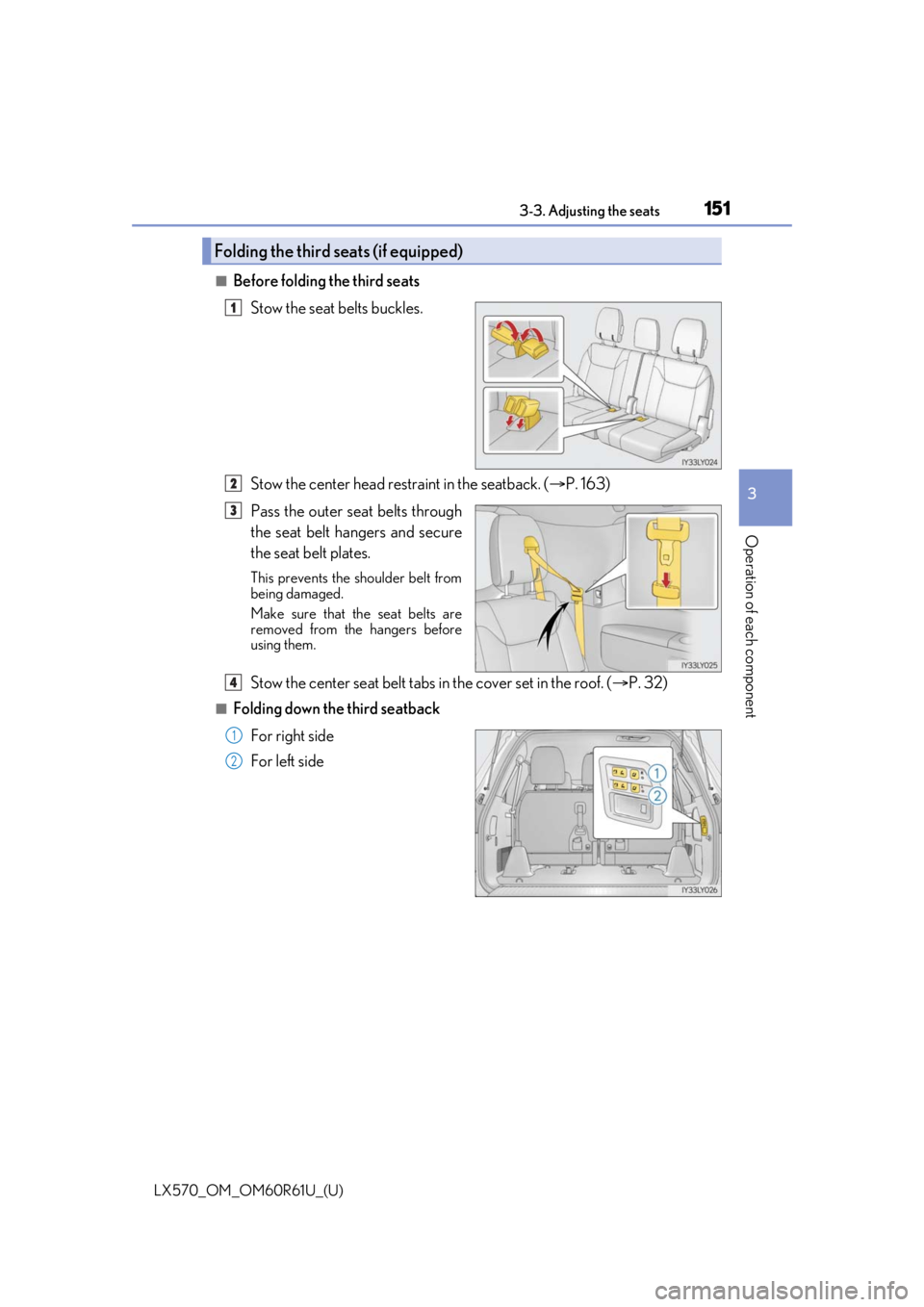
■Before folding the third seatsStow the seat belts buckles.
Stow the center head restraint in the seatback. ( P. 163)
Pass the outer seat belts through
the seat belt hangers and secure
the seat belt plates.
This prevents the shoulder belt from
being damaged.
Make sure that th e seat belts are
removed from the hangers before
using them.
Stow the center seat belt tabs in the cover set in the roof. ( P. 32)
■Folding down the third seatback
For right side
For left side
Folding the third seats (if equipped)
1
2
3
4
1
2
Page 162 of 636
162
LX570_OM_OM60R61U_(U)3-3. Adjusting the seats
To fold the head restraints, pull the head
restraint angle lever
■Adjusting the height of the head restraints
■Removing the head restraints
Front seats
While pressing in the fl
athead screwdriver, pull up the head restraint.
Second seats
Third outboard seats (if equipped)
Make sure that the head restraints are adjusted
so that the center of the head restraint is closest
to the top of your ears.
Push a flathead screwdriver into the slot. The
slot is located on the right side of the right
head restraint anchor.
Pull the head restraint up while pressing the lock
release button.
1
2
Lock release button