2020 LEXUS LS500 lights
[x] Cancel search: lightsPage 188 of 516

1884-3. Operating the lights and wipers
When the windshield wipers are not
being used, they retract to below the
hood. To enable the windshield wipers
to be lifted when parking in cold condi-
tions or when replacing a windshield
wiper insert, change the rest position of
the windshield wipers to the service
position using the wiper lever.
■Raising the wipers to the service
position
Within approximately 45 seconds of
turning the engine switch off, move the
wiper lever to the (U.S.A.) or
(Canada) position and hold it for
approximately 2 se conds or more.
The wipers will move to the service posi-
tion.
■Lifting the windshield wipers
While holding the hook portion of
the wiper arm, lift the windshield wiper
from the windshield.
■Lowering the windshield wipers to the
retracted position
With the windshield wipers placed on the
windshield, turn the engine switch to IGNI-
TION ON mode and then move the wiper
lever to an operating position. When the
wiper switch is turned off, the windshield
wipers will stop at the retracted position.
Even if the wipers deviate while the engine
switch is off, the wipers will return to the
normal position.
Changing the windshield wiper
rest position/Lifting the wind-
shield wipers
NOTICE
■When lifting the windshield wipers
●Do not lift the windshield wipers when
they are in the retracted position
below the hood. Otherwise, they may
contact the hood, possibly resulting in
damage to a windshield wiper and/or
the hood.
A
Page 189 of 516
1894-3. Operating the lights and wipers
4
Driving
NOTICE
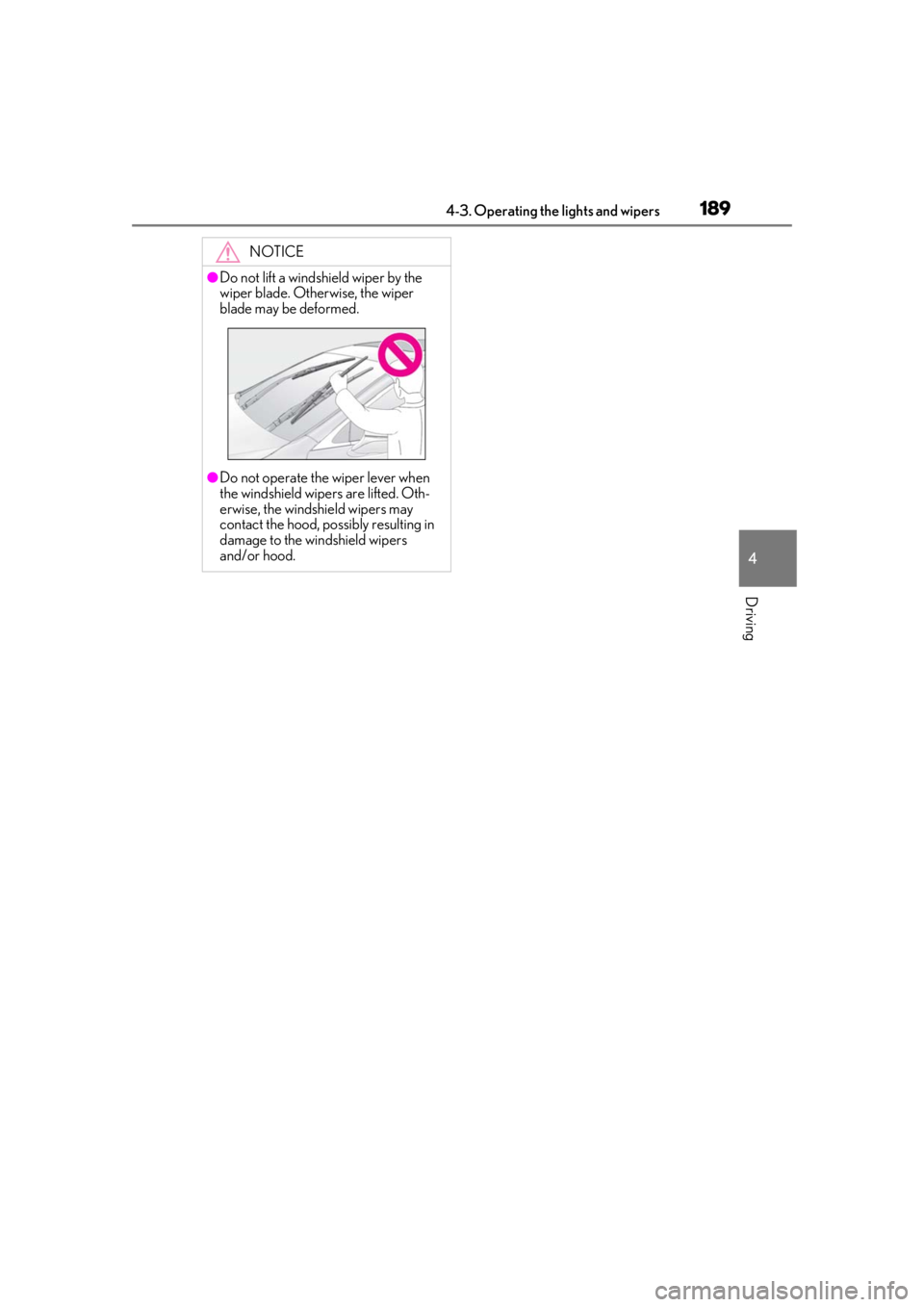
●Do not lift a windshield wiper by the
wiper blade. Otherwise, the wiper
blade may be deformed.
●Do not operate the wiper lever when
the windshield wipers are lifted. Oth-
erwise, the windshield wipers may
contact the hood, possibly resulting in
damage to the windshield wipers
and/or hood.
Page 195 of 516
1954-5. Using the driving support systems
4
Driving
WARNING
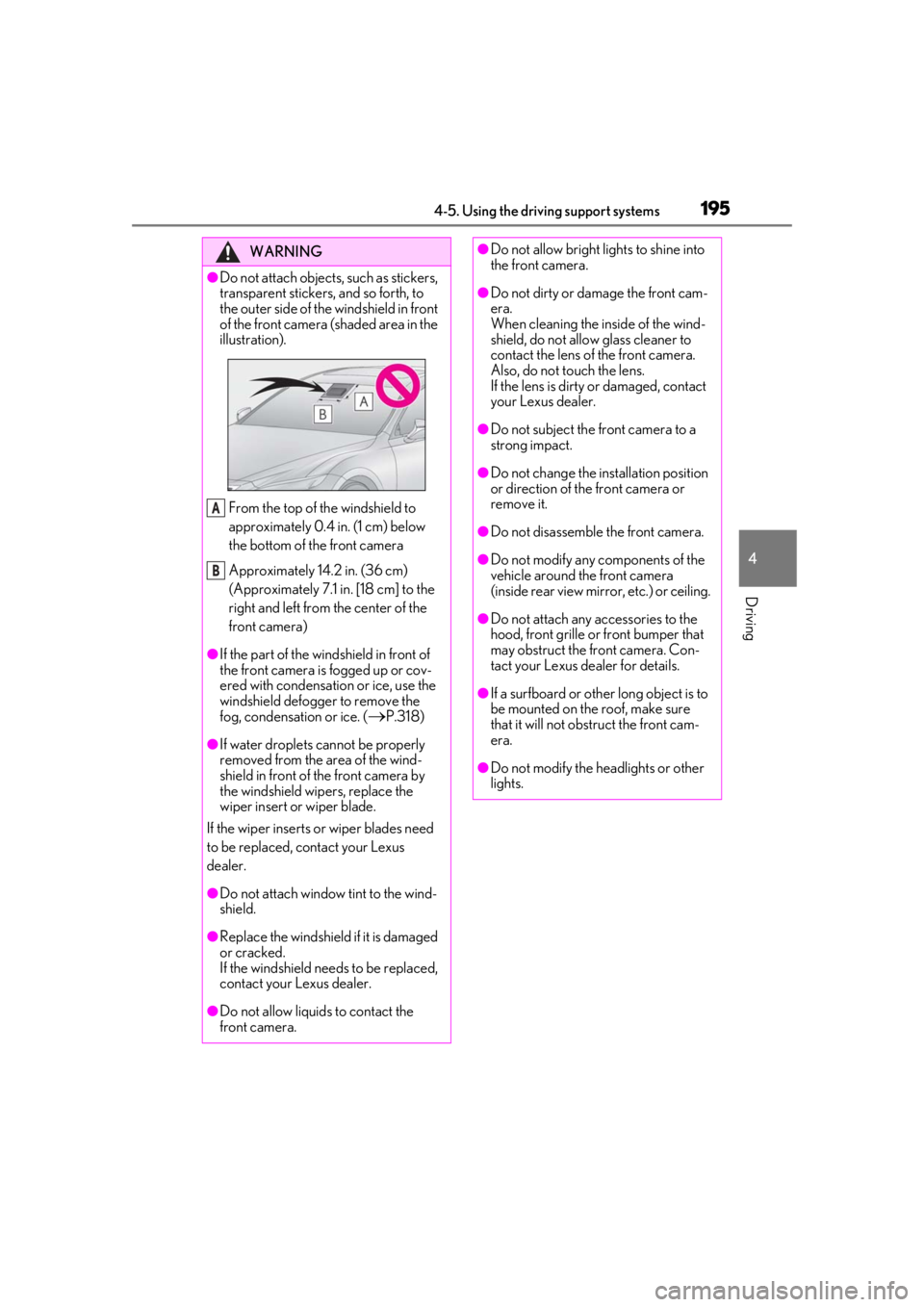
●Do not attach objects, such as stickers,
transparent stickers, and so forth, to
the outer side of the windshield in front
of the front camera (shaded area in the
illustration).From the top of the windshield to
approximately 0.4 in. (1 cm) below
the bottom of the front camera
Approximately 14.2 in. (36 cm)
(Approximately 7.1 in. [18 cm] to the
right and left from the center of the
front camera)
●If the part of the windshield in front of
the front camera is fogged up or cov-
ered with condensation or ice, use the
windshield defogger to remove the
fog, condensation or ice. (
P.318)
●If water droplets cannot be properly
removed from the area of the wind-
shield in front of the front camera by
the windshield wipers, replace the
wiper insert or wiper blade.
If the wiper inserts or wiper blades need
to be replaced, contact your Lexus
dealer.
●Do not attach window tint to the wind-
shield.
●Replace the windshield if it is damaged
or cracked.
If the windshield needs to be replaced,
contact your Lexus dealer.
●Do not allow liquids to contact the
front camera.
A
B
●Do not allow bright lights to shine into
the front camera.
●Do not dirty or damage the front cam-
era.
When cleaning the inside of the wind-
shield, do not allow glass cleaner to
contact the lens of the front camera.
Also, do not touch the lens.
If the lens is dirty or damaged, contact
your Lexus dealer.
●Do not subject the front camera to a
strong impact.
●Do not change the installation position
or direction of the front camera or
remove it.
●Do not disassemble the front camera.
●Do not modify any components of the
vehicle around the front camera
(inside rear view mirror, etc.) or ceiling.
●Do not attach any accessories to the
hood, front grille or front bumper that
may obstruct the front camera. Con-
tact your Lexus dealer for details.
●If a surfboard or other long object is to
be mounted on the roof, make sure
that it will not obstruct the front cam-
era.
●Do not modify the headlights or other
lights.
Page 198 of 516

1984-5. Using the driving support systems
●In the following situations, if the situation has changed (or the vehicle has been driven for
some time) and the normal operating conditions are detected, the message will disappear
and the system will become operational.
If the message does not disappear, contact your Lexus dealer.
• When the temperature around the radar sensor is outside of the operational range, such
as when the vehicle is in the sun or in an extremely cold environment
• When the front camera cannot detect objects in front of the vehicle, such as when driving
in the dark, snow, or fog, or when brig ht lights are shining into the front camera
When the temperature around the front
camera is outside of the operational range,
such as when the vehicle is in the sun or in an
extremely cold environment
If the front camera is hot, such as after the
vehicle had been parked in the sun, use the
air conditioning system to decrease the tem-
perature around the front camera.
If a sunshade was used when the vehicle
was parked, depending on its type, the sun-
light reflected from the surface of the sun-
shade may cause the temperature of the
front camera to become excessively high.
If the front camera is cold, such after the
vehicle is parked in an extremely cold envi-
ronment, use the air conditioning system to
increase the temperature around the front
camera.
The area in front of the front camera is
obstructed, such as when the hood is open
or a sticker is attached to the part of the
windshield in front of the front camera.
Close the hood, remove the sticker, etc. to
clear the obstruction.
SituationActions
Page 201 of 516
2014-5. Using the driving support systems
4
Driving
WARNING
●If the part of the windshield in front of
the front camera is fogged up or cov-
ered with condensation, or ice, use the
windshield defogger to remove the
fog, condensation, or ice. (P.318)
●If water droplets cannot be properly
removed from the area of the wind-
shield in front of the front camera by
the windshield wipers, replace the
wiper insert or wiper blade.
If the wiper inserts or wiper blades need
to be replaced, contact your Lexus
dealer.
●Do not attach window tint to the wind-
shield.
●Replace the windshield if it is damaged
or cracked.
If the windshield needs to be replaced,
contact your Lexus dealer.
●Do not allow liquids to contact the
front camera.
●Do not allow bright lights to shine into
the front camera.
●Do not dirty or damage the front cam-
era.
When cleaning the inside of the wind-
shield, do not allow glass cleaner to
contact the lens of the front camera.
Also, do not touch the lens.
If the lens is dirty or damaged, contact
your Lexus dealer.
●Do not subject the front camera to a
strong impact.
●Do not change the installation position
or direction of the front camera or
remove it.
●Do not disassemble the front camera.
●Do not modify any components of the
vehicle around the front camera
(inside rear view mirror, etc.) or ceiling.
●Do not attach any accessories to the
hood, front grille or front bumper that
may obstruct the front camera. Con-
tact your Lexus dealer.
●If a surfboard or other long object is to
be mounted on the roof, make sure
that it will not obstruct the front cam-
era.
●Do not modify the headlights or other
lights.
Page 204 of 516

2044-5. Using the driving support systems
●In the following situations, if the situation has changed (or the vehicle has been driven for
some time) and the normal operating conditions are detected, the message will disappear
and the system will become operational.
If the message does not disappear, contact your Lexus dealer.
• When the temperature around the radar sensor is outside of the operational range, such
as when the vehicle is in the sun or in an extremely cold environment
• When the front camera cannot detect objects in front of the vehicle, such as when driving
in the dark, snow, or fog, or when brig ht lights are shining into the front camera
When the temperature around the front
camera is outside of the operational range,
such as when the vehicle is in the sun or in an
extremely cold environment
If the front camera is hot, such as after the
vehicle had been parked in the sun, use the
air conditioning system to decrease the tem-
perature around the front camera.
If a sunshade was used when the vehicle
was parked, depending on its type, the sun-
light reflected from the surface of the sun-
shade may cause the temperature of the
front camera to become excessively high.
If the front camera is cold, such after the
vehicle is parked in an extremely cold envi-
ronment, use the air conditioning system to
increase the temperature around the front
camera.
The area in front of the front camera is
obstructed, such as when the hood is open
or a sticker is attached to the part of the
windshield in front of the front camera.
Close the hood, remove the sticker, etc. to
clear the obstruction.
SituationActions
Page 211 of 516
2114-5. Using the driving support systems
4
Driving
a vehicle, pedestrian or bicyclist may not be
detected depending on the surrounding
brightness and the motion, posture, and
angle of the person, preventing the system
from operating properly. (P.213)
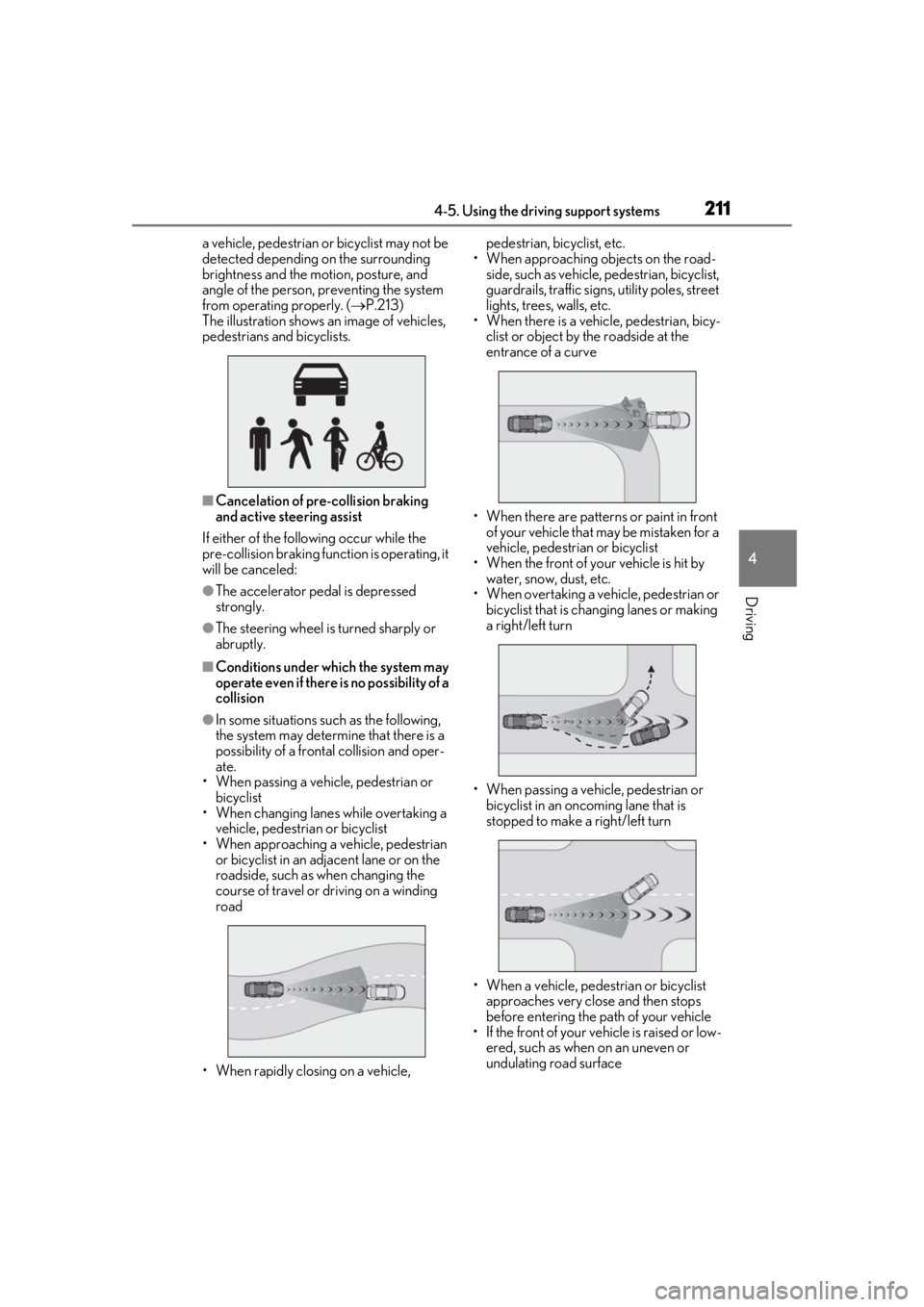
The illustration shows an image of vehicles,
pedestrians and bicyclists.
■Cancelation of pre-collision braking
and active steering assist
If either of the following occur while the
pre-collision braking function is operating, it
will be canceled:
●The accelerator pedal is depressed
strongly.
●The steering wheel is turned sharply or
abruptly.
■Conditions under which the system may
operate even if there is no possibility of a
collision
●In some situations such as the following,
the system may determine that there is a
possibility of a frontal collision and oper-
ate.
• When passing a vehicle, pedestrian or bicyclist
• When changing lane s while overtaking a
vehicle, pedestrian or bicyclist
• When approaching a vehicle, pedestrian or bicyclist in an adjacent lane or on the
roadside, such as when changing the
course of travel or driving on a winding
road
• When rapidly closing on a vehicle, pedestrian, bicyclist, etc.
• When approaching objects on the road- side, such as vehicle, pedestrian, bicyclist,
guardrails, traffic signs, utility poles, street
lights, trees, walls, etc.
• When there is a vehicle, pedestrian, bicy-
clist or object by the roadside at the
entrance of a curve
• When there are patterns or paint in front of your vehicle that may be mistaken for a
vehicle, pedestrian or bicyclist
• When the front of your vehicle is hit by water, snow, dust, etc.
• When overtaking a vehicle, pedestrian or
bicyclist that is changing lanes or making
a right/left turn
• When passing a vehicle, pedestrian or bicyclist in an oncoming lane that is
stopped to make a right/left turn
• When a vehicle, pedestrian or bicyclist approaches very close and then stops
before entering the pa th of your vehicle
• If the front of your vehicle is raised or low- ered, such as when on an uneven or
undulating road surface
Page 213 of 516

2134-5. Using the driving support systems
4
Driving
• When passing an object on the side of the
road, such as a parked vehicle
• When passing an oncoming vehicle on a S curve
• When there is an object that may be mis-
taken for a pedestrian, such as a utility
pole, tree, or pole on the roadside or at
the entrance of a curve
• When there is a bicycle or motorcycle on the roadside at the entrance of a curve
• If the preceding vehicle is a bicycle or
motorcycle
●The system may operate the pedestrian
alert unnecessarily if it detects the follow-
ing:
• Pedestrians on a sidewalk
• Bicycles and motorcycles
• Patterns or paint on the road, a wall, median, billboard, etc. that may be mis-
taken for a pedestrian or bicyclist
■Situations in which the system may not
operate properly
●In some situations, such as the following,
a vehicle, pedestrian or bicyclist may not
be detected by the sensors, preventing
the system from operating properly:
• When a vehicle, pedestrian or bicyclist is approaching your vehicle
• When your vehicle or a vehicle, pedes- trian or bicyclist is wobbling
• If a vehicle, pedestrian or bicyclist makes
an abrupt maneuver (such as sudden
swerving, acceleration or deceleration)
• When your vehicle approaches a vehicle,
pedestrian or bicyclist rapidly
• When a vehicle, pedestrian or bicyclist is not directly in front of your vehicle
• When a vehicle, pedestrian or bicyclist is near a wall, fence, guardrail, manhole
cover, vehicle, steel plate on the road, etc.
• When a vehicle, pedestrian or bicyclist is
under a structure
• When part of a vehicle, pedestrian or bicyclist is hidden by an object, such as
large baggage, an umbrella, or guardrail
• When multiple vehicl es, pedestrians or
bicyclists are close together
• If the sun or other light is shining directly on a vehicle, pedestrian, bicyclist or
guardrail ahead
• When a vehicle, pedestrian or bicyclist is a shade of white and looks extremely
bright
• When a vehicle, pedestrian or bicyclist appears to be nearly the same color or
brightness as its surroundings
• If a vehicles, pedestrians or bicyclists cuts or suddenly emerges in front of your
vehicle
• When the front of your vehicle is hit by water, snow, dust, etc.
• When a very bright light ahead, such as
the sun or the head lights of oncoming
traffic, shines direct ly into the front cam-
era
• When approaching the side or front of a vehicle ahead
• If a vehicle ahead is a motorcycle
• If a vehicle ahead is narrow, such as a per-
sonal mobility vehicle
• If a preceding vehicle has a small rear
end, such as an unloaded truck
• If a preceding vehicle has a low rear end, such as a low bed trailer