Page 272 of 462

2705-3. Using the air conditioning system
■Eco air conditioning mode
When Eco drive mode is selected using the
Driving Mode Select switch, eco air condi-
tioning mode turns on.
When a drive mode other than Eco drive
mode is selected, eco air conditioning
mode may turn off.
1Press the automatic mode switch or
select “AUTO” on the sub function
menu. ( P.267)
2
Press the outside/recirculated air
mode switch to switch to automatic
air intake mode.
The air conditioning system automatically
switches between outside air and recircu-
lated air modes.
3Adjust the temperature setting.
4
To stop the operation, press the off
switch or select “Off” on the sub
function menu. ( P.267)
If the fan speed setting or air flow
modes are operated , the automatic
mode indicator goes off. However,
automatic mode for functions other
than that operated is maintained.
■Using automatic mode
Fan speed is adjusted automatically accord-
ing to the temperature setting and the
ambient conditions.
Therefore, the fan may stop for a while until warm or cool air is ready to flow immedi-
ately after the automatic mode switch is
pressed or “AUTO” is selected.
Cool air may blow around the upper body
even when the heater is on due to sunlight.
■Windshield fog detection function
When automatic mode is set, the humidity
sensor detects fog on the windshield and
controls the air condit ioning system to pre-
vent fog.
■Automatic mode for air intake control
In automatic mode, the system detects
exhaust gas and other pollutants and auto-
matically switches between outside air and
recirculated air modes.
When the dehumidification function is off,
and the fan is operating, turning automatic
mode on will activate the dehumidification
function. The next time the dehumidification
function is turned off, the AUTO mode for
switching between outside air and recircu-
lated air modes is canceled.
WARNING
■To prevent burns (vehicles with wind-
shield wiper de-icer)
Do not touch the glass at lower part of
the windshield or to the side of the front
pillars when the wind shield wiper de-icer
is on.
Using automatic mode
NOTICE
■Humidity sensor
In order to detect fog on the windshield,
a sensor which monitors the temperature
of the windshield, the surround humidity,
etc. is installed.
Follow these points to avoid damaging
the sensor:
●Do not disassemble the sensor
●Do not spray the glass cleaner on the
sensor or subject it to strong impacts
●Do not stick anything on the sensor
Page 279 of 462
2775-4. Using the interior lights
5
Interior features
5-4.Using the interior lights
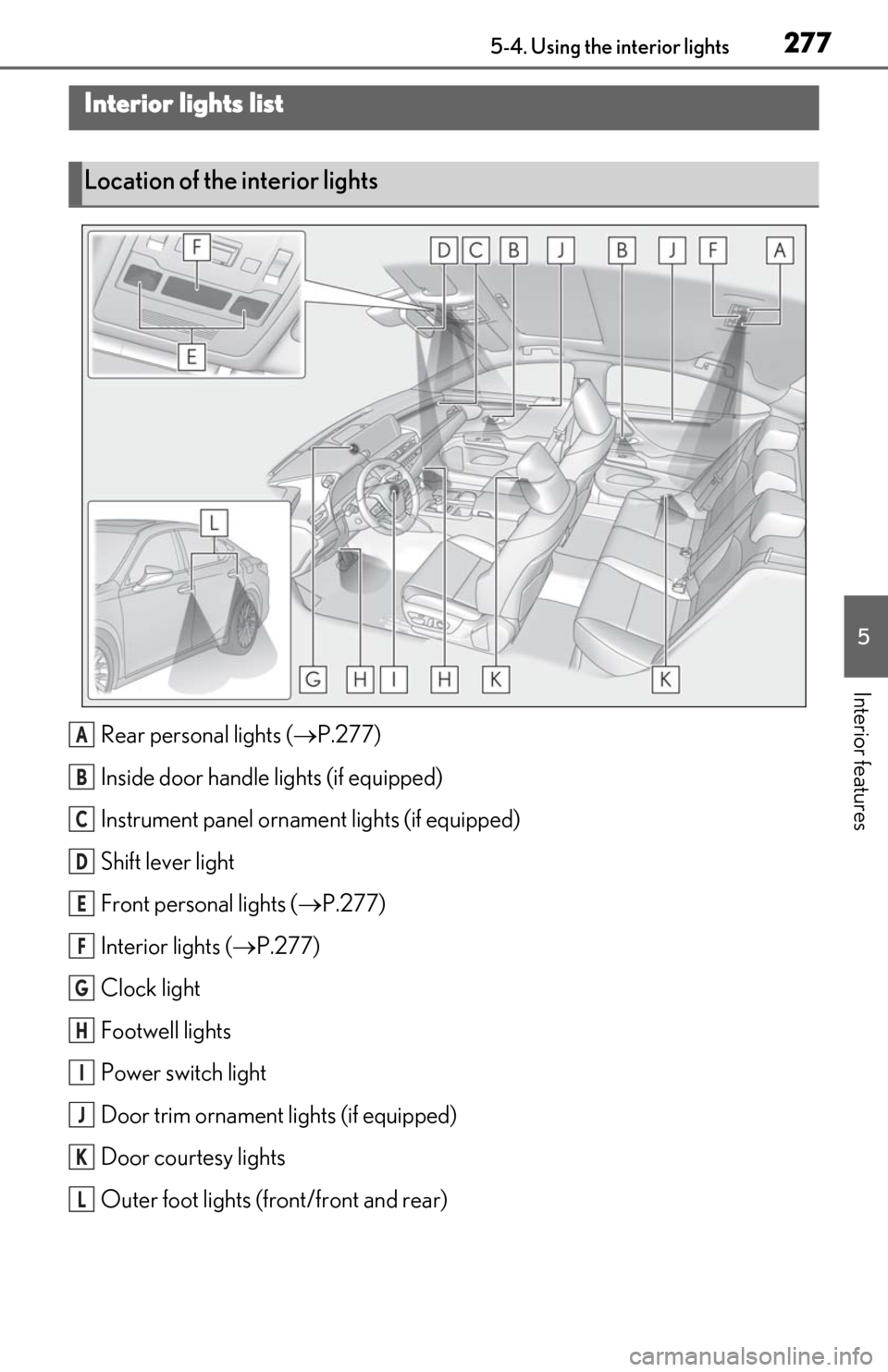
Rear personal lights (P.277)
Inside door handle lights (if equipped)
Instrument panel orname nt lights (if equipped)
Shift lever light
Front personal lights ( P.277)
Interior lights ( P.277)
Clock light
Footwell lights
Power switch light
Door trim ornament lights (if equipped)
Door courtesy lights
Outer foot lights (front/front and rear)
Interior lights list
Location of the interior lights
A
B
C
D
E
F
G
H
I
J
K
L
Page 280 of 462
2785-4. Using the interior lights
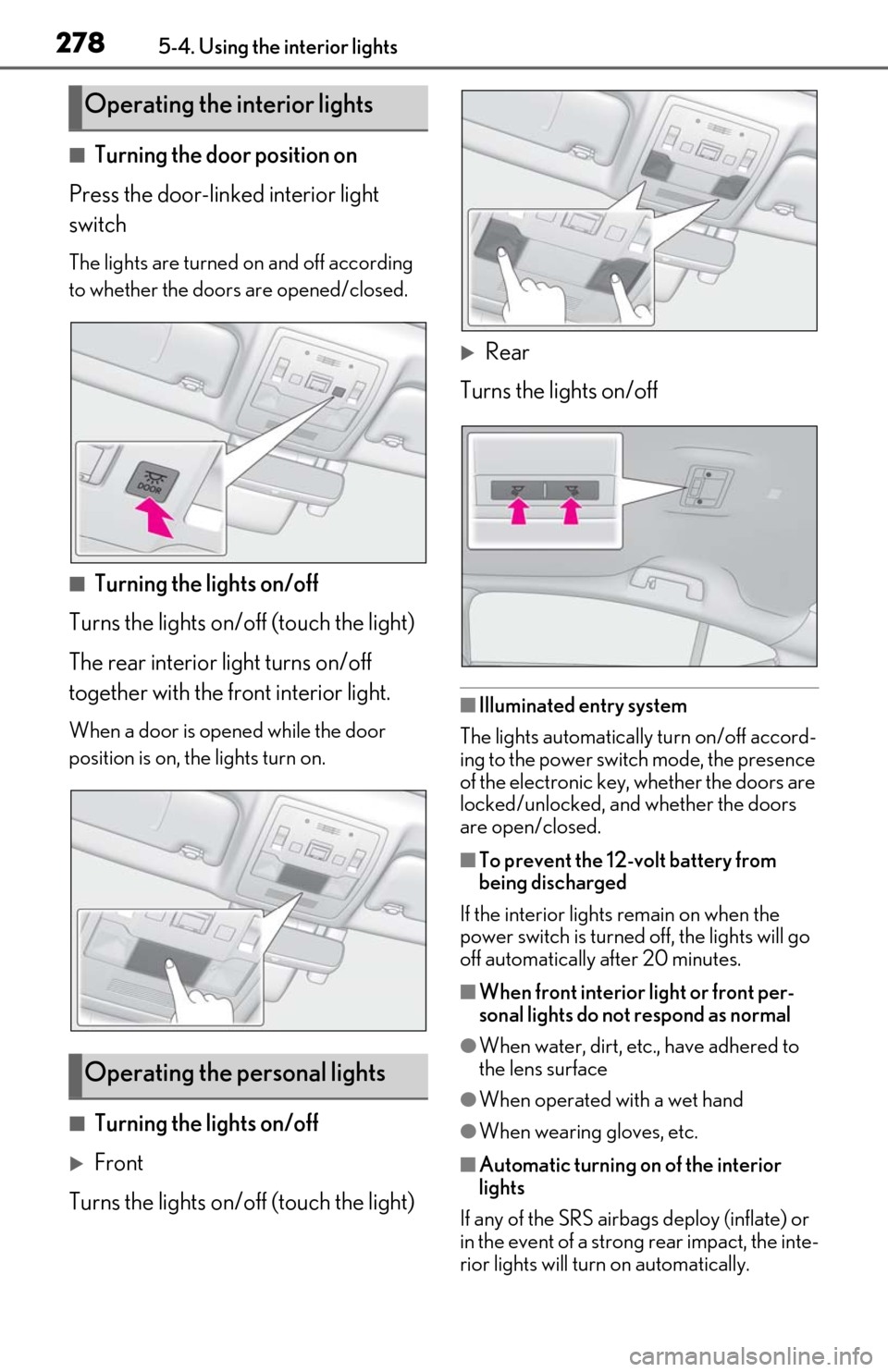
■Turning the door position on
Press the door-linked interior light
switch
The lights are turned on and off according
to whether the doors are opened/closed.
■Turning the lights on/off
Turns the lights on/off (touch the light)
The rear interior light turns on/off
together with the front interior light.
When a door is opened while the door
position is on, the lights turn on.
■Turning the lights on/off
Front
Turns the lights on/off (touch the light)
Rear
Turns the lights on/off
■Illuminated entry system
The lights automatically turn on/off accord-
ing to the power switch mode, the presence
of the electronic key, whether the doors are
locked/unlocked, and whether the doors
are open/closed.
■To prevent the 12-volt battery from
being discharged
If the interior lights remain on when the
power switch is turned off, the lights will go
off automatically after 20 minutes.
■When front interior light or front per-
sonal lights do not respond as normal
●When water, dirt, etc., have adhered to
the lens surface
●When operated with a wet hand
●When wearing gloves, etc.
■Automatic turning on of the interior
lights
If any of the SRS airbag s deploy (inflate) or
in the event of a strong rear impact, the inte-
rior lights will turn on automatically.
Operating the interior lights
Operating the personal lights
Page 281 of 462
2795-4. Using the interior lights
5
Interior features
The interior lights will turn off automatically
after approximately 20 minutes. The inte-
rior lights can be turned off manually. How-
ever, in order to help prevent further
collisions, it is recommended that they be
left on until safety can be ensured. (The inte-
rior lights may not turn on automatically
depending on the force of the impact and
conditions of the collision.)
■Customization
Some functions can be customized.
( P.418)
NOTICE
■To prevent 12-volt battery discharge
Do not leave the lights on longer than
necessary when the hy brid system is off.
■Removing light lenses
Never remove the lens for the front inte-
rior light and front personal lights. Other-
wise, the lights will be damaged. If a lens
needs to be removed, contact your Lexus
dealer.
Page 282 of 462
2805-5. Using the storage features
5-5.Using the storage features
Cup holder (P.280)
Glove box ( P.280)
Console box ( P.280)
Auxiliary box ( P.281)
List of storage features
Location of the storage features
A
B
C
D
WARNING
■Items that should not be left in the
vehicle
Do not leave glasses, lighters or spray
cans in the storage spaces, as this may
cause the following when cabin tempera-
ture becomes high:
●Glasses may be deformed by heat or
cracked if they come into contact with
other stored items.
●Lighters or spray cans may explode. If
they come into contact with other
stored items, the lighter may catch fire
or the spray can may release gas,
causing a fire hazard.
■When storage compartments are not
in use
When driving or when the storage com-
partments are not in use, keep the lids
closed.
In the event of sudden braking or sudden
swerving, an accident may occur due to
an occupant being struck by an open lid
or the items stored inside.
Page 283 of 462
2815-5. Using the storage features
5
Interior features
1Open (press the glove box opener)
2
Unlock with the mechanical key
3
Lock with the mechanical key
■Glove box light
The glove box light turns on when the tail
lights are on.
■Trunk opener main switch
P.109
Press a button to open the console box.
The console box can be opened from
either side.
■Console box light
The console box light turns on when the tail
lights are on.
Front (type A)
To open, press down and release the
cup holder lid.
Front (type B)
Adjust the depth of the cup holder.
Shallow (press the button)
Glove box
Console box
WARNING
■Caution while driving
Keep the console box closed.
Injuries may result in the event of an acci-
dent or sudden braking.
NOTICE
■To prevent damage to the console
box
When the console box is open, do not
apply excessive force in the direction that
it was opened.
Cup holders
A
Page 286 of 462
2845-6. Using the other interior features
5-6.Using the other interior features
1To set the visor in the forward posi-
tion, flip it down.
2
To set the visor in the side position,
flip down, unhook, and swing it to
the side.
3
To use the side extender, place the
visor in the side position, then slide
it backward.
Slide the cover to open.
The light turns on when the cover is
opened.
The GPS clock’s time is automatically
adjusted by utilizing GPS time infor-
mation.
For details, refer to the “NAVIGATION
AND MULTIMEDIA SYSTEM OWNER’S
MANUAL”.
Please use as a power supply for elec-
tronic goods that use less than 12
VDC/10 A (power consumption of
120 W).
Front
Open the lid.
Rear
Open the lid.
Other interior features
Sun visors
Vanity mirrors
NOTICE
■To prevent 12-volt battery discharge
Do not leave the lights on longer than
necessary when the hy brid system is off.
Clock
Power outlets
Page 288 of 462

2865-6. Using the other interior features
A portable device can be charged by
just placing Qi standard wireless
charge compatible portable devices
according to the Wireless Power Con-
sortium, such as smart phones and
mobile batteries, etc., on the charge
area.
This function cannot be used with por-
table devices that are larger than the charging area. Also, depending on the
portable device, it may not operate as
normal. Please read the operation
manual for portable devices to be
used.
■The “Qi” symbol
The “Qi” symbol is a trademark of the
Wireless Power Consortium.
■Name for all parts
Operation indicator light
Power supply switch
Charge area
■Using the wireless charger
1
Open the console box. ( P.280)
2
Press the power supply switch of
the wireless charger.
Switches on and off wi th each press of the
NOTICE
■To prevent damage to the USB
charging ports
●Do not insert foreign objects into the
ports.
●Do not spill water or other liquids into
the ports.
●When the USB charging ports are not
in use, close the lids. If a foreign object
or liquid enters a port may cause a
short circuit.
●Do not apply excessive force to or
impact the USB charging ports.
●Do not disassemble or modify the USB
charging ports.
■To prevent damage to external
devices
●Do not leave external devices in the
vehicle. The temperature inside the
vehicle may become high, resulting in
damage to an external device.
●Do not push down on or apply unnec-
essary force to an external device or
the cable of an external device while it
is connected.
■To prevent 12-volt battery discharge
Do not use the USB charging ports for a
long period of time with the hybrid sys-
tem stopped.
Wireless charger (if equipped)
A
B
C