2020 KIA SPORTAGE sport mode
[x] Cancel search: sport modePage 26 of 52
SPORTAGE FEATURES & FUNCTIONS GUIDE24*IF EQUIPPED †LEGAL DISCL AIMERS ON BACK INSIDE COVER
AUDIO SYSTEMS
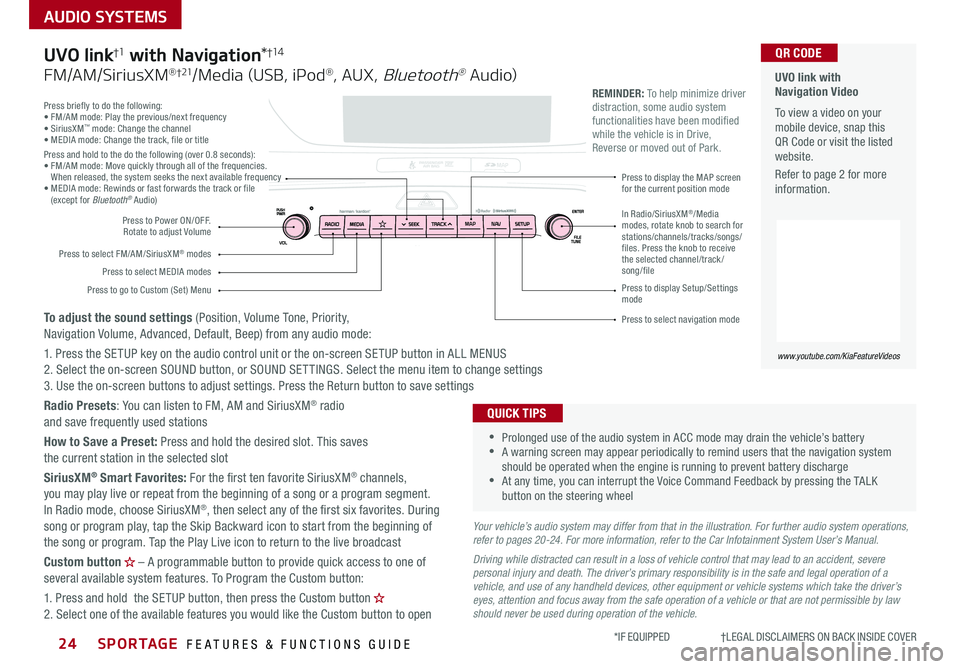
Press briefly to do the following:• FM/AM mode: Play the previous/next frequency• SiriusXM™ mode: Change the channel• MEDIA mode: Change the track, file or titlePress and hold to the do the following (over 0 8 seconds):• FM/AM mode: Move quickly through all of the frequencies When released, the system seeks the next available frequency• MEDIA mode: Rewinds or fast forwards the track or file (except for Bluetooth® Audio)
Press to Power ON/OFF Rotate to adjust Volume
Press to select FM/AM/SiriusXM® modes
Press to select MEDIA modes
Press to display Setup/Settings mode
Press to select navigation mode
Press to display the MAP screen for the current position mode
Press to go to Custom (Set) Menu
In Radio/SiriusXM®/Media modes, rotate knob to search for stations/channels/tracks/songs/files. Press the knob to receive the selected channel/track /song/file
UVO link with Navigation Video To view a video on your mobile device, snap this QR Code or visit the listed website
Refer to page 2 for more information
www.youtube.com/KiaFeatureVideos
QR CODE
MAP N AV
REMINDER: To help minimize driver distraction, some audio system functionalities have been modified while the vehicle is in Drive, Reverse or moved out of Park
Your vehicle’s audio system may differ from that in the illustration. For further audio system operations, refer to pages 20-24. For more information, refer to the Car Infotainment System User’s Manual.
Driving while distracted can result in a loss of vehicle control that may lead to an accident, severe personal injury and death. The driver’s primary responsibility is in the safe and legal operation of a vehicle, and use of any handheld devices, other equipment or vehicle systems which take the driver’s eyes, attention and focus away from the safe operation of a vehicle or that are not permissible by law should never be used during operation of the vehicle.
•
•Prolonged use of the audio system in ACC mode may drain the vehicle’s battery •A warning screen may appear periodically to remind users that the navigation system should be operated when the engine is running to prevent battery discharge •At any time, you can interrupt the Voice Command Feedback by pressing the TALK button on the steering wheel
QUICK TIPS
UVO link†1 with Navigation*†1 4
FM/AM/SiriusXM® †21/Media (USB, iPod®, AUX, Bluetooth® Au dio)
To adjust the sound settings (Position, Volume Tone, Priority, Navigation Volume, Advanced, Default, Beep) from any audio mode:
1 Press the SETUP key on the audio control unit or the on-screen SETUP button in ALL MENUS 2 Select the on-screen SOUND button, or SOUND SET TINGS Select the menu item to change settings3 Use the on-screen buttons to adjust settings Press the Return button to save settings
Radio Presets: You can listen to FM, AM and SiriusXM® radio and save frequently used stations
How to Save a Preset: Press and hold the desired slot This saves the current station in the selected slot
SiriusXM® Smart Favorites: For the first ten favorite SiriusXM® channels, you may play live or repeat from the beginning of a song or a program segment In Radio mode, choose SiriusXM®, then select any of the first six favorites During song or program play, tap the Skip Backward icon to start from the beginning of the song or program Tap the Play Live icon to return to the live broadcast
Custom button – A programmable button to provide quick access to one of several available system features To Program the Custom button:
1 Press and hold the SETUP button, then press the Custom button 2 Select one of the available features you would like the Custom button to open
Page 29 of 52
*IF EQUIPPED 27ALWAYS CHECK THE OWNER’S MANUAL FOR COMPLETE OPER ATING INFORMATION AND SAFET Y WARNINGS
CENTER PANEL
Sportage Automatic Defog System Video To view a video on your mobile device, snap this QR Code or visit the listed website
Refer to page 2 for more information
www.KuTechVideos.com/ql13/2018
QR CODE
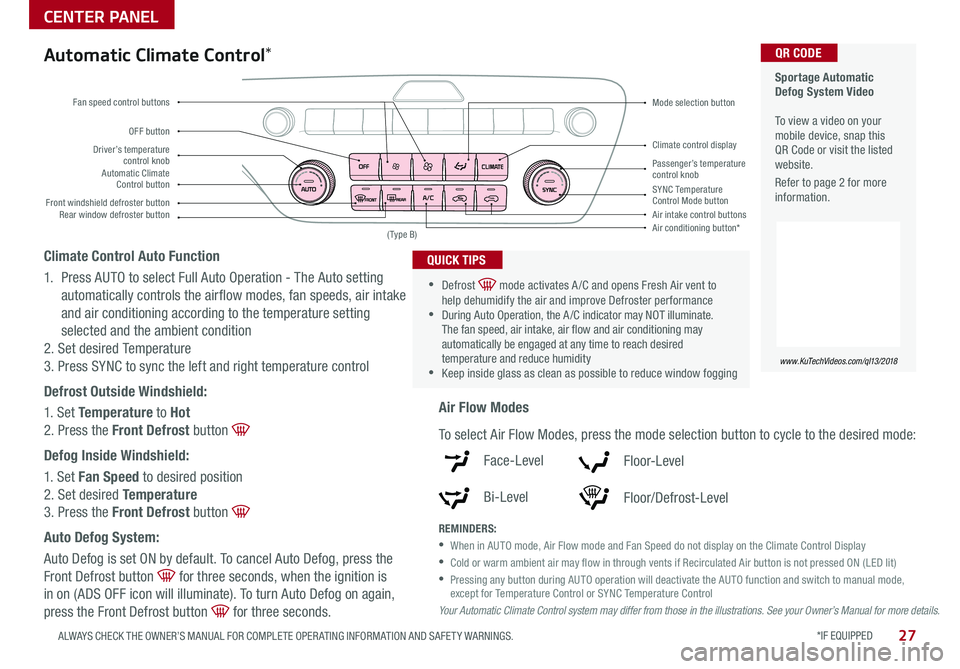
Driver’s temperature control knobPassenger’s temperature control knobAutomatic Climate Control button
Front windshield defroster button
Mode selection button
Air conditioning button*
SYNC Temperature Control Mode buttonRear window defroster buttonAir intake control buttons
Climate control display
Fan speed control buttons
OFF button
Your Automatic Climate Control system may differ from those in the illustrations. See your Owner’s Manual for more details.
( Type B)
Automatic Climate Control*
Climate Control Auto Function
1 Press AUTO to select Full Auto Operation - The Auto setting
automatically controls the airflow modes, fan speeds, air intake
and air conditioning according to the temperature setting
selected and the ambient condition
2 Set desired Temperature
3 Press SYNC to sync the left and right temperature control
Defrost Outside Windshield:
1 Set Temperature to Hot
2 Press the Front Defrost button
Defog Inside Windshield:
1 Set Fan Speed to desired position
2 Set desired Temperature
3 Press the Front Defrost button
Auto Defog System:
Auto Defog is set ON by default To cancel Auto Defog, press the
Front Defrost button for three seconds, when the ignition is
in on (ADS OFF icon will illuminate) To turn Auto Defog on again,
press the Front Defrost button for three seconds
•
•Defrost mode activates A /C and opens Fresh Air vent to help dehumidify the air and improve Defroster performance •During Auto Operation, the A /C indicator may NOT illuminate The fan speed, air intake, air flow and air conditioning may automatically be engaged at any time to reach desired temperature and reduce humidity •Keep inside glass as clean as possible to reduce window fogging
QUICK TIPS
Air Flow Modes
To select Air Flow Modes, press the mode selection button to cycle to the desired mode:
Face-Level
Bi-Level
F lo o r- L evel
Floor/Defrost-Level
REMINDERS:
•
When in AUTO mode, Air Flow mode and Fan Speed do not display on the Climate Control Display
•Cold or warm ambient air may flow in through vents if Recirculated Air button is not pressed ON (LED lit)
•
Pressing any button during AUTO operation will deactivate the AUTO function and switch to manual mode, except for Temperature Control or SYNC Temperature Control
Page 30 of 52
28*IF EQUIPPED SPORTAGE FEATURES & FUNCTIONS GUIDE
CENTER PANEL
01
2
3
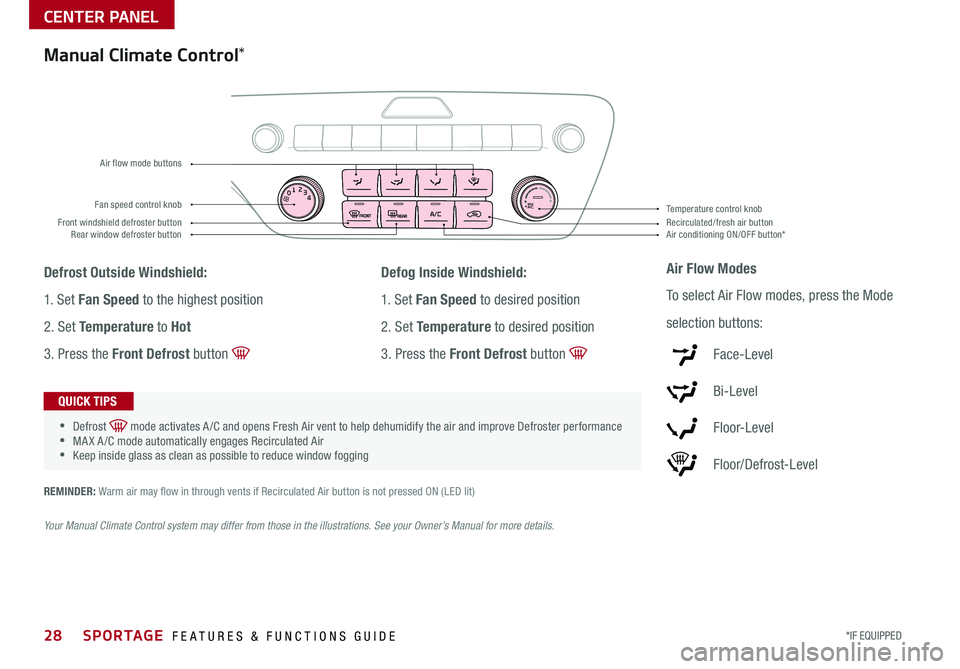
4MAXA/ CFan speed control knob
Front windshield defroster buttonAir conditioning ON/OFF button*Recirculated/fresh air button Rear window defroster button
Temperature control knob
Air flow mode buttons
Manual Climate Control*
Defrost Outside Windshield:
1 Set Fan Speed to the highest position
2 Set Temperature to Hot
3 Press the Front Defrost button
Defog Inside Windshield:
1 Set Fan Speed to desired position
2 Set Temperature to desired position
3 Press the Front Defrost button
Air Flow Modes
To select Air Flow modes, press the Mode
selection buttons:
Face-Level
Bi-Level
F lo o r- L evel
Floor/Defrost-Level
•
•Defrost mode activates A /C and opens Fresh Air vent to help dehumidify the air and improve Defroster performance •MA X A /C mode automatically engages Recirculated Air •Keep inside glass as clean as possible to reduce window fogging
QUICK TIPS
REMINDER: Warm air may flow in through vents if Recirculated Air button is not pressed ON (LED lit)
Your Manual Climate Control system may differ from those in the illustrations. See your Owner’s Manual for more details.
Page 31 of 52
29
CENTER PANEL
ALWAYS CHECK THE OWNER’S MANUAL FOR COMPLETE OPER ATING INFORMATION AND SAFET Y WARNINGS *IF EQUIPPED †LEGAL DISCL AIMERS ON BACK INSIDE COVER
Sportmatic® Shifting Video To view a video on your mobile device, snap this QR Code or visit the listed website
Refer to page 2 for more information
www.youtube.com/KiaFeatureVideos
QR CODE
REMINDER: When in Manual mode, pulling the left and right paddle shifters at the same time will NOT shift gears
Paddle Shifters*
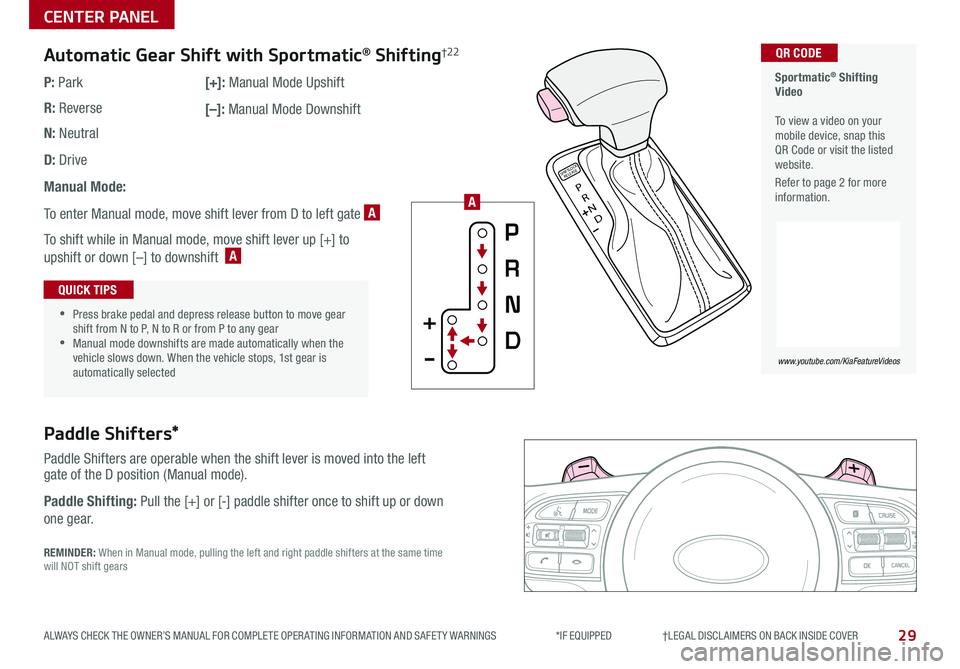
Paddle Shifters are operable when the shift lever is moved into the left gate of the D position (Manual mode)
Paddle Shifting: Pull the [+] or [-] paddle shifter once to shift up or down
one gear
P
R
N
D
SHIFTL OCK
RELEASE
Automatic Gear Shift with Sportmatic® Shifting†2 2
P: Park
R: Reverse
N: Neutral
D: Drive
Manual Mode:
To enter Manual mode, move shift lever from D to left gate A
To shift while in Manual mode, move shift lever up [+] to
upshift or down [–] to downshift A
[+]: Manual Mode Upshift
[–]: Manual Mode Downshift
•
•Press brake pedal and depress release button to move gear shift from N to P, N to R or from P to any gear •Manual mode downshifts are made automatically when the vehicle slows down When the vehicle stops, 1st gear is automatically selected
QUICK TIPS
A
Page 44 of 52

42SPORTAGE FEATURES & FUNCTIONS GUIDE
OTHER KEY FEATURES
*IF EQUIPPED †LEGAL DISCL AIMERS ON BACK INSIDE COVER
Driver Attention Warning (DAW)*†7
The DAW system is designed to alert the driver if it detects inattentive driving practices and, in certain
situations, can give a warning signal to take a break
The DAW System is set to OFF by default To turn the DAW System ON, turn the ignition on and then
select User Settings in the LCD Display on the Instrument Cluster Then go to Driving Assist and select
Driver Attention Warning Set the DAW System to Normal or High Sensitivity
Driver Attention Warning (DAW) System modes:
OFF: The Driver Attention Warning system is deactivated A
Normal Sensitivity: The Driver Attention Warning system alerts the driver of his/her inattentive
driving practices
High Sensitivity: The Driver Attention Warning system alerts the driver of his/her inattentive
driving practices faster than Normal mode
If the DAW System is activated, the DAW information will appear on the LCD Display B when you select
the ASSIST mode
A message, “Consider taking a break,” appears on the LCD display and a warning sounds to suggest the
driver to take a break when the driver’s attention level is below one bar C
REMINDERS:
•The set-up of the DAW System will be maintained, as selected, when the ignition is cycled
•
When activated, the DAW System does not display “Consider taking a break” message when the total trip driving time is less than 10 minutes
•
The DAW System will enter a standby mode if the camera does not detect the lanes and/or the driving speed remains under 40 mph
Attention Alert
System Off
Last Break ——:——Attention Level
LOW HIGH
Last Break 05:27 Attention Level
LOW
HIGH
Level Time 05:27
Consider taking a break
22.4
°C4025km
Attention Alert System Off
Last Break ——:——Attention Level
LOW HIGH
Last Break 05:27
Attention Level
LOWHIGH
Level Time 05:27
Consider taking a break
22.4
°C4025km
Attention Alert System Off
Last Break ——:—— Attention Level
LOW
HIGH
Last Break 05:27
Attention Level
LOWHIGH
Level Time 05:27
Consider taking a break
22.4
°C4025km
BCA
Driver Attention Warning is not a substitute for safe driving and may not detect all instances of inattentive driving practices. Failure to pay attention to travel conditions and vehicle operation could result in loss of vehicle control. Always drive safely and use caution.
Page 49 of 52

LEGAL DISCLAIMERSSales Consultant:
______________________________________________________________
Date:
____________________
Sales Manager:
________________________________________________________________
Date:
____________________
Customer:
_____________________________________________________________________
Date:
____________________
2. Airbags: For maximum protection, always wear your seat belt.
3. Android Auto™: Android Auto is a trademark of Google LLC. Vehicle user interface is a product of Google and its terms and privacy statements apply. Requires the Android Auto™ app on Google Play and an Android™ compatible smartphone running Android™ 5.0 Lollipop or higher. Data plan rates apply.
4. Apple CarPlay®: Apple CarPlay® is a registered trademark of Apple Inc.
5. Bluetooth® Wireless Technology: A compatible Bluetooth® wireless technology-enabled cell phone is required to use Bluetooth® wireless technology. The Bluetooth® word mark and logos are registered trademarks owned by Bluetooth SIG, Inc. and any use of such marks by Kia is under license. Other trademarks and trade names are those of their respective owners. A Bluetooth® enabled cell phone is required to use Bluetooth® wireless technology.
6. Driver Assist Features – Parking Distance Warning-Forward/Reverse, Blind-Spot Collision Warning with Lane Change Assist, Rear Cross-Traffic Collision Warning, Lane Keepinig Assist, Rear View Monitor, Forward Collision-Avoidance Assist-Ped / Forward Collision Warning, Smart Cruise Control with Stop & Go: These features are not substitutes for safe driving, and may not detect all objects surrounding vehicle. Always drive safely and use caution.
7. Driver Attention Warning (DAW) – Driver Attention Warning is not a substitute for safe driving and may not detect all instances of inattentive driving practices. Failure to pay attention to travel conditions and vehicle operation could result in loss of vehicle control. Always drive safely and use caution.
8. Electronic Stability Control (ESC)/Traction Control System (TCS)/Hill-start Assist Control (HAC), Downhill Brake Control (DBC): No system, no matter how advanced, can compensate for all driver error and/or driving conditions. Always drive safely.
9. Engine Start/Stop Button with Smart Key: Always come to a complete stop before turning the engine on or off. However, if you have an emergency while the vehicle is in motion and must turn the engine off, you can turn the engine off to the ACC position by pressing the Start/Stop button for more than 3 seconds o\
r 3 times in succession. If the vehicle is still moving, you can restart the engine by pressing the Start/Stop button with the s\
hift lever in Neutral (N). With the engine off, power assist for steering and braking will be disabled, and the vehicle will be more difficult to control.
10. Front Seat Headrest Adjustment: Never attempt to adjust headrests when vehicle is in motion.
11. Google Play™ Store is a trademark of Google, Inc. ©2019 Google Inc. All rights reserved. Google and the Google Logo are registered trademarks of Google Inc.
12. HomeLink®: Homelink® is a registered trademark of Gentex Corporation.
13. iPhone®: iPhone is a registered trademark of Apple Inc. Distracted driving can result in a loss of vehicle control. Never use a handheld device or vehicle system that takes your focus away from safe vehicle operation.
14. Navigation: Distracted driving can result in a loss of vehicle control. When operating a vehicle, never use a handheld device or vehicle system that takes your focus away from safe vehicle operation. Navigation is for information purposes only, and Kia does not make any warranties about the accuracy of the information.
15. Occupant Detection System (ODS): Kia vehicles use a number of different ODS types that vary by model.
16. Power Liftgate / Smart Power Liftgate: Driving with the trunk open may be unlawful and can draw dangerous exhaust fumes into your vehicle; if you choose to do so, keep air vents and all windows open for proper ventilation.17. Roadside Assist: 24-hour Enhanced Roadside Assistance is a service plan provided by Kia Motors America, Inc. Certain limitations apply. Coverage details are available in the Kia Warranty and Consumer Information Manual. For access to Enhanced Roadside Assistance, a connected mobile phone via Bluetooth® within the cellular service coverage area is required.
18. Seat adjustments: Reclining the passenger seats can reduce the effectiveness of the safety restraint system and may lead to additional injury in an accident.
19. Seat Belts / Airbags: For maximum protection, always wear your seatbelt.
20. Seat warmers: Use extreme caution when using the seat warmers to avoid burns. Refer to the Owner’s Manual for more information.
21. SiriusXM®: SiriusXM Satellite Radio, SiriusXM Traffic and SiriusXM Travel Link each require a subscription sold separately, or as a package, by SiriusXM Radio Inc. If you decide to continue your service at the end of your trial subscription, the plan you choose will automatically renew and bill at then-current r\
ates until you call 1-866-635-2349 to cancel. See SiriusXM Customer Agreement for complete terms at www.siriusxm.com. Other fees and taxes will apply. All fees and programming are subject to change. Not all vehicles or devices are capable of receiving all services offered by SiriusXM. Data displays and individual product availability vary by vehicle hardware. Current information and features may not be available in all locations, or on all receivers. Weather Forecast, Current Conditions may not be available in all locations. Images above are for representative purposes only and are not real products. For actual features and images of real products, consult the vehicle manufacturer. SiriusXM is not responsible for any errors or inaccuracies in the data services or their use in the vehicle. Travel Link Stocks displays current price and daily delta of around 7,000 actively reported securiti\
es traded on the NYSE®, NASDAQ® and AMEX®. The service is delayed approximately 20 minutes. SiriusXM satellite service is available only to those at least 18 years of age in the 48 contiguous USA, DC, and Puerto Rico (with coverage limitations). SiriusXM Internet Radio service is available throughout our satellite service area and in AK and HI. © 2019 SiriusXM Radio Inc. Sirius, XM and all related marks and logos are trademarks of SiriusXM Radio Inc.
22. Sportmatic® is a registered trademark of Kia Motors America.
23. Steering Wheel Controls: Driving while distracted is dangerous and should be avoided. Remain attentive to driving and be cautious when using steering-wheel-mounted controls while driving\
.
24. Sunvisors: Sunvisor may not shield all direct light. Do not operate the vehicle if Sunvisor is impairing your visibility.
Driving while distracted is dangerous and should be avoided. Drivers should remain attentive to driving and always exercise caution when using the steering-wheel-mounted controls while dri\
ving.
Driving while distracted can result in a loss of vehicle control that may lead to an accident, severe personal injury and death. The driver’s primary responsibility is in the safe and legal operation of a vehicle, and use of any handheld devices, other equipment or vehicle systems which take the driver’s eyes, attention and focus away from the safe operation of a vehicle or that are not permissible by law should never be used during operation of the vehicle.
Safety Features: No system, no matter how advanced, can compensate for all driver error and/or driving conditions. Always drive responsibly.
1. UVO link: Purchase/lease of a new 2020 Kia Sportage vehicle with UVO link with Navigation includes a complimentary 1-year subscription starting from new vehicle retail sale/lease date as recorded by the dealer. After your complimentary 1-year UVO link subscription expires, continued access to UVO link will require a paid subscription at the then current subscription rate or your use of UVO link will immediately terminate. Use of UVO link is subject to agreement to the UVO Privacy Policy (available at https://www.myuvo.com/legal/privacy-policy.shtml) and Terms of Service (available at https://www.myuvo.com/legal/terms-of-service.shtml). UVO link transferrable to subsequent owner during the original UVO link service term. Only use UVO link when safe to do so. The Kia Access with UVO link App is available from the App Store® or Google Play™ Store. Kia Motors America, Inc. reserves the right to change or discontinue UVO link at any time without prior notification or incurring any future obligation. Message and data rates may apply. Cellular and GPS coverage is required to use most features. UVO link features may vary by model, model year, and trim level. Features, specifications, and fees are subject to change. For more on details and limitations, visit myuvo.com or your authorized Kia dealer. Google and logos are trademarks of Google, Inc. App Store is a service mark of Apple, Inc.
Page 50 of 52

ECO Mode (Active ECO) – page 8 Parking Distance Warning-Forward* and Reverse* – page 32 Digital Clock – page 25 Engine Start /Stop Button* – page 13 HomeLink
® with Auto-Dimming Rearview Mirror* – page 38
Sunroof Operation* – page 39 Passenger Airbag Off Indicator – page 45 Rear View Monitor – page 43
Reclining/Folding Rear Seats – page 35 Seat Warmers / Ventilated Seats* – page 33 Smart Key* – page 36 Sunvisor – page 43 Tire Pressure Monitoring System ( TPMS) – page 5 USB Port, Power Outlets & USB Charger – page 25
*if equipped
Standard Audio System*
– page 22
For more information, refer to the Car Infotainment System User’s Manual.
Android Auto
™ / Apple CarPlay
®
Setup* – page 20
UVO link Activation – page 21
For further UVO eServices
operations, refer to the
Car
Infotainment System User’s Manual.
For other audio system information, refer to pages 20-23.
UVO link*
– page 23
For more information, refer to the
Car Infotainment System User’s Manual.
Cruise Control
– page 17
Demonstrate operation
Bluetooth
® Wireless Technology
–
p a g e s 18 -19
Demonstrate operation
UVO link with Navigation*
– page 24
For more information, refer to the Car Multimedia System User’s Manual.
Demonstrate the following with the customer
SPORTAGE
CUSTOMER DELIVERY CHECKLIST
KEY FEATURE WALKTHROUGHSales Consultant:
______________________________________________________________
Date:
____________________
Sales Manager:
________________________________________________________________
Date:
____________________
Customer:
_____________________________________________________________________
Date:
____________________
Explain first service process and schedule first service appointment Tour Parts & Service departments, introduce staff & explain value of Kia Parts and Service Review recommended maintenance schedule and maintenance requirements to validate warranty Review business hours & Customer 360° Care Review the Kia 10-year/100,000-mile warranty program Ensure 100% satisfaction with sales and delivery process and no problems with the vehicle Confirm time and best contact number for initial dealer follow-upDURING DELIVERY
OK
T H E S YSTE M
OK
HOME PHONE
HOMEPHONE
MAP N AV
Page 51 of 52

Air Conditioning / Climate Control –
pages 27-28
Demonstrate Air Flow modes, Defogging and Defrosting Windshield Windshield Wipers & Washers –
page 15
Rear Wiper & Washer –
page 15
*IF EQUIPPED
Automatic*
Manual*
To operate:• Rotate Rear Wiper switch to change Wiper modes• Push lever to spray and wipe
To operate:• Move lever Up/Down to change Wiper modes• Rotate INT switch to adjust Intermittent Wipe Speed• Pull lever to spray and wipe
BEFORE DELIVERYOwner’s Name:
_________________________________________
VIN:
_____________________________
Mileage:
_____________________
Dealership Name:
_______________________________________
Sales Consultant:
_________________
Date:
________________________
SPORTAGE
CUSTOMER DELIVERY CHECKLIST
Test and confirm