Page 198 of 604
489
Features of your vehicle
Center (AUTO, 3):
The mirror will fold or unfold auto-
matically as follows:
The mirror will fold or unfold when the door is locked or unlocked by
the folding key or smart key.
The mirror will fold or unfold when the door is locked or unlocked by the
button on the outside door handle.
The mirror will unfold when you approach the vehicle (all doors
closed and locked) with a smart
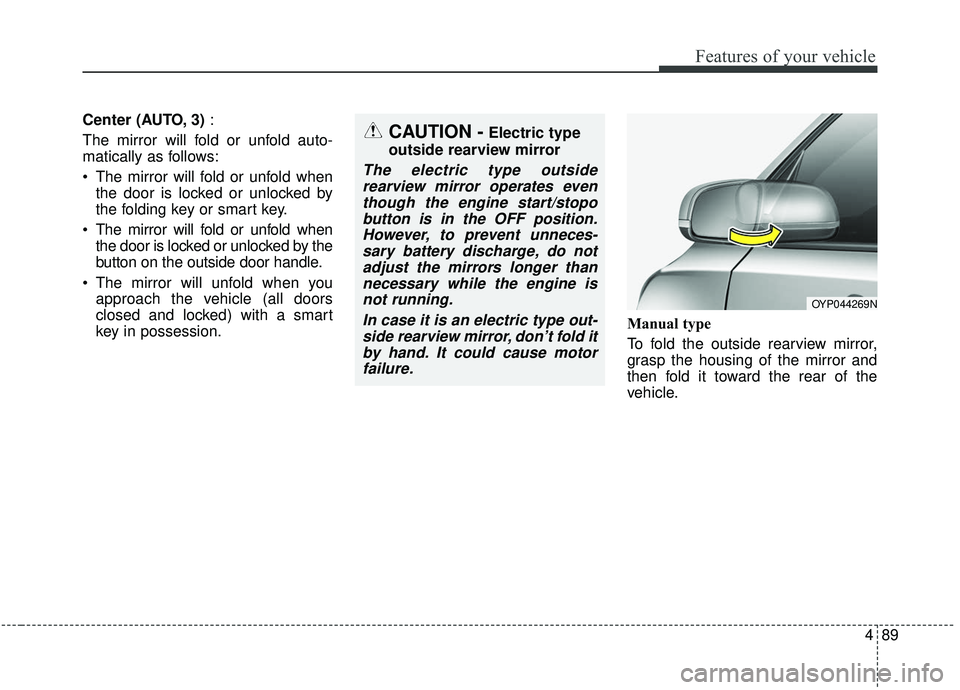
key in possession. Manual type
To fold the outside rearview mirror,
grasp the housing of the mirror and
then fold it toward the rear of the
vehicle.
OYP044269N
CAUTION -Electric type
outside rearview mirror
The electric type outside rearview mirror operates eventhough the engine start/stopobutton is in the OFF position.However, to prevent unneces-sary battery discharge, do notadjust the mirrors longer thannecessary while the engine isnot running.
In case it is an electric type out-side rearview mirror, don’t fold itby hand. It could cause motorfailure.
Page 216 of 604

4107
Features of your vehicle
Driver Attention Warning (DAW) (ifequipped)
❈ For more details, refer to ‘Driver
Attention Warning (DAW)” in chap-
ter 5.
Blind Spot Collision Warning Timing (if equipped)
- Choose the sensitivity(Late/Normal/Fast) of the Blind
Spot Collision Warning Timing
control.
❈ For more details, refer to “Blind
spot Collision Warning” in chapter
5.
Blind Spot Collision Warning Sound (if equipped)
- If this item is checked, the blindspot collision warning sound
function will be activated.
❈ For more details, refer to “Blind
spot Collision Warning” in chapter
5. Rear Cross Traffic Collision
Warning (if equipped)
- If this item is checked, the reacross traffic collision warning will
be activated.
❈ For more details, refer to “Blind-
spot Collision Warning” in chapter
5. Door/Liftgate
Automatically lock
- Disable : The auto door lock oper-ation will be deactivated.
- Enable on speed : All doors will be automatically locked when the
vehicle speed exceeds 9.3 mph
(15 km/h).
- Enable on shift : All doors will be automatically locked if the auto-
matic transaxle shift lever is shift-
ed from the P (Park) position to
the R (Reverse), N (Neutral), or D
(Drive) position.
Page 217 of 604
Features of your vehicle
108
4
Automatically Unlock :
- Disable : The auto door unlockoperation will be canceled.
- Vehicle Off : All doors will be automatically unlocked when the
Engine Star/Stop Button or igni-
tion switch is set to the OFF posi-
tion.
- On Shift to P : All doors will be automatically unlocked if the
automatic transmission shift lever
is shifted to the P (Park) position.
Two Press Unlock (if equipped) - If this item checked, the two pressunlock function will be activated.
(Only the driver’s door will unlock
when unlock button is pressed
once and all doors will unlock
when the same button is pressed
again within 4 seconds.) Smart Liftgate (if equipped)
- If this item is checked, the smartliftgate function will be activated.
- If the power liftgate function is not activated, you cannot activate
this function.
❈ For more details, refer to “Smart
Liftgate” in this chapter. Lights
One Touch Turn Signal :
- Off : The one touch turn signalfunction will be deactivated.
- 3, 5, 7 Flashes : The lane change signals will blink 3, 5 or 7 times
when the turn signal lever is
moved slightly.
❈ For more details, refer to “Light” in
this chapter.
Headlight Delay : - If this item checked, the headlight delay function will be activat-
ed.
Page 248 of 604

4139
Features of your vehicle
Battery saver function
The purpose of this feature is toprevent the battery from being dis-
charged if the lights are left in the
ON position. The system automati-
cally shuts off the parking lights 30
seconds after the ignition key is
removed and the driver’s door is
opened and closed.
With this feature, the parking lights will turn off automatically if the driver
parks on the side of the road at night
and opens the driver’s side door.
If necessary, to keep the parking
lights on when the ignition key is
removed, perform the following:
1) Open the driver-side door.
2) Turn the parking lights OFF and ON again using the light switch
on the steering column.
Headlight escort function
If you turn the ignition switch to the
ACC or OFF position with the head-
lights ON, the headlights remain on
for about 5 minutes. However, if the
driver's door is opened and closed,
the headlights are turned off after 15
seconds.
The headlights can be turned off by
pressing the lock button on the trans-
mitter (or smart key) twice or turning
the light switch to the OFF position.
If the driver gets out of the vehicle
through other doors (except driver’s
door), the battery saver function
does not operate and the headlight
escort function does not turn off
automatically. Therefore, it can cause
the battery to be discharged. In this
case, make sure to turn off the lamp
before getting out of the vehicle.
Daytime running light
(if equipped)
The Daytime Running Lights (DRL)
can make it easier for others to see
the front of your vehicle during the
day. DRL can be helpful in many dif-
ferent driving conditions, and it is
especially helpful after dawn and
before sunset.
The DRL system turns OFF when:
1. The headlight switch is on
2. The engine is off
3. Engaging the Parking Brake
LIGHTING
Page 262 of 604
4153
Features of your vehicle
Map lamp
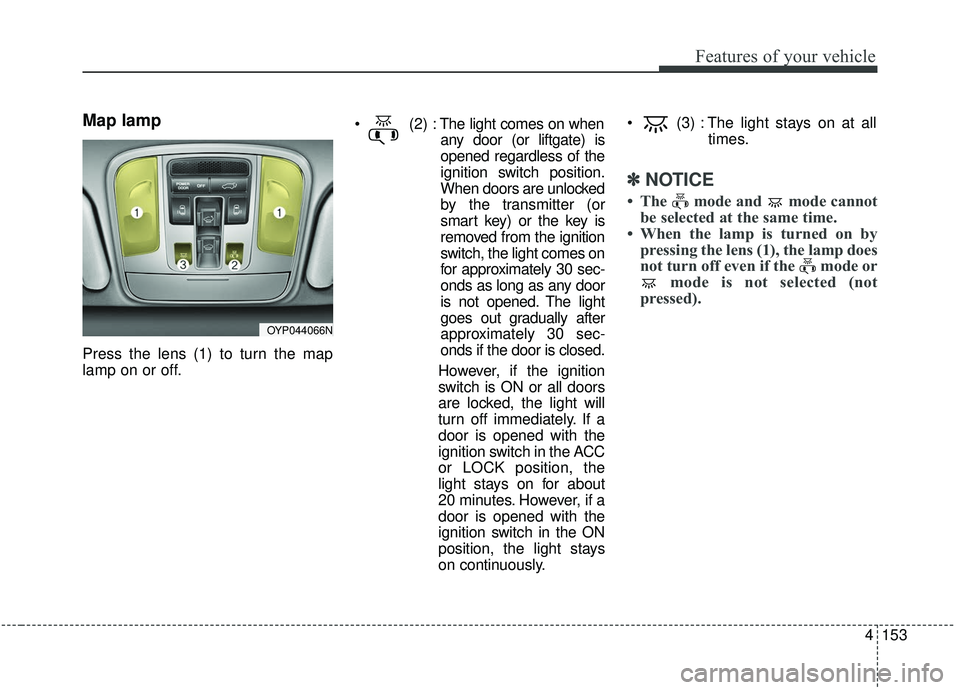
Press the lens (1) to turn the map
lamp on or off.
The light comes on when
any door (or liftgate) is
opened regardless of the
ignition switch position.
When doors are unlocked
by the transmitter (or
smart key) or the key is
removed from the ignition
switch, the light comes on
for approximately 30 sec-
onds as long as any door
is not opened. The light
goes out gradually after
approximately 30 sec-
onds if the door is closed.
However, if the ignition
switch is ON or all doors
are locked, the light will
turn off immediately. If a
door is opened with the
ignition switch in the ACC
or LOCK position, the
light stays on for about
20 minutes. However, if a
door is opened with the
ignition switch in the ON
position, the light stays
on continuously. (3) : The light stays on at all
times.
✽ ✽NOTICE
• The mode and mode cannot
be selected at the same time.
• When the lamp is turned on by pressing the lens (1), the lamp does
not turn off even if the mode or mode is not selected (not
pressed).
OYP044066N
Page 307 of 604
Features of your vehicle
198
4
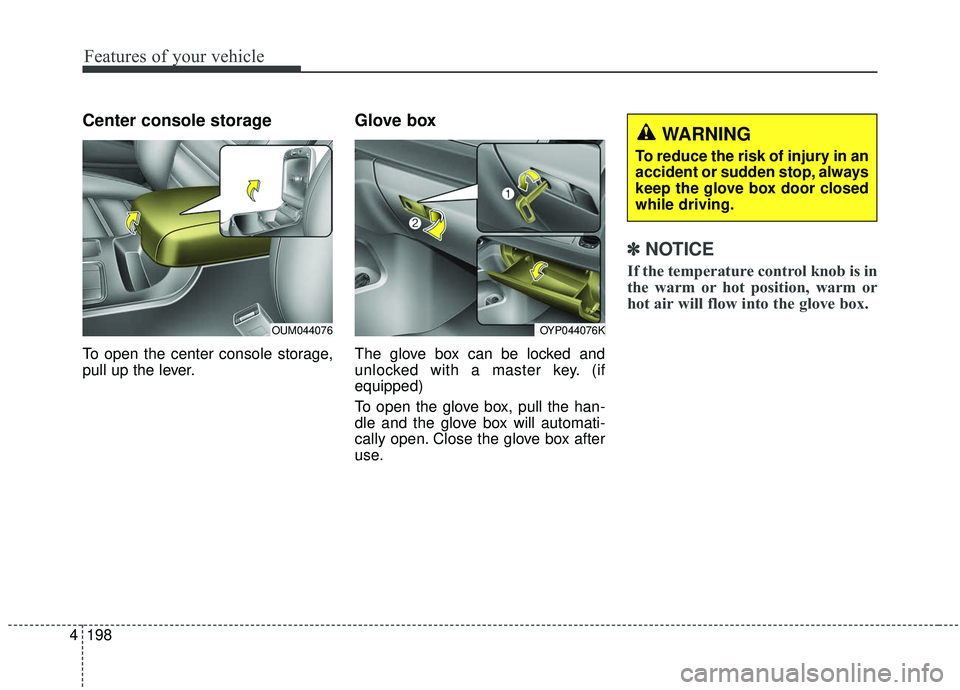
Center console storage
To open the center console storage,
pull up the lever.
Glove box
The glove box can be locked and
unlocked with a master key. (if
equipped)
To open the glove box, pull the han-
dle and the glove box will automati-
cally open. Close the glove box after
use.
✽ ✽
NOTICE
If the temperature control knob is in
the warm or hot position, warm or
hot air will flow into the glove box.
OYP044076K
WARNING
To reduce the risk of injury in an
accident or sudden stop, always
keep the glove box door closed
while driving.
OUM044076
Page 334 of 604
55
Driving your vehicle
Before entering vehicle
• Be sure that all windows, outsidemirror(s), and outside lights are
clean.
Check the condition of the tires.
Check under the vehicle for any sign of leaks.
Be sure there are no obstacles behind you if you intend to back up.
Necessary inspections
Fluid levels, such as engine oil,
engine coolant, brake fluid, and
washer fluid should be checked on a
regular basis, at the exact interval
depending on the fluid. Further
details are provided in chapter 7,
“Maintenance”.
Before starting
Close and lock all doors.
Position the seat so that all con-trols are easily reached.
Buckle your seat belt.
Adjust the inside and outside rearview mirrors.
Be sure that all lights work.
Check all gauges.
Check the operation of warning lights when the ignition switch is
turned to the ON position.
Release the parking brake and make sure the brake warning light
goes out.
For safe operation, be sure you are
familiar with your vehicle and its
equipment.
BEFORE DRIVING
WARNING - Distracted driving
Focus on the road while driving.
The driver's primary responsi-
bility is in the safe and legal
operation of the vehicle. Use of
any handled devices, other
equipment or vehicle systems
that distract the driver should
not be used during vehicle
operation.
Page 336 of 604
57
Driving your vehicle
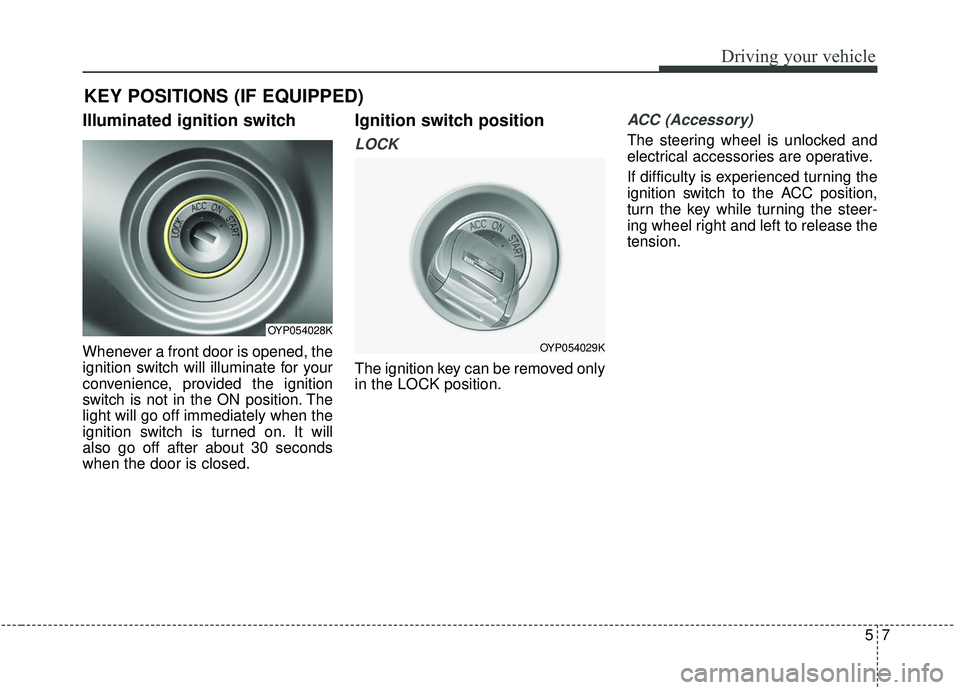
Illuminated ignition switch
Whenever a front door is opened, the
ignition switch will illuminate for your
convenience, provided the ignition
switch is not in the ON position. The
light will go off immediately when the
ignition switch is turned on. It will
also go off after about 30 seconds
when the door is closed.
Ignition switch position
LOCK
The ignition key can be removed only
in the LOCK position.
ACC (Accessory)
The steering wheel is unlocked and
electrical accessories are operative.
If difficulty is experienced turning the
ignition switch to the ACC position,
turn the key while turning the steer-
ing wheel right and left to release the
tension.
KEY POSITIONS (IF EQUIPPED)
OYP054028K
OYP054029K