Page 308 of 516
641
Driving your vehicle
Be cautious when parking on a hill.Firmly engage the parking brake
and place the shift lever in P
(Intelligent Variable Transmission)
or in first or reverse gear (Manual
Transmission). If your vehicle is
facing downhill, turn the front
wheels into the curb to help keep
the vehicle from rolling. If your vehi-
cle is facing uphill, turn the front
wheels away from the curb to help
keep the vehicle from rolling. If
there is no curb or if it is required
by other conditions to keep the
vehicle from rolling, chock the
wheels. Under some conditions, your park-
ing brake can freeze in the
engaged position. This is most like-
ly to happen when there is an
accumulation of snow or ice
around or near the rear brakes or if
the brakes are wet. If there is a risk
that the parking brake may freeze,
apply it only temporarily while you
put the shift lever in P (Intelligent
Variable Transmission) or in first or
reverse gear (Manual
Transmission) and chock the rear
wheels so the vehicle cannot roll.
Then release the parking brake.
Do not hold the vehicle on an incline with the accelerator pedal.
This can cause the transmission to
overheat. Always use the brake
pedal or parking brake.
SC CAN (ENG) 6.QXP 6/7/2019 9:50 AM Page 41
Page 311 of 516
Driving your vehicle
44
6
Prerequisite for activation
FCA system will activate when FCA
system is selected on the LCD dis-
play, and when the following prereq-
uisites are satisfied:
- The ESC (Electronic Stability
Control) is activated.
- The driving speed is over 10 km/h (6 mph). (FCA system only works
within a certain range of vehicle
speeds)
- When FCA system recognizes a vehicle in front. FCA system automatically activates
when you turn the vehicle on.
The driver can deactivate FCA sys-
tem by canceling the system setting
on the LCD display.
FCA system automatically deacti- vates when canceling the ESC.
When the ESC is canceled, FCA
system cannot be activated on the
LCD display. In this case, FCA sys-
tem warning light will illuminate,
but it does not indicate a malfunc-
tion.
FCA system warning message
and system control
FCA system produces warning mes-
sages, warning alarms, and emer-
gency braking based on the level of
risk of a frontal collision, such as
when a vehicle ahead suddenly
brakes, or when there is no following
distance from the vehicle in front.
WARNING
Set or cancel FCA with the con-
trol switches on the steering
wheel after stopping the vehicle
in a safe place.
WARNING
FCA system may not recognize
every obstacle or provide warn-
ings and braking in every situa-
tion, so do not rely on FCA sys-
tem to stop the vehicle in
instances where the driver sees
an obstacle and has the ability
to apply the brakes.
SC CAN (ENG) 6.QXP 6/13/2019 5:07 PM Page 44
Page 313 of 516

Driving your vehicle
46
6
Brake operation
In an emergency situation, the
braking system enters in ready sta-
tus for prompt reaction upon the
driver depressing the brake pedal.
FCA system provides additional braking power for optimum braking
performance when the driver
depresses the brake pedal.
The braking control is automatical- ly deactivated when the driver
sharply depresses the accelerator
pedal, or when the driver abruptly
turns the steering wheel.
The braking control is automatical- ly canceled when risk factors dis-
appear.
FCA system front radar sensor
In order for FCA system to operate
properly, always make sure the sen-
sor or sensor cover is clean and free
of dirt, snow, and debris. Dirt, snow,
or foreign substances on the lens
may adversely affect the sensing
performance of the sensor.
WARNING
FCA system logic operates
within certain parameters, such
as the distance from the vehicle
ahead, the speed of the vehicle
ahead, and the driver's vehicle
speed. Certain conditions such
as inclement weather, road con-
ditions, and systems limitations
may affect the operation of the
FCA system.
WARNING
FCA system braking control
cannot completely stop the
vehicle nor avoid all collisions.
The driver should hold the
responsibility to drive safely
and control the vehicle.
WARNING
Never deliberately drive danger-
ously to activate the system.
CAUTION
The driver should always exer-cise caution when operatingthe vehicle, even though there isno warning message or warningalarm.
OYB056063
SC CAN (ENG) 6.QXP 6/7/2019 9:50 AM Page 46
Page 320 of 516

653
Driving your vehicle
✽ ✽NOTICE
In some instances, FCA system may
be canceled when subjected to elec-
tromagnetic interference.
WARNING - Testing FCA
system
The FCA system may not oper-
ate in certain situations.
Therefore, never test the opera-
tion of the FCA system using a
person or object, as doing so
may cause severe injury or
even death.
WARNING - FCA system
and Towing
Cancel FCA system in the User
Settings on the LCD display,
before towing another vehicle.
While towing, the brake applica-
tion may adversely affect your
vehicle safety.
WARNING
Use extreme caution when the vehicle in front of you has
cargo that extends rearward
from the cab, or when the
vehicle in front of you has
higher ground clearance.
FCA system is designed to detect and monitor the vehicle
ahead through sensor recog-
nition. It is not designed to
detect bicycles, motorcycles,
or smaller wheeled objects
such as luggage bags, shop-
ping carts, or strollers.
When replacing or reinstalling of front bumper or radar, have
the vehicle inspected for the
system check by an author-
ized Kia dealer.
SC CAN (ENG) 6.QXP 6/7/2019 9:50 AM Page 53
Page 322 of 516
655
Driving your vehicle
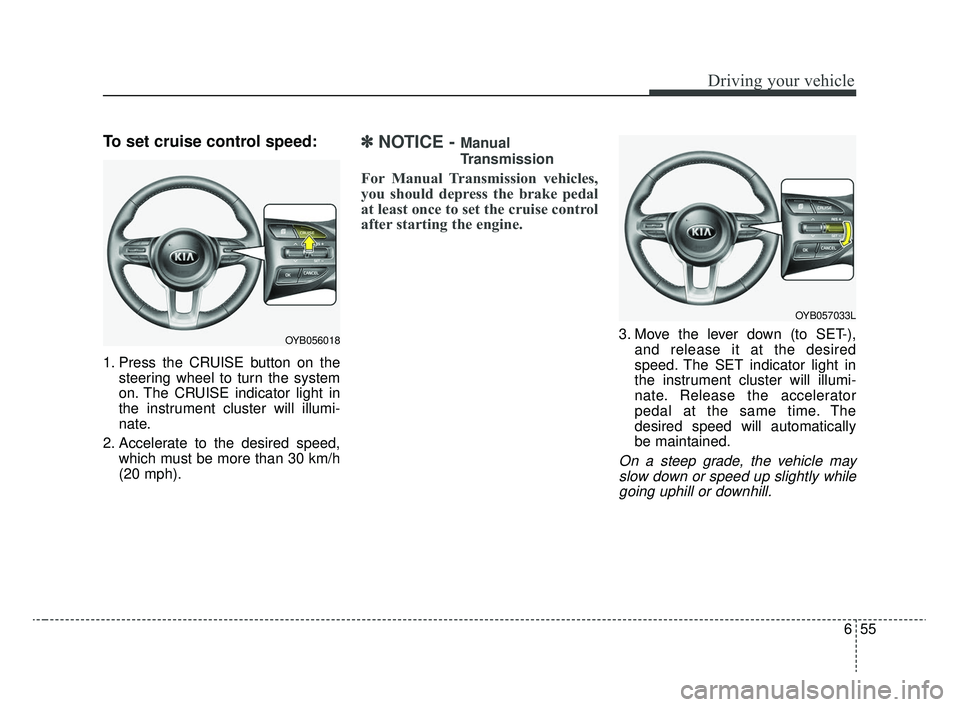
To set cruise control speed:
1. Press the CRUISE button on thesteering wheel to turn the system
on. The CRUISE indicator light in
the instrument cluster will illumi-
nate.
2. Accelerate to the desired speed, which must be more than 30 km/h
(20 mph).
✽ ✽NOTICE - Manual
Transmission
For Manual Transmission vehicles,
you should depress the brake pedal
at least once to set the cruise control
after starting the engine.
3. Move the lever down (to SET-),
and release it at the desired
speed. The SET indicator light in
the instrument cluster will illumi-
nate. Release the accelerator
pedal at the same time. The
desired speed will automatically
be maintained.
On a steep grade, the vehicle mayslow down or speed up slightly whilegoing uphill or downhill.
OYB056018
OYB057033L
SC CAN (ENG) 6.QXP 6/7/2019 9:50 AM Page 55
Page 324 of 516
657
Driving your vehicle
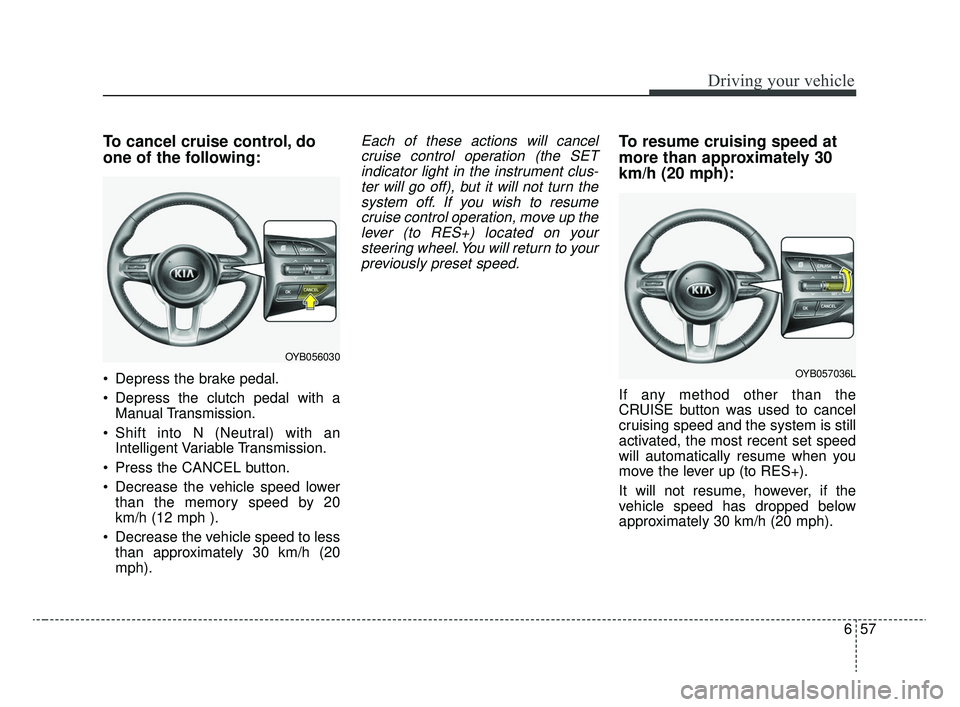
To cancel cruise control, do
one of the following:
Depress the brake pedal.
Depress the clutch pedal with aManual Transmission.
Shift into N (Neutral) with an Intelligent Variable Transmission.
Press the CANCEL button.
Decrease the vehicle speed lower than the memory speed by 20
km/h (12 mph ).
Decrease the vehicle speed to less than approximately 30 km/h (20
mph).
Each of these actions will cancelcruise control operation (the SETindicator light in the instrument clus-ter will go off), but it will not turn thesystem off. If you wish to resumecruise control operation, move up thelever (to RES+) located on yoursteering wheel. You will return to yourpreviously preset speed.To resume cruising speed at
more than approximately 30
km/h (20 mph):
If any method other than the
CRUISE button was used to cancel
cruising speed and the system is still
activated, the most recent set speed
will automatically resume when you
move the lever up (to RES+).
It will not resume, however, if the
vehicle speed has dropped below
approximately 30 km/h (20 mph).
OYB056030
OYB057036L
SC CAN (ENG) 6.QXP 6/7/2019 9:50 AM Page 57
Page 326 of 516
659
Driving your vehicle
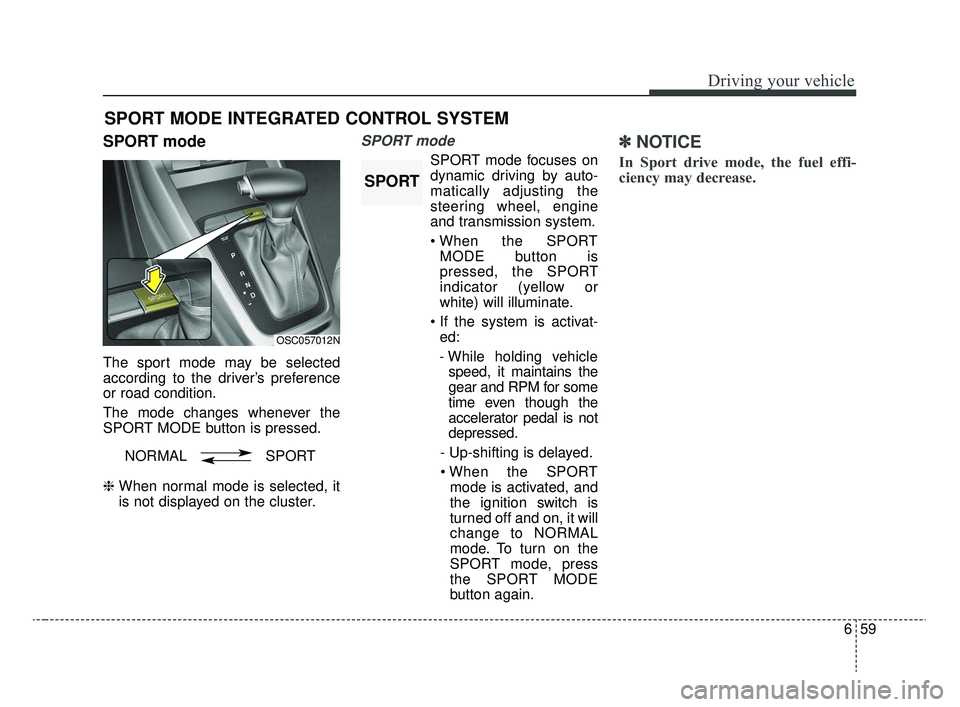
SPORT mode
The sport mode may be selected
according to the driver’s preference
or road condition.
The mode changes whenever the
SPORT MODE button is pressed.
❈ When normal mode is selected, it
is not displayed on the cluster.
SPORT mode
SPORT mode focuses on
dynamic driving by auto-
matically adjusting the
steering wheel, engine
and transmission system.
MODE button is
pressed, the SPORT
indicator (yellow or
white) will illuminate.
ed:
- While holding vehicle speed, it maintains the
gear and RPM for some
time even though the
accelerator pedal is not
depressed.
- Up-shifting is delayed. mode is activated, and
the ignition switch is
turned off and on, it will
change to NORMAL
mode. To turn on the
SPORT mode, press
the SPORT MODE
button again.
✽ ✽
NOTICE
In Sport drive mode, the fuel effi-
ciency may decrease.
SPORT MODE INTEGRATED CONTROL SYSTEM
OSC057012N
NORMAL SPORT
SPORT
SC CAN (ENG) 6.QXP 6/7/2019 9:51 AM Page 59
Page 327 of 516

Driving your vehicle
60
6
Your vehicle's fuel economy depends
mainly on your style of driving, where
you drive and when you drive.
Each of these factors affects how
many miles (kilometers) you can get
from a gallon (liter) of fuel. To operate
your vehicle as economically as pos-
sible, use the following driving sug-
gestions to help save money in both
fuel and repairs:
Drive smoothly. Accelerate at a
moderate rate. Don't make "jack-
rabbit" starts or full-throttle shifts
and maintain a steady cruising
speed. Don't race between stop-
lights. Try to adjust your speed to
the traffic so you don't have to
change speeds unnecessarily.
Avoid heavy traffic whenever pos-
sible. Always maintain a safe dis-
tance from other vehicles so you
can avoid unnecessary braking.
This also reduces brake wear.
Drive at a moderate speed. The faster you drive, the more fuel your
vehicle uses. Driving at a moderate
speed, especially on the highway,
is one of the most effective ways to
reduce fuel consumption. Don't "ride" the brake pedal. This
can increase fuel consumption and
also increase wear on these com-
ponents. In addition, driving with
your foot resting on the brake pedal
may cause the brakes to overheat,
which reduces their effectiveness
and may lead to more serious con-
sequences.
Take care of your tires. Keep them inflated to the recommended pres-
sure. Incorrect inflation, either too
much or too little, results in unnec-
essary tire wear. Check the tire
pressures at least once a month.
Be sure that the wheels are aligned correctly. Improper align-
ment can result from hitting curbs
or driving too fast over irregular
surfaces. Poor alignment causes
faster tire wear and may also result
in other problems as well as
greater fuel consumption. Keep your vehicle in good condi-
tion. For better fuel economy and
reduced maintenance costs, main-
tain your vehicle in accordance
with the maintenance schedule in
section 8. If you drive your vehicle
in severe conditions, more frequent
maintenance is required (see sec-
tion 8 for details).
Keep your vehicle clean. For maxi- mum service, your vehicle should
be kept clean and free of corrosive
materials. It is especially important
that mud, dirt, ice, etc. not be
allowed to accumulate on the
underside of the vehicle. This extra
weight can result in increased fuel
consumption and also contribute to
corrosion.
Travel lightly. Don't carry unneces- sary weight in your vehicle. Weight
reduces fuel economy.
Don't let the engine idle longer than necessary. If you are waiting
(and not in traffic), turn off your
engine and restart only when
you're ready to go.
ECONOMICAL OPERATION
SC CAN (ENG) 6.QXP 6/7/2019 9:51 AM Page 60