Page 226 of 516

Audio system
Audio system . . . . . . . . . . . . . . . . . . . . . . . . . . . . . . . 5-2
• Antenna . . . . . . . . . . . . . . . . . . . . . . . . . . . . . . . . . . . . \
. 5-2
• AUX, USB port . . . . . . . . . . . . . . . . . . . . . . . . . . . . . . . 5-3
• How vehicle audio works . . . . . . . . . . . . . . . . . . . . . . . 5-3
Audio (with touch screen) . . . . . . . . . . . . . . . . . . . . 5-8
• Feature of your audio . . . . . . . . . . . . . . . . . . . . . . . . . . 5-9
• Radio . . . . . . . . . . . . . . . . . . . . . . . . . . . . . . . . . . . . \
. . . 5-15
• SiriusXM . . . . . . . . . . . . . . . . . . . . . . . . . . . . . . . . . . . 5-\
18
• Media . . . . . . . . . . . . . . . . . . . . . . . . . . . . . . . . . . . . \
. . 5-20
• Phone . . . . . . . . . . . . . . . . . . . . . . . . . . . . . . . . . . . . \
. . 5-30
• Setup . . . . . . . . . . . . . . . . . . . . . . . . . . . . . . . . . . . . \
. . . 5-39
Declaration of conformity . . . . . . . . . . . . . . . . . . . 5-42
• IC . . . . . . . . . . . . . . . . . . . . . . . . . . . . . . . . . . . . \
. . . . . 5-42
5
SC CAN (ENG) 5(audio).qxp 6/7/2019 9:52 AM Page 1
Page 230 of 516

Audio system
55
Station Swapping - As a FM signalweakens, another more powerful
signal near the same frequency
may begin to play. This is because
your radio is designed to lock onto
the clearest signal. If this occurs,
select another station with a
stronger signal.
Multi-Path Cancellation - Radio sig- nals being received from several
directions can cause distortion or
fluttering. This can be caused by a
direct and reflected signal from the
same station, or by signals from
two stations with close frequencies.
If this occurs, select another station
until the condition has passed.
Using a cellular phone or a two-
way radio
When a cellular phone is used inside
the vehicle, noise may be produced
from the audio system. This does not
mean that something is wrong with
the audio equipment. If this occurs,
try using the cellular phone as far
away as possible from the audio
equipment.
When using a communication sys-
tem such as a cellular phone or a
radio set inside the vehicle, a sepa-
rate external antenna must be fitted.
When a cellular phone or a radio set
is used with an internal antenna
alone, it may interfere with the vehi-
cle's electrical system and adversely
affect safe operation of the vehicle.
JBM005
WARNING
Do not use a cellular phone
while driving. Stop at a safe
location to use a cellular phone.
WARNING- Distracted driving
Driving while distracted can
result in a loss of vehicle control
that may lead to an accident,
severe personal injury, and death.
The driver's primary responsibili-
ty is in the safe and legal opera-
tion of the vehicle, and any hand-
held devices, other equipment, or
vehicle systems which take the
driver's eyes, attention, and focus
away from the safe operation of
the vehicle, or which are not per-
missible by law, should never be
used during operation of the
vehicle.
SC CAN (ENG) 5(audio).qxp 6/7/2019 9:52 AM Page 5
Page 232 of 516
Audio system
75
iPod®
iPod®is a trademark of Apple Inc.
Bluetooth®Wireless Technology
A compatible Bluetooth®Wireless Technology-enabled
cell phone is required to use
Bluetooth®Wireless
Technology.
The Bluetooth
®word mark and logos are registered
trademarks owned by Bluetooth SIG, Inc. and any use of
such marks by Kia is under license.
Other trademarks and trade names are those of their
respective owners.
A Bluetooth
®enabled cell phone is required to use
Bluetooth®Wireless Technology.
Bluetooth®Wireless Technology phone compatibility can
be checked by visiting http://www.kia.com.
SC CAN (ENG) 5(audio).qxp 6/7/2019 9:52 AM Page 7
Page 234 of 516
Audio system
95
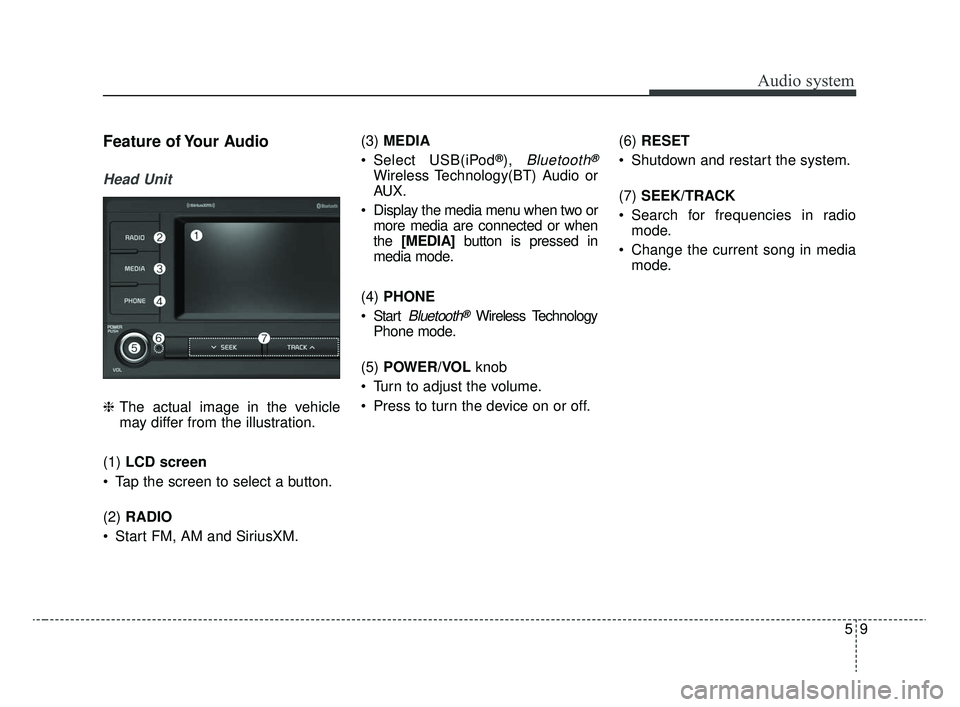
Feature of Your Audio
Head Unit
❈The actual image in the vehicle
may differ from the illustration.
(1) LCD screen
Tap the screen to select a button.
(2) RADIO
Start FM, AM and SiriusXM. (3)
MEDIA
Select USB(iPod
®), Bluetooth®
Wireless Technology(BT) Audio or
AUX.
Display the media menu when two or more media are connected or when
the [MEDIA] button is pressed in
media mode.
(4) PHONE
Start
Bluetooth®Wireless Technology
Phone mode.
(5) POWER/VOL knob
Turn to adjust the volume.
Press to turn the device on or off. (6)
RESET
Shutdown and restart the system.
(7) SEEK/TRACK
Search for frequencies in radio mode.
Change the current song in media mode.
SC CAN (ENG) 5(audio).qxp 6/7/2019 9:52 AM Page 9
Page 236 of 516
Audio system
11
5
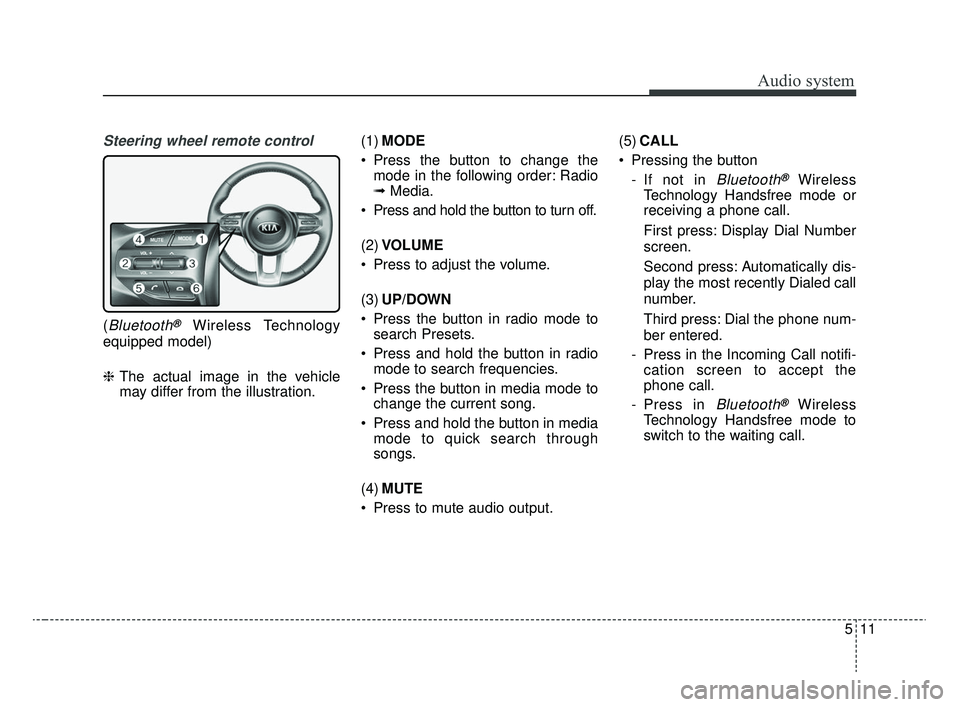
Steering wheel remote control
(Bluetooth®Wireless Technology
equipped model)
❈ The actual image in the vehicle
may differ from the illustration. (1)
MODE
Press the button to change the mode in the following order: Radio
➟ Media.
Press and hold the button to turn off.
(2) VOLUME
Press to adjust the volume.
(3) UP/DOWN
Press the button in radio mode to search Presets.
Press and hold the button in radio mode to search frequencies.
Press the button in media mode to change the current song.
Press and hold the button in media mode to quick search through
songs.
(4) MUTE
Press to mute audio output. (5)
CALL
Pressing the button - If not in
Bluetooth®Wireless
Technology Handsfree mode or
receiving a phone call.
First press: Display Dial Number
screen.
Second press: Automatically dis-
play the most recently Dialed call
number.
Third press: Dial the phone num-
ber entered.
- Press in the Incoming Call notifi- cation screen to accept the
phone call.
- Press in
Bluetooth®Wireless
Technology Handsfree mode to
switch to the waiting call.
SC CAN (ENG) 5(audio).qxp 6/7/2019 9:52 AM Page 11
Page 237 of 516
Audio system
512 Pressing and holding the button
- If not in
Bluetooth®Wireless
Technology Handsfree mode or
receiving a phone call, the most
recently Dialed Call number is
dialed.
- Press in
Bluetooth®Wireless
Technology Handsfree mode to
transfer the call to your cell
phone.
- Press in cell phone mode to switch to
Bluetooth®Wireless
Technology Handsfree mode.
(6) END
Press in
Bluetooth®Wireless
Technology Handsfree mode to
end the phone call.
Press in the incoming call screen to reject the call. Adjust the volume to levels that
allow the driver to hear sounds
from outside of the vehicle. Driving
in a state where external sounds
cannot be heard may lead to acci-
dents.
Pay attention to the volume setting when turning the device on. A sud-
den output of extreme volume
upon turning the device on could
lead to hearing impairment. (Adjust
the volume to a suitable levels
before turning off the device.)
Turn on the car ignition before using this device. Do not operate
the audio system for long periods
of time with the ignition turned off
as such operations may lead to
battery discharge.
In case of product malfunction, please contact your place of pur-
chase or customer service center.
Placing the audio system within an electromagnetic environment may
result in noise interference.
WARNING
Driving while distracted can
result in a loss of vehicle con-
trol that may lead to an acci-
dent, severe personal injury,
and death. The driver’s primary
responsibility is in the safe and
legal operation of a vehicle, and
use of any handheld devices,
other equipment, or vehicle sys-
tems which take the driver’s
eyes, attention and focus away
from the safe operation of a
vehicle or which are not permis-
sible by law should never be
used during operation of the
vehicle.
SC CAN (ENG) 5(audio).qxp 6/7/2019 9:52 AM Page 12
Page 239 of 516

Audio system
514
Information on status icons
Icons showing audio status are shown in the upper-right
corner of the screen.
IconDescription
MuteMute engaged
BatteryRemaining battery life of a connectedBluetooth®Wireless Technology device
Handsfree +
Audio streaming connectionBluetooth®Wireless Technology Handsfree
call and audio streaming available
Handsfree
connectionBluetooth®Wireless Technology Handsfree
call available
Bluetooth®
Wireless
Technology
audio streamingBluetooth®Wireless Technology audio
streaming available
Downloading contactsDownloading contacts through Bluetooth®
Wireless Technology wireless communications
Downloading call historyDownloading call history through Bluetooth®
Wireless Technology wireless communications
Line busyPhone call in progress
Mute micMic muted during a call
(caller cannot hear your voice)
Phone signal strengthDisplay the phone signal strength for a cell
phone connected by Bluetooth®Wireless
Technology
SC CAN (ENG) 5(audio).qxp 6/7/2019 9:52 AM Page 14
Page 244 of 516
![KIA RIO 2020 Owners Manual Audio system
19
5
List
A list of all channels is displayed.
Select the desired channel.
Favorite channels can be saved to
[Presets] by selecting [+]. Menu
Select [Menu], and select the desired
functio](/manual-img/2/40413/w960_40413-243.png "KIA RIO 2020 Owners Manual Audio system
19
5
List
A list of all channels is displayed.
Select the desired channel.
Favorite channels can be saved to
[Presets] by selecting [+]. Menu
Select [Menu], and select the desired
functio")
Audio system
19
5
List
A list of all channels is displayed.
Select the desired channel.
Favorite channels can be saved to
[Presets] by selecting [+]. Menu
Select [Menu], and select the desired
function.
Presets: Save up to 40 frequently
used channels.
To listen to a preset, select the
desired channel.
Press and hold the desired slot
from 1 through 40. This saves the
current channel in the selected
slot.
If the slot is empty, simply selecting
saves the channel to the slot.
Categories: Channels can be searched by category.
Direct Tune: The desired channel can be selected by entering num-
bers.
Sound Settings: Audio sound set- tings can be changed.
Tag Song: Tag the current song information.
When an Apple device (iPhone
®,
iPod®) is connected, tagged song
information is sent automatically to
the connected device.
✽ ✽ NOTICE
Up to 50 songs can be tagged.
Scan: All channels available in the
vehicle’s current location are
played for ten seconds each.
Program Schedule: View the pro- gram schedule.
Featured Favorites: The Featured Favorites feature allows SiriusXM™
to broadcast additional presets.
- Example 1: During holidays,“Holiday Music” might include all
SiriusXM™ channels that are
playing holiday music for easy
access by users.
Multiple sets of Featured Favorites
data can be broadcast by
SiriusXM™ and can change from
time to time.
Information: View detailed channel information.
Category Lock: Search or scan channels in the current category
only.
SC CAN (ENG) 5(audio).qxp 6/7/2019 9:52 AM Page 19