Page 9 of 589
H9
How to Connect to an AC Charger
1. Depress the brake pedal andapply the parking brake.
2. Turn OFF all switches, move the shift lever to P (Park), and turn
OFF the vehicle.
3. After unlocking doors, open the charging door by pressing it.
✽ ✽NOTICE
• The charging door does not open
when the theft alarm system is
armed.
• To open the charging inlet cover, all vehicle doors must be
unlocked. When the doors are
locked, the charging inlet cover
will not open.
4. Remove any dust on the charging
connector and charging inlet.
5. Hold the charging connector han- dle and insert it into the charging
inlet while pressing the release
button, until you hear a click
sound. If it is not fully connected, a
bad connection between the
charging connector and the charg-
ing terminals may cause a fire.OJFHPQ016010L
OJFHPQ018064L
Page 11 of 589
H11
Unlock Charging Door inEmergency
If the charging door does not open
due to battery discharge, open the
hood and slightly pull the emergency
cable which is located in headlamp
cover as shown above.
The charging door will then open. The charging cable lock may not
work properly when foreign materials
such as dust enter the cable or the
cable is encrusted with ice.
In that case, the charging cable may
not be disconnected or locked, or the
vehicle may not be charged. If this
happens, open the hood and pull the
emergency cable lightly 2 to 3 times
and then try to disconnect the charg-
ing cable or start recharging.
Charging Status
Checking Charging Status
You can monitor the charging status
outside of the vehicle when charging
the high-voltage battery.
OJFHP076232NOJFHPQ016009L
Page 12 of 589

H12
How to Disconnect an ACCharger
1. The vehicle doors must be unlocked in order to be able to dis-
connect the charging connector. A
lock system prevents charger
cable disconnection when the
vehicle's doors are locked.
2. Press the door unlock button onthe smart key.
3. Hold the charging connector han- dle and pull it while pressing the
release button (1).
OJFHPQ018028L
Charging StatusIndicator
Charging in
progressIlluminates (green)
Fully chargedOff
Scheduled chargingBlinks (green) and then turns off
Auxiliary battery
saver+ or sched-
uled air conditioner is operatingQuickly blinks
(Green) and then turns off
MalfunctionBlinks (red)
CHARGING THE PLUG-IN HYBRID VEHICLE (CONT.)
CAUTION
In order to disconnect thecharging connector, unlock thedoors to unlatch the chargingconnector lock system. If not,the charging connector and thevehicle's charging inlet may bedamaged.
CAUTION
When disconnecting the charg-ing connector, do not try to dis-connect it by force while notpressing the release button.This may damage the chargingconnector and vehicle charginginlet.
Page 16 of 589
H16
3. Check if the power lamp (green)on the control box turns ON.
❈ Make sure that the plug is not
loosely put into the outlet. (If it is
loose, it may generate heat.) 4. Depress the brake pedal and
apply the parking brake.
5. After unlocking doors, open the charging door by pressing it.
✽ ✽NOTICE
The charging door does not open
when the theft alarm system is
armed.
6. Remove any dust on the charging
connector and charging inlet.
7. Hold the charging connector han- dle and insert it into the charging
inlet while pressing the release
button, until you hear a click
sound. If it is not fully connected,
improper connection between the
charging connector and the charg-
ing terminals are a potential fire
hazard.
OJFHPQ016010L
CHARGING THE PLUG-IN HYBRID VEHICLE (CONT.)
ODEEVQ018043OJFHPQ018064L
Page 18 of 589
H18
10. After charging has started, theestimated charging time is dis-
played on the instrument cluster
for about 1 minute. It is also dis-
played when the driver's door is
opened with charging in progress.
When scheduled charging is set,
the estimated charging time is dis-
played as "--".
Unlock Charging Door in
Emergency
If the charging door does not open
due to battery discharge, open the
hood and slightly pull the emergency
cable which is located in headlamp
cover as shown above.
The charging door will then open. The charging cable lock may not
work properly when foreign materials
such as dust enter the cable or the
cable is encrusted with ice.
In that case, the charging cable may
not be disconnected or locked, or the
vehicle may not be charged. If this
happens, open the hood and pull the
emergency cable lightly 2 to 3 times
and then try to disconnect the charg-
ing cable or start recharging.
CHARGING THE PLUG-IN HYBRID VEHICLE (CONT.)
OJFHPQ018041L
OJFHP076232N
Page 23 of 589
H23
How to Disconnect PortableCharging Cable
(ICCB: In-Cable Control Box)
1. Before disconnecting the charging connector, make sure the doors
are unlocked. When the door is
locked, the charging connector
lock system will not allow discon-
nection.
2. Hold the charging connector han-dle and pull it while pressing the
release button (1).
3. Make sure to securely close the charging door. 4. Disconnect the plug from the
household electric outlet. Do not
pull the cable when disconnecting
the plug.
5. Close the protective cover for the charging connector so that foreign
material cannot get into the termi-
nal.
6. Put the charging cable inside the cable compartment to protect it.
OJFHPQ016015NCAUTION
In order to disconnect the charg-ing connector, unlock the doorsto unlatch the charging connec-tor lock system. If not, the charg-ing connector and the vehicle'scharging inlet may be damaged.
OJFHPQ018028L
Page 61 of 589
23
Your vehicle at a glance
1. Door locks .............................................4-13
2. Fuel filler lid ..................................4-31, 4-35
3. Rear combination lamp (Maintenance) .......................................7-83
4. High mounted stop lamp (Maintenance) .......................................7-86
5. Trunk ......................................................4-18
6. Antenna ...............................................4-154
7. Rear view monitor ...............................4-101
8. Parking Distance Warning - reverse ......4-98
OJFHP018008L
■ Rear view
❈The actual shape may differ from the illustration.
Page 62 of 589
Your vehicle at a glance
42
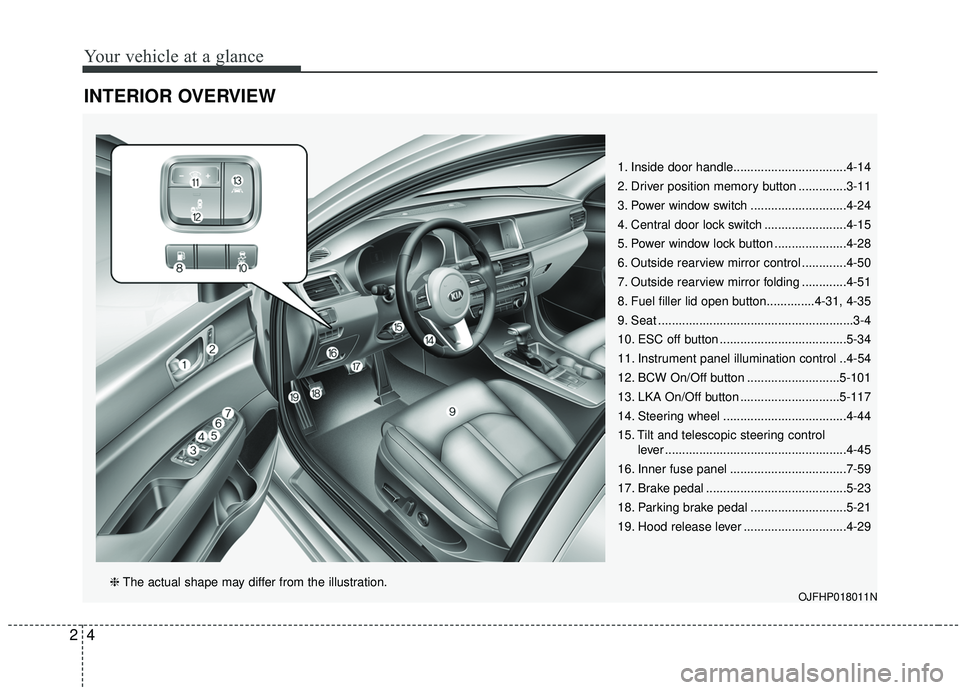
INTERIOR OVERVIEW
1. Inside door handle.................................4-14
2. Driver position memory button ..............3-11
3. Power window switch ............................4-24
4. Central door lock switch ........................4-15
5. Power window lock button .....................4-28
6. Outside rearview mirror control .............4-50
7. Outside rearview mirror folding .............4-51
8. Fuel filler lid open button..............4-31, 4-35
9. Seat .........................................................3-4
10. ESC off button .....................................5-34
11. Instrument panel illumination control ..4-54
12. BCW On/Off button ...........................5-101
13. LKA On/Off button .............................5-117
14. Steering wheel ....................................4-44
15. Tilt and telescopic steering control lever .....................................................4-45
16. Inner fuse panel ..................................7-59
17. Brake pedal .........................................5-23
18. Parking brake pedal ............................5-21
19. Hood release lever ..............................4-29
OJFHP018011N❈ The actual shape may differ from the illustration.


