Page 172 of 589

437
Features of your vehicle
Closing the fuel filler lid
1. To install the cap, turn it clockwiseuntil it “clicks” once. This indicates
that the cap is securely tightened.
2. Close the fuel filler lid and push it in lightly making sure that it is
securely closed.
✽ ✽NOTICE - Refueling
Do not "top off" after the nozzle
automatically shuts off when refuel-
ing. If pressurized fuel sprays out, it
can cover your clothes or skin and
subject you to the risk of fire and
burns. Always remove the fuel cap
carefully and slowly. If the cap is
venting fuel or if you hear a hissing
sound, wait until the condition stops
before completely removing the cap.
✽ ✽NOTICE
Always check that the fuel cap is
installed securely to prevent fuel
spillage in the event of an accident.
Emergency fuel filler lid release
If the fuel filler lid does not open
using the remote fuel filler lid
release, you can open it manually.
Remove the panel in the cargo area.
Pull the handle out slightly.
In this case, slowly open the fuel tank
cap, because the fuel tank may be
highly pressurized. If fuel leaks out,
or if air hisses out, wait until it disap-
pears, open the fuel tank cap, and
slowly refuel the vehicle. If you quick-
ly pour fuel into the fuel tank, the fuel
may overflow out of the fuel tank.
CAUTION
Do not pull the handle exces-
sively, otherwise the luggagecompartment area trim orrelease handle may be damaged.
OJFH045023
Page 180 of 589

445
Features of your vehicle
(Continued)
• If the Electronic Power SteeringSystem does not operate normally,
the warning light will illuminate or
flash on the instrument cluster. If
the power assistance of steering
fails, you will need to use more
force to steer.
Take your vehicle to an authorized
Kia dealer and have the vehicle
checked as soon as possible.
• When the charging system warning light comes on due to low voltage
(when the alternator or battery do
not operate normally or malfunc-
tions), the steering wheel may
require increased steering effort.Tilt and telescopic steering
Tilt and telescopic steering allows
you to adjust the steering wheel
before you drive. You can also raise it
to give your legs more room when
you exit and enter the vehicle.
The steering wheel should be posi-
tioned so that it is comfortable for
you to drive, while permitting you to
see the instrument panel warning
lights and gauges. To change the steering wheel angle,
pull down the lock-release lever (1),
adjust the steering wheel to the
desired angle (2) and height (3, if
equipped) then pull up the lock-
release lever to lock (4) the steering
wheel in place. Be sure to adjust the
steering wheel to the desired posi-
tion before driving.
WARNING- Steering
wheel adjustment
Never adjust the angle and
height of the steering wheel
while driving. You may lose
steering control.
OJFHP048028
Page 181 of 589
Features of your vehicle
46
4
✽ ✽
NOTICE
After adjustment, sometimes the
lock release lever may not lock the
steering wheel. It is not a malfunc-
tion. This occurs when two gears are
not engaged correctly. In this case,
adjust the steering wheel again and
then lock the steering wheel.
Heated steering wheel
(if equipped)
With the Engine Start/Stop button is
ON position, pressing the heated
steering wheel button warms the
steering wheel. The indicator on the
button will illuminate.
To turn the heated steering wheel off,
press the button once again. The
indicator on the button will turn off.
✽ ✽NOTICE
The heated steering wheel will turn
off automatically approximately 30
minutes after the heated steering
wheel is turned on.
OJFA045029
WARNING
If the steering wheel becomes
too warm, turn the system off.
The heated steering wheel may
cause burns even at low tem-
peratures, especially if used for
long periods of time.
Page 186 of 589
451
Features of your vehicle
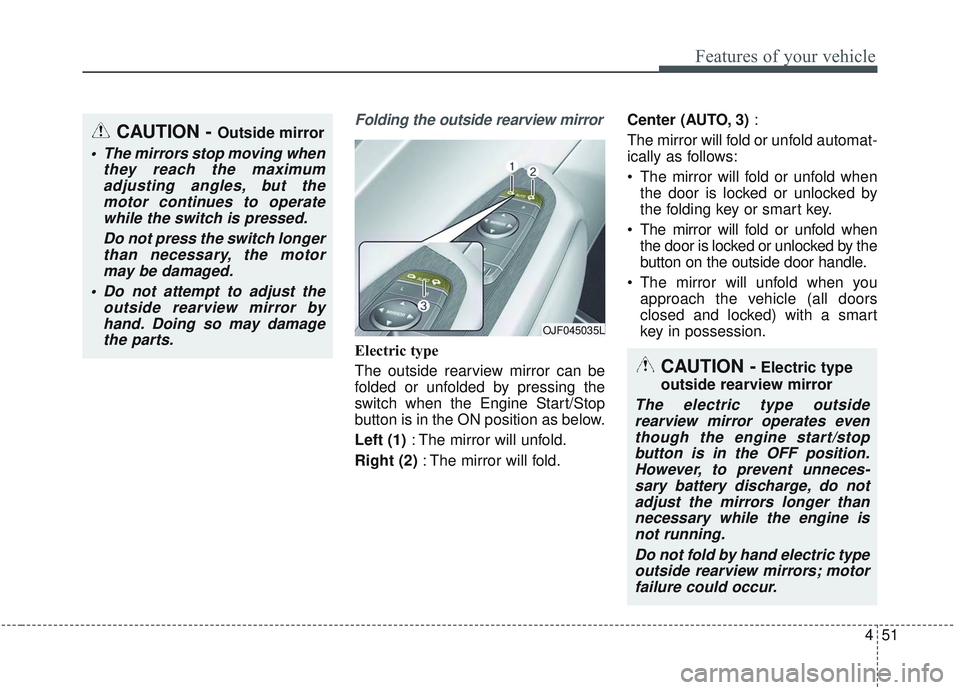
Folding the outside rearview mirror
Electric type
The outside rearview mirror can be
folded or unfolded by pressing the
switch when the Engine Start/Stop
button is in the ON position as below.
Left (1): The mirror will unfold.
Right (2) : The mirror will fold. Center (AUTO, 3)
:
The mirror will fold or unfold automat-
ically as follows:
The mirror will fold or unfold when the door is locked or unlocked by
the folding key or smart key.
The mirror will fold or unfold when the door is locked or unlocked by the
button on the outside door handle.
The mirror will unfold when you approach the vehicle (all doors
closed and locked) with a smart
key in possession.
CAUTION - Outside mirror
The mirrors stop moving when they reach the maximumadjusting angles, but themotor continues to operatewhile the switch is pressed.
Do not press the switch longerthan necessary, the motormay be damaged.
Do not attempt to adjust the outside rearview mirror byhand. Doing so may damagethe parts.
OJF045035L
CAUTION -Electric type
outside rearview mirror
The electric type outside rearview mirror operates eventhough the engine start/stopbutton is in the OFF position.However, to prevent unneces-sary battery discharge, do notadjust the mirrors longer thannecessary while the engine isnot running.
Do not fold by hand electric typeoutside rearview mirrors; motorfailure could occur.
Page 201 of 589

Features of your vehicle
66
4
Door
Automatically Lock :
- Enable on Speed : All doors willbe automatically locked when the
vehicle speed exceeds 15 km/h
(9.3 mph).
- Enable on Shift : All doors will be automatically locked if the trans-
mission shift lever is shifted from
the P (Park) position to the R
(Reverse), N (Neutral), or D
(Drive) position.
Automatically Unlock : - Disable : The auto door unlockoperation will be canceled.
- Vehicle Off/On key out : All doors will be automatically unlocked
when the ignition key is removed
from the ignition switch or the
Engine Start/Stop button is set to
the OFF position.
- On Shift to P : All doors will be automatically unlocked if the
automatic transmission shift lever
is shifted to the P (Park) position. Two Press Unlock :
- If this item is checked, the twopress unlock function will be acti-
vated.
Horn Feedback (if equipped) : - If this item is checked, the hornfeedback function will be activat-
ed.
Smart Trunk (if equipped) : - If this item is checked, the smarttrunk function will be activated.
❈ For more details, refer to “Smart
Trunk” in this chapter. Lights
One Touch Turn Signal :
- Off: The one touch turn signalfunction will be deactivated.
- 3, 5, 7 Flashes : The lane change signals will blink 3, 5 or 7 times
when the turn signal lever is
moved slightly.
❈ For more details, refer to “Lighting”
in this chapter.
Ambient Light Brightness (if equipped) :
- To select the brightness of theambient light. (Level 1 ~ 4)
Ambient Light Color (if equipped) : - To select the color of the ambientlight. (White / Orange / Red / Green
/ Blue / Violet / Link to Driver Mode)
Headlight Delay : - If this item is checked, the headlamp delay function will be acti-
vated.
❈ For more details, refer to “Lighting”
in this chapter.
Page 209 of 589

Features of your vehicle
74
4
Battery discharging due to exter-
nal electrical devices
The vehicle can detect self-dis- charge of the battery due to over-
current that may be generated by
external electrical devices.
Please note that functions such as ISG are limited and battery dis-
charge problems may occur.
If the warning continues even after external electrical devices are
removed, have your vehicle
inspected by an authorized Kia
dealer.
Low Key Battery
This warning message illuminatesif the battery of the smart key is
discharged when the Engine
Start/Stop Button changes to the
OFF position.
Press start button while turning
wheel
This warning message illuminates if the steering wheel does not
unlock normally when the Engine
Start/Stop Button is pressed.
It means that you should press the Engine Start/Stop Button while turn-
ing the steering wheel right and left.
Steering wheel not locked
This warning message illuminatesif the steering wheel does not lock
when the Engine Start/Stop Button
changes to the OFF position.
Check steering wheel lock sys-
tem
This warning message illuminates if the steering wheel does not lock
normally when the Engine
Start/Stop Button changes to the
OFF position.
Press brake pedal to start engine
This warning message illuminatesif the Engine Start/Stop Button
changes to the ACC position twice
by pressing the button repeatedly
without depressing the brake pedal.
It means that you should depress the brake pedal to start the engine.
Page 221 of 589

Features of your vehicle
86
4
Anti-lock Brake System
(ABS) Warning Light
This warning light illuminates:
Once you set the Engine Start/Stop Button to the ON posi-
tion.
- It illuminates for approximately 3seconds and then goes off.
When there is a malfunction with the ABS (The normal braking sys-
tem will still be operational without
the assistance of the anti-lock
brake system).
In this case, have your vehicle
inspected by an authorized Kia
dealer.
Electronic
Brake forceDistribution(EBD) SystemWarning Light
These two warning lights illuminate at
the same time while driving:
When the ABS and regular brake system may not work normally.
In this case, have your vehicle
inspected by an authorized Kia
dealer.
WARNING - Electronic
Brake force Distribution
(EBD) System Warning Light
When both ABS and Parking
Brake & Brake Fluid Warning
Lights are on, the brake system
will not work normally and you
may experience an unexpected
and dangerous situation during
sudden braking thereby
increasing the risk of a crash
and injury. In this case, avoid
high speed driving and abrupt
braking. Have your vehicle
inspected by an authorized Kia
dealer as soon as possible.
Page 234 of 589

499
Features of your vehicle
Types of warning sound
When an object is 120 cm to 61 cm(47 in. to 24 in.) from the rear
bumper: Buzzer beeps intermit-
tently.
When an object is 60 cm to 31 cm (24 in. to 12 in.) from the rear
bumper: Buzzer beeps more fre-
quently.
When an object is within 30 cm (12 in.) of the rear bumper:
Buzzer sounds continuously.
Non-operational conditions of
the parking distance warning-
reverse system
The parking distance warning-
reverse system may not operate
properly when:
1. Moisture is frozen to the sensor. (It will operate normally once the
moisture clears.)
2. The sensor is covered with foreign matter, such as snow or water, or
the sensor cover is blocked. (It will
operate normally when the materi-
al is removed or the sensor is no
longer blocked.)
3. Driving on uneven road surfaces (unpaved roads, gravel, bumps,
gradient).
4. Objects generating excessive noise (vehicle horns, loud motor-
cycle engines, or truck air brakes)
are within range of the sensor.
5. Heavy rain or water spray exists.
6. Wireless transmitters or mobile phones are within range of the
sensor.
7. The sensor is covered with snow.
8. Trailer towing. The detecting range may decrease
when:
1. The sensor is covered with foreign
matter such as snow or water.
(The sensing range will return to
normal when removed.)
2. Outside air temperature is extremely hot or cold.
The following objects may not be
recognized by the sensor:
1. Sharp or slim objects such as ropes, chains or small poles.
2. Objects which tend to absorb the sensor frequency such as clothes,
sound absorbent material or snow.
3. Undetectable objects smaller than 1 m (40 in.) in height and narrower
than 14 cm (6 in.) in diameter.
