2020 KIA OPTIMA alarm
[x] Cancel search: alarmPage 395 of 589

Driving your vehicle
102
5
The system will activate when:
1. The BCW system is on.
2. The vehicle speed is above about
30 km/h (20 mph).
3. Other vehicles are detected in blind spot.Warning indicator and sound
First stage alert
If a vehicle is detected within the
boundary of the system, a yellow
warning light will illuminate on the
outside rearview mirror.
If the detected vehicle is not in detec-
tion range, the warning will be turned
off according to the driving condi-
tions of the vehicle. Second stage alert
A warning alarm to alert the driver
will activate when:
1. A vehicle has been detected in the
blind spot area by the radar sys-
tem (the warning light will illumi-
nate on the outside rearview mir-
ror (i.e., in the first stage alert)
AND
2. The turn signal is on to change a lane (same side as where the
vehicle is being detected)
OJF055213
1st stage
OJF055215
2nd stage
Page 396 of 589

5103
Driving your vehicle
When the second stage alert is acti-
vated, the warning light on the out-
side rearview mirror will also blink.
If you turn off the turn signal switch,
the second stage alert (the warning
chime and the blinking warning light
on the outside rearview mirror) will
be deactivated.
If the detected vehicle is not in detec-
tion range, the warning will be turned
off according to the driving condi-
tions of the vehicle.CAUTION
The driver should always useextreme caution while operat-ing the vehicle, whether or notthe warning light on the out-side rearview mirror illumi-nates or there is a warningalarm.
Playing the vehicle audio sys- tem at high volume may pre-vent occupants from hearingthe Blind-Spot CollisionWarning System warningsounds.
The warning of the Blind-Spot Collision Warning System maynot sound if warning soundsfrom other systems are acti-vated.
WARNING
The warning light on the out-
side rearview mirror will illu-
minate whenever a vehicle is
detected at the rear side by
the system. To avoid acci-
dents, do not focus only on
the warning light and neglect
to see the surrounding of the
vehicle.
Drive safely even though the
vehicle is equipped with a
Blind-Spot Collision Warning
System (BCW). Do not solely
rely on the system but check
your surroundings before
changing lanes or backing the
vehicle up. The Blind-Spot
Collision Warning system
(BCW) may not detect every
object alongside the vehicle.
The system may not alert the
driver in some situations due
to system limitations so
always check your surround-
ings while driving.
Page 399 of 589

Driving your vehicle
106
5
If the vehicle detected by the sensors
approaches from the rear left/right
side of your vehicle, the warning
chime will sound, the warning light
on the outside rearview mirror will
blink and a message will appear on
the LCD display.
The warning will stop when:
- The vehicle moving at the rear
left/right side of your vehicle is not
in the detection range.
- The vehicle is right behind your vehicle.
- The vehicle is not driving towards your vehicle.
- The vehicle’s approaching speed is decreased.
WARNING
Drive safely even though thevehicle is equipped with a
Rear Cross-Traffic Collision
Warning (RCCW) System. Do
not solely rely on the system
but check your surrounding
when backing the vehicle up.
The RCCW system may not
detect every object alongside
the vehicle.
The driver is responsible for accurate brake control.
Always pay extreme caution while driving. The Rear Cross-
Traffic Collision Warning
System may not operate prop-
erly or unnecessarily operate
in accordance with your driv-
ing situations.
CAUTION
If the operating conditions of RCCW are satisfied, a warningis issued every time a vehiclecomes to the rear side, even ifyour vehicle is stopped (vehi-cle speed 0 km/h (0 mph)).
The system's warning may not operate properly if theleft/right of your vehicle's rearbumper is blocked by a vehi-cle or obstacle.
The driver should always use extreme caution while operat-ing the vehicle, whether or notthe warning light on the out-side rearview mirror illumi-nates or there is a warningalarm.
Playing the vehicle audio sys- tem at high volume may pre-vent occupants from hearingthe system's warning sounds.
The warning of the Rear Cross- Traffic Collision WarningSystem may not sound if warn-ing sounds from other systemsare activated.
Page 410 of 589
5117
Driving your vehicle
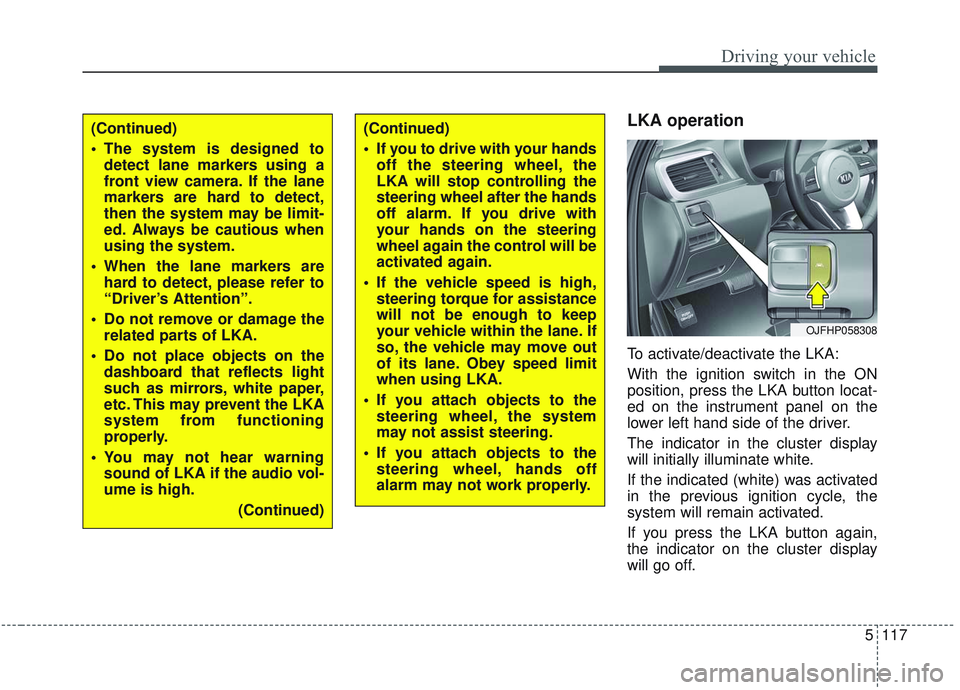
LKA operation
To activate/deactivate the LKA:
With the ignition switch in the ON
position, press the LKA button locat-
ed on the instrument panel on the
lower left hand side of the driver.
The indicator in the cluster display
will initially illuminate white.
If the indicated (white) was activated
in the previous ignition cycle, the
system will remain activated.
If you press the LKA button again,
the indicator on the cluster display
will go off.
OJFHP058308
(Continued)
The system is designed todetect lane markers using a
front view camera. If the lane
markers are hard to detect,
then the system may be limit-
ed. Always be cautious when
using the system.
When the lane markers are hard to detect, please refer to
“Driver’s Attention”.
Do not remove or damage the related parts of LKA.
Do not place objects on the dashboard that reflects light
such as mirrors, white paper,
etc. This may prevent the LKA
system from functioning
properly.
You may not hear warning sound of LKA if the audio vol-
ume is high.
(Continued)(Continued)
If you to drive with your handsoff the steering wheel, the
LKA will stop controlling the
steering wheel after the hands
off alarm. If you drive with
your hands on the steering
wheel again the control will be
activated again.
If the vehicle speed is high, steering torque for assistance
will not be enough to keep
your vehicle within the lane. If
so, the vehicle may move out
of its lane. Obey speed limit
when using LKA.
If you attach objects to the steering wheel, the system
may not assist steering.
If you attach objects to the steering wheel, hands off
alarm may not work properly.
Page 521 of 589

755
Maintenance
Inner panel fuse replacement
1. Turn the engine start/stop buttonto the OFF position and all other
switches off.
2. Open the fuse panel cover.
If the switch is located in the “OFF”
position, a caution indicator will be
displayed in the cluster. 3. Pull the suspected fuse straight
out. Use the removal tool provided
on the engine compartment fuse
panel cover.
4. Check the removed fuse; replace it if it is blown.
Spare fuses are provided in theengine compartment fuse panel.
5. Push in a new fuse of the same rating, and make sure it fits tightly
in the clips.
If it fits loosely, consult an authorized
Kia dealer.
OJFH075023
OJF075022
CAUTION - Random
wiring prohibited when
retrofitting equipment
Use of random wiring in the vehicle might cause danger dueto failure and damage of thevehicle’s performance. Usingrandom wires especially whenretrofitting the AVN or theftalarm system, remote enginecontrol, car phone or radio,might damage the vehicle orcause fire.
CAUTION - Remodeling
Prohibited
Do not rewire your vehicle inany way as doing so may affectthe performance of several safe-ty features in your vehicle.Rewiring your vehicle may alsovoid your warranty and causeyou to be responsible for anysubsequent vehicle damagewhich may result.
Page 536 of 589

Maintenance
70
7
Fuse NameFuse ratingCircuit Protected
FUSE
SENSOR 115AOxygen Sensor (Up/Down), E/R Junction Block (Cooling Fan Relay)
IGN COIL20AIgnition Coil #1/#2/#3/#4
ECU 210APCM
TCU 110APCM
HEV ECU 210AHPCU, E/R Junction Block (Battery C/Fan Relay)
ECU 310APCM
POWER OUT-
LET220AFront Power Outlet #1
HORN20AHorn Relay, ICM Relay Box (Burglar Alarm Horn Relay)
WIPER 130AWiper Power Relay
BATTERYC/FAN15AE/R Junction Block (Battery C/Fan Relay)
Page 587 of 589

I9
Index
Smart Cruise Control switch ......................................5-78
To adjust the sensitivity of smart cruise control ........5-89
To convert to cruise control mode ..............................5-89
Vehicle to vehicle distance setting ..............................5-83
When the lane ahead is clear ......................................5-84
When there is a vehicle ahead of you in your lane ....5-85
Smart key ........................................................................\
4-4 Battery replacement ......................................................4-8
Loss of the smart key ....................................................4-7
Record your key number ..............................................4-4
Smart key function ........................................................4-4
Smart key immobilizer system ....................................4-8
Smart key precautions ..................................................4-7
Smart trunk ....................................................................4-18\
Detecting area ............................................................4-22
Emergency trunk safety release ..................................4-22
How to deactivate the Smart Trunk function using the smart key ..................................................................4-21
How to use the Smart Trunk ......................................4-18
Special driving conditions ..........................................5-132 Driving at night ........................................................5-133
Driving in flooded areas ..........................................5-135
Driving in the rain ....................................................5-134
Hazardous driving conditions ..................................5-132
Highway driving ......................................................5-135
Rocking the vehicle ..................................................5-132
Smooth cornering ......................................................5-133 Steering wheel ..............................................................4-44
Electric Power Steering (EPS) ....................................4-44
Heated steering wheel ................................................4-46
Horn ........................................................................\
....4-47
Tilt and telescopic steering ........................................4-45
Storage compartments ................................................4-140 Center console storage ..............................................4-140
Glove box ..................................................................4-140
Sunglass holder ........................................................4-141
Theft-alarm system ........................................................4-10 Armed stage ................................................................4-10
Disarmed stage ............................................................4-11
Theft-alarm stage ........................................................4-11
Tire Pressure Monitoring System (TPMS) ......................6-9 Changing a tire with TPMS ........................................6-13
Check tire pressure.....................................................\
...6-9
Low tire pressure position telltale ..............................6-11
Tire specification and pressure label ..............................8-9
Tires and wheels ....................................................7-39, 8-4 All season tires ..........................................................7-51
Checking tire inflation pressure ..................................7-40
Radial-ply tires ............................................................7-52
Recommended cold tire inflation pressures................7-39
Snow tires....................................................................7-51\
Summer tires ..............................................................7-51
T