Page 14 of 589

H14When you cannot drive to a public
charging station due to low battery,
you can charge the car by using the
220V portable charger (ICCB: In
Cable Control Box) which you can
buy as an option.
✽ ✽
NOTICE
This cable is designed to prevent
problems caused by unexpected bat-
tery discharge and when you use
general outlets, it may lead to exces-
sive electricity charges as the elec-
tricity charges for electric vehicles
will not be applied. So refrain from
using it to fully charge your car.
How to Set Charging Current of
Portable Charging Cable
1. Check the outlet’s current rating before connecting the plug to the
outlet.
2. Connect the power plug to the household electrical outlet.
3. Check the status of the control box display. 4. Adjust the charging current by
pressing the button (1) on the
back of the control box for more
than 1 second. (Refer to the exam-
ples of charging cable type and
charging current setting.)
5. Each time the button (1) is pressed, the control box display is
sequentially changed to 12A, 10A
and 8A.
6. Once the charging current setting is complete, start charging accord-
ing to Trickle Charge procedure.
CHARGING THE PLUG-IN HYBRID VEHICLE (CONT.)
OJFHPQ016015N
ODEEVQ018041
WARNING
If this cable is connected to a
household power source, it may
exceed the capacity of the dis-
tributor, resulting in safety
problems such as electrical
shutdown and fire.
Page 16 of 589
H16
3. Check if the power lamp (green)on the control box turns ON.
❈ Make sure that the plug is not
loosely put into the outlet. (If it is
loose, it may generate heat.) 4. Depress the brake pedal and
apply the parking brake.
5. After unlocking doors, open the charging door by pressing it.
✽ ✽NOTICE
The charging door does not open
when the theft alarm system is
armed.
6. Remove any dust on the charging
connector and charging inlet.
7. Hold the charging connector han- dle and insert it into the charging
inlet while pressing the release
button, until you hear a click
sound. If it is not fully connected,
improper connection between the
charging connector and the charg-
ing terminals are a potential fire
hazard.
OJFHPQ016010L
CHARGING THE PLUG-IN HYBRID VEHICLE (CONT.)
ODEEVQ018043OJFHPQ018064L
Page 18 of 589
H18
10. After charging has started, theestimated charging time is dis-
played on the instrument cluster
for about 1 minute. It is also dis-
played when the driver's door is
opened with charging in progress.
When scheduled charging is set,
the estimated charging time is dis-
played as "--".
Unlock Charging Door in
Emergency
If the charging door does not open
due to battery discharge, open the
hood and slightly pull the emergency
cable which is located in headlamp
cover as shown above.
The charging door will then open. The charging cable lock may not
work properly when foreign materials
such as dust enter the cable or the
cable is encrusted with ice.
In that case, the charging cable may
not be disconnected or locked, or the
vehicle may not be charged. If this
happens, open the hood and pull the
emergency cable lightly 2 to 3 times
and then try to disconnect the charg-
ing cable or start recharging.
CHARGING THE PLUG-IN HYBRID VEHICLE (CONT.)
OJFHPQ018041L
OJFHP076232N
Page 20 of 589
H20
CHARGING THE PLUG-IN HYBRID VEHICLE (CONT.)
Control BoxIndicatorDetails
PLUG
On : Power on
Blink : Plug temperature sensor failure
On : Plug high temperature protection
Blink : Plug high temperature warning
POWEROn : Power on
CHARGEBlink : Charging In power saving mode, only the CHARGE indicator is illuminated.
FAU LTBlink : Charging interrupted
CHARGE LEVEL
Charging current 12 AThe charging current
changes (3 level)
whenever the button
(1) is pressed for 1 sec
with the charger
plugged into an electri-
cal outlet but not the
vehicle.
Charging current 10 A
Charging current 8 A
VEHICLE
Charging connector plugged
Charging
Blink : Charging impossible
(Green)
(Green) (Blue)
(Red)(Red)
Charging Status Indicator Lamp for Portable Charger
Page 22 of 589
H22
CHARGING THE PLUG-IN HYBRID VEHICLE (CONT.)
NOControl BoxStatus / Diagnosis / CountermeasureNOControl BoxStatus / Diagnosis / Countermeasure
5
- Plugged into the vehicle (Red blink)
Internal diagnostic device failure
Current leakage
Abnormal internal temperature
(Contact an authorized Kia dealer.)
6
- After plugging charging connectorinto vehicle (Red blink)
(Contact an authorized Kia dealer.)
7
Plug temperature sensor failure (Green blink)
Plug high temperature protection (Red blink)
Plug high temperature warning (Red On)
(Contact an authorized Kia dealer.)
8
- Power saving mode
3minutes after charging starts (Green blink)
Page 24 of 589

H24
Precautions for PortableCharging Cable (ICCB: In-Cable Control Box)
Use a portable charging cable that is certified by Kia.
Do not try to repair, disassemble, or adjust the portable charging cable.
Do not use an extension cord or adapter.
Stop using immediately if failure warning light occurs.
Do not touch the plug and charging connector with wet hands.
Do not touch the terminal part of the AC charging connector and the AC
charging inlet on the vehicle.
Do not connect the charging con- nector to voltage that does not
comply with regulations.
Do not use the portable charging cable if it is worn out, exposed, or
there exists any type of damage on
the portable charging cable. If the ICCB case and AC charging
connector is damaged, cracked, or
the wires are exposed in any way,
do not use the portable charging
cable.
Do not let children operate or touch the portable charging cable.
Keep the control box free of water.
Keep the AC charging connector or plug terminal free of foreign sub-
stances.
Do not step on the cable or cord. Do not pull the cable or cord and
do not twist or bend it.
Do not charge when there is light- ning.
Do not drop the control box or place a heavy object on the control
box.
Do not place an object that can generate high temperatures near
the charger when charging. Charging with a worn out or dam-
aged household electric outlet can
result in a risk of electric shock If
you have doubts about the house-
hold electric outlet condition, have
it checked by a licensed electri-
cian.
Stop using the portable charging cable immediately if the household
electric outlet or any components
are overheating or smell burning.
CHARGING THE PLUG-IN HYBRID VEHICLE
Page 25 of 589
H25
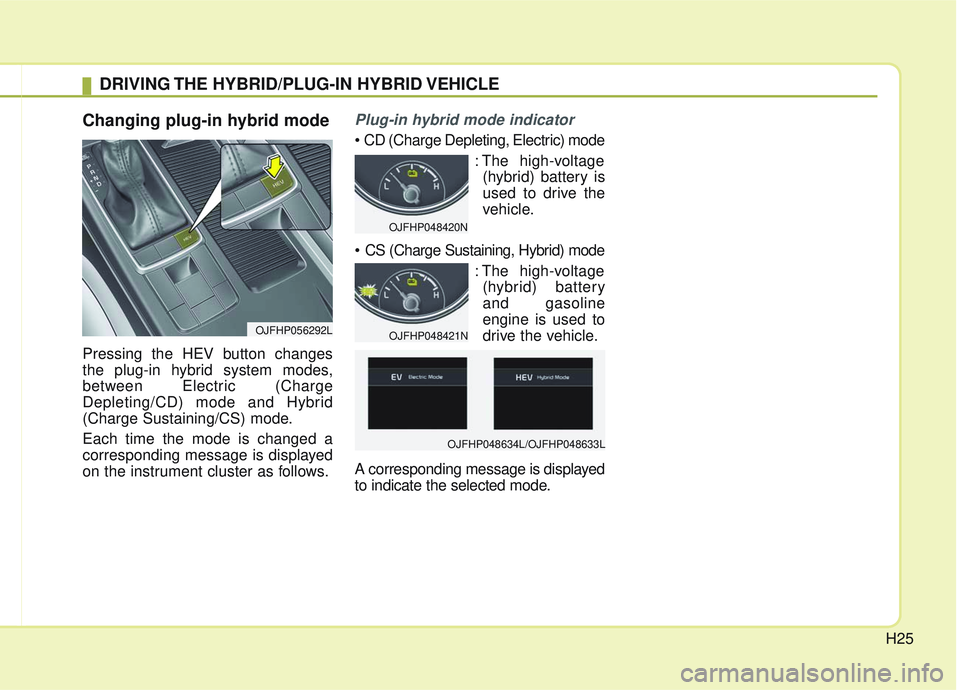
Changing plug-in hybrid mode
Pressing the HEV button changes
the plug-in hybrid system modes,
between Electric (Charge
Depleting/CD) mode and Hybrid
(Charge Sustaining/CS) mode.
Each time the mode is changed a
corresponding message is displayed
on the instrument cluster as follows.
Plug-in hybrid mode indicator
: The high-voltage(hybrid) battery is
used to drive the
vehicle.
: The high-voltage(hybrid) battery
and gasoline
engine is used to
drive the vehicle.
A corresponding message is displayed
to indicate the selected mode.
DRIVING THE HYBRID/PLUG-IN HYBRID VEHICLE
OJFHP056292L
OJFHP048420N
OJFHP048421N
OJFHP048634L/OJFHP048633L
Page 26 of 589

H26
Warning and indicator lights
Ready Indicator
This indicator illuminates :
When the vehicle is ready to be driven.
- ON : Normal driving is possible.
- OFF : Normal driving is not possible,
or a problem has occurred.
- Blinking : Emergency driving.
When the ready indicator goes OFF
or blinks, there is a problem with the
system. In this case, have your vehi-
cle inspected by an authorized Kia
dealer.
Hybrid system warning light
This warning light illuminates:
When there is a malfunction with the
hybrid system.
In this case, have the vehicle
inspected by an authorized Kia deal-
er.
When the warning light illuminates
while driving, or does not go OFF
after starting the vehicle, have your
vehicle inspected by an authorized
Kia dealer.
EV Mode Indicator
This indicator illuminates when the
vehicle is driven by the electric motor.
Charging CableConnection Indicator(Plug-in hybrid)
This indicator illuminates in red when
the charging cable is connected.
DRIVING THE HYBRID/PLUG-IN HYBRID VEHICLE (CONT.)
EV