2020 KIA OPTIMA HYBRID climate
[x] Cancel search: climatePage 36 of 597

H29
Charger Error! (Plug-in hybrid)
This message is displayed when the
charging failed due to an external
charger error.
The purpose of this message is to let
you know the error has occurred in
the charger itself, not in the vehicle.
Low/High System temperatureMaintaining Hybrid mode (Plug-in hybrid)
This message is displayed when the
vehicle is unable to convert to EV
mode even when pressing the HEV
button during HEV mode driving due
to low/high system temperature.
Switching to Hybrid mode toallow heating or air conditioning(Plug-in hybrid)
When the coolant temperature is lower than 57 °F (-14 °C), and you
turn the climate control On for
heating, this message will be dis-
played in the cluster. Then, the
vehicle will automatically switch to
HEV mode.
When the coolant temperature is higher than 57 °F (-14 °C), or you
turn the climate control Off, the
vehicle will automatically return to
EV mode.
Wait until fuel door opens
(Plug-in hybrid)
This message is displayed when you
attempt to open the fuel filler lid with
the fuel tank pressurized. Wait until
the fuel tank is depressurized.
✽ ✽ NOTICE
• It may take up to 20 seconds to
open fuel filler lid.
• When the fuel filler lid is frozen and does not open after 20 seconds
at freezing temperature, slightly
tap the fuel filler lid and then
attempt to open it.
Page 66 of 597

25
Your vehicle at a glance
INSTRUMENT PANEL OVERVIEW
1. Cruise control ......................................5-72Smart Cruise Control with Stop & Go .5-76
2. Driver’s front air bag ............................3-59
3. Horn.....................................................4-47
4. Instrument cluster ................................4-53
5. Wiper and washer control lever .........4-112
6. Engine start/stop button ........................5-7
7. Passenger’s front air bag ....................3-60
8. Glove box ..........................................4-139
9. Hazard warning flasher .........................6-2
10. Automatic climate control system ....4-119
11. Shift lever A/T ....................................5-12
12. Heated steering wheel button ...........4-46
13.Drive mode button (Hybrid vehicle) ....5-96
14. Seat warmer ....................................4-142 Air ventilation seat ...........................4-143
15. Electronic parking brake (EPB) switch.................................................5-22
16. Auto Hold On/Off button ....................5-29
17. Center console storage box ............4-138
18.Power outlet......................................4-144
19. USB charger ....................................4-145
20. Smart phone wireless charger ........4-146
21. ECO button (Plug-in hybrid vehicle) ..5-98
OJFHP018014N❈ The actual shape may differ from the illustration.
Page 141 of 597

Welcome system . . . . . . . . . . . . . . . . . . . . . . . . . . 4-117
. . . . . . . . . . 4-117
. . . . . . . . . . . . . . . . . . . . . . . . . . . . . . . 4-117
. . . . . . . . . . . . . . . . . . . . . . . . . . . . . . . . 4-117
Defroster . . . . . . . . . . . . . . . . . . . . . . . . . . . . . . . . 4-118
. . . . . . . . . . . . . . . . . . . . . . . 4-118
Automatic climate control system. . . . . . . . . . . . 4-119
. . . . . . . . . 4-120
. . . . . . . . . . . 4-121
. . . . . . . . . . . . . . . . . . . . . . . . . . . . 4-129
. . . . . . . . . . . . . . . . . . . . . . 4-131
refrigerant and compressor lubricant . . . . . . . . . . 4-132
Windshield defrosting and defogging . . . . . . . . . 4-134
. . . . . . . . . . . . . . 4-134
Clean air . . . . . . . . . . . . . . . . . . . . . . . . . . . . . . . . 4-137
Storage compartments . . . . . . . . . . . . . . . . . . . . . 4-138
. . . . . . . . . . . . . . . . . . . . . . . 4-138
. . . . . . . . . . . . . . . . . . . . . . . . . . . . . . . . . . 4-13\
9
. . . . . . . . . . . . . . . . . . . . . . . . . . . . . 4-139
Interior features . . . . . . . . . . . . . . . . . . . . . . . . . . 4-141
. . . . . . . . . . . . . . . . . . . . . . . . . . . . . . . . . 4-141
. . . . . . . . . . . . . . . . . . . . . . . . . . . . . . . . 4-142
. . . . . . . . . . . . . . . . . . . . . . . . . . 4-143
. . . . . . . . . . . . . . . . . . . . . . . . . . . . . . . . . . . 4-\
143
. . . . . . . . . . . . . . . . . . . . . . . . . . . . . . . . 4-144
. . . . . . . . . . . . . . . . . . . . . . . . . . . . . . . . 4-145
. . . . . . . . . . 4-146
. . . . . . . . . . . . . . . . . . . . . . . . . . . . . . . . . . 4-14\
9
. . . . . . . . . . . . . . . . . . . . . . . . . . . . . . . . 4-151
Audio system . . . . . . . . . . . . . . . . . . . . . . . . . . . . . 4-152
. . . . . . . . . . . . . . . . . . . . . 4-153
Declaration of Conformity . . . . . . . . . . . . . . . . . 4-156
. . . . . . . . . . . . . . . . . . . . . . . . . . . . . . . . . . . . \
. . . 4-156
4
Page 151 of 597
413
Features of your vehicle
DOOR LOCKS
Operating door locks from
outside the vehicle
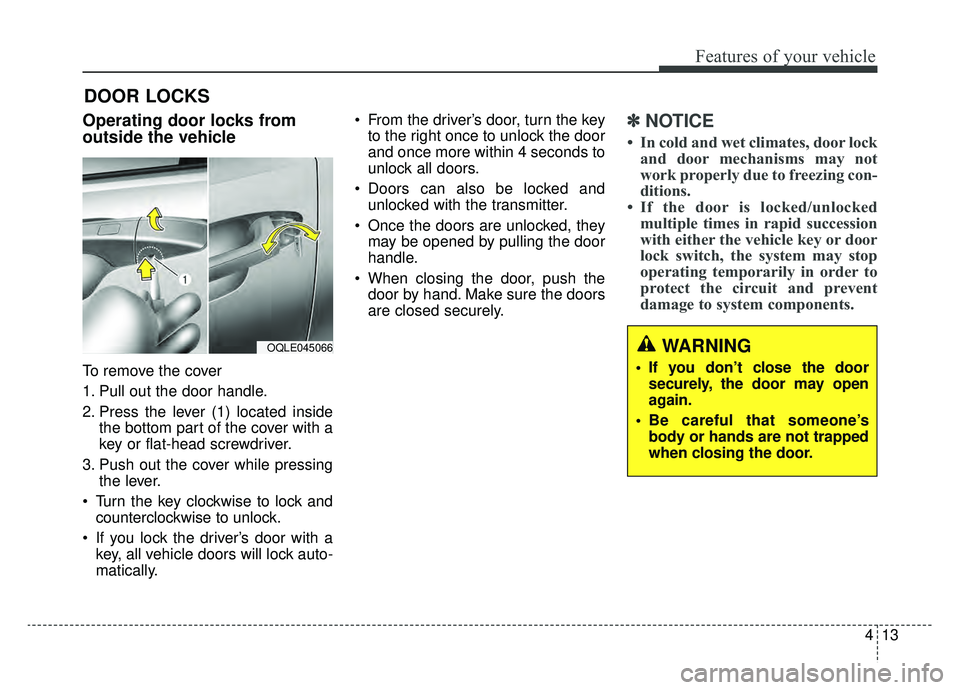
To remove the cover
1. Pull out the door handle.
2. Press the lever (1) located insidethe bottom part of the cover with a
key or flat-head screwdriver.
3. Push out the cover while pressing the lever.
Turn the key clockwise to lock and counterclockwise to unlock.
If you lock the driver’s door with a key, all vehicle doors will lock auto-
matically. From the driver’s door, turn the key
to the right once to unlock the door
and once more within 4 seconds to
unlock all doors.
Doors can also be locked and unlocked with the transmitter.
Once the doors are unlocked, they may be opened by pulling the door
handle.
When closing the door, push the door by hand. Make sure the doors
are closed securely.
✽ ✽ NOTICE
• In cold and wet climates, door lock
and door mechanisms may not
work properly due to freezing con-
ditions.
• If the door is locked/unlocked multiple times in rapid succession
with either the vehicle key or door
lock switch, the system may stop
operating temporarily in order to
protect the circuit and prevent
damage to system components.
OQLE045066WARNING
• If you don’t close the door
securely, the door may open
again.
Be careful that someone’s body or hands are not trapped
when closing the door.
Page 162 of 597
Features of your vehicle
24
4
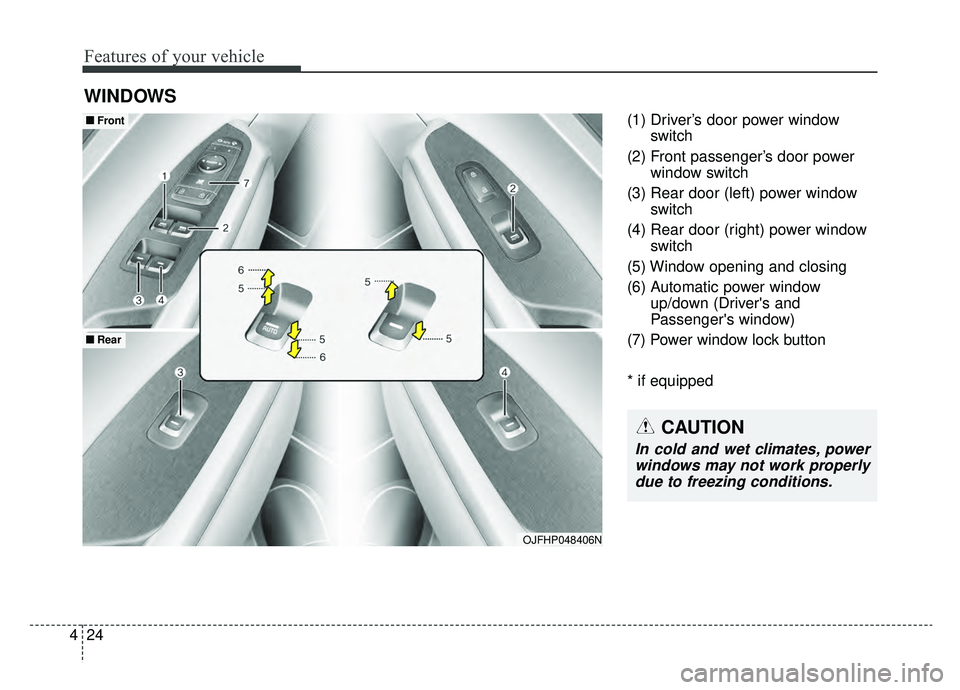
(1) Driver’s door power window
switch
(2) Front passenger’s door power window switch
(3) Rear door (left) power window switch
(4) Rear door (right) power window switch
(5) Window opening and closing
(6) Automatic power window up/down (Driver's and
Passenger's window)
(7) Power window lock button
* if equipped
WINDOWS
OJFHP048406N
■ ■ Front
■ ■Rear
CAUTION
In cold and wet climates, power
windows may not work properlydue to freezing conditions.
Page 176 of 597

Features of your vehicle
38
4
If your vehicle is equipped with a
sunroof, you can slide or tilt your
sunroof with the sunroof control lever
located on the overhead console.
The sunroof can be operated for
approximately 30 seconds after
turned to the Engine Start/Stop but-
ton OFF position.
However, if the front door is opened,
the sunroof cannot be operated even
within the 30 second period. In cold and wet climates, the sunroof
may not work properly due to freez-
ing conditions.
After the vehicle is washed or in a
rainstorm, be sure to wipe off any
water that is on the sunroof before
operating it.The sunroof cannot slide when it is in
the tilt position nor can it be tilted
while in an open or slide position.
PANORAMIC SUNROOF (IF EQUIPPED)
CAUTION- Sunroof
control lever
Do not continue to press the sun-
roof control lever after the sun-roof is fully opened, closed, ortilted. Damage to the motor orsystem components could occur.
CAUTION - Sunroof motor
damage
To prevent damage to the sun-roof, periodically remove anydirt that may accumulate on theguide rail.
WARNING- Roof cargo
Do not operate the sun roof
while using the roof rack to
transport cargo. This may cause
the cargo to come loose and
distract the driver.
OJF045024
WARNING
Never adjust the sunroof or
sunshade while driving. This
could result in loss of control
and an accident that may cause
death, serious injury, or proper-
ty damage.
WARNING
Do not allow children to operate
the sunroof. This may result in
injury to the child.
Page 220 of 597

Features of your vehicle
82
4
EV/HEV (Plug-in hybrid)
A corresponding message is dis-
played when a mode is selected by
pressing the HEV button.
Low battery. Maintaining Hybrid
mode (Plug-in hybrid)
This message is displayed when
unable to convert to EV mode even
when pressing the HEV button dur-
ing HEV mode driving due to insuffi-
cient high-voltage(hybrid) battery
level.
Charger Error! (Plug-in hybrid)
This message is displayed when
there is a problem with the charger.
The purpose of this message is to let
you know an error has occurred in
charger itself not in vehicle.
Low/High System Temp.Maintaining Hybrid (Plug-in hybrid)
This message is displayed when
unable to convert to EV mode even
when pressing the HEV button dur-
ing HEV mode driving due to
low/high system temperature.
Switching to Hybrid mode toallow heating (Plug-in hybrid)
When the coolant temperature is lower than 57°F (-14°C), and you
turn the climate control On for
heating, this message will be dis-
played in the cluster. Then, the
vehicle will automatically switch to
HEV mode.
When the coolant temperature is higher than 57°F(-14°C), or you
turn the climate control Off, the
vehicle will automatically return to
EV mode.
Wait until fuel door opens
(Plug-in hybrid)
This message is displayed when you
attempt to open the fuel filler lid with
the fuel tank pressurized. Wait until
the fuel tank is depressurized.
✽ ✽ NOTICE
• It may take up to 20 seconds to
open fuel filler lid.
• When the fuel filler lid is frozen and does not open after 20 seconds
at freezing temperature, slightly
tap the fuel filler lid and then
attempt to open it.
Page 257 of 597
4119
Features of your vehicle
AUTOMATIC CLIMATE CONTROL SYSTEM
OJFH045083L/OJFH045084L
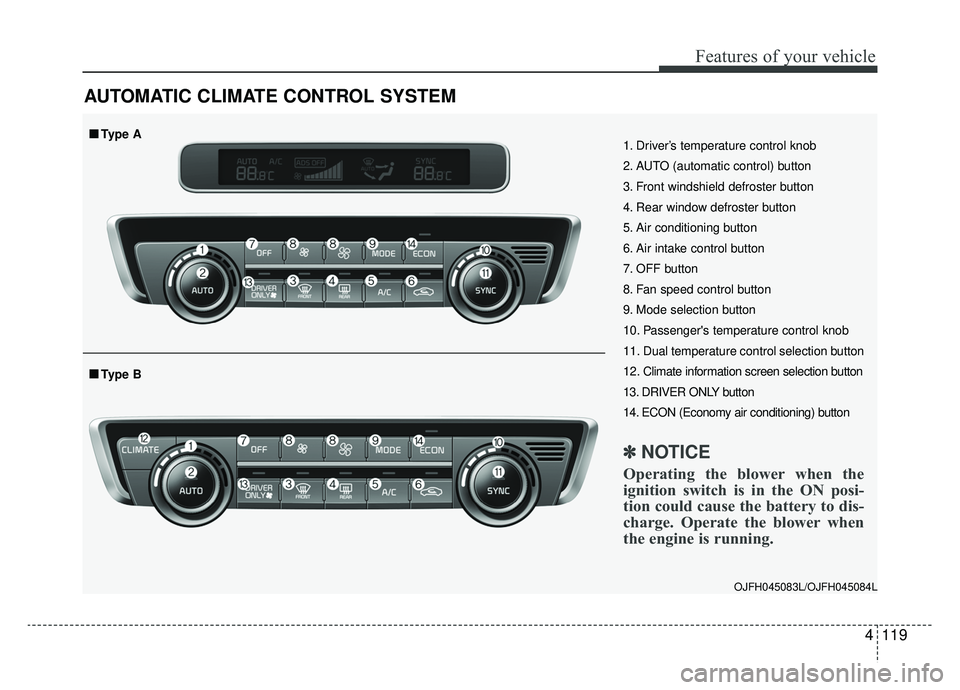
1. Driver’s temperature control knob
2. AUTO (automatic control) button
3. Front windshield defroster button
4. Rear window defroster button
5. Air conditioning button
6. Air intake control button
7. OFF button
8. Fan speed control button
9. Mode selection button
10. Passenger's temperature control knob
11. Dual temperature control selection button
12. Climate information screen selection button
13. DRIVER ONLY button
14. ECON (Economy air conditioning) button
✽ ✽NOTICE
Operating the blower when the
ignition switch is in the ON posi-
tion could cause the battery to dis-
charge. Operate the blower when
the engine is running.
■ ■Type B
■ ■Type A