Page 321 of 687
511
Driving your vehicle
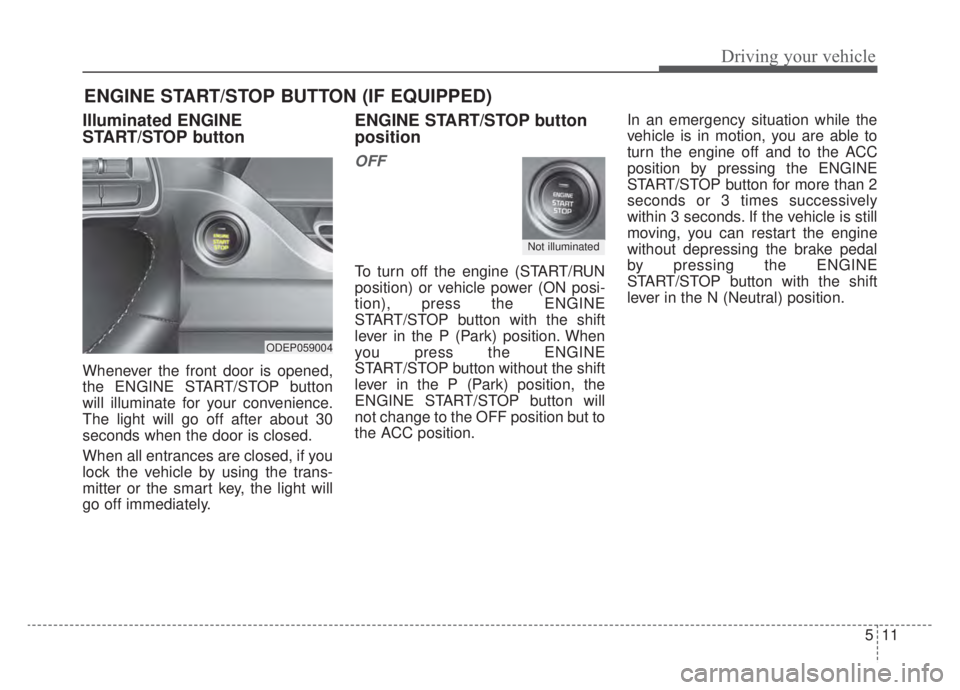
Illuminated ENGINE
START/STOP button
Whenever the front door is opened,
the ENGINE START/STOP button
will illuminate for your convenience.
The light will go off after about 30
seconds when the door is closed.
When all entrances are closed, if you
lock the vehicle by using the trans-
mitter or the smart key, the light will
go off immediately.
ENGINE START/STOP button
position
OFF
To turn off the engine (START/RUN
position) or vehicle power (ON posi-
tion), press the ENGINE
START/STOP button with the shift
lever in the P (Park) position. When
you press the ENGINE
START/STOP button without the shift
lever in the P (Park) position, the
ENGINE START/STOP button will
not change to the OFF position but to
the ACC position.In an emergency situation while the
vehicle is in motion, you are able to
turn the engine off and to the ACC
position by pressing the ENGINE
START/STOP button for more than 2
seconds or 3 times successively
within 3 seconds. If the vehicle is still
moving, you can restart the engine
without depressing the brake pedal
by pressing the ENGINE
START/STOP button with the shift
lever in the N (Neutral) position.
ENGINE START/STOP BUTTON (IF EQUIPPED)
ODEP059004
Not illuminated
Page 322 of 687
Driving your vehicle
12
5
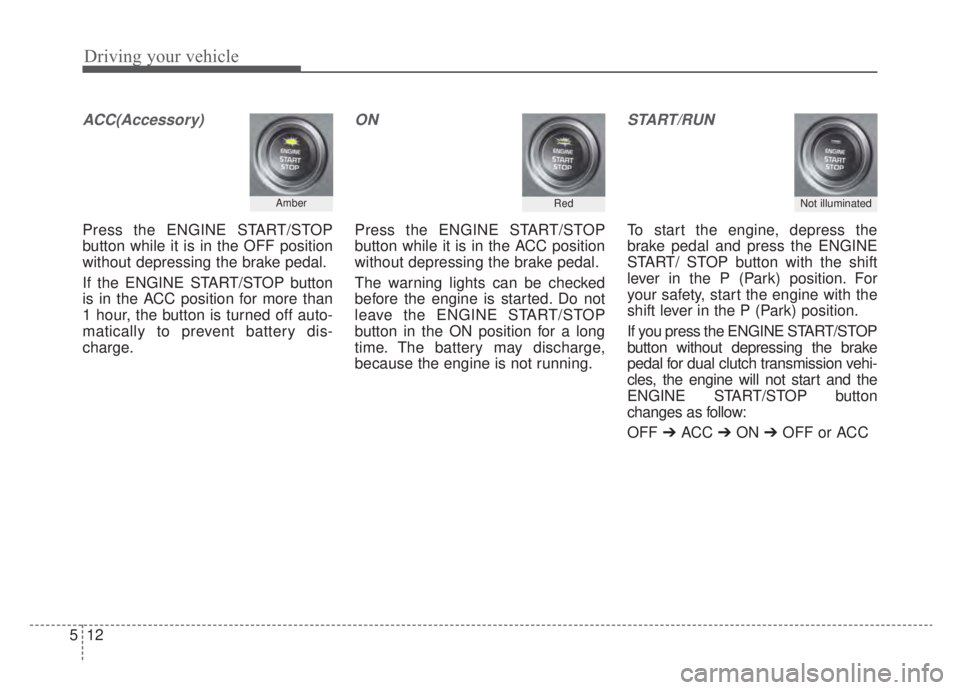
ACC(Accessory)
Press the ENGINE START/STOP
button while it is in the OFF position
without depressing the brake pedal.
If the ENGINE START/STOP button
is in the ACC position for more than
1 hour, the button is turned off auto-
matically to prevent battery dis-
charge.
ON
Press the ENGINE START/STOP
button while it is in the ACC position
without depressing the brake pedal.
The warning lights can be checked
before the engine is started. Do not
leave the ENGINE START/STOP
button in the ON position for a long
time. The battery may discharge,
because the engine is not running.
START/RUN
To start the engine, depress the
brake pedal and press the ENGINE
START/ STOP button with the shift
lever in the P (Park) position. For
your safety, start the engine with the
shift lever in the P (Park) position.
If you press the ENGINE START/STOP
button without depressing the brake
pedal for dual clutch transmission vehi-
cles, the engine will not start and the
ENGINE START/STOP button
changes as follow:
OFF ➔ACC ➔ON ➔OFF or ACC
Not illuminated AmberRed
Page 330 of 687
Driving your vehicle
20
5
N (Neutral)
The wheels and transmission are not
engaged. - Parking in N (Neutral) gear
Follow below steps when parking
and you want the vehicle to move
when pushed.
1.After parking your vehicle, step on
the brake pedal and move the shift
lever to [P] with the ignition switch or
ENGINE START/STOP button in
[ON] or while the engine is running.
2.If the parking brake is applied unlock the parking brake.
- For EPB (Electronic ParkingBrake) equipped vehicles, push
the brake pedal with the ignition
switch or ENGINE START/STOP
button in [ON] or while the engine
is running to disengage the park-
ing brake. If [AUTO HOLD] func-
tion is used while driving (If
[AUTO HOLD] indicator is on in
the cluster), press [AUTO HOLD]
switch and [AUTO HOLD] func-
tion should be turn off. 3.While pressing the brake pedal,
turn the ignition switch or ENGINE
START/STOP button [OFF].
- For smart key equipped vehicles,the ignition switch or ENGINE
START/STOP button can be
moved to [OFF] only when the
shift lever is in [P].
4.Change the gear shift lever to [N] (Neutral) while pressing the brake
pedal and pushing [SHIFT LOCK
RELEASE] button or inserting,
pressing down a tool (e.g. flathead
screw-driver) into the [SHIFT LOCK
RELEASE] access hole at the same
time. Then, the vehicle will move
when external force is applied.
WARNING
Do not shift into gear unless
your foot is firmly on the brake
pedal. Shifting into gear when
the engine is running at high
speed can cause the vehicle to
move very rapidly. You could
lose control of the vehicle and
hit people or objects.
WARNING
Do not drive with the shift lever
in N (Neutral).
The engine brake may not work
and lead to an accident.
Page 333 of 687
![KIA NIRO HYBRID EV 2020 Owners Manual 523
Driving your vehicle
With the shift lever in the manual mode
Pull the [+] or [-] paddle shifter once
to shift up or down one gear.
✽ ✽NOTICE
If you pull the [+] and [-] paddle
shifters at the](/manual-img/2/58907/w960_58907-332.png "KIA NIRO HYBRID EV 2020 Owners Manual 523
Driving your vehicle
With the shift lever in the manual mode
Pull the [+] or [-] paddle shifter once
to shift up or down one gear.
✽ ✽NOTICE
If you pull the [+] and [-] paddle
shifters at the")
523
Driving your vehicle
With the shift lever in the manual mode
Pull the [+] or [-] paddle shifter once
to shift up or down one gear.
✽ ✽NOTICE
If you pull the [+] and [-] paddle
shifters at the same time, you cannot
shift the gear.
SPORT Mode / ECO Mode
When you drive after changing the
gear shift lever to manual mode, the
vehicle will automatically shift to
SPORT mode. When you drive the
vehicle after putting the gear shift
lever to ‘D’, the vehicle will automati-
cally shift to ECO mode. Each auto-
matic change in shift will be dis-
played on the instrument cluster.
ECO mode
This driving mode increases fuel effi-
ciency. The actual fuel mileage will
depend on your driving habits and
road conditions.
SPORT mode
This driving mode provides sporty
driving experience. Be aware that fuel
efficiency may decrease in this mode.Shift lock system
For your safety, the dual clutch trans-
mission has a shift lock system which
prevents shifting the transaxle from P
(Park) into R (Reverse) unless the
brake pedal is depressed.
To shift the transaxle from P (Park)
into R (Reverse):
1. Depress and hold the brake pedal.
2. Start the engine or turn the ignition
switch or ENGINE START/STOP
button to the ON position.
3. Move the shift lever.
If the brake pedal is repeatedly
depressed and released with the shift
lever in the P (Park) position, a chat-
tering noise & vibration near the shift
lever may be heard. This is a normal
condition.
Page 351 of 687

541
Driving your vehicle
Leaving
If you press the accelerator pedal
with the shift lever in D (Drive) or
manual mode, the Auto Hold will be
released automatically and the vehi-
cle will start to move. The indicator
changes from green to white.Cancel
To cancel the Auto Hold operation,
press the Auto Hold switch. The
AUTO HOLD indicator will go out.
To cancel the Auto Hold operation
when the vehicle is at a standstill,
press the Auto Hold switch while
depressing the brake pedal.
✽ ✽NOTICE
• The Auto Hold does not operate
when:
- The driver's door is opened
- The engine hood is opened
- The shift lever is in P (Park) or R(Reverse)
- The EPB is applied
• For your safety, the Auto Hold automatically switches to EPB in
such cases:
- The driver's door is opened
- The engine hood is opened
- The vehicle is in a standstill formore than 10 minutes
- The vehicle is standing on a steep slope
- The vehicle moved several times (Continued)
ODEP059289
WARNING
When driving off from Auto
Hold by depressing the acceler-
ator pedal, always check the
surrounding area near your
vehicle.
Slowly depress the accelerator
pedal for a smooth launch.
Page 408 of 687
Driving your vehicle
98
5
Warning Timing
The driver can select the initial
warning activation time select “User
Settings →Driver Assistance →
Warning Timing”
The options for the initial Blind- Spot Collision Warning includes
the following: - Normal:
When this condition is selected,the initial Blind-Spot Collision
Warning is activated normally. If
this setting feels too sensitive
change the option to ‘Normal’.
The warning activation time may feel late if the side/rear vehicle
abruptly accelerates.
- Later: Select this warning activation
time when the traffic is light and
you are driving in a low speed.
✽ ✽ NOTICE
If you change the warning timing,
the warning time of other systems
may change. Always be aware
before changing the warning timing.
OYG059344L
Page 414 of 687
Driving your vehicle
104
5
The vehicle drives on a curved road.
The vehicle drives through a tollgate.
The road pavement (or the periph-
eral ground) abnormally contains
metallic components (i.e. possibly
due to subway construction).
There is a fixed object near the vehicle, such as a guardrail.
While going down or up a steep road where the height of the lane is
different.
Driving on a narrow road where trees or grass or overgrown.
Driving in rural areas where the sensor does not detect another
vehicle or structure for an extended
period of time.
Driving on a wet road.
Driving on a road where the guardrail or wall is in double structure.
A big vehicle is near such as a bus or truck.
When the other vehicle approach- es very close.
When the other vehicle passes at a very fast speed. While changing lanes.
If the vehicle has started at the
same time as the vehicle next to
you and has accelerated.
When the vehicle in the next lane moves two lanes away from you
OR when the vehicle two lanes
away moves to the next lane from
you.
A motorcycle or bicycle is near.
A flat trailer is near.
If there are small objects in the detecting area such as a shopping
cart or a baby stroller.
If there is a low height vehicle such as a sports car.
The brake pedal is depressed.
ESC (Electronic Stability Control) is activated.
ESC (Electronic Stability Control) malfunctions.
The tire pressure is low or a tire is damaged.
The brake is reworked. The vehicle abruptly changes driv-
ing direction.
The vehicle makes sharp lane changes.
The vehicle sharply stops.
Temperature is extremely low around the vehicle.
The vehicle severely vibrates while driving over a bumpy road,
uneven/bumpy road, or concrete
patch.
The vehicle drives on a slippery surface due to snow, water puddle,
or ice.
Lane Departure Warning system or Lane Keeping Assist system do not
operate normally.
For more information refer to “Lane
Keeping Assist (LKA)” in this chap-
ter.
Page 418 of 687
Driving your vehicle
108
5
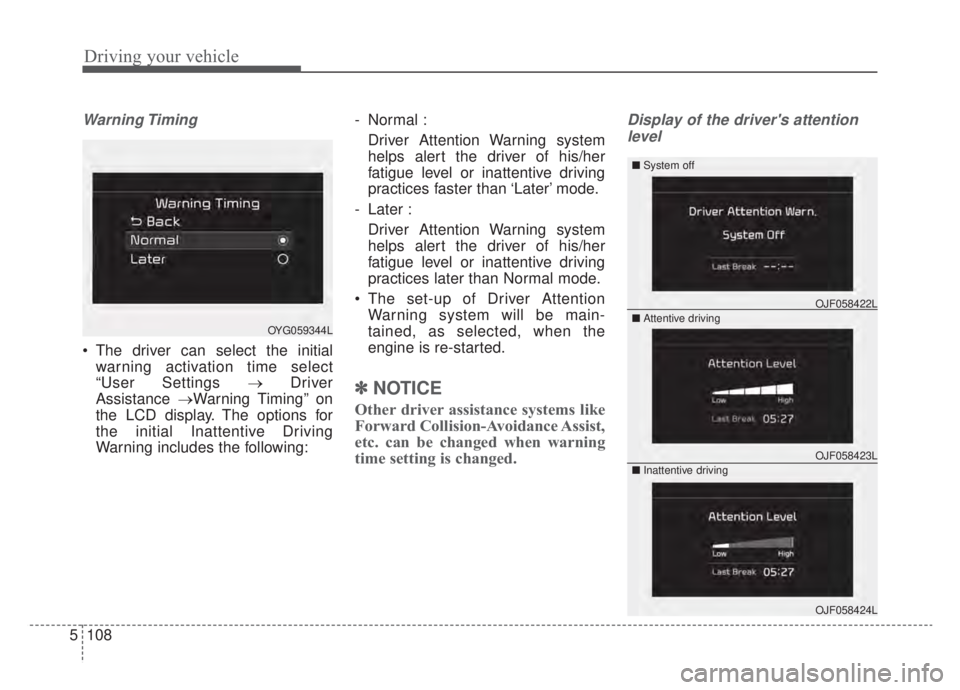
Warning Timing
The driver can select the initial
warning activation time select
“User Settings → Driver
Assistance →Warning Timing” on
the LCD display. The options for
the initial Inattentive Driving
Warning includes the following: - Normal :
Driver Attention Warning system
helps alert the driver of his/her
fatigue level or inattentive driving
practices faster than ‘Later’ mode.
- Later : Driver Attention Warning system
helps alert the driver of his/her
fatigue level or inattentive driving
practices later than Normal mode.
The set-up of Driver Attention Warning system will be main-
tained, as selected, when the
engine is re-started.
✽ ✽ NOTICE
Other driver assistance systems like
Forward Collision-Avoidance Assist,
etc. can be changed when warning
time setting is changed.
Display of the driver's attention
level
OJF058423L
OJF058422L
OJF058424L
OYG059344L ■
System off
■ Attentive driving
■ Inattentive driving