2020 KIA FORTE transmission
[x] Cancel search: transmissionPage 285 of 568

539
Driving your vehicle
In sports mode, moving the shift
lever backwards or forwards will
allow you to make gearshifts rapidly.
In contrast to a manual transmission,
the sports mode allows gearshifts
with the accelerator pedal
depressed.
Up (+) : Push the lever forwardonce to shift up one gear.
Down (-) : Pull the lever backwards
once to shift down one gear.✽ ✽
NOTICE
• In sports mode, the driver must
execute upshifts in accordance
with road conditions, being care-
ful to keep the engine speed below
the red zone.
• In sports mode, only the 8 forward gears can be selected. To reverse
or park the vehicle, move the shift
lever to the R (Reverse) or P
(Park) position as required.
• In sports mode, downshifts are made automatically when the
vehicle slows down. When the
vehicle stops, 1st gear is automati-
cally selected.
• In sports mode, when the engine rpm approaches the red zone, shift
points are varied to upshift auto-
matically.
• To maintain the required levels of vehicle performance and safety,
the system may not execute cer-
tain gearshifts when the shift lever
is operated. (Continued)(Continued)
• When driving on a slippery road,
push the shift lever forward into
the +(up) position. This causes the
transmission to shift into the 2nd
gear which is better for smooth
driving on a slippery road. Push
the shift lever to the -(down) side
to shift back to the 1st gear.
• When SPORT mode is activated: - The engine rpm will tend toremain raised over a certain
length of time even after releas-
ing the accelerator
- Upshifts are delayed when accel- erating
• In SPORT mode, the fuel efficien- cy may decrease.
Page 286 of 568

Driving your vehicle
40
5
Shift lock system (if equipped)
For your safety, the Intelligent
Variable Transmission (IVT) has a
shift lock system which prevents
shifting the transmission from P
(Park) into R (Reverse) unless the
brake pedal is depressed.
To shift the transmission from P
(Park) into R (Reverse):
1. Depress and hold the brake pedal.
2. Start the engine or turn the ignition
switch to the ON position.
3. Move the shift lever.
If the brake pedal is repeatedly
depressed and released with the shift
lever in the P (Park) position, a chat-
tering noise near the shift lever may
be heard. This is a normal condition.
Shift-lock override
If the shift lever cannot be moved
from the P (Park) position into R
(Reverse) position with the brake
pedal depressed, continue depress-
ing the brake, then do the following:
WARNING
Always fully depress the brake
pedal before and while shifting
out of the P (Park) position into
another position to avoid inad-
vertent motion of the vehicle,
which could injure persons in
or around the vehicle.
OBDM059157
Page 292 of 568
Driving your vehicle
46
5
Rear drum brakes (if equipped)
Your rear drum brakes do not have
wear indicators. Therefore, have the
rear brake linings inspected if you
hear a rear brake rubbing noise. Also
have your rear brakes inspected
each time you change or rotate your
tires and when you have the front
brakes replaced.
Parking brake
Applying the parking brake
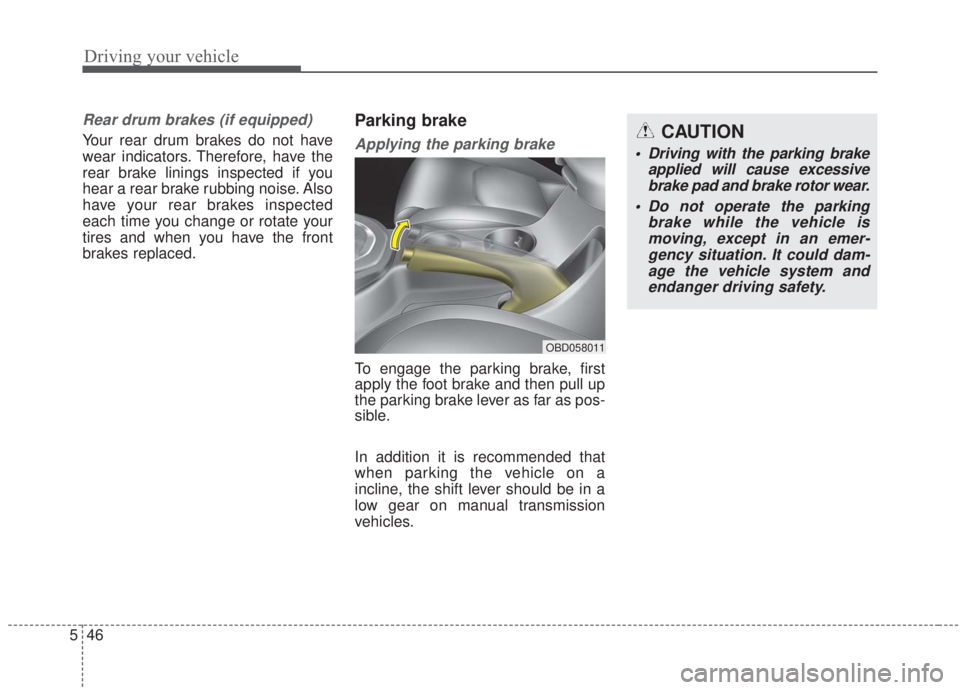
To engage the parking brake, first
apply the foot brake and then pull up
the parking brake lever as far as pos-
sible.
In addition it is recommended that
when parking the vehicle on a
incline, the shift lever should be in a
low gear on manual transmission
vehicles.
OBD058011
CAUTION
Driving with the parking brake
applied will cause excessivebrake pad and brake rotor wear.
Do not operate the parking brake while the vehicle ismoving, except in an emer-gency situation. It could dam-age the vehicle system andendanger driving safety.
Page 293 of 568
547
Driving your vehicle
Releasing the parking brake
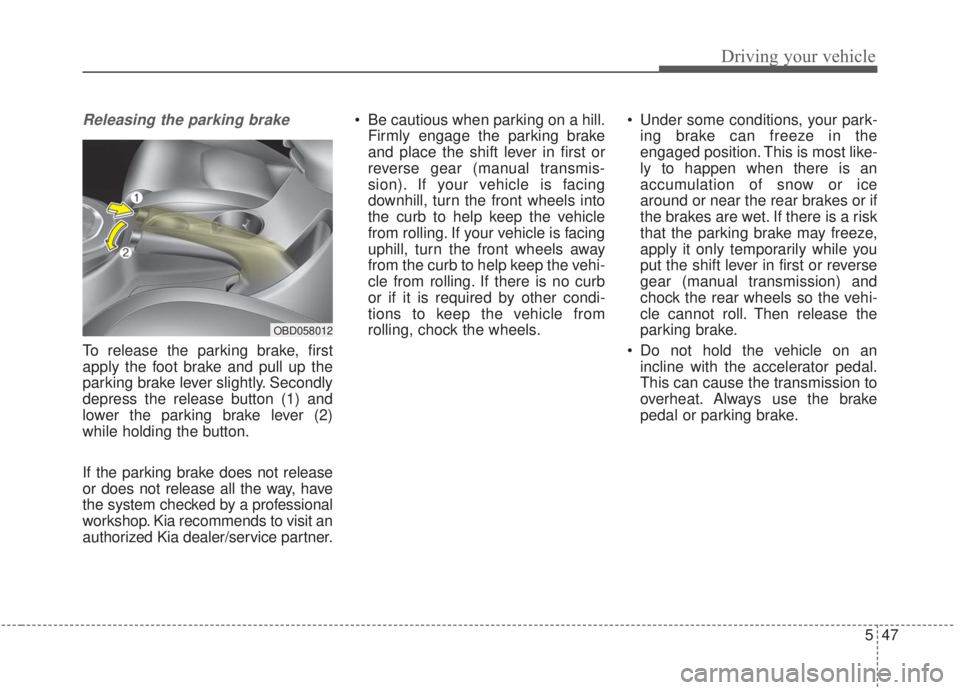
To release the parking brake, first
apply the foot brake and pull up the
parking brake lever slightly. Secondly
depress the release button (1) and
lower the parking brake lever (2)
while holding the button.
If the parking brake does not release
or does not release all the way, have
the system checked by a professional
workshop. Kia recommends to visit an
authorized Kia dealer/service partner. Be cautious when parking on a hill.
Firmly engage the parking brake
and place the shift lever in first or
reverse gear (manual transmis-
sion). If your vehicle is facing
downhill, turn the front wheels into
the curb to help keep the vehicle
from rolling. If your vehicle is facing
uphill, turn the front wheels away
from the curb to help keep the vehi-
cle from rolling. If there is no curb
or if it is required by other condi-
tions to keep the vehicle from
rolling, chock the wheels. Under some conditions, your park-
ing brake can freeze in the
engaged position. This is most like-
ly to happen when there is an
accumulation of snow or ice
around or near the rear brakes or if
the brakes are wet. If there is a risk
that the parking brake may freeze,
apply it only temporarily while you
put the shift lever in first or reverse
gear (manual transmission) and
chock the rear wheels so the vehi-
cle cannot roll. Then release the
parking brake.
Do not hold the vehicle on an incline with the accelerator pedal.
This can cause the transmission to
overheat. Always use the brake
pedal or parking brake.
OBD058012
Page 303 of 568

557
Driving your vehicle
Hill-start assist control (HAC)
A vehicle has the tendency to roll
back on a steep hill when it starts to
go after stopping. The Hill-start
Assist Control (HAC) prevents the
vehicle from rolling back by applying
the brakes automatically for about 2
seconds. The brakes are released
when the accelerator pedal is
depressed or after about 2 seconds.
The HAC is activated only for about 2
seconds, so when the vehicle begins
to roll, always depress the accelera-
tor pedal.
Good braking practices
Check to be sure the parking brakeis not engaged and the parking
brake indicator light is out before
driving away.
Driving through water may get the brakes wet. They can also get wet
when the vehicle is washed. Wet
brakes can be dangerous! Your
vehicle will not stop as quickly if the
brakes are wet. Wet brakes may
cause the vehicle to pull to one side.
To dry the brakes, apply the brakes
lightly until the braking action
returns to normal, taking care to
keep the vehicle under control at all
times. If the braking action does not
return to normal, stop as soon as it
is safe to do so and call an author-
ized Kia dealer for assistance.
Don't coast down hills with the vehicle out of gear. This is extreme-
ly hazardous. Keep the vehicle in
gear at all times, use the brakes to
slow down, then shift to a lower
gear so that engine braking will
help you maintain a safe speed. Don't "ride" the brake pedal.
Resting your foot on the brake
pedal while driving can be danger-
ous because the brakes might
overheat and lose their effective-
ness. It also increases the wear of
the brake components.
If a tire goes flat while you are driv- ing, apply the brakes gently and
keep the vehicle pointed straight
ahead while you slow down. When
you are moving slowly enough for it
to be safe to do so, pull off the road
and stop in a safe place.
If your vehicle is equipped with an Intelligent Variable Transmission /
Dual clutch transmission, don't let
your vehicle creep forward. To
avoid creeping forward, keep your
foot firmly on the brake pedal when
the vehicle is stopped.
Be cautious when parking on a hill. Firmly engage the parking brake
and place the shift lever in P (intel-
ligent variable transmission). If
your vehicle is facing downhill, turn
the front wheels into the curb to
help keep the vehicle from rolling.
WARNING- Maintaining
Brake Pressure on Incline
HAC does not replace the need
to apply brakes while stopped on
an incline. While stopped, make
sure you maintain brake pres-
sure sufficient to prevent your
vehicle from rolling backward
and causing an accident. Don’t
release the brake pedal until you
are ready to accelerate forward.
Page 304 of 568
Driving your vehicle
58
5
If your vehicle is facing uphill, turn
the front wheels away from the
curb to help keep the vehicle from
rolling. If there is no curb or if it is
required by other conditions to
keep the vehicle from rolling, chock
the wheels.
Under some conditions, your park- ing brake can freeze in the
engaged position. This is most like-
ly to happen when there is an
accumulation of snow or ice
around or near the rear brakes or if
the brakes are wet. If there is a risk
that the parking brake may freeze,
apply it only temporarily while you
put the shift lever in P (intelligent
variable transmission) and chock
the rear wheels so the vehicle can-
not roll. Then release the parking
brake.
Do not hold the vehicle on an incline with the accelerator pedal.
This can cause the transmission to
overheat. Always use the brake
pedal or parking brake.
Page 334 of 568

Driving your vehicle
88
5
To decrease the cruising
speed:
Follow either of these procedures:
Move the lever down (to SET-) and
hold it. Your vehicle SET speed will
decrease by 10 km/h (5 mph).
Release the lever at the speed you
want to maintain.
Move the lever down (to SET-) and release it immediately. The cruising
speed will decrease by 1 km/h (1.0
mph) each time the lever is operat-
ed in this manner.
To temporarily accelerate with
the cruise control on:
If you want to speed up temporarily
when the cruise control is on,
depress the accelerator pedal.
Increased speed will not interfere
with the cruise control operation or
change the set speed.
To return to the set speed, take your
foot off the accelerator.
To cancel cruise control, do
one of the following:
Depress the brake pedal.
Shift into N (Neutral) with an Intelligent Variable Transmission /
Dual clutch transmission.
Press the CANCEL switch.
Decrease the vehicle speed lower than the memory speed by 20
km/h (12 mph).
Decrease the vehicle speed to less than approximately 30 km/h (20
mph).
OBD058088LOBD058084L
Page 359 of 568
5113
Driving your vehicle
Various driving situations which you
may encounter in SMART mode
The driving mode automaticallychanges to ECO mode after a cer-
tain period of time when you gently
depress the accelerator pedal
(Your driving is categorized to be
mild).
The driving mode automatically changes from SMART ECO mode
to SMART NORMAL mode after a
certain period of time when you
sharply or repetitively depress the
accelerator pedal.
The driving mode automatically changes to SMART NORMAL
mode with the same driving pat-
terns when the vehicle starts to
drive on an upward slope of a cer-
tain angle. The driving mode auto-
matically returns to SMART ECO
mode when the vehicle enters a
leveled road. The driving mode automatically
changes to SMART SPORT when
you abruptly accelerate the vehicle
or repetitively operate the steering
wheel (Your driving is categorized
to be sporty). In this mode, your
vehicle drives in a lower gear for
faster accelerating/decelerating
and increased engine brake per-
formance.
You may still sense the engine brake performance, even when you
release the accelerator pedal in
SMART SPORT mode. It is
because your vehicle remains in a
lower gear over a certain period of
time.
The driving mode automatically changes to SMART SPORT mode
only in dynamic driving situations.
In most normal driving situations
the driving mode sets to either
SMART ECO mode or SMART
NORMAL mode. Limitation of SMART mode
The SMART mode may be limited in
following situations. (The OFF indica-
tor illuminates in those situations.)
The driver manually moves the
shift lever : It deactivates SMART
mode.
The cruise control is activated : The cruise system may deactivate
the SMART mode. (SMART mode
is not automatically deactivated
just by activing the cruise system.)
The transmission oil temperature is either extremely low or extremely
high : The SMART mode can be
active in most of the normal driving
situations. However an extremely
high/ low transmission oil tempera-
ture may temporarily deactivate the
SMART mode, because the trans-
mission condition is out of normal
operation condition.