2020 KIA FORTE service
[x] Cancel search: servicePage 283 of 568

537
Driving your vehicle
R (Reverse)
Use this position to drive the vehicle
backward.N (Neutral)
The wheels and transmission are not
engaged. The vehicle will roll freely
even on the slightest incline unless
the parking brake or service brakes
are applied.
-Parking in N (Neutral) gear
Follow the steps below when parking
and you want the vehicle to move
when pushed.
1.After parking your vehicle, step on
the brake pedal and move the shift
lever to "P" with the ignition button in
"ON" or while the engine is running.
2.If the parking brake is applied, unlock the parking brake.
3.While pressing the brake pedal, turn the ignition button "OFF".
- For smart key equipped vehicles,the ignition switch can be moved
to "OFF" only when the shift lever
is in "P".
4.Change the gear shift lever to "N" (Neutral) while pressing the brake
pedal and pushing "SHIFT LOCK
RELEASE" button or inserting, a
tool (e.g. flathead screw-driver) into
the "SHIFT LOCK RELEASE"
access hole at the same time. Then,
the vehicle will move when external
force is applied.
CAUTION
The transmission may be dam-aged if you shift into P (Park)while the vehicle is in motion.
CAUTION
Always come to a complete stopbefore shifting into or out of R(Reverse); you may damage thetransmission if you shift into Rwhile the vehicle is in motion,except as explained in “Rockingthe vehicle” in this section.
WARNING
Do not drive with the shift lever
in N (Neutral).
The engine brake may not work,
which may lead to an accident.
Page 287 of 568

541
Driving your vehicle
1. Place the ignition switch in theLOCK/OFF position.
2. Apply the parking brake.
3. Carefully remove the cap covering the shift-lock release access hole.
4. Insert a tool (e.g. flathead screw- driver) into the access hole and
press down on the tool.
5. Move the shift lever.
6. Remove the tool from the shiftlock override access hole then install
the cap.
7. Have the system inspected by a professional workshop. Kia recom-
mends to visit an authorized Kia
dealer/service partner.Ignition key interlock system
(if equipped)
The ignition key cannot be removed
unless the shift lever is in the P
(Park) position.
Good driving practices
Never move the shift lever from P (Park) or N (Neutral) to any other
position with the accelerator pedal
depressed.
Never move the shift lever into P (Park) when the vehicle is in
motion.
Be sure the vehicle is completely stopped before you attempt to shift
into R (Reverse) or D (Drive).
Never take the vehicle out of gear and coast down a hill. This may be
extremely hazardous. Always leave
the vehicle in gear when moving.
Do not "ride" the brakes. This can cause them to overheat and mal-
function. Instead, when you are
driving down a long hill, slow down
and shift to a lower gear. When you
do this, engine braking will help
slow down the vehicle.
Slow down before shifting to a lower gear. Otherwise, the lower
gear may not be engaged.
WARNING
Exercise extreme caution when
driving on a slippery surface.
Be especially careful when
braking, accelerating or shifting
gears. On a slippery surface, an
abrupt change in vehicle speed
can cause the drive wheels to
lose traction and the vehicle to
lose control.
Page 289 of 568

543
Driving your vehicle
Moving up a steep grade from astanding start
To move up a steep grade from a
standing start, depress the brake
pedal, release the parking break,
and shift the shift lever to D (Drive).
Select the appropriate gear depend-
ing on load weight and steepness of
the grade, and release the parking
brake. Depress the accelerator grad-
ually while releasing the service
brakes.
When accelerating from a stop on a
steep hill, the vehicle may have a
tendency to roll backwards.
Shifting the shift lever into 2
(Second Gear) will help prevent the
vehicle from rolling backwards.
Page 291 of 568

545
Driving your vehicle
In the event of brake failure
If service brakes fail to operate while
the vehicle is in motion, you can
make an emergency stop with the
parking brake. The stopping dis-
tance, however, will be much greater
than normal.
Disc brakes wear indicator
When your brake pads are worn and
new pads are required, you will hear
a high-pitched warning sound from
your front brakes or rear brakes. You
may hear this sound come and go or
it may occur whenever you depress
the brake pedal.
Please remember that some driving
conditions or climates may cause a
brake squeal when you first apply (or
lightly apply) the brakes. This is nor-
mal and does not indicate a problem
with your brakes.
Always replace the front or rear
brake pads as pairs.
WARNING- Parking
brake
Avoid applying the parking
brake to stop the vehicle while it
is moving, except in an emer-
gency situation. Applying the
parking brake while the vehicle
is moving at normal speeds can
cause a sudden loss of control
of the vehicle. If you must use
the parking brake to stop the
vehicle, use great caution in
applying the brake.
WARNING- Brake wear
Do not ignore high pitched wear
sounds from your brakes. If you
ignore this audible warning, you
will eventually lose braking per-
formance, which could lead to a
serious accident.
CAUTION- Replace brake pads
Do not continue to drive withworn brake pads. Continuing todrive with worn brake pads candamage the braking system andresult in costly brake repairs.
Page 293 of 568
547
Driving your vehicle
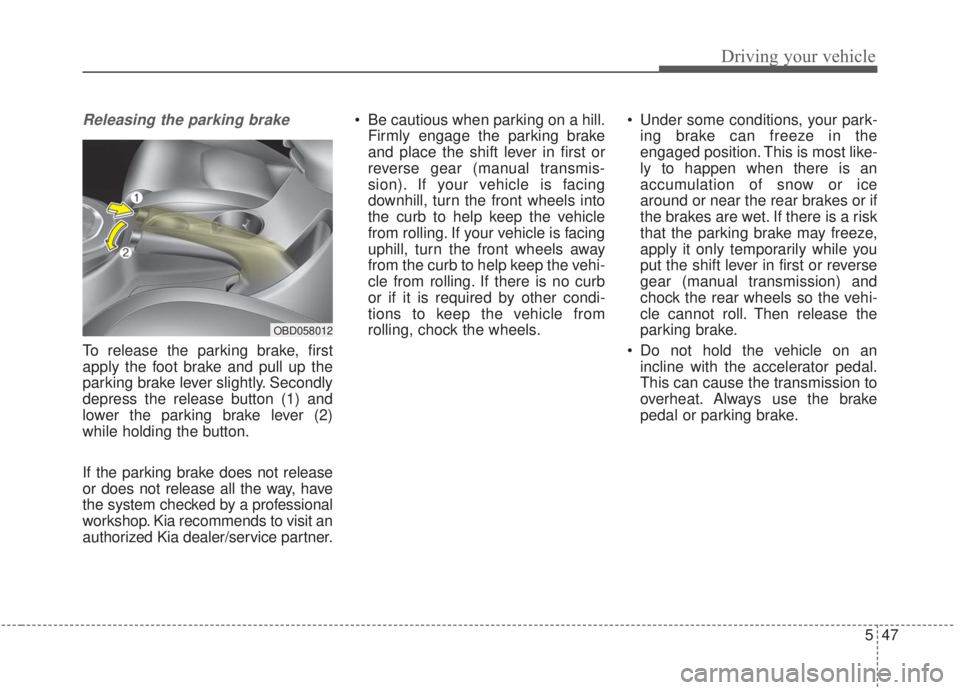
Releasing the parking brake
To release the parking brake, first
apply the foot brake and pull up the
parking brake lever slightly. Secondly
depress the release button (1) and
lower the parking brake lever (2)
while holding the button.
If the parking brake does not release
or does not release all the way, have
the system checked by a professional
workshop. Kia recommends to visit an
authorized Kia dealer/service partner. Be cautious when parking on a hill.
Firmly engage the parking brake
and place the shift lever in first or
reverse gear (manual transmis-
sion). If your vehicle is facing
downhill, turn the front wheels into
the curb to help keep the vehicle
from rolling. If your vehicle is facing
uphill, turn the front wheels away
from the curb to help keep the vehi-
cle from rolling. If there is no curb
or if it is required by other condi-
tions to keep the vehicle from
rolling, chock the wheels. Under some conditions, your park-
ing brake can freeze in the
engaged position. This is most like-
ly to happen when there is an
accumulation of snow or ice
around or near the rear brakes or if
the brakes are wet. If there is a risk
that the parking brake may freeze,
apply it only temporarily while you
put the shift lever in first or reverse
gear (manual transmission) and
chock the rear wheels so the vehi-
cle cannot roll. Then release the
parking brake.
Do not hold the vehicle on an incline with the accelerator pedal.
This can cause the transmission to
overheat. Always use the brake
pedal or parking brake.
OBD058012
Page 314 of 568

Driving your vehicle
68
5
- The vehicle in front is driving errat-
ically
- Backlight is reflected in the direc- tion of the vehicle (including front
light from the vehicle ahead)
- Moisture on the windscreen is not completely removed or frozen.
- The weather is misty.
- The vehicle in front does not turn ON the rear lights, does not have
rear lights, has asymmetric rear
lights, or has rear lights out of
angle.
- The vehicle is on unpaved or uneven rough surfaces, or roads
with sudden gradient changes
- The vehicle is moving under ground level or inside a building
- If a sudden change in the sensor recognition takes place whilst
passing through a speed bump
- When the vehicle is severely shak- en
- When driving around a circular intersection with a vehicle or object
in front - If the front of the camera lens is
contaminated by front glass tinting,
film, water repellent coating, dam-
age on glass, or foreign matter
(sticker, insect, etc.)
- The camera or camera lens is damaged.
- If the headlights of the vehicle are not used at night or in a tunnel sec-
tion, or the light is too weak
- If street light or the light of the vehi- cle coming from the opposite direc-
tion is reflected or when sunlight is
reflected by water on the road
service
- When the back light is projected in the direction of the vehicle's motion
(including the headlights of vehi-
cles)
- Road sign, shadow on the road, tunnel entrances, toll gates, partial
pavement
- If the windshield has moisture on its surface or if the windshield
freezes,
- Driving in the fog.
- When objects are out of the sens- ing range of the camera - Driving on a curve
The FCA performance may be limit-
ed while driving on a curve. The FCA
may not recognize the vehicle in front
even if in the same lane. It may pro-
duce the warning message and the
warning alarm prematurely, or it may
not produce the warning message or
the warning alarm at all. When driv-
ing on a curve, exercise caution,
maintain a safe braking distance,
and if necessary, depress the brake
pedal to reduce your driving speed in
order to maintain a safe distance.
OJF055025
Page 319 of 568
573
Driving your vehicle
The warning light illumi-
nates on the LCD display
when you cancel the FCA
system. The driver can
monitor the FCA ON/OFF status on
the LCD display. Also, the warning
light illuminates when the ESC
(Electronic Stability Control) is
turned off. When the warning light
remains ON with the FCA activated,
have the system checked by a pro-
fessional workshop. Kia recom-
mends to visit an authorized Kia
dealer/service partner.
The driver can select the initial warn-
ing activation time in the User
Settings in the instrument cluster
LCD display. The options for the ini-
tial Forward Collision Warning
include the following:
When this option is select-
ed, the initial Forward
Collision Warning is acti-
vated earlier than normal.
This setting maximizes the
amount of distance
between your vehicle and
the vehicle or pedestrian
ahead before the initial
warning occurs. If the
‘EARLY’ option feels too
sensitive, change it to
‘NORMAL’. When the vehi-
cle ahead suddenly stops,
the warning may seem to
activate later even if the
‘EARLY’ condition was
selected.
selected, the initial
Forward Collision
Warning is activated nor-
mally. Compared to
EARLY mode, this set-
ting allows for a shorter
amount of distance
between your vehicle
and the vehicle or
pedestrian ahead before
the initial warning
occurs.
ed, the initial Forward
Collision Warning is activat-
ed later than normal. This
setting reduces the amount
of distance between your
vehicle and the vehicle or
pedestrian ahead before
the initial warning occurs.
Select this option only when
traffic is light and you are
driving slowly.
Page 385 of 568
5139
Driving your vehicle
Your vehicle's fuel economy depends
mainly on your style of driving, where
you drive and when you drive.
Each of these factors affects how
many miles (kilometers) you can get
from a gallon (liter) of fuel. To operate
your vehicle as economically as pos-
sible, use the following driving sug-
gestions to help save money in both
fuel and repairs:
Drive smoothly. Accelerate at amoderate rate. Don't make "jack-
rabbit" starts or full-throttle shifts
and maintain a steady cruising
speed. Don't race between stop-
lights. Try to adjust your speed to
the traffic so you don't have to
change speeds unnecessarily.
Avoid heavy traffic whenever pos-
sible. Always maintain a safe dis-
tance from other vehicles so you
can avoid unnecessary braking.
This also reduces brake wear.
Drive at a moderate speed. The faster you drive, the more fuel your
vehicle uses. Driving at a moderate
speed, especially on the highway,
is one of the most effective ways to
reduce fuel consumption. Don't "ride" the brake pedal. This
can increase fuel consumption and
also increase wear on these com-
ponents. In addition, driving with
your foot resting on the brake pedal
may cause the brakes to overheat,
which reduces their effectiveness
and may lead to more serious con-
sequences.
Take care of your tires. Keep them inflated to the recommended pres-
sure. Incorrect inflation, either too
much or too little, results in unnec-
essary tire wear. Check the tire
pressures at least once a month.
Be sure that the wheels are aligned correctly. Improper align-
ment can result from hitting curbs
or driving too fast over irregular
surfaces. Poor alignment causes
faster tire wear and may also result
in other problems as well as
greater fuel consumption. Keep your vehicle in good condi-
tion. For better fuel economy and
reduced maintenance costs, main-
tain your vehicle in accordance
with the maintenance schedule in
Chapter 7. If you drive your vehicle
in severe conditions, more frequent
maintenance is required (see
Chapter 7 for details).
Keep your vehicle clean. For maxi- mum service, your vehicle should
be kept clean and free of corrosive
materials. It is especially important
that mud, dirt, ice, etc. not be
allowed to accumulate on the
underside of the vehicle. This extra
weight can result in increased fuel
consumption and also contribute to
corrosion.
Travel lightly. Don't carry unneces- sary weight in your vehicle. Weight
reduces fuel economy.
Don't let the engine idle longer than necessary. If you are waiting
(and not in traffic), turn off your
engine and restart only when
you're ready to go.
ECONOMICAL OPERATION