Page 199 of 560
4117
Features of your vehicle
High beam operation
To turn on the high beam headlamp,
push the lever away from you. The lever
will return to its original position. The
high beam indicator will light when the
headlight high beams are switched on.
To turn off the high beam headlamps,
pull the lever towards you. It will return
to the normal (low beam) position
when released.
To prevent the battery from being
discharged, do not leave the lights
on for a prolonged time while the
engine is not running.
WARNING - High beams
Do not use high beam when
there are other vehicles in front
of your vehicle. Using high
beam could obstruct the other
driver’s vision.
OYG040637N
CAUTION
Never place anything over the
sensor (1) located on the
instrument panel, this will
ensure better auto-light sys-
tem control.
Don’t clean the sensor using a
window cleaner, the cleaner
may leave a light film which
could interfere with sensor
operation.
Page 204 of 560

Features of your vehicle
122 4
One-touch Turn signal lamp
When you change lanes, even if the
turn signal lamp lever returns to its
original position after move the turn
signal lever slightly to B position, the
turn signal lamp will blink 3 times
(or 5, 7 times).
This is a feature that helps you con-
tinue to operate even if you are not
holding the turn signal lever when
changing lanes. You may change the
number of blink (3, 5 or 7 times) or
deactivate the one touch turn signal
lamp function from the Infotainment
System as ‘Settings →Vehicle →
Lights →One Touch Turn Signal’.
For more details, please scan the
QR code in a separately supplied
Car Infotainment System Quick
Reference Guide.
✽ ✽
NOTICE
If an indicator flash is abnormally
quick or slow, a bulb may be burned
out or have a poor electrical connec-
tion in the circuit.
Check headlight
This warning message illuminates if
there is a malfunction (burned-out
bulb except LED lamp or circuit mal-
function) with the headlamp. In this
case, have your vehicle inspected by
an authorized Kia dealer.
✽ ✽
NOTICE
• When replacing the bulb, use the
same wattage bulb.
For more information, refer to
“BULB WATTAGE” in chapter 8.
• If a different wattage bulb is
installed on the vehicle, this warn-
ing message is not displayed.
OYG040633N
Page 209 of 560
4127
Features of your vehicle
Do not use the interior lights for
extended periods when the engine is
not running.
It may cause battery discharge.Automatic turn off function
The interior lights automatically turn
off approximately 20 minutes after
the Engine Start/Stop button is
turned off, if the lights are in the ON
position.
If your vehicle is equipped with the
theft alarm system, the interior lights
automatically turn off approximately
5 seconds after the system is armed.
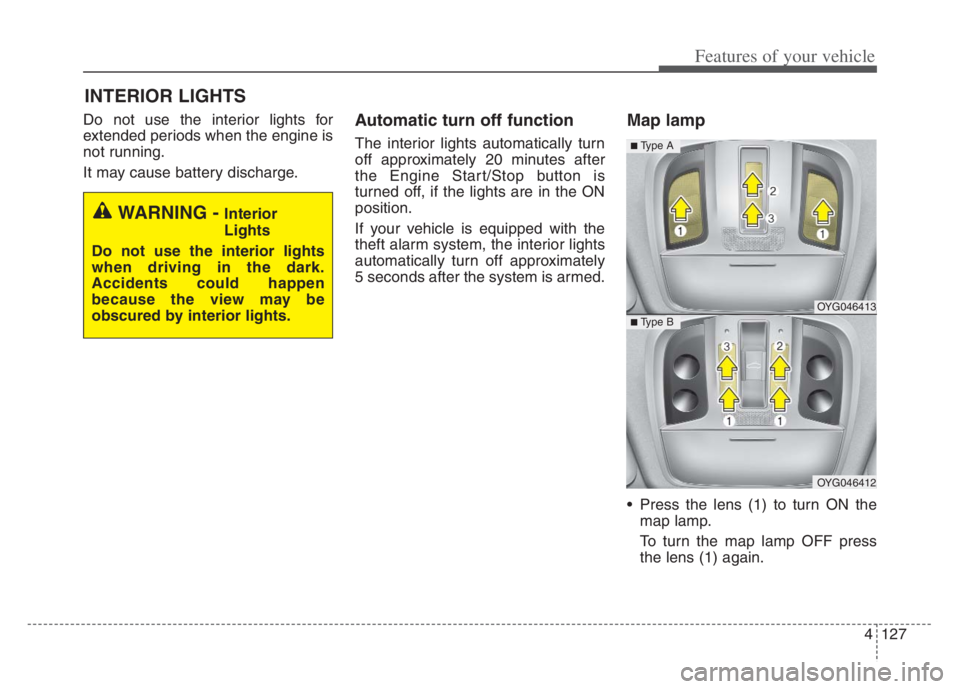
Map lamp
Press the lens (1) to turn ON the
map lamp.
To turn the map lamp OFF press
the lens (1) again.
INTERIOR LIGHTS
WARNING - Interior
Lights
Do not use the interior lights
when driving in the dark.
Accidents could happen
because the view may be
obscured by interior lights.
OYG046413
OYG046412
■ Type B
■ Type A
Page 223 of 560

4141
Features of your vehicle
Air conditioning
Press the A/C button to turn the air
conditioning system on (indicator
light will illuminate).
Press the button again to turn the air
conditioning system off.
OFF mode
Press the front blower OFF button to
turn off the front air climate control
system. However, you can still oper-
ate the mode and air intake buttons
as long as the Engine Start/Stop but-
ton is in the ON position.
OYG049353
WARNING -Reduced
Visibility
Continuous use of the climate
control system in the recirculat-
ed air position may allow
humidity to increase inside the
vehicle which may fog the glass
and obscure visibility.
WARNING - Recirculated
Air
Continued use of the climate
control system in the recirculat-
ed air position can cause
drowsiness or sleepiness, and
loss of vehicle control. Set the
air intake control to the outside
(fresh) air position as much as
possible while driving.
WARNING - Sleeping with
AC on
Do not sleep in a vehicle with
the air conditioning or heating
on as this may cause serious
harm or death due to a drop in
the oxygen level and/or body
temperature.OYG049355
Page 244 of 560

Features of your vehicle
162 4
Wireless Charging System is activat-
ed or deactivated when you select
‘‘Settings →Vehicle →Convenience
→Wireless Charging System ’ from
the Settings menu in the instrument
cluster and the Infotainment System
screen.
For more details, please scan the
QR code in a separately supplied
Car Infotainment System Quick
Reference Guide.If the wireless charging does not
work, gently move your smart phone
around the pad until the charging indi-
cator light turns yellow. Depending on
the smart phone, the charging indica-
tor light may not turn green even after
the charging is complete.
If the wireless charging is not func-
tioning properly, the orange light will
blink and flash for ten seconds then
turn off. In such cases, remove the
smart phone from the pad and
replace it on the pad again, or double
check the charging status.
If you leave the smart phone on the
charging pad when the vehicle the
Engine Start/Stop button is in OFF,
the vehicle will alert you through
warning messages and sound (appli-
cable for vehicles with voice guid-
ance function) after the ‘Good bye’
function on the instrument cluster
ends.✽ ✽
NOTICE
For some manufacturers' cellular
phones, the system may not warn
you even though the cellular phone
is left on the wireless charging unit.
This is due to the particular charac-
teristic of the cellular phone and not
a malfunction of the wireless charg-
ing.
Page 257 of 560

Driving your vehicle
4 5
Before entering vehicle
• Be sure that all windows, outside
mirror(s), and outside lights are
clean.
Check the condition of the tires.
Check under the vehicle for any
sign of leaks.
Be sure there are no obstacles
behind you if you intend to back up.
Necessary inspections
Fluid levels, such as engine oil,
engine coolant, brake fluid, and
washer fluid should be checked on a
regular basis, at the exact interval
depending on the fluid. Further
details are provided in chapter 7,
“Maintenance”.
Before starting
Close and lock all doors.
Position the seat so that all con-
trols are easily reached.
Buckle your seat belt.
Adjust the inside and outside
rearview mirrors.
Be sure that all lights work.
Check all gauges.
Check the operation of warning
lights when the ENGINE
START/STOP button is in the ON
position.
Release the parking brake and
make sure the brake warning light
goes out.
For safe operation, be sure you are
familiar with your vehicle and its
equipment.
BEFORE DRIVING
WARNING - Distracted
driving
Focus on the road while driving.
The driver's primary responsi-
bility is in the safe and legal
operation of the vehicle. Use of
any handled devices, other
equipment or vehicle systems
that distract the driver should
not be used during vehicle
operation.
Page 260 of 560

57
Driving your vehicle
ACC(Accessory)
Press the ENGINE START/STOP
button while it is in the OFF position
without depressing the brake pedal.
If the ENGINE START/STOP button
is in the ACC position for more than
1 hour, the button is turned off auto-
matically to prevent battery dis-
charge.
ON
Press the ENGINE START/STOP
button while it is in the ACC position
without depressing the brake pedal.
The warning lights can be checked
before the engine is started. Do not
leave the ENGINE START/STOP
button in the ON position for an
extended period of time. The battery
may discharge, because the engine
is not running.
START/RUN
To start the engine, depress the
brake pedal and press the ENGINE
START/ STOP button with the shift
lever in the P (Park) or the N
(Neutral) position. For your safety,
start the engine with the shift lever in
the P (Park) position.
If you press the ENGINE
START/STOP button without depress-
ing the brake pedal the engine will not
start and the ENGINE START/STOP
button changes as follow:
OFF ➔ACC ➔ON ➔OFF or ACC
OJF058312
Page 264 of 560

511
Driving your vehicle
When stopped on an incline, do not
hold the vehicle with the engine
power. Use the service brake or the
parking brake.
Transmission ranges
The indicator in the instrument clus-
ter displays the shift lever position
when the ENGINE START/STOP
button is in the ON position.
P (Park)
Always come to a complete stop
before shifting into P (Park). This
position locks the transmission and
prevents the drive wheels from rotat-
ing.
Shifting into P (Park) while the vehi-
cle is in motion will cause the drive
wheels to lock which will cause you
to lose control of the vehicle.R (Reverse)
Use this position to drive the vehicle
backward.
N (Neutral)
The wheels and transmission are not
engaged. The vehicle will roll freely
even on the slightest incline unless
the parking brake or service brakes
are applied.
WARNING- Leaving
Vehicle
Before leaving the driver’s seat,
always make sure the shift lever
is in the P (Park) position; then
set the parking brake fully and
shut the engine off. Do not use
the P position in place of the
parking brake. Always make
sure the shift lever is locked in
the P position and set the park-
ing brake fully. Unexpected and
sudden vehicle movement can
occur if these precautions are
not followed.
CAUTION- Transmission
To avoid damage to your trans-
mission, do not accelerate the
engine in R (Reverse) or any for-
ward gear position with the
brakes on. The transmission
may be damaged if you shift
into P (Park) while the vehicle is
in motion.
CAUTION- Shifting
Always come to a complete stop
before shifting into or out of R
(Reverse); you may damage the
transmission if you shift into R
(Reverse) while the vehicle is in
motion, except when “Rocking
the vehicle” explained in this
chapter.