Page 158 of 560
Features of your vehicle
76 4
Trip information (Trip computer)
The trip computer is a microcomput-
er-controlled driver information sys-
tem that displays information related
to driving.
✽ ✽
NOTICE
Some driving information stored in
the trip computer (for example
Average Vehicle Speed) resets if the
battery is disconnected.
Trip Modes
WARNING
Do not adjust the User Settings
while driving. You may lose your
steering control and cause
severe personal injury or acci-
dents.
Accumulated Info
Digital speedometer
Drive Info
Fuel Economy
Drive mode
To change the trip mode, scroll the
MOVE scroll switch ( / ) in the
trip computer mode.
Page 162 of 560

Features of your vehicle
80 4
Drive mode
This mode displays the currently
selected drive mode.
❈For more details, refer to “Drive
Mode Integrated Control System”
in chapter 5.
Service Mode
✽ ✽
NOTICE
To use the service interval menu,
consult an authorized Kia dealer.
Service in
It calculates and displays when you
need a scheduled maintenance
service (mileage or days).
If the remaining mileage or time
reaches 900 mi. (1,500 km) or 30
days, “Service in” message is dis-
played for several seconds each time
you set the ENGINE START/STOP
button to the ON position.
Service required
If you do not have your vehicle serv-
iced according to the already
inputted service interval, “Service
required” message is displayed for
several seconds each time you set
the ENGINE START/STOP button to
the ON position.
✽ ✽
NOTICE
If any of the following conditions
occurs, the mileage and days may be
incorrect.
- The battery cable is disconnected.
- The battery is discharged.
- The fuse switch is turned off.
OYG049572L
Page 165 of 560

483
Features of your vehicle
Low Key Battery
This warning message illuminates
if the battery of the smart key is
discharged when the ENGINE
START/STOP button changes to
the OFF position.
Press START button while turning
wheel
This warning message illuminates
if the steering wheel does not
unlock normally when the ENGINE
START/STOP button is pressed.
It means that you should press the
ENGINE START/STOP button
while turning the steering wheel
right and left.
Press brake pedal to start engine
This warning message illuminates
if the ENGINE START/STOP button
changes to the ACC position twice
by pressing the button repeatedly
without depressing the brake pedal.
It means that you should depress
the brake pedal to start the engine.
Key not in vehicle
This warning message illuminates
if the smart key is not in the vehicle
when you press the ENGINE
START/STOP button.
It means that you should always
have the smart key with you.
Key not detected
This warning message illuminates
if the smart key is not detected
when you press the ENGINE
START/STOP button.
Vehicle is On
If the driver’s door is opened with
the ENGINE START/STOP button
in the ON position and shift lever in
P(Park) position, the message
above will appear.
Page 167 of 560

485
Features of your vehicle
Device in wireless charger
This warning messages will illumi-
nate when the vehicle ignition is in
OFF and the smart phone is on the
wireless charging pad in below two
situations.
1. When the driver or passenger
door is opened.
2. When one minute passed after
the ignition has been turned
OFF (and the door has not been
opened for more than one
minute).
❈For more details, refer to “Wireless
smart phone charging system” in
this chapter.
Check headlamp LED
This warning message illuminates if
the headlamp does not turn on nor-
mally when you attempt to turn the
head lamp on. In this case, have your
vehicle inspected by an authorized
Kia dealer.
Battery discharging due to exter-
nal electrical devices
The vehicle can detect self-dis-
charge of the battery due to over-cur-
rent that is generated by unautho-
rized electrical devices such as
dashboard camera (dash cam)
mounting during parking.
If the warning continues even after
external electrical devices are
removed, have your vehicle inspect-
ed by an authorized Kia dealer.
Page 177 of 560

495
Features of your vehicle
Electronic Stability
Control (ESC) OFF
Indicator Light
This indicator light illuminates:
Once you set the ENGINE
START/STOP button to the ON
position.
- It illuminates for approximately 3
seconds and then goes off.
When you deactivate the ESC sys-
tem by pressing the ESC OFF but-
ton.
❈For more details, refer to
“Electronic Stability Control (ESC)”
in chapter 5.
Immobilizer Indicator
Light (With Smart Key)
This indicator light illuminates for up
to 30 seconds:
When the vehicle detects the
smart key in the vehicle properly
while the ENGINE START/STOP
button is ACC or ON.
- At this time, you can start the
engine.
- The indicator light goes off after
starting the engine.
This indicator light blinks for a few
seconds:
When the smart key is not in the
vehicle.
- At this time, you can not start the
engine.This indicator light illuminates for 2
seconds and goes off:
When the vehicle can not detect
the smart key which is in the vehi-
cle while the ENGINE
START/STOP button is ON.
In this case, have your vehicle
inspected by an authorized Kia
dealer.
This indicator light blinks:
When the battery of the smart key
is weak.
- At this time, you can not start the
engine. However, you can start the
engine if you press the ENGINE
START/STOP button with the
smart key. (For more details, refer
to "Starting the engine with a
smart key" in chapter 5).
When there is a malfunction with
the immobilizer system.
In this case, have your vehicle
inspected by an authorized Kia
dealer.
Page 197 of 560

4115
Features of your vehicle
Battery saver function
The purpose of this feature is to
prevent the battery from being dis-
charged if the lights are left in the
ON position. The system automati-
cally shuts off the parking lights 30
seconds after the ignition key is
removed and the driver’s door is
opened and closed.
With this feature, the parking lights
will turn off automatically if the driver
parks on the side of the road at night
and opens the driver’s side door.
If necessary, to keep the parking
lights on when the ignition key is
removed, perform the following:
1) Open the driver-side door.
2) Turn the parking lights OFF and
ON again using the light switch
on the steering column.
Headlight escort function
If you turn the Engine Start/Stop but-
ton to the ACC or OFF position with
the headlights ON, the headlights
remain on for about 5 minutes.
However, if the driver's door is
opened and closed, the headlights
are turned off after 15 seconds.
The headlights can be turned off by
pressing the lock button on the trans-
mitter (or smart key) twice or turning
the light switch to the OFF position.
Headlight escort function is activated
or deactivated when you select
‘Settings →Vehicle →Lights →
Headlight Delay’ from the Settings
menu in the Infotainment System
screen.
For more details, please scan the
QR code in a separately supplied
Car Infotainment System Quick
Reference Guide.
Lighting control
The light switch has a Headlight and
a Parking light position.
To operate the lights, turn the knob at
the end of the control lever to one of
the following positions:
(1) OFF position
(2) Auto light position
(3) Parking & Tail light
(4) Headlight position
LIGHTING
OYG040634N
Page 199 of 560
4117
Features of your vehicle
High beam operation
To turn on the high beam headlamp,
push the lever away from you. The lever
will return to its original position. The
high beam indicator will light when the
headlight high beams are switched on.
To turn off the high beam headlamps,
pull the lever towards you. It will return
to the normal (low beam) position
when released.
To prevent the battery from being
discharged, do not leave the lights
on for a prolonged time while the
engine is not running.
WARNING - High beams
Do not use high beam when
there are other vehicles in front
of your vehicle. Using high
beam could obstruct the other
driver’s vision.
OYG040637N
CAUTION
Never place anything over the
sensor (1) located on the
instrument panel, this will
ensure better auto-light sys-
tem control.
Don’t clean the sensor using a
window cleaner, the cleaner
may leave a light film which
could interfere with sensor
operation.
Page 209 of 560
4127
Features of your vehicle
Do not use the interior lights for
extended periods when the engine is
not running.
It may cause battery discharge.Automatic turn off function
The interior lights automatically turn
off approximately 20 minutes after
the Engine Start/Stop button is
turned off, if the lights are in the ON
position.
If your vehicle is equipped with the
theft alarm system, the interior lights
automatically turn off approximately
5 seconds after the system is armed.
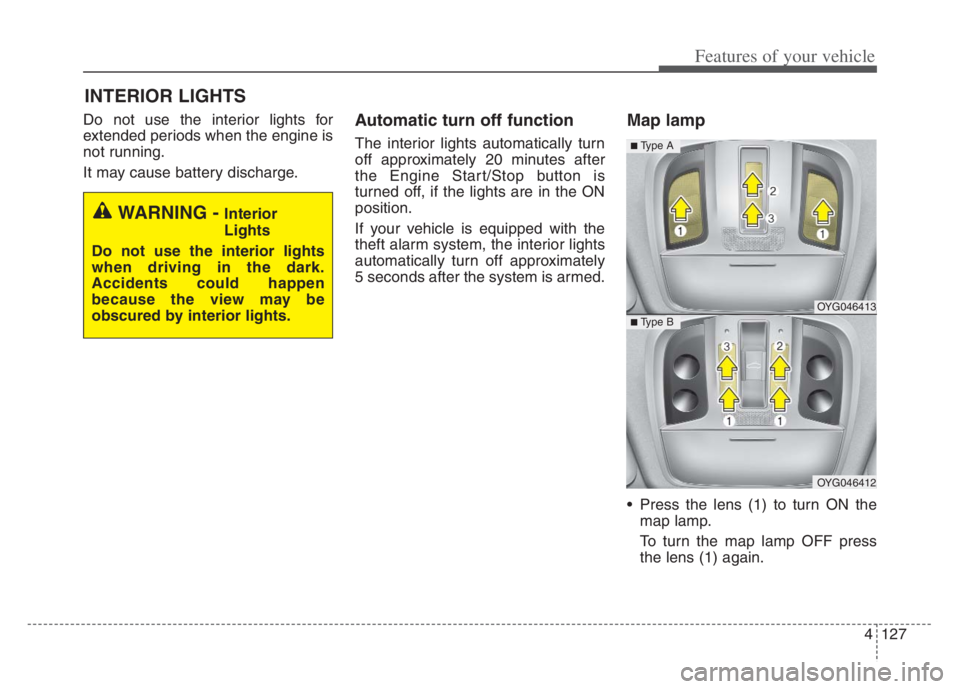
Map lamp
Press the lens (1) to turn ON the
map lamp.
To turn the map lamp OFF press
the lens (1) again.
INTERIOR LIGHTS
WARNING - Interior
Lights
Do not use the interior lights
when driving in the dark.
Accidents could happen
because the view may be
obscured by interior lights.
OYG046413
OYG046412
■ Type B
■ Type A