Page 188 of 480
3-54
Convenient features of your vehicle
This indicator light illuminates for
2 seconds and goes off:
If the smart key is in the vehicle
and the Engine Start/Stop button is
ON, but the vehicle cannot detect
the smart key.
In this case, have the vehicle inspect-
ed by an authorized HYUNDAI deal-
er.
This indicator light blinks:
When the battery voltage of the
smart key is low.
- If this occurs, you will not be able
to start the engine by simply
pressing the Start/Stop button.
However, you can still start the
engine by pressing the Start/Stop
button directly with the smart key.
(Refer to "Starting the Engine"
in chapter 5.)
When there is a malfunction with
the immobilizer system.
In this case, have the vehicle
inspected by an authorized
HYUNDAI dealer.
Turn Signal Indicator
Light
This indicator light blinks:
When you operate the turn signal
indicator stalk.
If any of the following occur, there may
be a malfunction with the turn signal
system.
- The turn signal indicator light illumi-
nates but does not blink
- The turn signal indicator light blinks
rapidly
- The turn signal indicator light does
not illuminate at all
If any of these conditions occur, have
your vehicle inspected by an author-
ized HYUNDAI dealer.
High Beam Indicator
Light
This indicator light illuminates:
When the headlights are on and in
the high beam position
When the turn signal lever is pulled
into the Flash-to-Pass position.
Page 192 of 480
3-58
Convenient features of your vehicle
LCD Display Messages
Shift to P or N to start engine
(for smart key system)
This warning message is displayed if
you try to start the engine with the
shift lever not in the P (Park) or N
(Neutral) position.
Information
You can start the engine with the shift
lever in the N (Neutral) position. But,
for your safety, we recommend that
you start the engine with the shift
lever in the P (Park) position.
Shift to P
(for smart key system)
This message is displayed if you try
to turn off the engine without the shift
lever in P (Park) position.
If this occurs, the Engine Start/Stop
button turns to the ACC position (If
you press the Engine Start/Stop but-
ton once more, it will turn to the ON
position).
Low key battery
(for smart key system)
This warning message is displayed if
the battery of the smart key is dis-
charged while changing the Engine
Start/Stop button to the OFF position.
Press brake pedal to start
engine (for smart key system
and automatic transmission/
dual clutch transmission)
This warning message is displayed if
the Engine Start/Stop button
changes to the ACC position twice
by pressing the button repeatedly
without depressing the brake pedal.
You can start the vehicle by depress-
ing the brake pedal and then press-
ing the Engine Start/Stop button.
Press clutch pedal to start
engine (for smart key system
and manual transmission)
This warning message is displayed if
the Engine Start/Stop button
changes to the ACC position twice
by pressing the button repeatedly
without depressing the clutch pedal.
You can start the engine by depress-
ing the clutch pedal to.
Key not in vehicle
(for smart key system)
This warning message is displayed if
the smart key is not in the vehicle
when you press the Engine Start/
Stop button.
When attempting to start the vehicle,
always have the smart key with you.
i
Page 193 of 480
3-59
Convenient features of your vehicle
3
Key not detected
(for smart key system)
This warning message is displayed if
the smart key is not detected when you
press the Engine Start/Stop button.
Press START button again
(for smart key system)
This message is displayed if you
were unable to start the vehicle when
the Engine Start/Stop button was
pressed.
If this occurs, attempt to start the
engine by pressing the Engine Start/
Stop button again.
If the warning message appears
each time you press the Engine
Start/Stop button, have your vehicle
inspected by an authorized
HYUNDAI dealer.
Battery discharging due to
external electrical devices
This message is displayed if the bat-
tery voltage is weak due to any non-
factory electrical accessories (ex.
dashboard camera) while parking.
Be careful that the battery is not dis-
charged.
If the warning message appears
after removing the non-factory elec-
trical accessories, we recommend
that you have the vehicle inspected
by an authorized HYUNDAI dealer.
Press START button with key
(for smart key system)
This warning message is displayed if
you press the Engine Start/Stop but-
ton while the warning message "Key
not detected" is displayed.
At this time, the immobilizer indicator
light blinks.
Check BRAKE SWITCH fuse
(for smart key system)
This warning message is displayed if
the brake switch fuse is disconnected.
You need to replace the fuse with a
new one before starting the engine.
If that is not possible, you can start
the engine by pressing the Engine
Start/Stop button for 10 seconds in
the ACC position.
Page 194 of 480
3-60
Convenient features of your vehicle
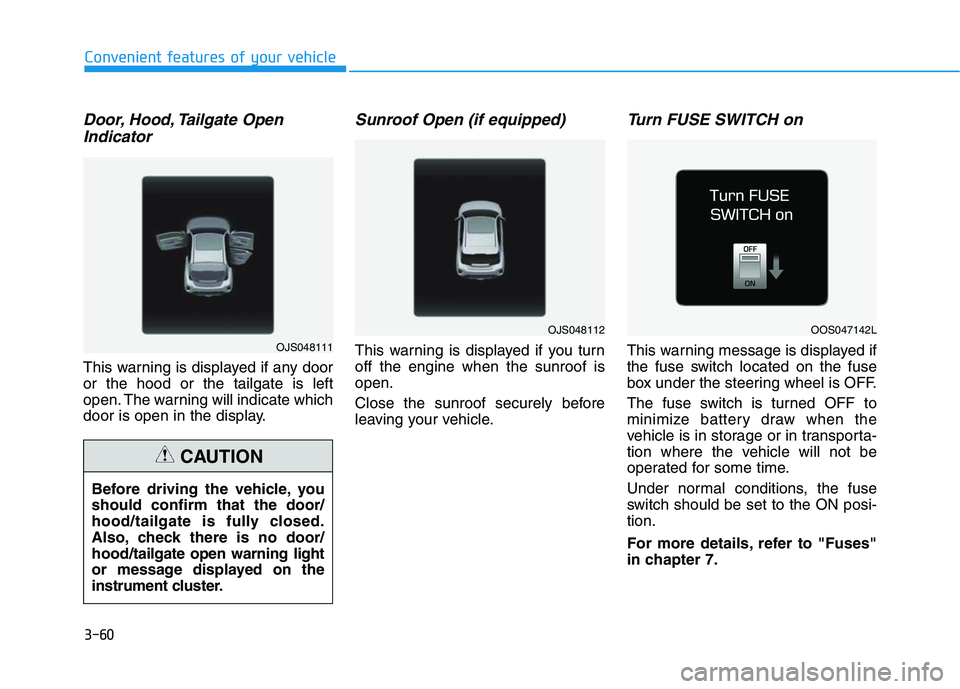
Door, Hood, Tailgate Open
Indicator
This warning is displayed if any door
or the hood or the tailgate is left
open. The warning will indicate which
door is open in the display.
Sunroof Open (if equipped)
This warning is displayed if you turn
off the engine when the sunroof is
open.
Close the sunroof securely before
leaving your vehicle.
Turn FUSE SWITCH on
This warning message is displayed if
the fuse switch located on the fuse
box under the steering wheel is OFF.
The fuse switch is turned OFF to
minimize battery draw when the
vehicle is in storage or in transporta-
tion where the vehicle will not be
operated for some time.
Under normal conditions, the fuse
switch should be set to the ON posi-
tion.
For more details, refer to "Fuses"
in chapter 7. Before driving the vehicle, you
should confirm that the door/
hood/tailgate is fully closed.
Also, check there is no door/
hood/tailgate open warning light
or message displayed on the
instrument cluster.
CAUTION
OJS048111
OJS048112OOS047142L
Page 206 of 480
3-72
Convenient features of your vehicle
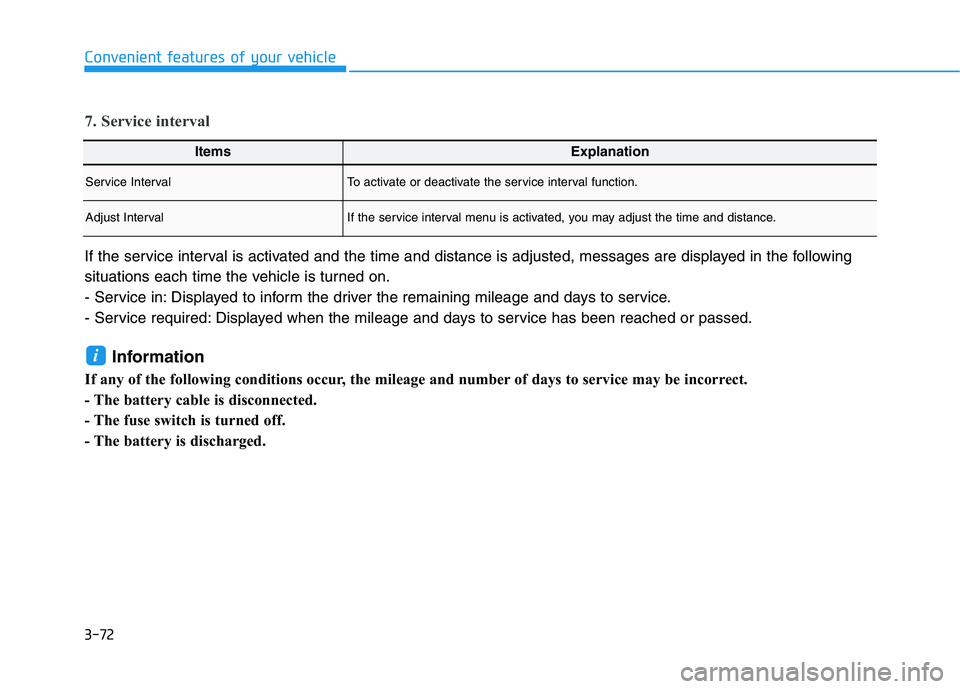
ItemsExplanation
Service IntervalTo activate or deactivate the service interval function.
Adjust IntervalIf the service interval menu is activated, you may adjust the time and distance.
7. Service interval
If the service interval is activated and the time and distance is adjusted, messages are displayed in the following
situations each time the vehicle is turned on.
- Service in: Displayed to inform the driver the remaining mileage and days to service.
- Service required: Displayed when the mileage and days to service has been reached or passed.
Information
If any of the following conditions occur, the mileage and number of days to service may be incorrect.
- The battery cable is disconnected.
- The fuse switch is turned off.
- The battery is discharged.
i
Page 208 of 480
3-74
Convenient features of your vehicle
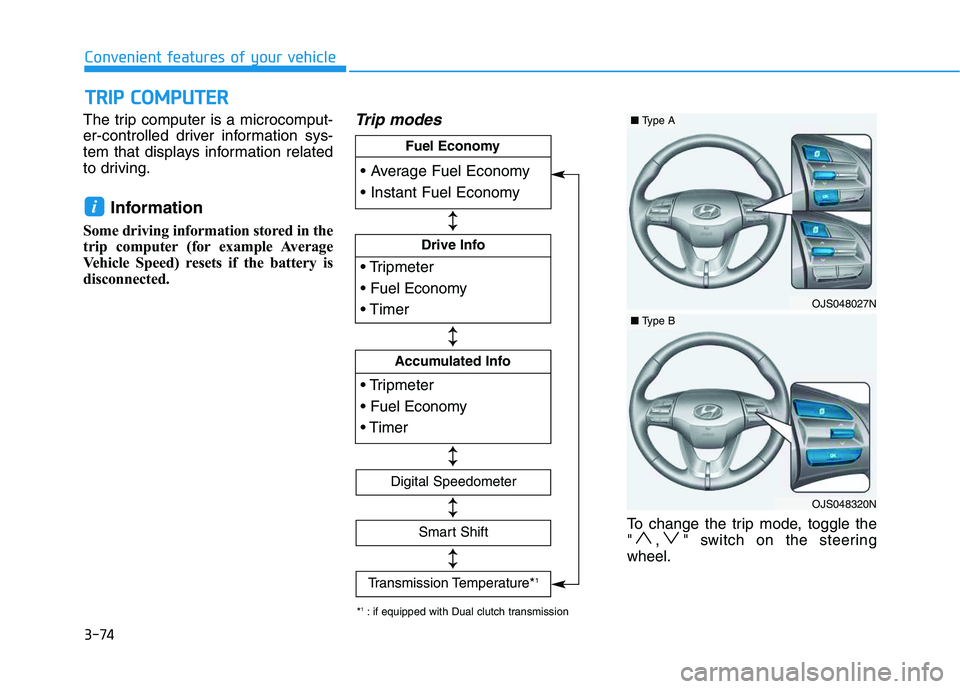
The trip computer is a microcomput-
er-controlled driver information sys-
tem that displays information related
to driving.
Information
Some driving information stored in the
trip computer (for example Average
Vehicle Speed) resets if the battery is
disconnected.
Trip modes
To change the trip mode, toggle the
" , " switch on the steering
wheel.
i
T TR
RI
IP
P
C
CO
OM
MP
PU
UT
TE
ER
R
Drive Info
Accumulated Info
Fuel Economy
Digital Speedometer
Smart Shift
Transmission Temperature*1
↕ ↕
↕ ↕
↕ ↕
↕ ↕
↕ ↕
*1: if equipped with Dual clutch transmission
OJS048027N
■Type A
OJS048320N
■Type B
Page 225 of 480
5-7
Driving your vehicle
5
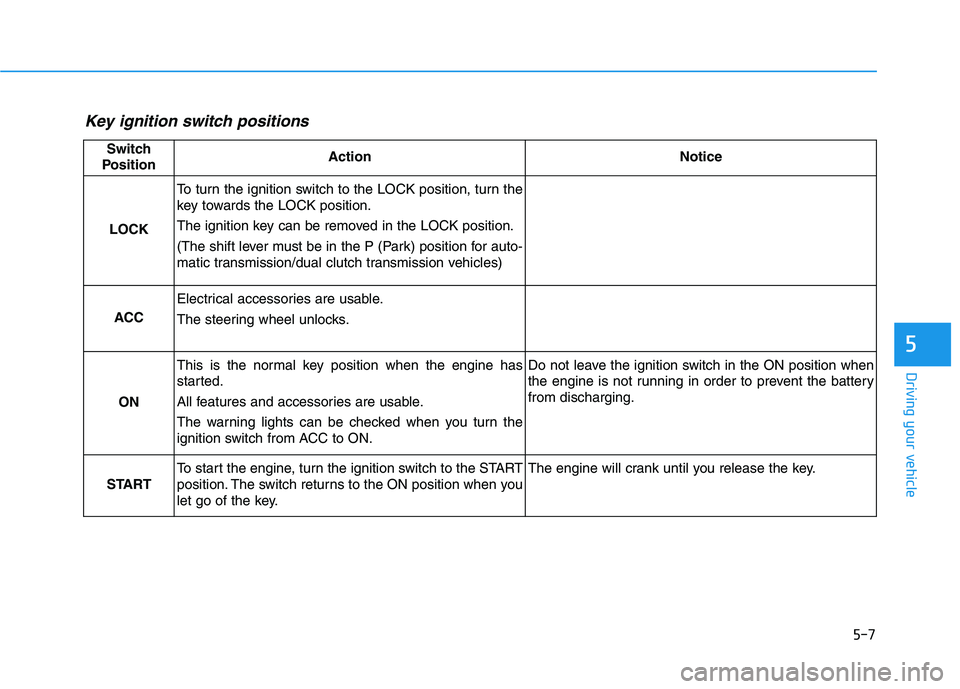
Key ignition switch positions
Switch
PositionActionNotice
LOCK
To turn the ignition switch to the LOCK position, turn the
key towards the LOCK position.
The ignition key can be removed in the LOCK position.
(The shift lever must be in the P (Park) position for auto-
matic transmission/dual clutch transmission vehicles)
ACC
Electrical accessories are usable.
The steering wheel unlocks.
ON
This is the normal key position when the engine has
started.
All features and accessories are usable.
The warning lights can be checked when you turn the
ignition switch from ACC to ON.Do not leave the ignition switch in the ON position when
the engine is not running in order to prevent the battery
from discharging.
START
To start the engine, turn the ignition switch to the START
position. The switch returns to the ON position when you
let go of the key.The engine will crank until you release the key.
Page 229 of 480
5-11
Driving your vehicle
5
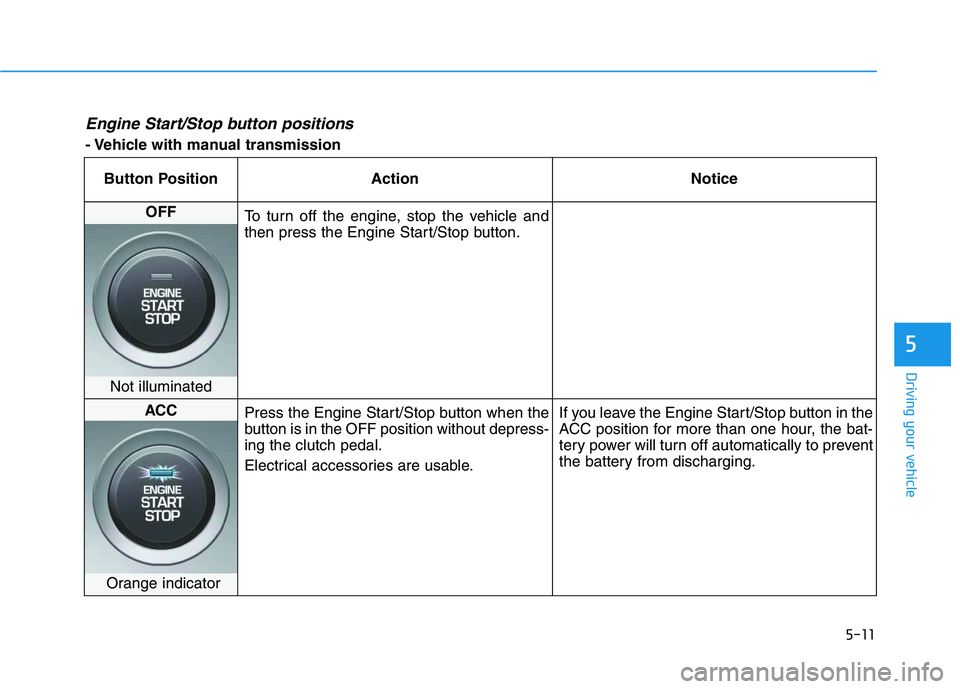
Engine Start/Stop button positions
- Vehicle with manual transmission
Button Position Action Notice
OFF
To turn off the engine, stop the vehicle and
then press the Engine Start/Stop button.
Not illuminated
ACC
Press the Engine Start/Stop button when the
button is in the OFF position without depress-
ing the clutch pedal.
Electrical accessories are usable.If you leave the Engine Start/Stop button in the
ACC position for more than one hour, the bat-
tery power will turn off automatically to prevent
the battery from discharging.
Orange indicator