2020 HYUNDAI TUCSON ULTIMATE warning
[x] Cancel search: warningPage 303 of 546
5-37
Driving your vehicle
5
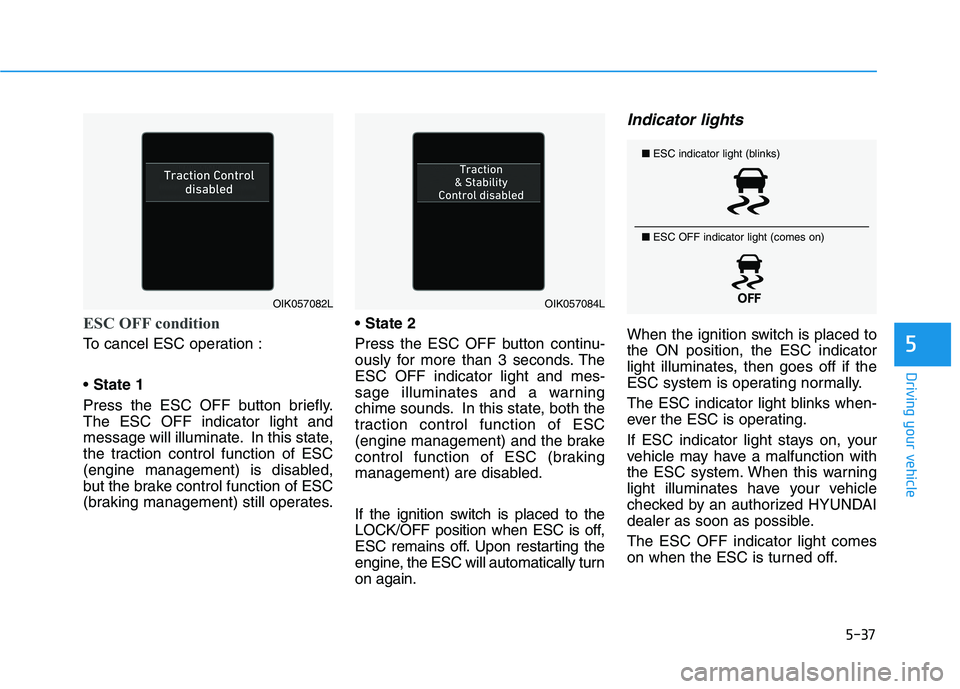
ESC OFF condition
To cancel ESC operation :
State 1
Press the ESC OFF button briefly.
The ESC OFF indicator light and
message will illuminate. In this state,
the traction control function of ESC
(engine management) is disabled,
but the brake control function of ESC
(braking management) still operates.
Press the ESC OFF button continu-
ously for more than 3 seconds. The
ESC OFF indicator light and mes-
sage illuminates and a warning
chime sounds. In this state, both the
traction control function of ESC
(engine management) and the brake
control function of ESC (braking
management) are disabled.
If the ignition switch is placed to the
LOCK/OFF position when ESC is off,
ESC remains off. Upon restarting the
engine, the ESC will automatically turn
on again.
Indicator lights
When the ignition switch is placed to
the ON position, the ESC indicator
light illuminates, then goes off if the
ESC system is operating normally.
The ESC indicator light blinks when-
ever the ESC is operating.
If ESC indicator light stays on, your
vehicle may have a malfunction with
the ESC system. When this warning
light illuminates have your vehicle
checked by an authorized HYUNDAI
dealer as soon as possible.
The ESC OFF indicator light comes
on when the ESC is turned off.
OIK057082LOIK057084L
■ESC indicator light (blinks)
■ ESC OFF indicator light (comes on)
Page 304 of 546
5-38
Driving your vehicle
Driving with wheels and tires with
different sizes may cause the ESC
system to malfunction. Before
replacing tires, make sure all four
tires and wheels are the same
size. Never drive the vehicle with
different sized tires and wheels
installed.
ESC OFF usage
When Driving
The ESC OFF mode should only be
used briefly to help free the vehicle if
stuck in snow or mud by temporarily
stopping operation of the ESC to
maintain wheel torque.
To turn ESC off while driving, press
the ESC OFF button while driving on
a flat road surface.To prevent damage to the trans-
mission:
Do not allow wheel(s) of one
axle to spin excessively while
the ESC, ABS, and parking brake
warning lights are displayed.
The repairs would not be cov-
ered by the vehicle warranty.
Reduce engine power and do
not spin the wheel(s) excessive-
ly while these lights are dis-
played.
When operating the vehicle on a
dynamometer, make sure the
ESC is turned off (ESC OFF light
illuminated).
Information
Turning the ESC off does not affect
ABS or standard brake system opera-
tion.
i
NOTICE
NOTICE
When the ESC is blinking, this
indicates the ESC is active:
Drive slowly and NEVER attempt
to accelerate. NEVER turn the
ESC off while the ESC indicator
light is blinking or you may lose
control of the vehicle resulting in
an accident.
WARNING
Page 305 of 546
5-39
Driving your vehicle
5
Vehicle Stability Management
(VSM)
The Vehicle Stability Management
(VSM) is a function of the Electronic
Stability Control (ESC) system. It
helps ensure the vehicle stays stable
when accelerating or braking sud-
denly on wet, slippery and rough
roads where traction over the four
tires can suddenly become uneven.
VSM operation
VSM ON condition
The VSM operates when:
The Electronic Stability Control
(ESC) is on.
Vehicle speed is approximately
above 9 mph (15 km/h) on curve
roads.
Vehicle speed is approximately
above 12 mph (20 km/h) when the
vehicle is braking on rough roads.
When operating
When you apply your brakes under
conditions which may activate the
ESC, you may hear sounds from the
brakes, or feel a corresponding sen-
sation in the brake pedal. This is nor-
mal and it means your VSM is active.
Information
The VSM does not operate when:
• Driving on bank road such as gradi-
ent or incline.
• Driving rearward.
• ESC OFF indicator light is on.
• EPS (Electric Power Steering)
warning light ( ) is on.
i
Take the following precautions
when using the Vehicle Stability
Management (VSM):
ALWAYS check the speed and
the distance to the vehicle
ahead. The VSM is not a sub-
stitute for safe driving prac-
tices.
Never drive too fast for the
road conditions. The VSM sys-
tem will not prevent acci-
dents. Excessive speed in bad
weather, slippery and uneven
roads can result in severe
accidents.
WARNING
Page 306 of 546
5-40
Driving your vehicle
VSM OFF condition
To cancel VSM operation, press the
ESC OFF button. ESC OFF indicator
light ( ) will illuminate.
To turn on VSM, press the ESC OFF
button again. The ESC OFF indicator
light will go out.
Driving with wheels and tires with dif-
ferent sizes may cause the ESC sys-
tem to malfunction. Before replacing
tires, make sure all four tires and
wheels are the same size. Never
drive the vehicle with different sized
tires and wheels installed.
Hill-Start Assist Control (HAC)
The Hill-Start Assist Control (HAC)
helps prevent the vehicle from rolling
backwards when starting a vehicle
from a stop on a hill. The system
operates the brakes automatically for
approximately 2 seconds and releas-
es the brake after 2 seconds or when
the accelerator pedal is depressed.
The HAC does not operate when
the shift lever is in P (Park) or N
(Neutral)
The HAC activates even though
the ESC (Electronic Stability
Control) is off but does not acti-
vate when the ESC has malfunc-
tioned.
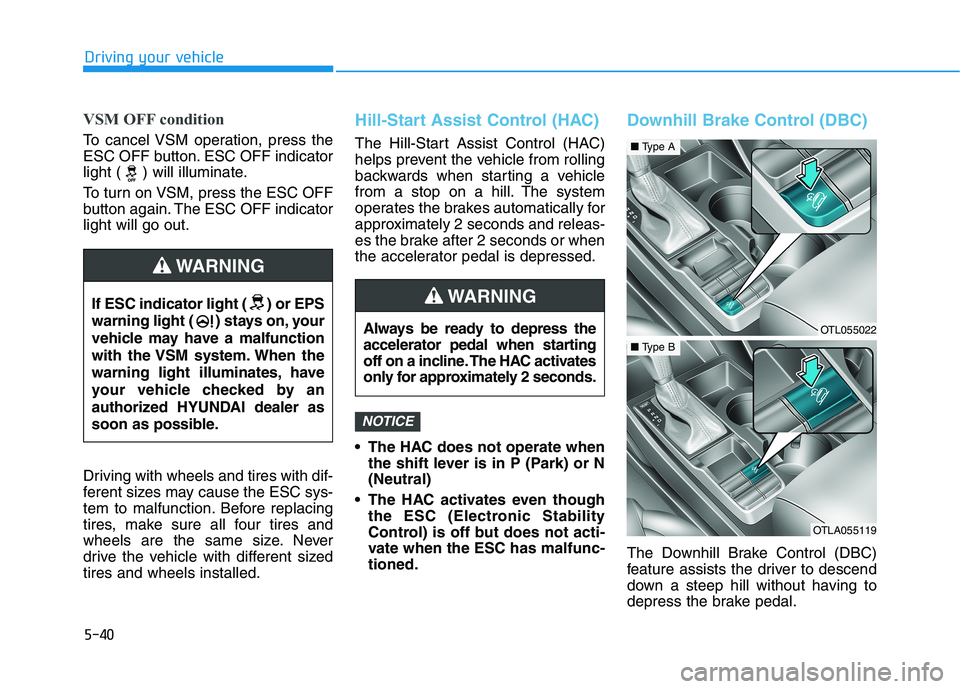
Downhill Brake Control (DBC)
The Downhill Brake Control (DBC)
feature assists the driver to descend
down a steep hill without having to
depress the brake pedal.
NOTICE
If ESC indicator light ( ) or EPS
warning light ( ) stays on, your
vehicle may have a malfunction
with the VSM system. When the
warning light illuminates, have
your vehicle checked by an
authorized HYUNDAI dealer as
soon as possible.
WARNING
Always be ready to depress the
accelerator pedal when starting
off on a incline. The HAC activates
only for approximately 2 seconds.
WARNING
OTL055022
■Type A
OTLA055119
■Type B
Page 307 of 546
5-41
Driving your vehicle
5
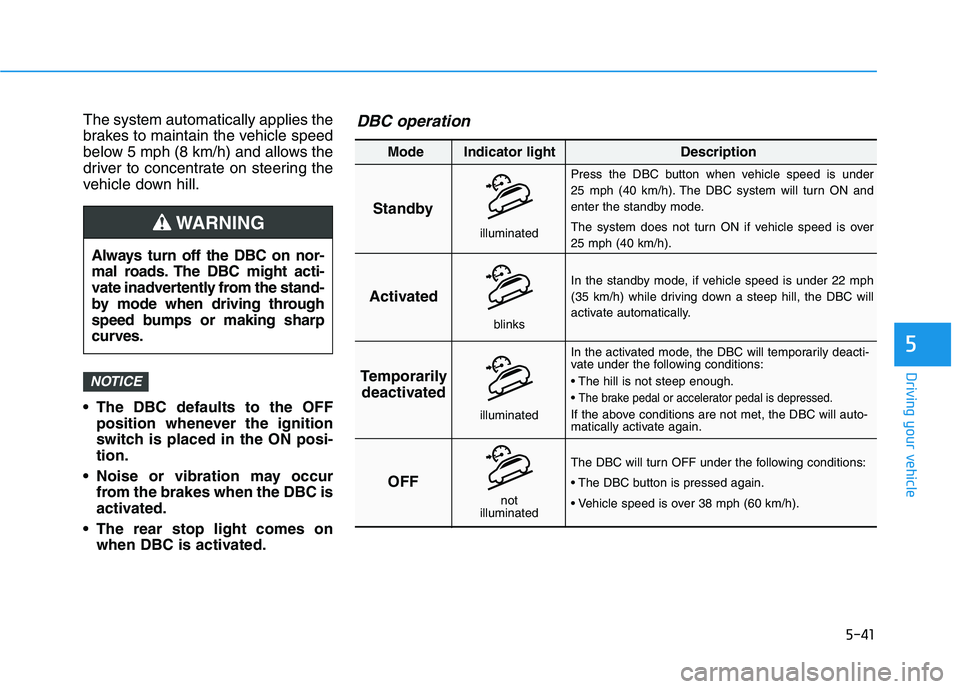
The system automatically applies the
brakes to maintain the vehicle speed
below 5 mph (8 km/h) and allows the
driver to concentrate on steering the
vehicle down hill.
The DBC defaults to the OFF
position whenever the ignition
switch is placed in the ON posi-
tion.
Noise or vibration may occur
from the brakes when the DBC is
activated.
The rear stop light comes on
when DBC is activated.
NOTICE
Always turn off the DBC on nor-
mal roads. The DBC might acti-
vate inadvertently from the stand-
by mode when driving through
speed bumps or making sharp
curves.
WARNING
Standby
Press the DBC button when vehicle speed is under
25 mph (40 km/h). The DBC system will turn ON and
enter the standby mode.
The system does not turn ON if vehicle speed is over
25 mph (40 km/h).
In the standby mode, if vehicle speed is under 22 mph
(35 km/h) while driving down a steep hill, the DBC will
activate automatically.
In the activated mode, the DBC will temporarily deacti-
vate under the following conditions:
The brake pedal or accelerator pedal is depressed.
If the above conditions are not met, the DBC will auto-
matically activate again.
The DBC will turn OFF under the following conditions:
Activated
Temporarily
deactivated
OFF
Mode Indicator light Description
blinks
illuminated
not
illuminated
illuminated
DBC operation
Page 308 of 546
5-42
Driving your vehicle
The DBC may not deactivate on
steep inclines even though the
brake or accelerator pedal is
depressed.
The DBC does not operate
when:
- The shift lever is in P (Park).
- The ESC is activated.
Good Braking Practices
Wet brakes can be dangerous! The
brakes may get wet if the vehicle is
driven through standing water or if it
is washed. Your vehicle will not stop
as quickly if the brakes are wet. Wet
brakes may cause the vehicle to pull
to one side.To dry the brakes, apply the brakes
lightly until the braking action returns
to normal, taking care to keep the
vehicle under control at all times. If
the braking action does not return to
normal, stop as soon as it is safe to
do so and call an authorized
HYUNDAI dealer for assistance.
DO NOT drive with your foot resting
on the brake pedal. Even light, but
constant pedal pressure can result in
the brakes overheating, brake wear,
and possibly even brake failure.
If a tire goes flat while you are driv-
ing, apply the brakes gently and
keep the vehicle pointed straight
ahead while you slow down. When
you are moving slowly enough for it
to be safe to do so, pull off the road
and stop in a safe location.
Keep your foot firmly on the brake
pedal when the vehicle is stopped to
prevent the vehicle from rolling for-
ward.
NOTICE
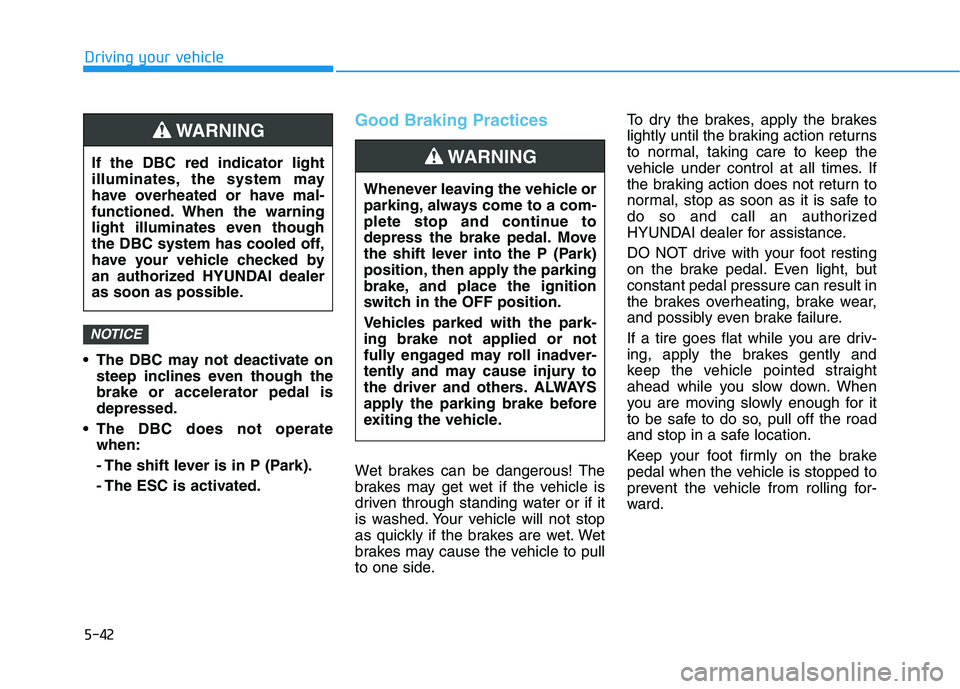
If the DBC red indicator light
illuminates, the system may
have overheated or have mal-
functioned. When the warning
light illuminates even though
the DBC system has cooled off,
have your vehicle checked by
an authorized HYUNDAI dealer
as soon as possible.
WARNING
Whenever leaving the vehicle or
parking, always come to a com-
plete stop and continue to
depress the brake pedal. Move
the shift lever into the P (Park)
position, then apply the parking
brake, and place the ignition
switch in the OFF position.
Vehicles parked with the park-
ing brake not applied or not
fully engaged may roll inadver-
tently and may cause injury to
the driver and others. ALWAYS
apply the parking brake before
exiting the vehicle.
WARNING
Page 309 of 546
5-43
Driving your vehicle
5
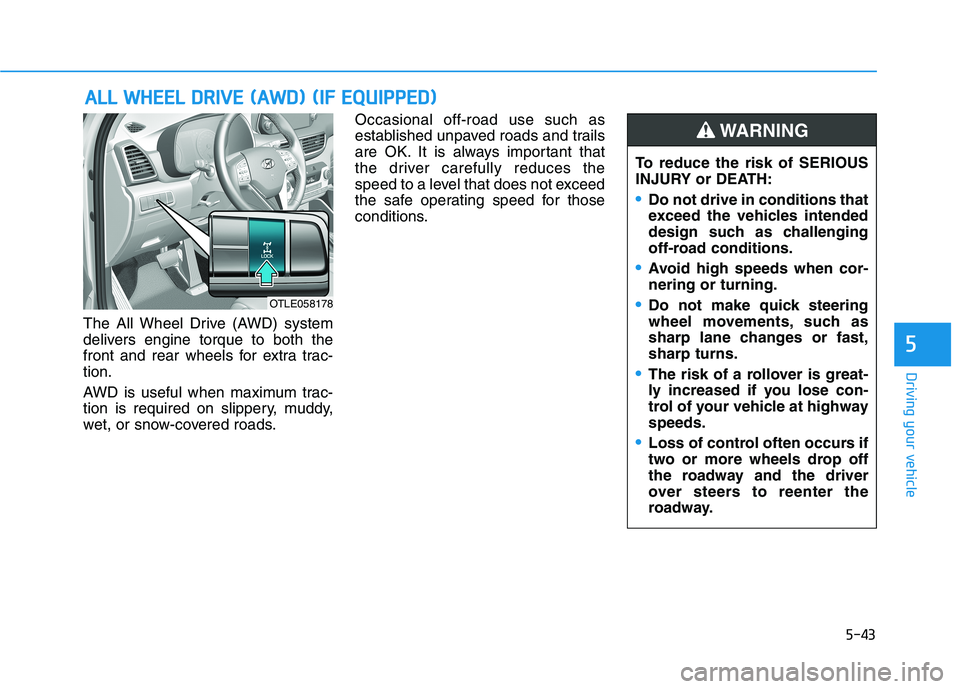
The All Wheel Drive (AWD) system
delivers engine torque to both the
front and rear wheels for extra trac-
tion.
AWD is useful when maximum trac-
tion is required on slippery, muddy,
wet, or snow-covered roads.Occasional off-road use such as
established unpaved roads and trails
are OK. It is always important that
the driver carefully reduces the
speed to a level that does not exceed
the safe operating speed for those
conditions.
A AL
LL
L
W
WH
HE
EE
EL
L
D
DR
RI
IV
VE
E
(
(A
AW
WD
D)
)
(
(I
IF
F
E
EQ
QU
UI
IP
PP
PE
ED
D)
)
To reduce the risk of SERIOUS
INJURY or DEATH:
Do not drive in conditions that
exceed the vehicles intended
design such as challenging
off-road conditions.
Avoid high speeds when cor-
nering or turning.
Do not make quick steering
wheel movements, such as
sharp lane changes or fast,
sharp turns.
The risk of a rollover is great-
ly increased if you lose con-
trol of your vehicle at highway
speeds.
Loss of control often occurs if
two or more wheels drop off
the roadway and the driver
over steers to reenter the
roadway.
WARNING
OTLE058178
Page 311 of 546
5-45
Driving your vehicle
5
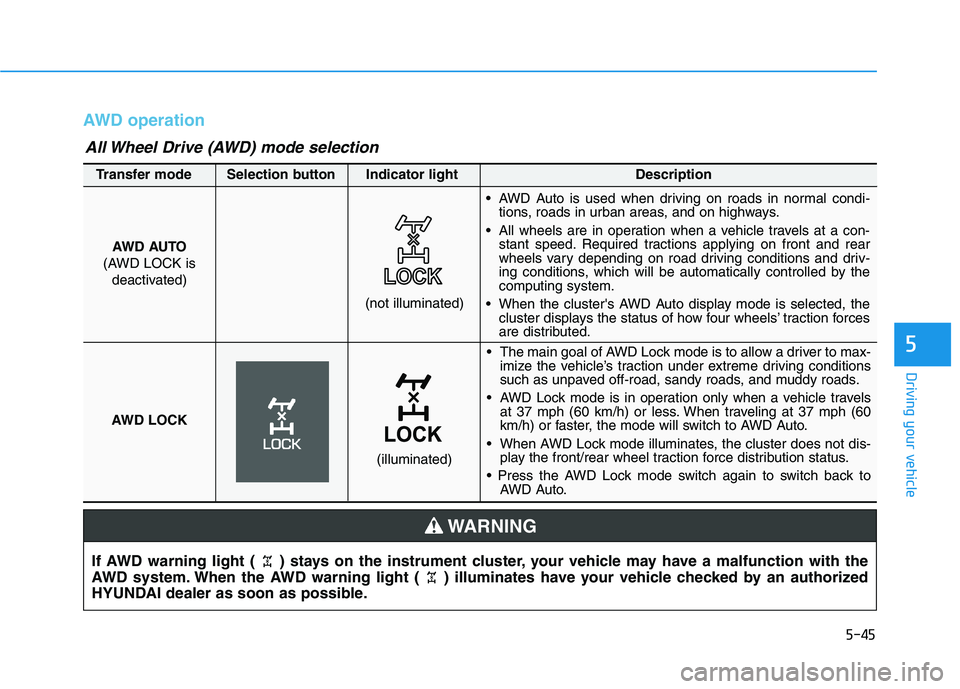
AWD operation
If AWD warning light ( ) stays on the instrument cluster, your vehicle may have a malfunction with the
AWD system. When the AWD warning light ( ) illuminates have your vehicle checked by an authorized
HYUNDAI dealer as soon as possible.
WARNING
• The main goal of AWD Lock mode is to allow a driver to max-imize the vehicle’s traction under extreme driving conditions
such as unpaved off-road, sandy roads, and muddy roads.
AWD Lock mode is in operation only when a vehicle travels at 37 mph (60 km/h) or less. When traveling at 37 mph (60
km/h) or faster, the mode will switch to AWD Auto.
When AWD Lock mode illuminates, the cluster does not dis- play the front/rear wheel traction force distribution status.
AWD Auto.
AWD AUTO
(AWD LOCK is deactivated)
(not illuminated)
Transfer mode Selection button Indicator light Description
AWD Auto is used when driving on roads in normal condi-
tions, roads in urban areas, and on highways.
All wheels are in operation when a vehicle travels at a con- stant speed. Required tractions applying on front and rear
wheels vary depending on road driving conditions and driv-
ing conditions, which will be automatically controlled by the
computing system.
When the cluster's AWD Auto display mode is selected, the cluster displays the status of how four wheels’ traction forces
are distributed.
AWD LOCK
(illuminated)
All Wheel Drive (AWD) mode selection