2020 Hyundai Tucson tyre pressure
[x] Cancel search: tyre pressurePage 390 of 637
5-73
Driving your vehicle
5
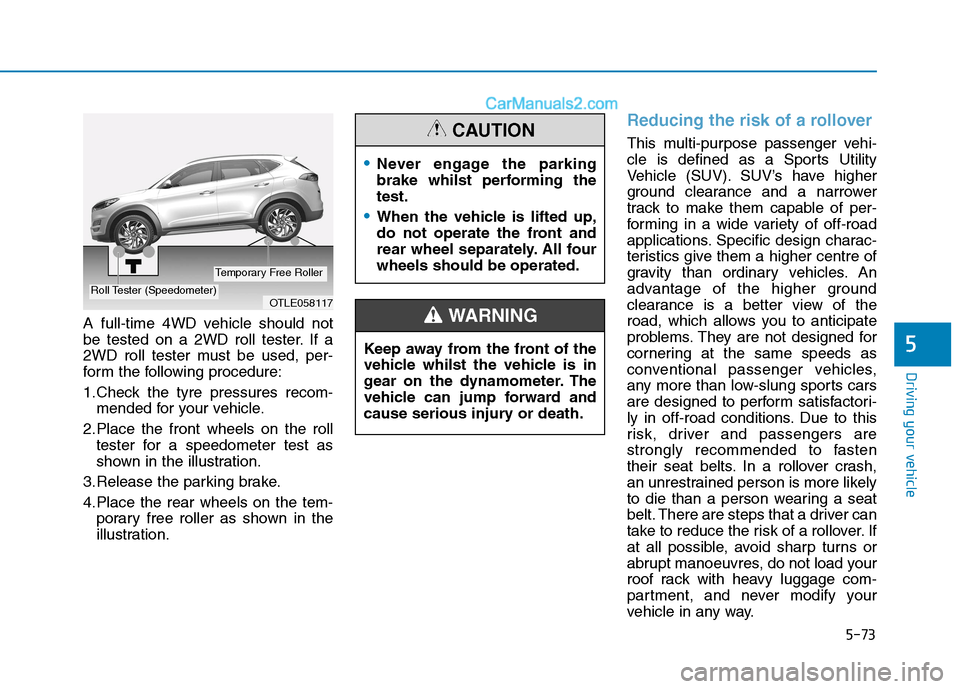
A full-time 4WD vehicle should not
be tested on a 2WD roll tester. If a
2WD roll tester must be used, per-
form the following procedure:
1.Check the tyre pressures recom-
mended for your vehicle.
2.Place the front wheels on the roll
tester for a speedometer test as
shown in the illustration.
3.Release the parking brake.
4.Place the rear wheels on the tem-
porary free roller as shown in the
illustration.
Reducing the risk of a rollover
This multi-purpose passenger vehi-
cle is defined as a Sports Utility
Vehicle (SUV). SUV’s have higher
ground clearance and a narrower
track to make them capable of per-
forming in a wide variety of off-road
applications. Specific design charac-
teristics give them a higher centre of
gravity than ordinary vehicles. An
advantage of the higher ground
clearance is a better view of the
road, which allows you to anticipate
problems. They are not designed for
cornering at the same speeds as
conventional passenger vehicles,
any more than low-slung sports cars
are designed to perform satisfactori-
ly in off-road conditions. Due to this
risk, driver and passengers are
strongly recommended to fasten
their seat belts. In a rollover crash,
an unrestrained person is more likely
to die than a person wearing a seat
belt. There are steps that a driver can
take to reduce the risk of a rollover. If
at all possible, avoid sharp turns or
abrupt manoeuvres, do not load your
roof rack with heavy luggage com-
partment, and never modify your
vehicle in any way.
OTLE058117Roll Tester (Speedometer)
Temporary Free Roller
Never engage the parking
brake whilst performing the
test.
When the vehicle is lifted up,
do not operate the front and
rear wheel separately. All four
wheels should be operated.
CAUTION
Keep away from the front of the
vehicle whilst the vehicle is in
gear on the dynamometer. The
vehicle can jump forward and
cause serious injury or death.
WARNING
Page 430 of 637
5-113
Driving your vehicle
- A trailer or carrier is installed. To
use the BCW system, remove the
trailer or carrier from your vehicle.
If any of these conditions occur, the
light on the BCW switch and the sys-
tem will turn off automatically.
When the BCW cancelled warning
message is displayed in the cluster,
check to make sure that the rear
bumper is free from any dirt or snow
in the areas where the sensor is
located. Remove any dirt, snow, or
foreign material that could interfere
with the radar sensors.
After any dirt or debris is removed,
the BCW system should operate nor-
mally after about 10 minutes of driv-
ing the vehicle.
If the system still does not operate
normally have your vehicle inspected
by an authorised HYUNDAI dealer.
Information
Turn off the system by pressing the
BCW switch and deselecting Rear
Rear Cross-Traffic Collision warning
(RCCW) from the User Settings mode
on the cluster, when using a trailer or
carrier behind your vehicle.
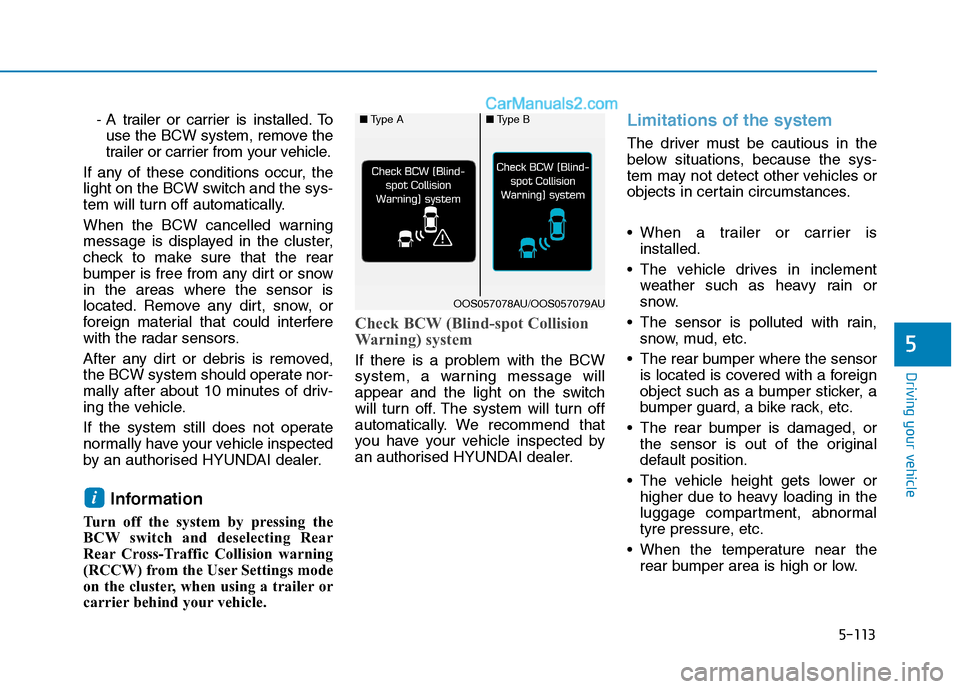
Check BCW (Blind-spot Collision
Warning) system
If there is a problem with the BCW
system, a warning message will
appear and the light on the switch
will turn off. The system will turn off
automatically. We recommend that
you have your vehicle inspected by
an authorised HYUNDAI dealer.
Limitations of the system
The driver must be cautious in the
below situations, because the sys-
tem may not detect other vehicles or
objects in certain circumstances.
When a trailer or carrier is
installed.
The vehicle drives in inclement
weather such as heavy rain or
snow.
The sensor is polluted with rain,
snow, mud, etc.
The rear bumper where the sensor
is located is covered with a foreign
object such as a bumper sticker, a
bumper guard, a bike rack, etc.
The rear bumper is damaged, or
the sensor is out of the original
default position.
The vehicle height gets lower or
higher due to heavy loading in the
luggage compartment, abnormal
tyre pressure, etc.
When the temperature near the
rear bumper area is high or low.
i
5
■Type A■Type B
OOS057078AU/OOS057079AU
Page 445 of 637
5-128
Driving your vehicle
The vehicle drives on a
bumpy road.
The vehicle is controlled by
the following driving assist
systems:
- Lane Keeping Assist (LKA)
system
- Forward Collision-
Avoidance Assist (FCA) sys-
tem
- Smart Cruise Control system
Playing the vehicle audio sys-
tem at high volume may offset
the Driver Attention Warning
(DAW) system warning sounds.
CAUTION
The Driver Attention Warning
(DAW) system may not properly
operate with limited alerting in
the following situations:
The lane detection perform-
ance is limited. (For more
details, refer to "Lane Keeping
Assist (LKA) system" in this
chapter.)
The vehicle is violently driven
or is abruptly turned for
obstacle avoidance (e.g. con-
struction area, other vehicles,
fallen objects, bumpy road).
Forward drivability of the
vehicle is severely under-
mined (possibly due to wide
variation in tyre pressures,
uneven tyre wear-out, toe-
in/toe-out alignment).
The vehicle drives on a curvy
road.
The vehicle drives through a
windy area.
CAUTION
Page 468 of 637
5-151
Driving your vehicle
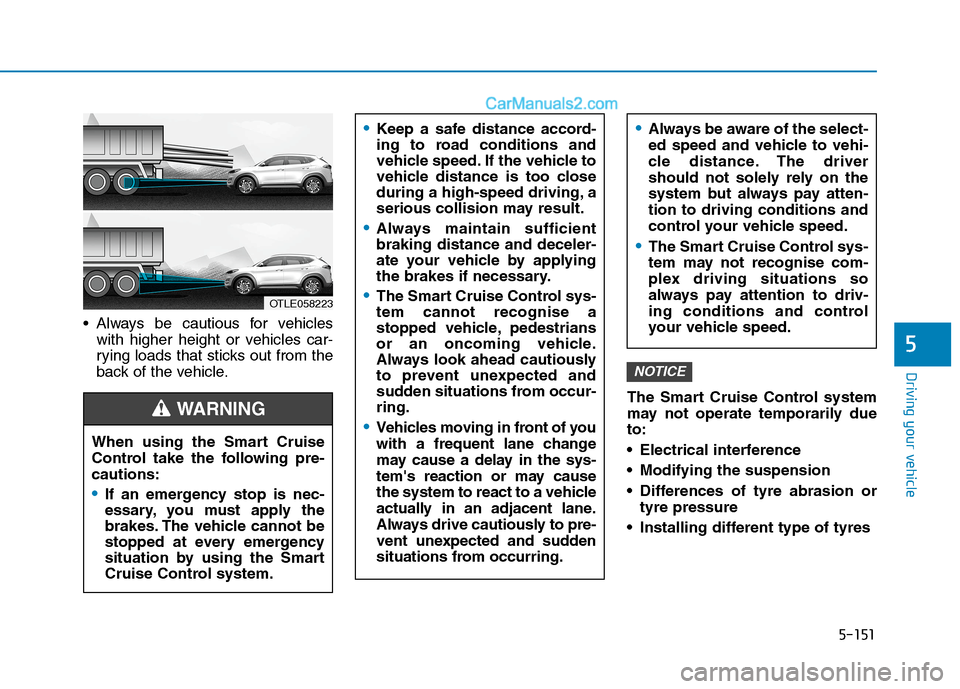
Always be cautious for vehicles
with higher height or vehicles car-
rying loads that sticks out from the
back of the vehicle.
The Smart Cruise Control system
may not operate temporarily due
to:
Electrical interference
Modifying the suspension
Differences of tyre abrasion or
tyre pressure
Installing different type of tyres
NOTICE
5
OTLE058223
Keep a safe distance accord-
ing to road conditions and
vehicle speed. If the vehicle to
vehicle distance is too close
during a high-speed driving, a
serious collision may result.
Always maintain sufficient
braking distance and deceler-
ate your vehicle by applying
the brakes if necessary.
The Smart Cruise Control sys-
tem cannot recognise a
stopped vehicle, pedestrians
or an oncoming vehicle.
Always look ahead cautiously
to prevent unexpected and
sudden situations from occur-
ring.
Vehicles moving in front of you
with a frequent lane change
may cause a delay in the sys-
tem's reaction or may cause
the system to react to a vehicle
actually in an adjacent lane.
Always drive cautiously to pre-
vent unexpected and sudden
situations from occurring.
Always be aware of the select-
ed speed and vehicle to vehi-
cle distance. The driver
should not solely rely on the
system but always pay atten-
tion to driving conditions and
control your vehicle speed.
The Smart Cruise Control sys-
tem may not recognise com-
plex driving situations so
always pay attention to driv-
ing conditions and control
your vehicle speed.
When using the Smart Cruise
Control take the following pre-
cautions:
If an emergency stop is nec-
essary, you must apply the
brakes. The vehicle cannot be
stopped at every emergency
situation by using the Smart
Cruise Control system.
WARNING
Page 471 of 637
5-154
Driving your vehicle
If you believe your brakes may be
wet, apply them lightly whilst driv-
ing until normal braking operation
returns.
Hydroplaning
If the road is wet enough and you are
going fast enough, your vehicle may
have little or no contact with the road
surface and actually ride on the
water. The best advice is SLOW
DOWN when the road is wet.
The risk of hydroplaning increas-
es as the depth of tyre tread
decreases. Refer to "Tyre replace-
ment" in chapter 7.
Driving in flooded areas
Avoid driving through flooded areas
unless you are sure the water is no
higher than the bottom of the wheel
hub. Drive through any water slowly.
Allow adequate stopping distance
because brake performance may be
reduced.
After driving through water, dry the
brakes by gently applying them sev-
eral times whilst the vehicle is mov-
ing slowly.
Highway driving
Tyres
Adjust the tyre inflation, as specified.
Under-inflation may overheat or
damage the tyres.
Do not install worn-out or damaged
tyres, which may reduce traction or
fail the braking operation.
Information
Never over-inflate your tyres above
the maximum inflation pressure, as
specified on your tyres.
Fuel, engine coolant and engine
oil
Driving at a high speed consumes
more fuel than driving at a slow
speed, such as in an urban area. Do
not forget to check both the engine
coolant and engine oil.
Drive belt
A loose or damaged drive belt may
overheat the engine.
i
Page 489 of 637
What to do in an emergency
Hazard warning flasher ........................................6-2
In case of an emergency whilst driving .............6-3
If the engine stalls whilst driving ..................................6-3
If the engine stalls at a crossroad or crossing .........6-3
If you have a flat tyre whilst driving ...........................6-3
If the engine will not start ...................................6-4
If the engine doesn't turn over or turns over
slowly....................................................................................6-4
If the engine turns over normally but doesn't
start.......................................................................................6-4
Jump starting ..........................................................6-4
If the engine overheats ........................................6-8
Tyre pressure monitoring system (TPMS) .......6-10
Check tyre pressure .......................................................6-10
Tyre pressure monitoring system ...............................6-11
Low tyre pressure telltale.............................................6-12
Low tyre pressure position telltale and tyre
pressure telltale ...............................................................6-12
TPMS (Tyre Pressure Monitoring System)
malfunction indicator .....................................................6-13
Changing a tyre with TPMS .........................................6-14
If you have a flat tyre ........................................6-16
Jack and tools ..................................................................6-16
Changing tyres .................................................................6-17
Towing ...................................................................6-23
Towing service .................................................................6-23
Removable towing hook ................................................6-24
Emergency towing ..........................................................6-25
Emergency commodity ........................................6-28
Fire extinguisher .............................................................6-28
First aid kit ........................................................................6-28
Triangle reflector ............................................................6-28
Tyre pressure gauge ......................................................6-28
6
Page 498 of 637
6-10
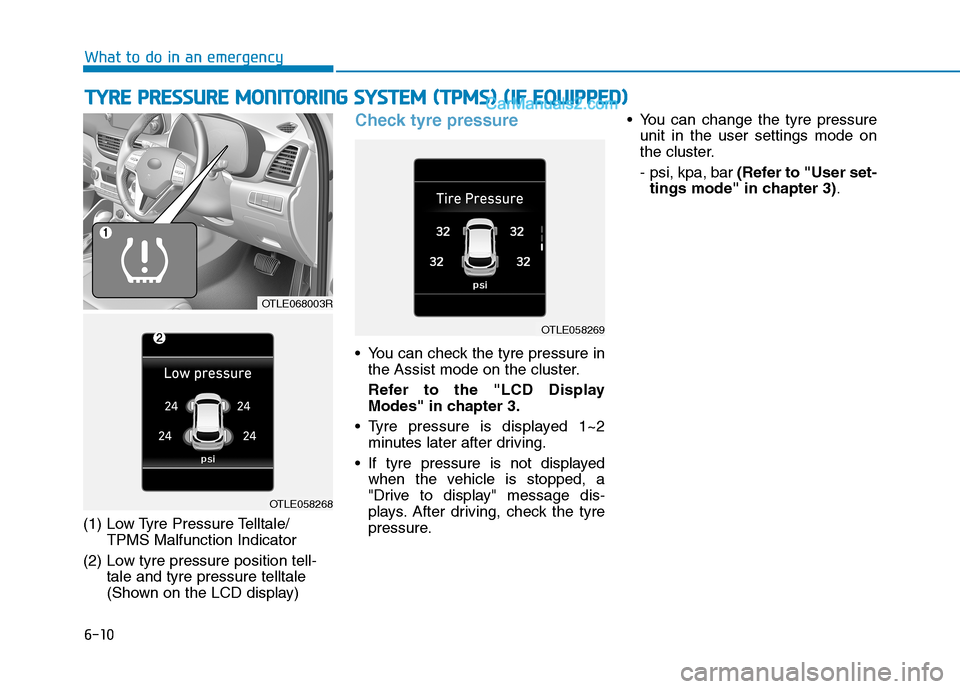
(1) Low Tyre Pressure Telltale/
TPMS Malfunction Indicator
(2) Low tyre pressure position tell-
tale and tyre pressure telltale
(Shown on the LCD display)
Check tyre pressure
You can check the tyre pressure in
the Assist mode on the cluster.
Refer to the "LCD Display
Modes" in chapter 3.
Tyre pressure is displayed 1~2
minutes later after driving.
If tyre pressure is not displayed
when the vehicle is stopped, a
"Drive to display" message dis-
plays. After driving, check the tyre
pressure. You can change the tyre pressure
unit in the user settings mode on
the cluster.
- psi, kpa, bar(Refer to "User set-
tings mode" in chapter 3).
T
TY
YR
RE
E
P
PR
RE
ES
SS
SU
UR
RE
E
M
MO
ON
NI
IT
TO
OR
RI
IN
NG
G
S
SY
YS
ST
TE
EM
M
(
(T
TP
PM
MS
S)
)
(
(I
IF
F
E
EQ
QU
UI
IP
PP
PE
ED
D)
)
What to do in an emergency
OTLE068003R
OTLE058268
OTLE058269
Page 499 of 637
6-11
What to do in an emergency
Tyre pressure monitoring sys-
tem
Each tyre, including the spare (if pro-
vided), should be checked monthly
when cold and inflated to the inflation
pressure recommended by the vehi-
cle manufacturer on the vehicle plac-
ard or tyre inflation pressure label. If
your vehicle has tyres of a different
size than the size indicated on the
vehicle placard or tyre inflation pres-
sure label, you should determine the
proper tyre inflation pressure for
those tyres.As an added safety feature, your
vehicle has been equipped with a
tyre pressure monitoring system
(TPMS) that illuminates a low tyre
pressure telltale when one or more
of your tyres is significantly under-
inflated. Accordingly, when the low
tyre pressure telltale illuminates, you
should stop and check your tyres as
soon as possible, and inflate them to
the proper pressure. Driving on a sig-
nificantly under-inflated tyre causes
the tyre to overheat and can lead to
tyre failure. Under-inflation also
reduces fuel efficiency and tyre tread
life, and may affect the vehicle’s han-
dling and stopping ability.
Please note that the TPMS is not a
substitute for proper tyre mainte-
nance, and it is the driver’s responsi-
bility to maintain correct tyre pres-
sures, even if under-inflation has not
reached the level to trigger illumina-
tion of the TPMS low tyre pressure
telltale.Your vehicle has also been equipped
with a TPMS malfunction indicator to
indicate when the system is not
operating properly. The TPMS mal-
function indicator is combined with
the low tyre pressure telltale. When
the system detects a malfunction,
the telltale will flash for approximate-
ly one minute and then remain con-
tinuously illuminated. This sequence
will continue upon subsequent vehi-
cle start-ups as long as the malfunc-
tion exists. When the malfunction
indicator is illuminated, the system
may not be able to detect or signal
low tyre pressure as intended.
TPMS malfunctions may occur for a
variety of reasons, including the
installation of replacement or alter-
native tyres or wheels on the vehicle
that prevent the TPMS from function-
ing properly. Always check the TPMS
malfunction telltale after replacing
one or more tyres or wheels on your
vehicle to ensure that the replace-
ment or alternative tyres and wheels
allow the TPMS to continue to func-
tion properly.
6
Over-inflation or under-inflation
can reduce tyre life, adversely
affect vehicle handling, and
lead to sudden tyre failure that
may cause loss of vehicle con-
trol resulting in an accident.
WARNING