Page 104 of 537
4-19
04
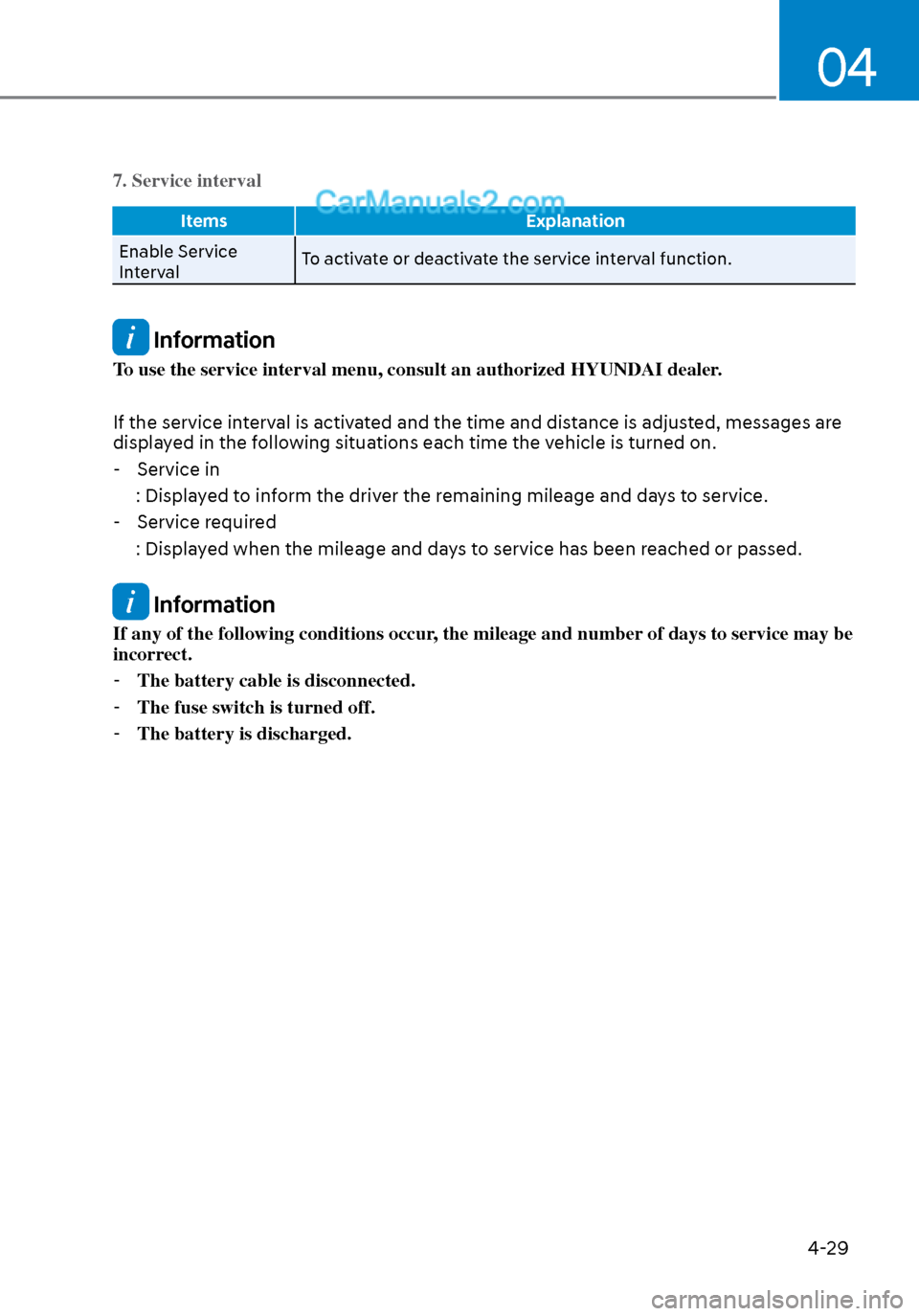
LCD Display Control
ODN8A069203ODN8A069203
The LCD display modes can be changed by using the control buttons.
1.
: MODE button for changing modes
2.
, : MOVE switch for changing items
3. OK : Push the SELECT/RESET button for setting or resetting the selected item
LCD DISPLAY (TYPE A, B)
Page 112 of 537
04
4-27
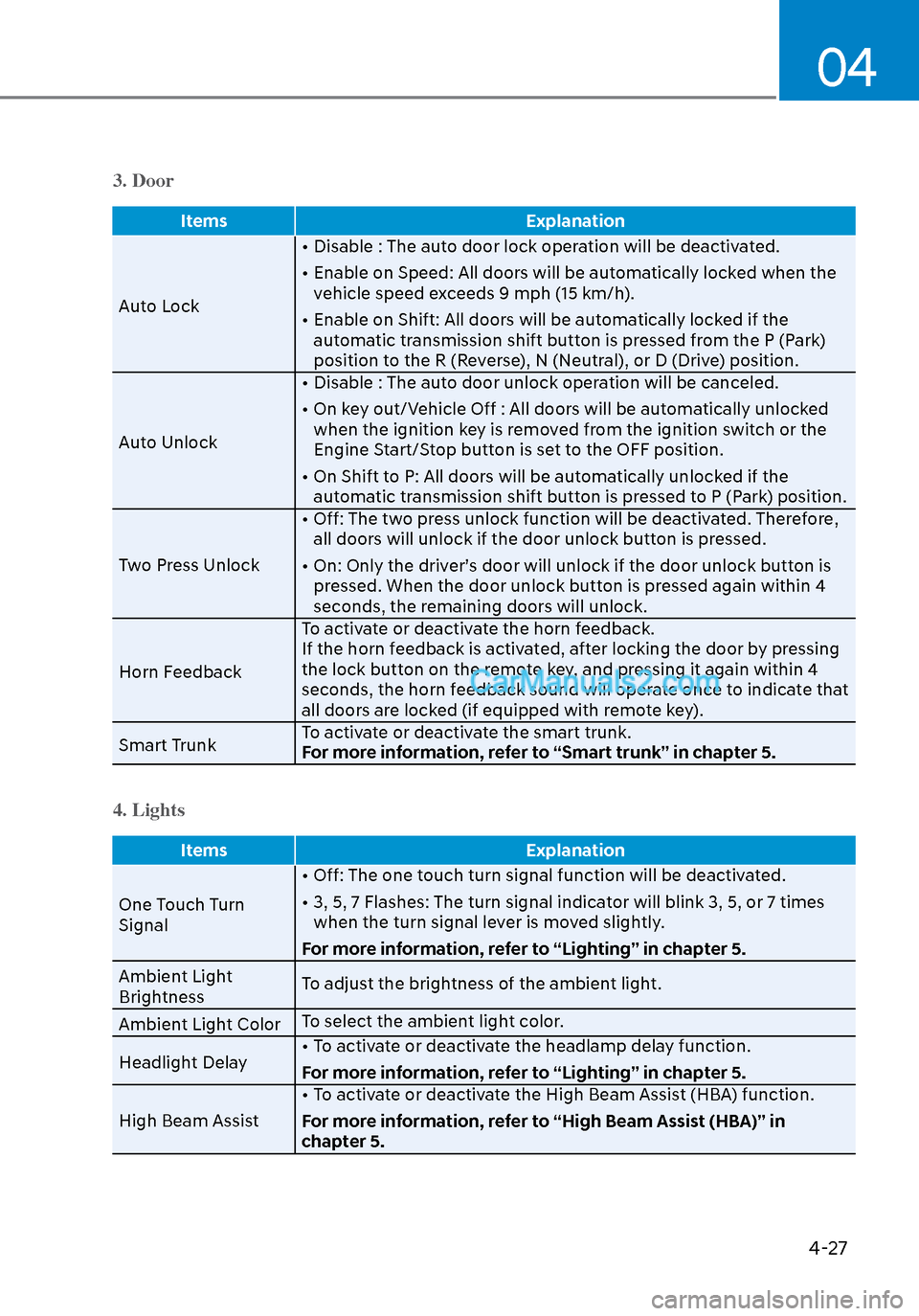
3. Door
ItemsExplanation
Auto Lock •
Disable : The auto door lock operation will be deactivated.
• Enable on Speed: All doors will be automatically locked when the vehicle speed exceeds 9 mph (15 km/h).
• Enable on Shift: All doors will be automatically locked if the automatic transmission shift button is pressed from the P (Park)
position to the R (Reverse), N (Neutral), or D (Drive) position.
Auto Unlock • Disable : The auto door unlock operation will be canceled.
• On key out/Vehicle Off : All doors will be automatically unlocked
when the ignition key is removed from the ignition switch or the
Engine Start/Stop button is set to the OFF position.
• On Shift to P: All doors will be automatically unlocked if the automatic transmission shift button is pressed to P (Park) position.
Two Press Unlock • Off: The two press unlock function will be deactivated. Therefore,
all doors will unlock if the door unlock button is pressed.
• On: Only the driver’s door will unlock if the door unlock button is pressed. When the door unlock button is pressed again within 4
seconds, the remaining doors will unlock.
Horn Feedback To activate or deactivate the horn feedback.
If the horn feedback is activated, after locking the door by pressing
the lock button on the remote key, and pressing it again within 4
seconds, the horn feedback sound will operate once to indicate that
all doors are locked (if equipped with remote key).
Smart Trunk To activate or deactivate the smart trunk.
For more information, refer to “Smart trunk” in chapter 5.
4. Lights
Items
Explanation
One Touch Turn
Signal •
Off: The one touch turn signal function will be deactivated.
• 3, 5, 7 Flashes: The turn signal indicator will blink 3, 5, or 7 times when the turn signal lever is moved slightly.
For more information, refer to “Lighting” in chapter 5.
Ambient Light
Brightness To adjust the brightness of the ambient light.
Ambient Light Color To select the ambient light color.
Headlight Delay • To activate or deactivate the headlamp delay function.
For more information, refer to “Lighting” in chapter 5.
High Beam Assist • To activate or deactivate the High Beam Assist (HBA) function.
For more information, refer to “High Beam Assist (HBA)” in
chapter 5.
Page 114 of 537
04
4-29
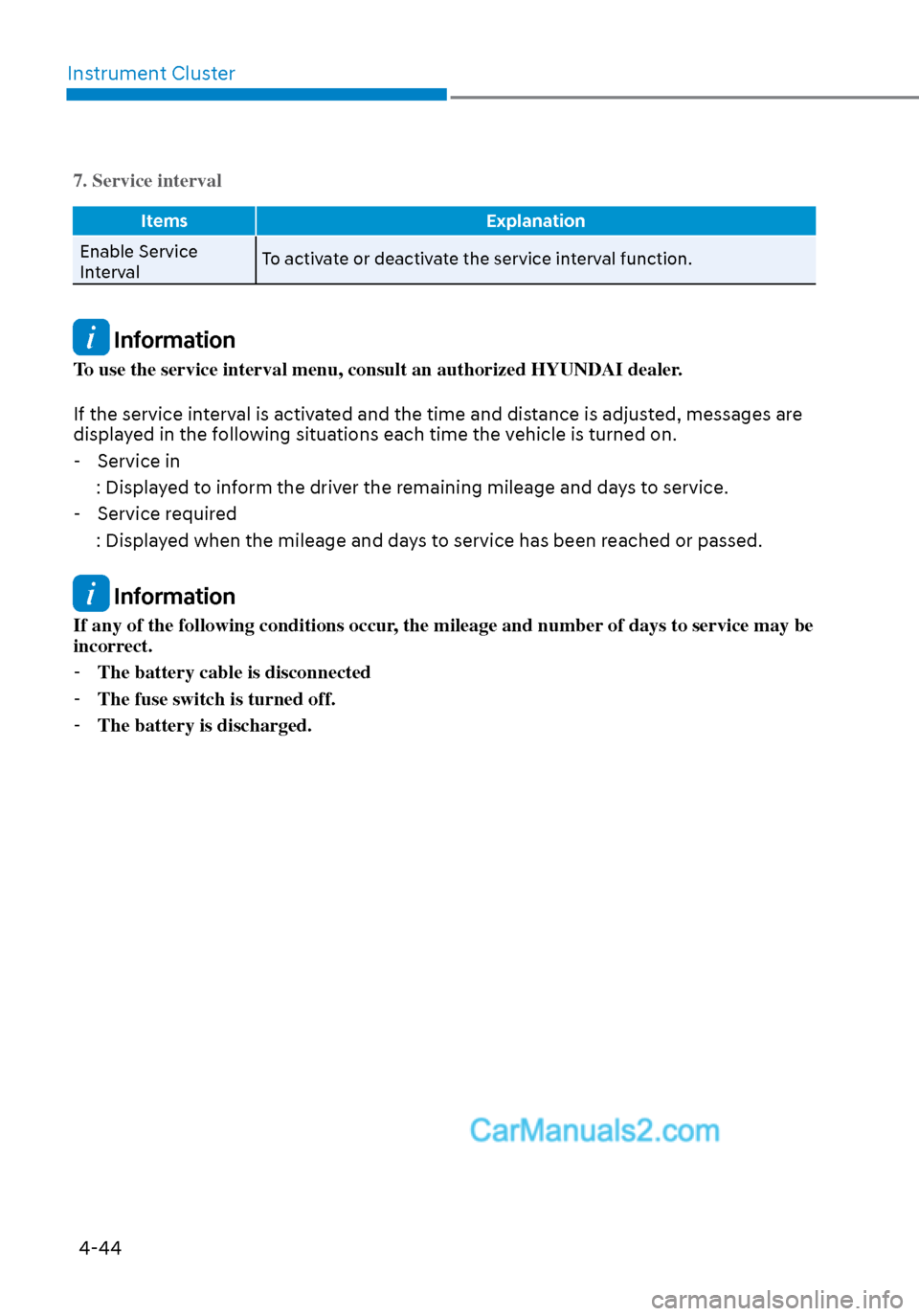
7. Service interval
ItemsExplanation
Enable Service
Int
erval To activate or deactivate the service interval function.
Information
To use the service interval menu, consult an authorized HYUNDAI dealer.
If the service interval is activated and the time and distance is adjusted, messages are
displayed in the following situations each time the vehicle is turned on.
- Service in
: Displayed to inform the driver the remaining mileage and days to service.
- Service required
: Displayed when the mileage and days to service has been reached or passed.
Information
If any of the following conditions occur, the mileage and number of days to service may be
incorrect. - The battery cable is disconnected.
- The fuse switch is turned off.
- The battery is discharged.
Page 116 of 537
04
4-31
Trip Computer
The trip computer is a microcomputer-
controlled driver information system that
displays information related to driving.
Information
Some driving information stored in the
trip computer (for example Average
Vehicle Speed) resets if the battery is
disconnected.
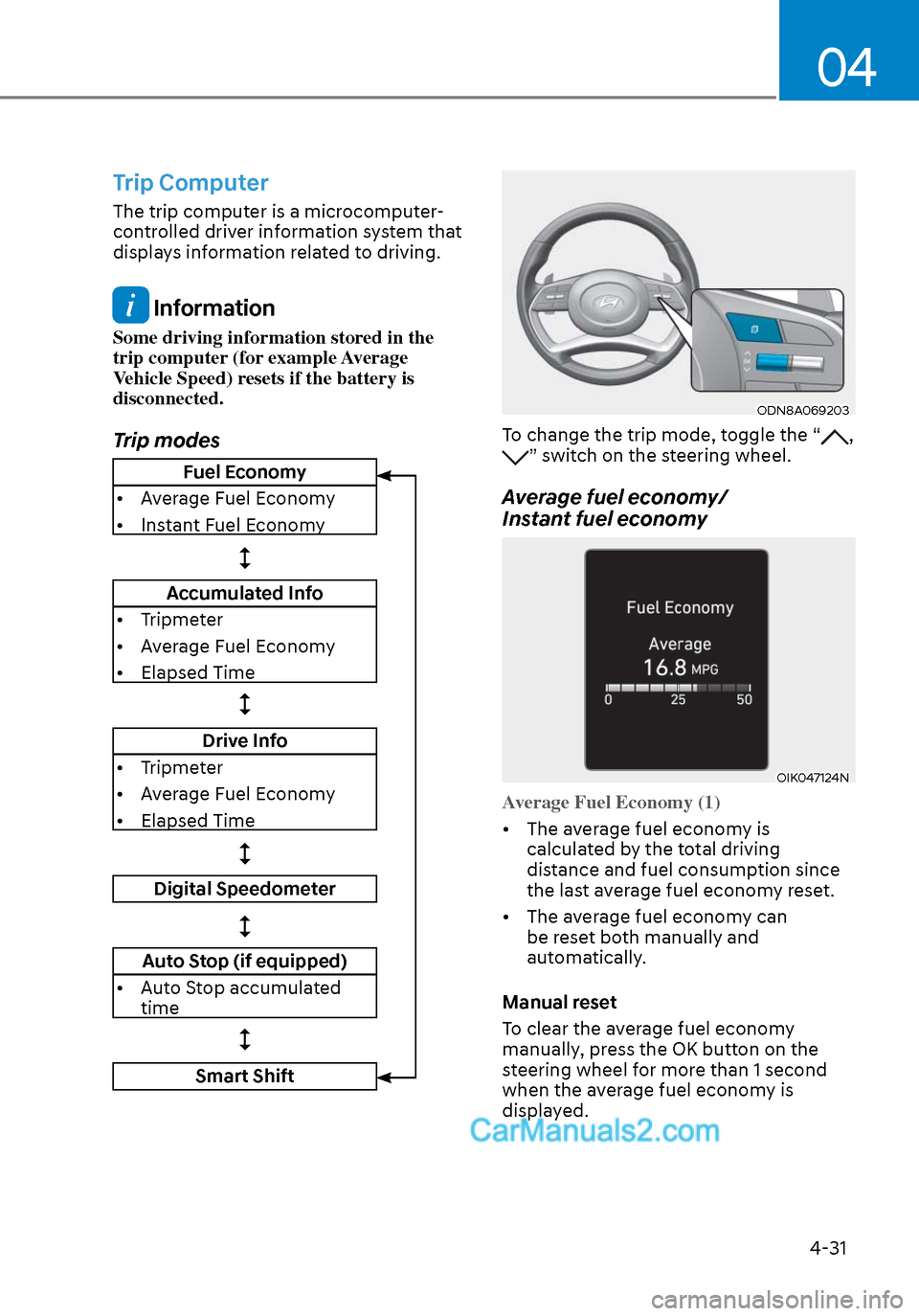
Trip modes
ODN8A069203ODN8A069203
To change the trip mode, toggle the “, ” switch on the steering wheel.
Average fuel economy/
Instant fuel economy
OIK047124NOIK047124N
Average Fuel Economy (1)
• The average fuel economy is calcula
ted by the total driving
distance and fuel consumption since
the last average fuel econ omy reset.
• The average fuel economy can be reset both manually and
automatically.
Manual reset
To clear the average fuel economy
manually, press the OK button on the
steering wheel for more than 1 second
when the average fuel economy is
displayed.
Fuel Economy
• Average Fuel Economy
• Instant Fuel Economy
Accumulated Info
• Tripmeter
• Average Fuel Economy
• Elapsed Time
Drive Info
• Tripmeter
• Average Fuel Economy
• Elapsed Time
Digital Speedometer
Auto Stop (if equipped)
• Auto Stop accumulated time
Smart Shift
Page 119 of 537
4-34
Instrument Cluster
LCD Display Control
ODN8A069203ODN8A069203
LCD DISPLAY (TYPE C)
The LCD display modes can be changed by using the control buttons.
Switch Operation
Function
Ta pMODE button for changing view modes
, Ta pMOVE switch for changing items
OK Ta p
SELECT/RESET button for setting the selected item
Tap and hold SELECT/RESET button for retrieving assist information or
resetting the selected item
Page 127 of 537

Instrument Cluster4-42
3. Door
Items Explanation
Auto Lock • Disable : The aut
o door lock operation will be deactivated.
• Enable on Speed: All doors will be automatically locked when the vehicle speed exceeds 9 mph (15 km/h).
• Enable on Shift: All doors will be automatically locked if the automatic transmission shift button is pressed from the P (Park)
position to the R (Reverse), N (Neutral), or D (Drive) position.
Auto Unlock • Disable : The auto door unlock operation will be canceled.
• On key out/Vehicle Off : All doors will be automatically unlocked
when the ignition key is removed from the ignition switch or the
Engine Start/Stop button is set to the OFF position.
• On Shift to P: All doors will be automatically unlocked if the automatic transmission shift button is pressed to P (Park) position.
Two Press Unlock • Off: The two press unlock function will be deactivated. Therefore,
all doors will unlock if the door unlock button is pressed.
• On: Only the driver’s door will unlock if the door unlock button is pressed. When the door unlock button is pressed again within 4
seconds, the remaining doors will unlock.
Horn Feedback To activate or deactivate the horn feedback.
If the horn feedback is activated, after locking the door by pressing
the lock button on the remote key, and pressing it again within 4
seconds, the horn feedback sound will operate once to indicate that
all doors are locked (if equipped with remote key).
Smart Trunk To activate or deactivate the smart trunk.
For more information, refer to “Smart trunk” in chapter 5.
4. Lights
Items
Explanation
One Touch Turn
Signal • Off: The one t
ouch turn signal function will be deactivated.
• 3, 5, 7 Flashes: The turn signal indicator will blink 3, 5, or 7 times when the turn signal lever is moved slightly.
For more information, refer to “Lighting” in chapter 5.
Ambient Light
Brightness To adjust the brightness of the ambient light.
Ambient Light Color To select the ambient light color.
Headlight Delay • To activate or deactivate the headlamp delay function.
For more information, refer to “Lighting” in chapter 5.
High Beam Assist • To activate or deactivate the High Beam Assist (HBA) function.
For more information, refer to “High Beam Assist (HBA)” in chapter 5.
Page 129 of 537
Instrument Cluster4-44
7. Service interval
Items Explanation
Enable Service
Int
erval To activate or deactivate the service interval function.
Information
To use the service interval menu, consult an authorized HYUNDAI dealer.
If the service interval is activated and the time and distance is adjusted, messages are
displayed in the following situations each time the vehicle is turned on.
- Service in
: Displayed to inform the driver the remaining mileage and days to service. - Service required
: Displayed when the mileage and days to service has been reached or passed.
Information
If any of the following conditions occur, the mileage and number of days to service may be
incorrect. - The battery cable is disconnected
- The fuse switch is turned off.
- The battery is discharged.
Page 134 of 537

Convenient Features5-4
Remote Key (if equipped)
OIG046001OIG046001
Your HYUNDAI uses a remote key, which
you can use to lock or unlock the driver
and passenger doors or the rear trunk.
(1) Door Lock
(2) Door Unlock
(3) Trunk Unlock
(4) Panic
Locking your vehicle
To lock your vehicle:
1. Make sure all doors, the engine hood and the trunk are closed.
2. Press the Door Lock button (1) on the remote key to lock all doors.
3. If the Door Lock button (1) is pressed once more within four seconds, the
horn will beep once and the hazard
warning lights will blink.
4. Make sure the doors are locked by checking the position of the door lock
button inside the vehicle.
WARNING
Do not leave the keys in your
vehicle with unsupervised children.
Unattended children could place the
key in the ignition switch and may
operate power windows or other
controls, or even make the vehicle
move, which could result in serious
injury or death.
Unlocking your vehicle
To unlock your vehicle:
1. Press the Door Unlock button (2) on the remote key.
2. The driver’s door will unlock. The hazard warning lights will blink two
times.
• Two press unlock setting: If you press the Door Unlock button
on the remote key again within
four seconds, then all the doors will
unlock.
Two press unlock setting can be
changed according to owner’s
preference in the cluster User Settings
mode or with the remote key.
• User settings mode method:
Select or deselect the ‘Two Press
Unlock’ feature in the User Settings
mode on the cluster LCD display (User
Settings → Door → Two Press Unlock).
Information
After unlocking the doors, the doors will
automatically relock after 30 seconds
unless a door is opened.
ACCESSING YOUR VEHICLE