2020 Hyundai Sonata height
[x] Cancel search: heightPage 169 of 537

05
5-39
ODN8A059019ODN8A059019
The Driver Position Memory System is
provided to store and recall the following
memory settings with a simple button
operation.
- Driver’s seat position (Power seat)
- Side view mirror position
- Instrument panel illumination intensity
- Head Up Display (HUD) position and brightness (if equipped)
WARNING
Never attempt to operate the driver
position memory system while the
vehicle is moving.
This could result in loss of control, and
an accident causing death, serious
injury, or property damage.
Information
• If the battery is disconnected, the
memory settings will be erased.
• If the Driver Position Memory System
does not operate normally, have the
system checked by an authorized
HYUNDAI dealer.
Storing Positions into Memory
1. Shift to P (Park) while the ignition
switch is in the ON position.
2. Adjust the driver’s seat position, side view mirror position, instrument panel
illumination intensity and head-up
display height/brightness to positions
comfortable for the driver.
3. Press the SET button. The system will beep once and notify you “Press
button to save settings” on the cluster
LCD display.
4. Press one of the memory buttons (1 or 2) within 4 seconds. The system
will beep twice when the memory has
been successfully stored.
5. “Settings 1 (or 2) saved” will appear on the cluster LCD display.
DRIVER POSITION MEMORY SYSTEM (IF EQUIPPED)
Page 170 of 537

Convenient Features5-40
Recalling Positions from Memory
1. Shift to P (Park) while the ignition switch is in the ON position.
2. Press the desired memory button (1 or 2). The system will beep once,
and then the driver’s seat position,
side view mirror position, instrument
panel illumination intensity and
head-up display height/brightness
will automatically adjust to the stored
positions.
3. “Settings 1 (or 2) applied” will appear on the cluster LCD display.
If your vehicle is equipped with
additional navigation, please refer to the
infotainment system manual separately
supplied.
Information
• While recalling the “1” memory
position, pressing the SET or 1 button
temporarily stops the adjustment of
the recalled memory position. Pressing
the 2 button recalls the “2” memory
position.
• While recalling the “2” memory
position, pressing the SET or 2 button
temporarily stops the adjustment of
the recalled memory position. Pressing
the 1 button recalls the “1” memory
position.
• While recalling the stored positions,
pressing one of the control buttons
for the driver’s seat, side view mirror,
instrument panel illumination or head-
up display will cause the movement of
that component to stop and move in
the direction that the control button is
pressed.
Resetting the Driver’s Seat
Memory System
Take the following procedures to reset
the driver’s seat memory system, when it
does not operate properly.
To reset the driver’s seat memory
system
1. Place the ignition switch to the ON
position, shift to P (Park), and open
the driver’s door.
2. Operate the control switch to set the driver’s seat and seatback to the
foremost position.
3. Simultaneously press the SET button and push forward the seat movement
switch over 2 seconds.
While resetting the driver’s seat
memory system
1. It starts with the notification sound.
2. The driver’s seat and seatback is adjusted to the rearward position with
the notification sound.
3. The driver’s seat and seatback is re-adjusted to the default position
(central position) with the notification
sound.
However, in the following cases, the
resetting procedure and the notification
sound may stop.
- The memory button is pressed.
- The control switch is operated.
- The gear is shifted out of P (Park) .
- The driving speed exceeds 2 mph (3 km/h).
- The driver’s door is closed.
Page 173 of 537
05
5-43
Tilt Steering / Telescope Steering
When adjusting the steering wheel to a
comfortable position, adjust the steering
wheel so that it points toward your chest,
not toward your face. Make sure you can
see the instrument cluster warning lights
and gauges. After locking the lever, push
the steering wheel both up and down to
be certain it is locked in position. Always
adjust the position of the steering wheel
before driving.
WARNING
NEVER adjust the steering wheel while
driving. This may cause loss of vehicle
control resulting in an accident.
ODN8059021ODN8059021
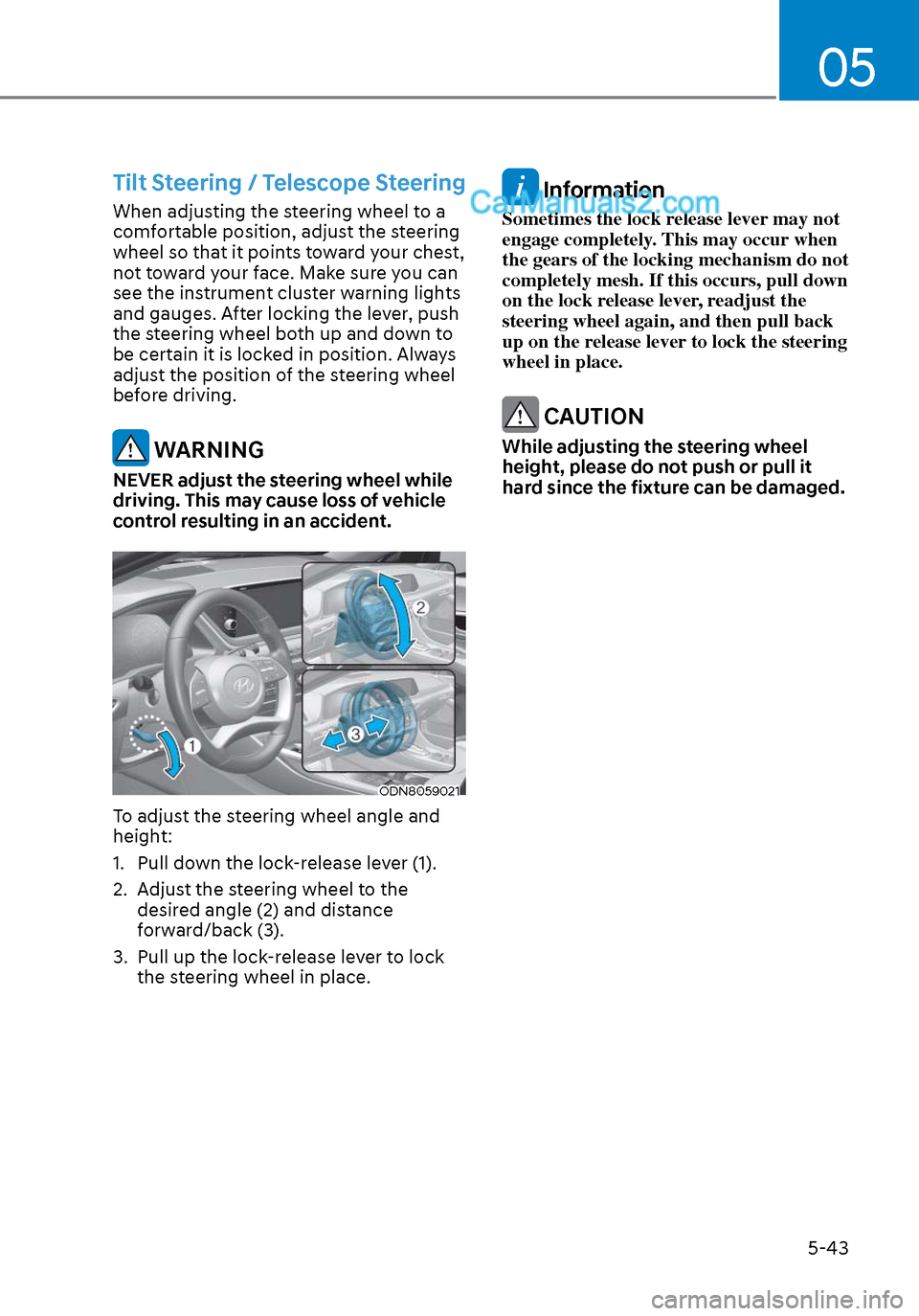
To adjust the steering wheel angle and
height:
1. Pull down the lock-release lever (1).
2. Adjust the steering wheel to the desired angle (2) and distance
forward/back (3).
3. Pull up the lock-release lever to lock the steering wheel in place.
Information
Sometimes the lock release lever may not
engage completely. This may occur when
the gears of the locking mechanism do not
completely mesh. If this occurs, pull down
on the lock release lever, readjust the
steering wheel again, and then pull back
up on the release lever to lock the steering
wheel in place.
CAUTION
While adjusting the steering wheel
height, please do not push or pull it
hard since the fixture can be damaged.
Page 203 of 537
05
5-73
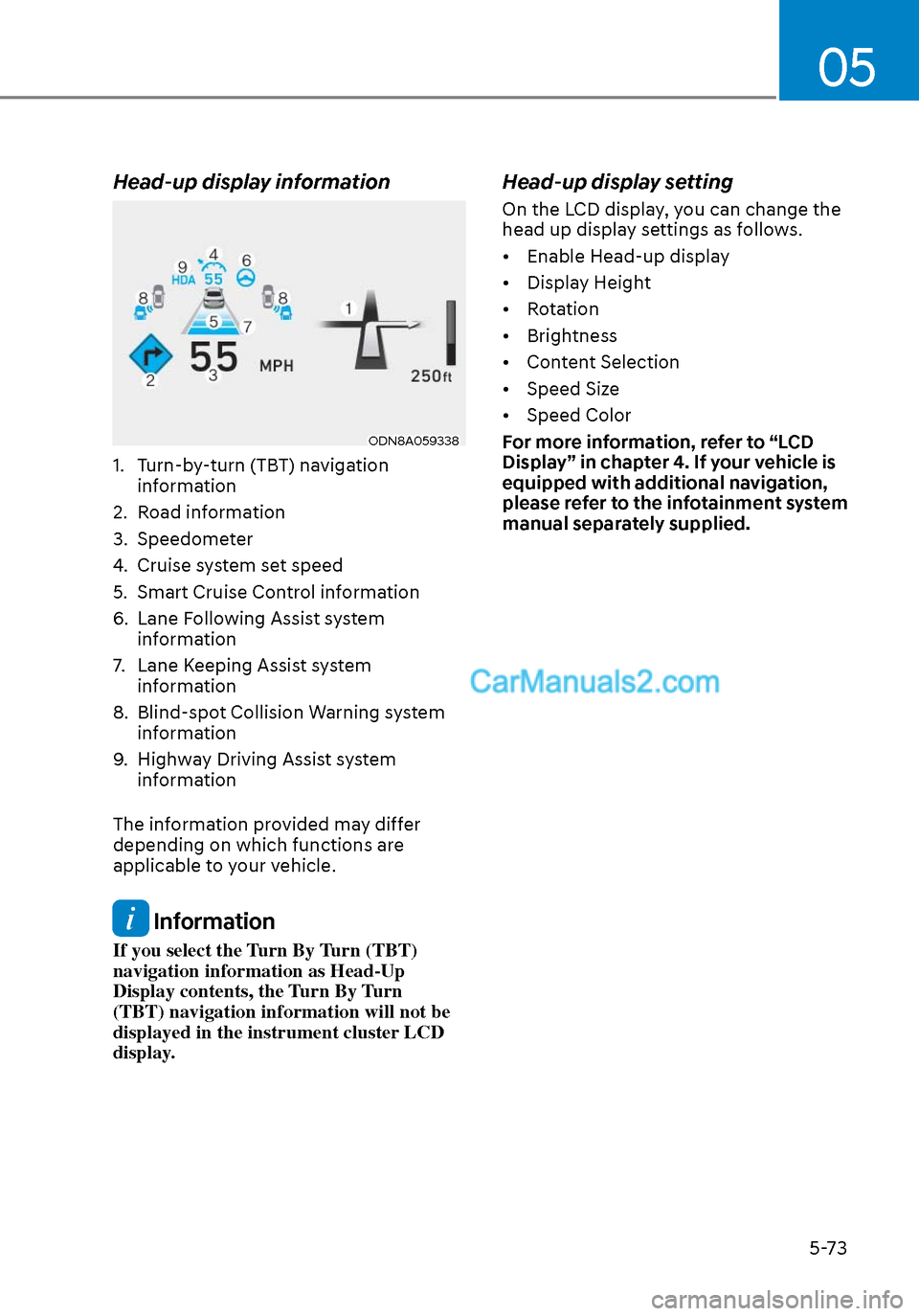
Head-up display information
ODN8A059338ODN8A059338
1. Turn-by-turn (TBT) navigation information
2. Road information
3. Speedometer
4. Cruise system set speed
5. Smart Cruise Control information
6. Lane Following Assist system information
7. Lane Keeping Assist system information
8. Blind-spot Collision Warning system information
9. Highway Driving Assist system information
The information provided may differ
depending on which functions are
applicable to your vehicle.
Information
If you select the Turn By Turn (TBT)
navigation information as Head-Up
Display contents, the Turn By Turn
(TBT) navigation information will not be
displayed in the instrument cluster LCD
display.
Head-up display setting
On the LCD display, you can change the
head up display settings as follows.
• Enable Head-up display
• Display Height
• Rotation
• Brightness
• Content Selection
• Speed Size
• Speed Color
For more information, refer to “LCD
Display” in chapter 4. If your vehicle is
equipped with additional navigation,
please refer to the infotainment system
manual separately supplied.
Page 223 of 537

05
5-93
Warning message
Rear view cameraRear view camera
ODN8A049044ODN8A049044
Rear ultrasonic sensorRear ultrasonic sensor
ODN8A049045ODN8A049045
Rear camera error or blockage/ Parking
sensor error or blockage
This warning message may appear when:
•
The rear view camera or the ultrasonic
sensor(s) is blocked by dirt, snow, or a
foreign object.
• There is inclement weather, such as heavy snow, rain, etc.
If any of these conditions occur, the
system may turn off automatically or not
operate properly.
When the warning message is displayed
in the cluster, make sure that the rear
view camera and the rear ultrasonic
sensors are clean.
System Malfunction
ODN8A049046ODN8A049046
Check Parking Collision-Avoidance Assist
system
If there is a problem with Reverse Parking
Collision-
Avoidance Assist system
or other related systems, a warning
message will appear and the system will
turn off automatically. Have the vehicle
inspected by an authorized HYUNDAI
dealer.
Limitations of the System
Reverse Parking Collision-Avoidance
Assist system may not assist braking
or alert the driver under the following
conditions even if there are pedestrians
or objects.
• Any non-factory equipment or accessories have been installed.
• The condition of the vehicle is unstable due to an accident or other
causes.
• The height of the bumper or the sensor installation has been modified.
• The rear view camera or the ultrasonic sensor(s) is damaged.
• The rear view camera or the ultrasonic sensor(s) is stained with foreign
matter, such as snow, dirt, etc.
• The rear view camera is obscured by a light source or by bad weather
conditions, such as heavy rain, fog,
snow, etc.
• The surrounding is either too dark or too bright.
Page 224 of 537

Convenient Features5-94
• Outside air temperature is hot or cold.
• The wind is either strong (over 12 mph (20 km/h)) or blowing perpendicular
to the rear bumper.
• Objects generating excessive noise, such as vehicle horns, loud
motorcycle engines, or truck air
brakes, are near the vehicle.
• An ultrasonic sensor with a similar frequency is near the vehicle.
• There is ground height difference between the vehicle and the
pedestrian.
• The image of the pedestrian in the rear view camera is indistinguishable
from the background.
• The pedestrian is near the rear edge of the vehicle.
• The pedestrian is not standing upright.
• The pedestrian is either too short or too tall for the system to recognize.
• The pedestrian is wearing clothes that are hard for the system to recognize.
• The pedestrian is wearing a cloth that does not reflect ultrasound well.
• The size, thickness, height, or shape of the object does not reflect ultrasound
well (e.g., pole, bush, curbs, carts,
edge of a wall, etc.).
• The pedestrian or the object is moving.
• The pedestrian or the object is very close to the rear of the vehicle.
• A wall is behind the pedestrian or the object.
• The object is not at the rear center of the vehicle.
• The plane of the obstacle is not parallel to the rear bumper.
• The road is slippery or inclined.
• The driver backs up the vehicle immediately after shifting to R
(Reverse).
• The driver accelerates or turns the vehicle. Reverse Parking Collision-Avoidance
Assist system may alert the driver or
apply brake power unnecessarily under
the following conditions even if there are
“no” pedestrians or objects.
• Any non-factory equipment or
accessories have been installed.
• The condition of the vehicle is unstable due to an accident or other
causes.
• The height of the bumper or the sensor installation has been modified.
• The bumper height has changed due to heavy loads, tire pressure change,
etc.
• The rear view camera or the ultrasonic sensor(s) is stained with foreign
matter, such as snow, dirt, etc.
• The pattern on the road is mistaken for a pedestrian.
• There is a shadow or a light reflecting on the ground.
• Pedestrians or objects are around the path of the vehicle.
• Objects generating excessive noise, such as vehicle horns, loud
motorcycle engines, or truck air
brakes, are near the vehicle.
• The vehicle is backing towards a narrow passage or parking space.
• The vehicle is backing towards an uneven road surface, such as unpaved
road, gravel, bump, gradient, etc.
• A trailer is attached to the vehicle
Page 227 of 537

05
5-97
To Turn off Reverse Parking
Distance Warning System
(if equipped)
ODN8059057LODN8059057L
Push the button to turn off Reverse
Parking Distance Warning system. The
indicator light on the button will turn on.
Non-Operational Conditions
of Reverse Parking Distance
Warning System
Reverse Parking Distance Warning
system may not operate normally when:
• Moisture is frozen to the sensor.
• Sensor is covered with foreign matter, such as snow or water, or the sensor
cover is blocked.
There is a possibility of Reverse
Parking Distance Warning system
malfunction when:
• Driving on uneven road surfaces such as unpaved roads, gravel, bumps, or
gradient.
• Objects generating excessive noise such as vehicle horns, loud
motorcycle engines, or truck air
brakes can interfere with the sensor.
• Heavy rain or water spray is present.
• Wireless transmitters or mobile phones are present near the sensor.
• The sensor is covered with snow.
• Any non-factory equipment or accessories have been installed, or if
the vehicle bumper height or sensor
installation has been modified.
Detecting range may decrease
when:
Outside air temperature is extremely hot
or cold.
Page 228 of 537

Convenient Features5-98
The following objects may not be
recognized by the sensor:
• Sharp or slim objects such as ropes, chains or small poles.
• Objects, which tend to absorb sensor frequency such as clothes, spongy
material or snow.
• Undetectable objects smaller than 40 in (100 cm) and narrower than 6 in (14
cm) in diameter.
WARNING
Your new vehicle warranty does not
cover any accidents or damage to the
vehicle or injuries to its occupants
related to Reverse Parking Distance
Warning system. Always drive safely
and cautiously.
Reverse Parking Distance
Warning System Precautions
• Reverse Parking Distance Warning system may not sound consistently
depending on the speed and shapes
of the objects detected.
• Reverse Parking Distance Warning system may malfunction if the vehicle
bumper height or sensor installation
has been modified or damaged. Any
non-factory installed equipment or
accessories may also interfere with
the sensor performance.
• The sensor may not recognize objects less than 12 in (30 cm) from the
sensor, or it may sense an incorrect
distance. Use caution.
• When the sensor is frozen or stained with snow, dirt, or water, the sensor
may be inoperative until the stains are
removed using a soft cloth.
• Do not push, scratch or strike the sensor with any hard objects that
could damage the surface of the
sensor. Sensor damage could occur.
• Do not spray the sensors or its surrounding area directly with a high
pressure washer. Shock applied from
high pressure water may cause the
device to not operate normally.