2020 Hyundai Sonata Glass
[x] Cancel search: GlassPage 333 of 537
06
6-49
Detecting vehicle, pedestrian and
cyclist
The sensor may be limited when:
• The system may not operate for 15 seconds after the vehicle is started or
the camera is initialized
• The radar sensor or camera is covered with a foreign object or debris
• The camera lens is contaminated due to tinted, filmed or coated windshield,
damaged glass, or stuck of foreign
matter (sticker, bug, etc.) on the glass
• Inclement weather such as heavy rain or snow obscures the field of view of
the radar sensor or camera
• There is interference by electromagnetic waves
• There is severe irregular reflection from the radar sensor
• The radar/camera sensor recognition is limited
• The vehicle in front is too small to be detected (for example a motorcycle
etc.)
• The vehicle in front is an oversize vehicle or trailer that is too big to be
detected by the camera recognition
system (for example a tractor trailer,
etc.)
• The camera’s field of view is not well illuminated (either too dark or too
much reflection or too much backlight
that obscures the field of view)
• The vehicle in front does not have their rear lights or their rear lights
does not turned ON or their rear lights
are located unusually
• The outside brightness changes suddenly, for example when entering
or exiting a tunnel
• Light coming from a street light or an oncoming vehicle is reflected on a wet
road surface such as a puddle in the
road • The field of view in front is obstructed
by sun glare or head light of oncoming
vehicle
• The windshield glass is fogged up; a clear view of the road is obstructed
• The vehicle in front is driving erratically
• The vehicle is on unpaved or uneven rough surfaces, or road with sudden
gradient changes
• The vehicle is driven near areas containing metal substances as a
construction zone, railroad, etc.
• The vehicle drives inside a building, such as a basement parking lot
• The camera does not recognize the entire vehicle in front
• The camera is damaged
• The brightness outside is too low such as when the headlamps are not on at
night or the vehicle is going through
a tunnel
• The shadow is on the road by a median strip, trees, etc.
• The vehicle drives through a tollgate
• The windshield glass is fogged up; a clear view of the road is obstructed
• The rear part of the vehicle in front is not normally visible (the vehicle turns
in other direction or the vehicle is
overturned.)
• The adverse road conditions cause excessive vehicle vibrations while
driving
• The sensor recognition changes suddenly when passing over a speed
bump
• The vehicle in front is moving vertically to the driving direction
• The vehicle in front is stopped vertically
• The vehicle in front is driving towards your vehicle or reversing
• You are on a roundabout and the vehicle in front circles
Page 338 of 537
While Driving6-54
• The pedestrian or cyclist is not fully detected by the camera recognition
system, for example, if the pedestrian
is leaning over or is not fully walking
upright
• The pedestrian or cyclist is moving very quickly or appears abruptly in the
camera detection area
• The pedestrian or cyclist is wearing clothing that easily blends into the
background, making it difficult to be
detected by the camera recognition
system
• The outside lighting is too bright (e.g. when driving in bright sunlight or
in sun glare) or too dark (e.g. when
driving on a dark rural road at night)
• It is difficult to detect and distinguish the pedestrian or cyclist from other
objects in the surroundings, for
example, when there is a group of
pedestrians, cyclists or a large crowd
• There is an item similar to a person’s body structure
• The pedestrian or cyclist is small
• The pedestrian has impaired mobility
• The sensor recognition is limited • The radar sensor or camera is blocked
with a foreign object or debris
• Inclement weather such as heavy rain or snow obscures the field of view of
the radar sensor or camera
• When light coming from a street light or an oncoming vehicle is reflected on
a wet road surface such as a puddle in
the road
• The field of view in front is obstructed by sun glare
• The windshield glass is fogged up; a clear view of the road is obstructed
• The adverse road conditions cause excessive vehicle vibrations while
driving
• The sensor recognition changes suddenly when passing over a speed
bump
• You are on a roundabout
• The pedestrian or cyclist suddenly interrupts in front of the vehicle
• The cyclist in front is riding intersected with the driving direction
• There is any other electromagnetic interference
• The construction area, rail or other metal object is near the cyclist
• The bicycle material is not reflected well on the radar
WARNING
Turn off Forward Collision avoidance
Assist system through cluster or
infotainment system before towing
a vehicle. Application of FCA system
while towing may adversely affect the
safety of your vehicle or the towing
vehicle.
Use extreme caution when the vehicle
in front of you has cargo that extends
rearward from the cab, or when the
vehicle in front of you has higher
ground clearance.
Page 339 of 537
06
6-55
FCA system may work when it
recognizes objects similar in shape or
property to a vehicle, pedestrian or
cyclist.
FCA system is designed to help detect
and monitor the vehicle ahead or detect
a pedestrian or cyclist in the roadway
through radar signals and camera
recognition. It is not designed to detect
bicycles, motorcycles, or smaller
wheeled objects such as luggage bags,
shopping carts, or strollers.
Never try to test the operation of FCA
system. Doing so may cause severe
injury or death.
If the front bumper, front glass, radar or
camera have been replaced or repaired,
have the vehicle inspected by an
authorized HYUNDAI dealer.
Information
In some instances, FCA system
may be cancelled when subjected to
electromagnetic interference.
Information
This device complies with Part 15 of the
FCC rules.
Operation is subject to the following two
conditions:
1. This device may not cause harmful
interference.
2. This device must accept any
interference received, including
interference that may cause undesired
operation.
Forward Collision-Avoidance
Assist - Junction Turning (if
equipped)
FCA-Junction Turning function is
designed to reduce the risk of collision
by detecting and monitoring the
oncoming vehicle ahead. When the
vehicle turns to the left at a junction, the
system recognises the oncoming vehicle
ahead in advance with the front view
camera and the front radar. It produces
warning messages or haptic warning
alarms in accordance with the collision
risk levels.
System setting
FCA-Junction Turning function can be
activated from the User Settings menu
by following the procedure below.
1. Set the Engine Start/Stop button to the
ON or START position.
2. Select ‘User settings
Driver
assistance Forward safety’.
For more details, refer to “Forward
Collision-Avoidance Assist (FCA)” in this
chapter.
Page 344 of 537
While Driving6-60
• When you replace the windshield
glass, LKA system camera or related
parts of the steering wheel, have the
vehicle inspected by an authorized
HYUNDAI dealer and have the system
checked for calibration.
• The system detects lane markers
and controls the steering wheel
by a camera, therefore, if the lane
markers are hard to detect, the
system may not work properly.
Please refer to “Limitations of the
System”.
• Do not remove or damage the related
parts of LKA system.
• You may not hear a warning sound
of LKA system if the audio volume is
high.
• Do not place objects on the
dashboard that reflects light such as
mirrors, white paper, etc. This may
prevent LKA system from functioning
properly. •
Always have your hands on the
steering wheel while LKA system is
activated. If you continue to drive
with your hands off the steering
wheel after the “Keep hands on
steering wheel” warning message
appears, the system will stop
controlling the steering wheel.
• The steering wheel is not
continuously controlled so if the
vehicle speed is at a higher rate
when leaving a lane the vehicle may
not be controlled by the system. The
driver must always follow the speed
limit when using the system.
• If you attach objects to the steering
wheel, the system may not assist
steering or the hands off alarm may
not work properly.
Page 350 of 537

While Driving6-66
When external condition is intervened
• The brightness outside changes suddenly such as when entering or
exiting a tunnel, or when passing
under a bridge.
• The brightness outside is too low such as when the headlamps are not on at
night or the vehicle is going through
a tunnel.
• There is a boundary structure in the roadway such as a concrete barrier,
guardrail and reflector post that is
inadvertently being detected by the
camera.
• When light coming from a street light or an oncoming vehicle is reflected on
a wet road surface such as a puddle in
the road.
• The field of view in front is obstructed by sun glare.
• There is not enough distance between you and the vehicle in front to be
able to detect the lane marker or the
vehicle ahead is driving on the lane
marke.
• Driving on a steep grade, over a hill, or when driving on a curved road.
• The adverse road conditions cause excessive vehicle vibrations while
driving.
• The surrounding of the inside rear view mirror temperature is high due to
direct sunlight, etc.
• Road surface is not even. When front visibility is poor
• The windshield or the camera lens is
blocked with dirt or debris.
• The windshield glass is fogged up; a clear view of the road is obstructed.
• Placing objects on the dashboard, etc.
• The sensor cannot detect the lane marker because of fog, heavy rain or
snow.
Page 394 of 537

While Driving6-110
• When you replace the windshield
glass, LFA system camera or related
parts of the steering wheel, have the
vehicle inspected by an authorized
HYUNDAI dealer.
• The system helps detect lane
markers and controls the steering
wheel by a camera, therefore, if the
lane markers are hard to detect, the
system may not work properly.
• Please refer to “Limitations of the
System”.
• Do not remove or damage the related
parts of LFA system.
• You may not hear a warning sound
of LFA system if the audio volume is
high.
• Do not place objects on the
dashboard that reflects light such as
mirrors, white paper, etc. This may
prevent LFA system from functioning
properly. •
Always have your hands on the
steering wheel while LFA system is
activated. If you continue to drive
with your hands off the steering
wheel after the “Keep hands on
steering wheel” warning message
appears, the system will turn off
automatically.
However, if the driver has their
hands on the steering wheel again,
the system will start controlling the
steering wheel.
• The steering wheel is not
continuously controlled so if the
vehicle speed is at a higher rate
when leaving a lane the vehicle may
not be controlled by the system. The
driver must always follow the speed
limit when using the system.
• If you attach objects to the steering
wheel, the system may not assist
steering or the hands off alarm may
not work properly.
Page 398 of 537

While Driving6-114
• The shadow is on the lane marker by a median strip, trees, guardrail, noise
barriers, etc.
• The lane markers are complicated or a structure substitutes for the lines such
as a construction area.
• There are crosswalk signs or other symbols on the road.
• The lane marker in a tunnel is stained with oil, etc.
• The lane suddenly disappears such as at the intersection.
• Driving the shared lane usage (bicycle lane, pedestrians lane, etc.)
When external condition is intervened
• The brightness outside changes suddenly such as when entering or
exiting a tunnel, or when passing
under a bridge.
• The brightness outside is too low such as when the headlamps are not on at
night or the vehicle is going through
a tunnel.
• There is a boundary structure in the roadway such as a concrete barrier,
guardrail and reflector post that is
inadvertently being detected by the
camera.
• When light coming from a street light or an oncoming vehicle is reflected on
a wet road surface such as a puddle in
the road.
• The field of view in front is obstructed by sun glare. • There is not enough distance between
you and the vehicle in front to be
able to detect the lane marker or the
vehicle ahead is driving on the lane
marker.
• Driving on a steep grade, over a hill, or when driving on a curved road.
• The adverse road conditions cause excessive vehicle vibrations while
driving.
• The surrounding of the inside rear view mirror temperature is high due to
direct sunlight, etc.
• The sensor recognition changes suddenly when passing over a speed
bump or driving on a steep up/down
or right/left grade
When front visibility is poor
• The windshield or the camera lens is blocked with dirt or debris.
• The windshield glass is fogged up; a clear view of the road is obstructed.
• Placing objects on the dashboard, etc.
• The sensor cannot detect the lane because of fog, heavy rain or snow.
Page 479 of 537
Maintenance8-32
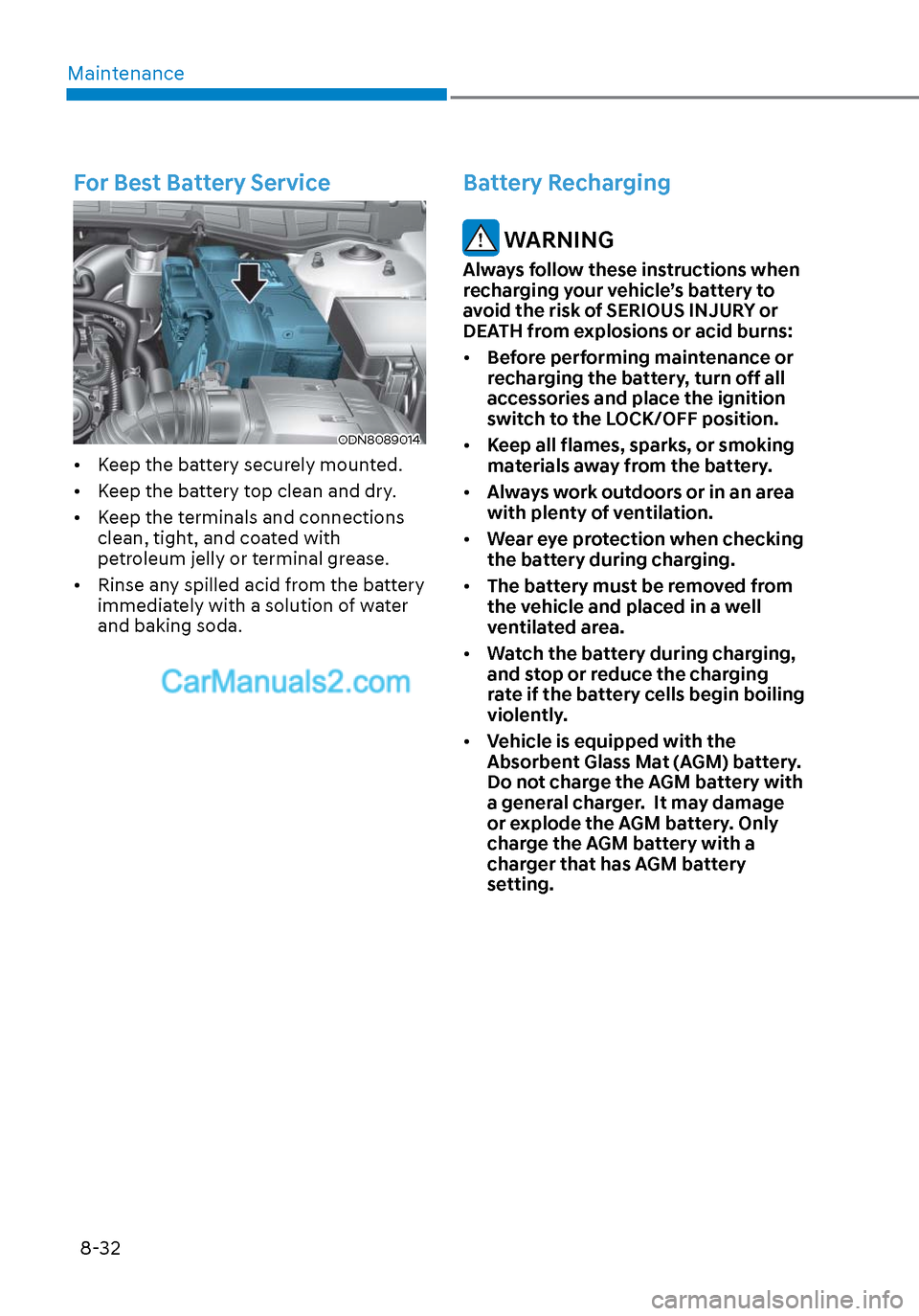
For Best Battery Service
ODN8089014ODN8089014
• Keep the battery securely mounted.
• Keep the battery top clean and dry.
• Keep the terminals and connections clean, tight, and coated with
petroleum jelly or terminal grease.
• Rinse any spilled acid from the battery immediately with a solution of water
and baking soda.
Battery Recharging
WARNING
Always follow these instructions when
recharging your vehicle’s battery to
avoid the risk of SERIOUS INJURY or
DEATH from explosions or acid burns:
• Before performing maintenance or
recharging the battery, turn off all
accessories and place the ignition
switch to the LOCK/OFF position.
• Keep all flames, sparks, or smoking
materials away from the battery.
• Always work outdoors or in an area
with plenty of ventilation.
• Wear eye protection when checking
the battery during charging.
• The battery must be removed from
the vehicle and placed in a well
ventilated area.
• Watch the battery during charging,
and stop or reduce the charging
rate if the battery cells begin boiling
violently.
• Vehicle is equipped with the
Absorbent Glass Mat (AGM) battery.
Do not charge the AGM battery with
a general charger. It may damage
or explode the AGM battery. Only
charge the AGM battery with a
charger that has AGM battery
setting.