2020 Hyundai Sonata navigation system
[x] Cancel search: navigation systemPage 171 of 537

05
5-41
NOTICE
• Reattempt to do the resetting procedure again, when the resetting
procedure incompletely stops or the
notification sound do not stop.
• Make sure that there is no obstacle around the driver’s seat in advance
of resetting the driver’s seat memory
system.
Easy Access Function
The system will move the driver’s seat
automatically as follows:
• It will move the driver’s seat rearward when the Engine Start/Stop button is
pressed to the OFF position.
• It will move the driver’s seat forward when the Engine Start/Stop button is
pressed to the ACC or START position.
You can activate or deactivate the Easy
Access Function from the User Settings
mode in the cluster LCD display.
‘Convenience → Seat Easy Access →
Off/Normal/Extended’.
For more information, refer to “LCD
Display” in chapter 4.If your vehicle is
equipped with additional navigation,
please refer to the infotainment system
manual separately supplied.
CAUTION
Driver should be cautious when using
this function to assure no injury to
passenger or child on the back seat.
In case of emergency the driver has to
stop movement of front seat (when easy
access feature is activated) by pressing
SET button or any of the driver seat
control switches.
Page 197 of 537
05
5-67
How to use the Smart Trunk with
Auto Open
The trunk can be opened with no-touch
activation satisfying all the conditions
below.
• After 15 seconds when all doors are closed and locked
• Positioned in the detecting area for more than 3 seconds.
Information
• The Smart Trunk with Auto Open does not operate when:
- The smart key is detected within 15 seconds after the doors are closed and
locked, and is continuously detected.
- The smart key is detected within 15 seconds after the doors are closed
and locked, and within 60 inches
(1.5 m) from the front door handles.
(for vehicles equipped with Welcome
Light)
- A door is not locked or closed.
- The smart key is in the vehicle.
1. Setting
To activate the Smart Trunk with Auto
Open, go to User Settings Mode and
select Smart Trunk on the LCD display.
For more information, refer to the “LCD
Display” section in this chapter. If your
vehicle is equipped with additional
navigation, please refer to the
infotainment system manual separately
supplied.
ODN8A059047ODN8A059047
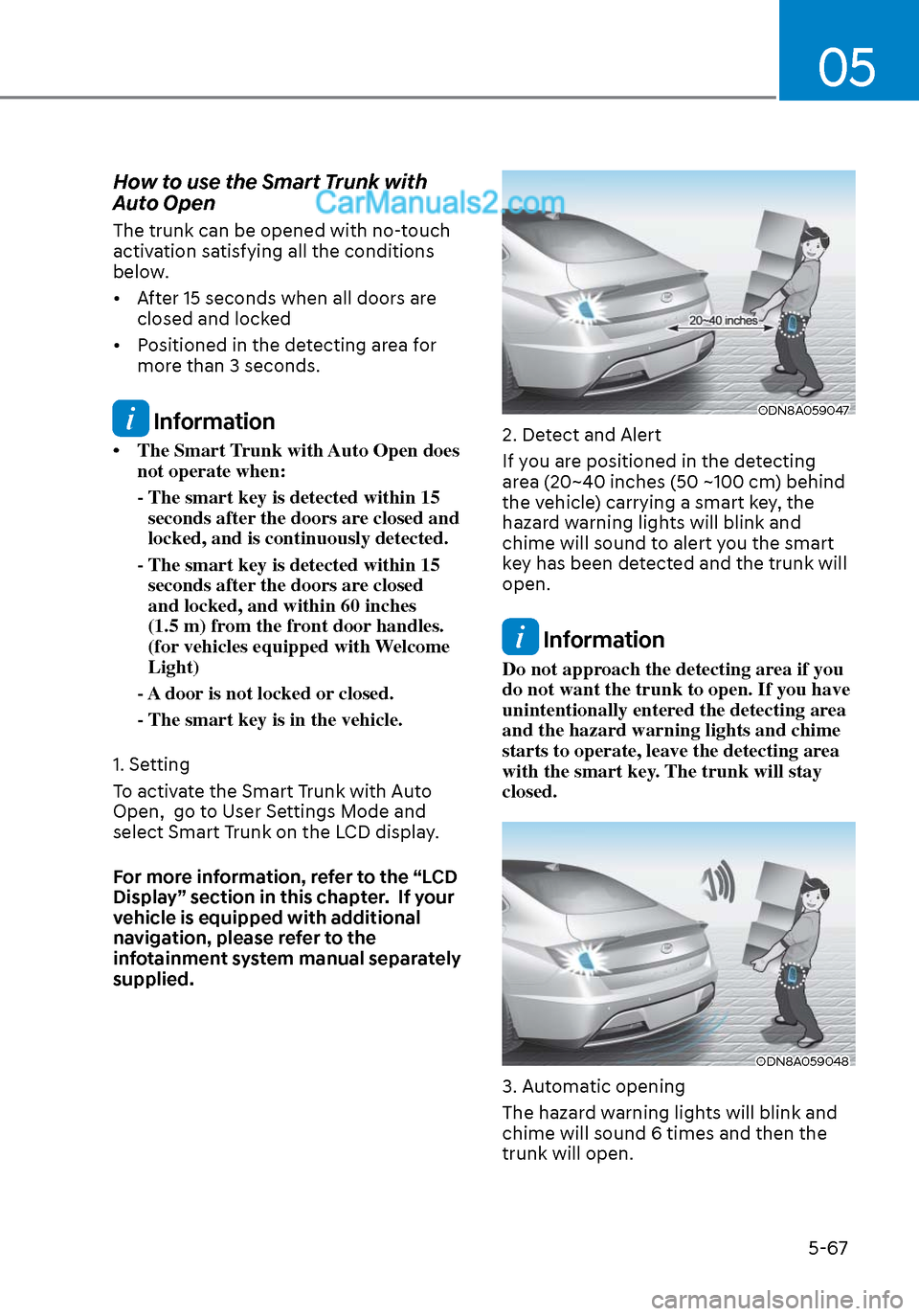
2. Detect and Alert
If you are positioned in the detecting
area (20~40 inches (50 ~100 cm) behind
the vehicle) carrying a smart key, the
hazard warning lights will blink and
chime will sound to alert you the smart
key has been detected and the trunk will
open.
Information
Do not approach the detecting area if you
do not want the trunk to open. If you have
unintentionally entered the detecting area
and the hazard warning lights and chime
starts to operate, leave the detecting area
with the smart key. The trunk will stay
closed.
ODN8A059048ODN8A059048
3. Automatic opening
The hazard warning lights will blink and
chime will sound 6 times and then the
trunk will open.
Page 202 of 537
Convenient Features5-72
HEAD UP DISPLAY (HUD) (IF EQUIPPED)
ODN8A059054ODN8A059054
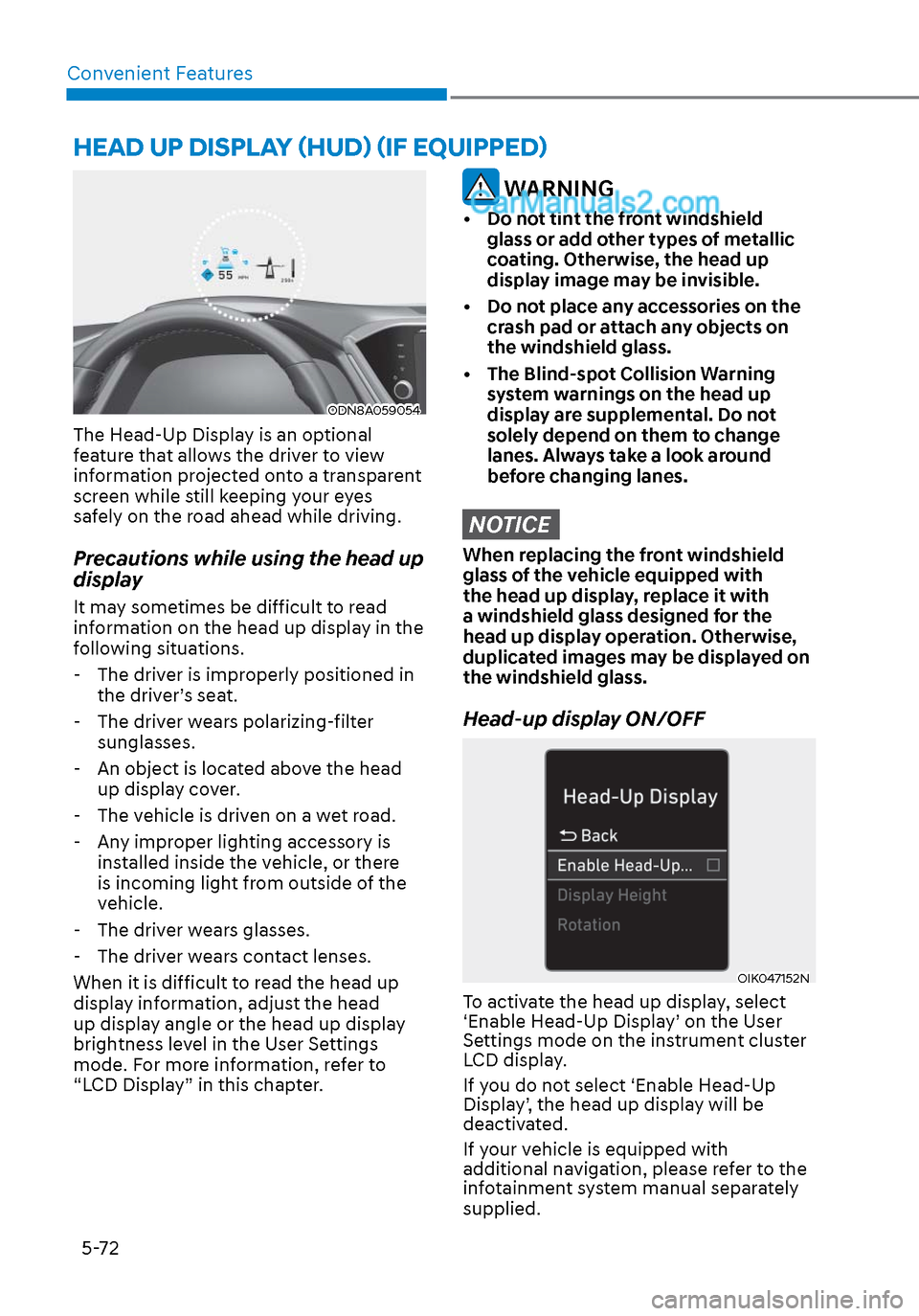
The Head-Up Display is an optional
feature that allows the driver to view
information projected onto a transparent
screen while still keeping your eyes
safely on the road ahead while driving.
Precautions while using the head up
display
It may sometimes be difficult to read
information on the head up display in the
following situations.
- The driver is improperly positioned in the driver’s seat.
- The driver wears polarizing-filter sunglasses.
- An object is located above the head up display cover.
- The vehicle is driven on a wet road.
- Any improper lighting accessory is installed inside the vehicle, or there
is incoming light from outside of the
vehicle.
- The driver wears glasses.
- The driver wears contact lenses.
When it is difficult to read the head up
display information, adjust the head
up display angle or the head up display
brightness level in the User Settings
mode. For more information, refer to
“LCD Display” in this chapter.
WARNING
• Do not tint the front windshield glass or add other types of metallic
coating. Otherwise, the head up
display image may be invisible.
• Do not place any accessories on the crash pad or attach any objects on
the windshield glass.
• The Blind-spot Collision Warning system warnings on the head up
display are supplemental. Do not
solely depend on them to change
lanes. Always take a look around
before changing lanes.
NOTICE
When replacing the front windshield
glass of the vehicle equipped with
the head up display, replace it with
a windshield glass designed for the
head up display operation. Otherwise,
duplicated images may be displayed on
the windshield glass.
Head-up display ON/OFF
OIK047152NOIK047152N
To activate the head up display, select
‘Enable Head-Up Display’ on the User
Settings mode on the instrument cluster
LCD display.
If you do not select ‘Enable Head-Up
Display’, the head up display will be
deactivated.
If your vehicle is equipped with
additional navigation, please refer to the
infotainment system manual separately
supplied.
Page 203 of 537
05
5-73
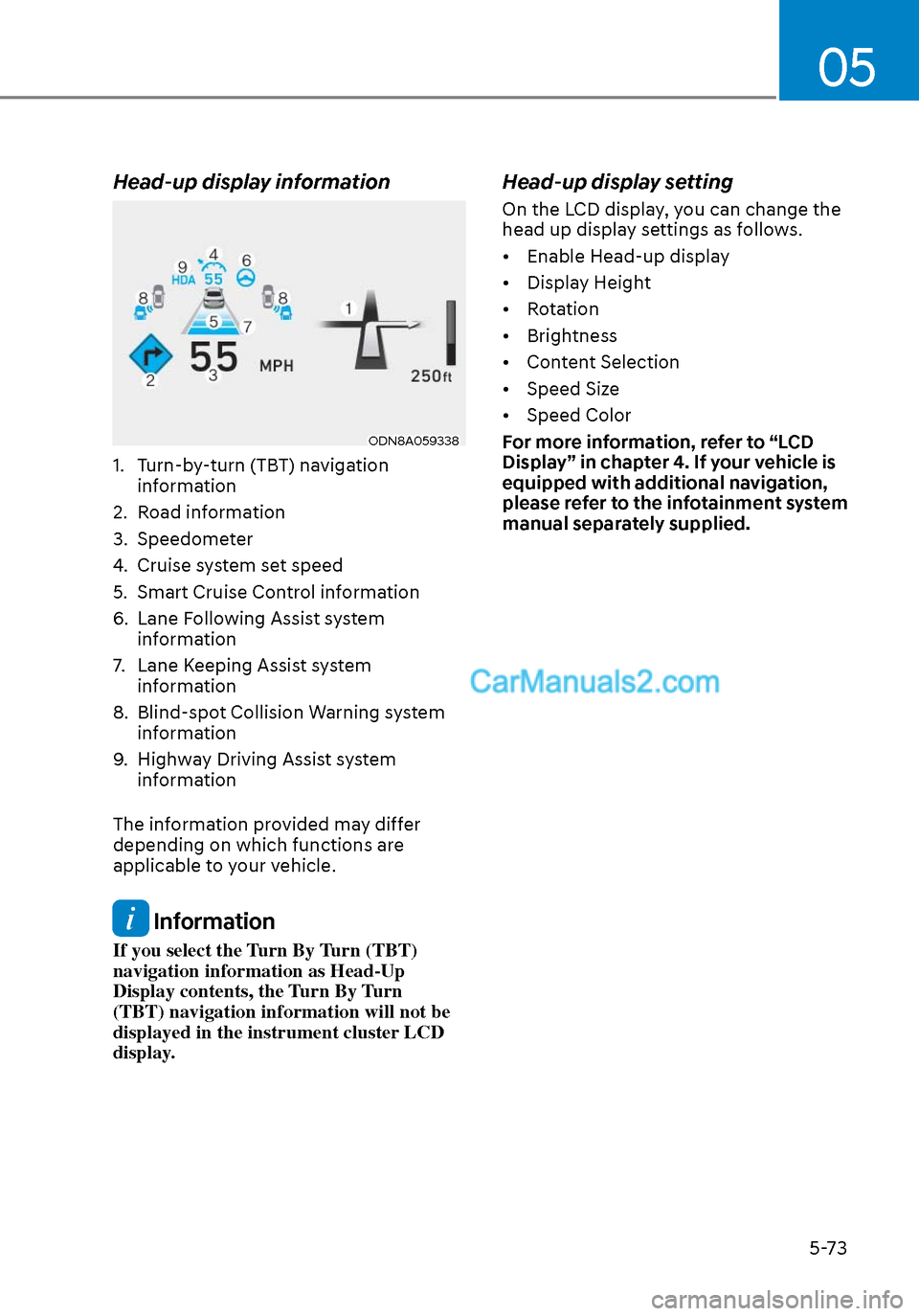
Head-up display information
ODN8A059338ODN8A059338
1. Turn-by-turn (TBT) navigation information
2. Road information
3. Speedometer
4. Cruise system set speed
5. Smart Cruise Control information
6. Lane Following Assist system information
7. Lane Keeping Assist system information
8. Blind-spot Collision Warning system information
9. Highway Driving Assist system information
The information provided may differ
depending on which functions are
applicable to your vehicle.
Information
If you select the Turn By Turn (TBT)
navigation information as Head-Up
Display contents, the Turn By Turn
(TBT) navigation information will not be
displayed in the instrument cluster LCD
display.
Head-up display setting
On the LCD display, you can change the
head up display settings as follows.
• Enable Head-up display
• Display Height
• Rotation
• Brightness
• Content Selection
• Speed Size
• Speed Color
For more information, refer to “LCD
Display” in chapter 4. If your vehicle is
equipped with additional navigation,
please refer to the infotainment system
manual separately supplied.
Page 213 of 537
05
5-83
Welcome System (if equipped)
Welcome light
ODN8A059099ODN8A059099
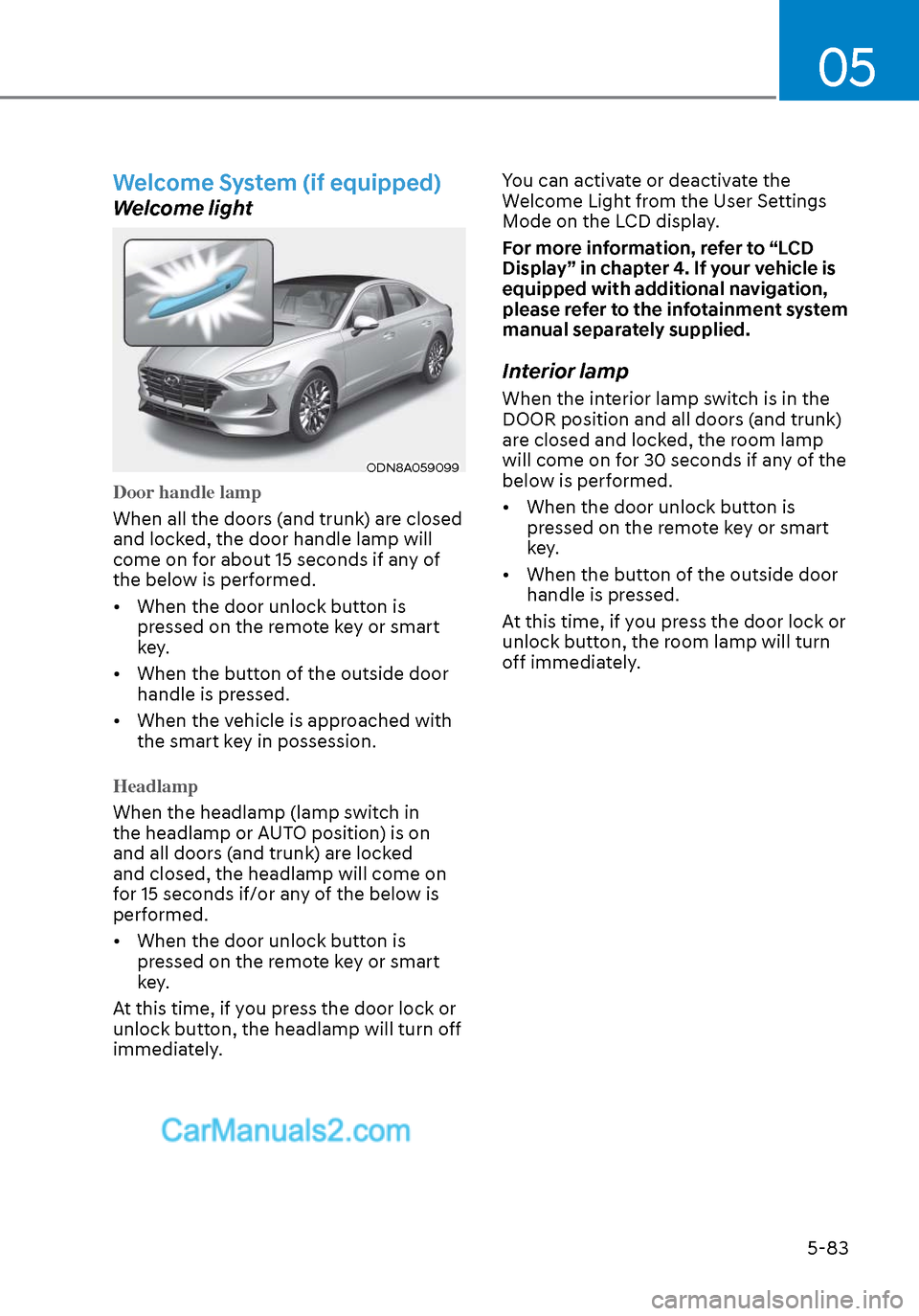
Door handle lamp
When all the doors (and trunk) are closed
and lock
ed, the door handle lamp will
come on for about 15 seconds if any of
the below is performed.
• When the door unlock button is pressed on the remote key or smart
key.
• When the button of the outside door handle is pressed.
• When the vehicle is approached with the smart key in possession.
Headlamp
When the headlamp (lamp switch in
the headlamp or A
UTO position) is on
and all doors (and trunk) are locked
and closed, the headlamp will come on
for 15 seconds if/or any of the below is
performed.
• When the door unlock button is pressed on the remote key or smart
key.
At this time, if you press the door lock or
unlock button, the headlamp will turn off
immediately. You can activate or deactivate the
Welcome Light from the User Settings
Mode on the LCD display.
For more information, refer to “LCD
Display” in chapter 4. If your vehicle is
equipped with additional navigation,
please refer to the infotainment system
manual separately supplied.
Interior lamp
When the interior lamp switch is in the
DOOR position and all doors (and trunk)
are closed and locked, the room lamp
will come on for 30 seconds if any of the
below is performed.
• When the door unlock button is
pressed on the remote key or smart
key.
• When the button of the outside door handle is pressed.
At this time, if you press the door lock or
unlock button, the room lamp will turn
off immediately.
Page 284 of 537
Convenient Features5-154
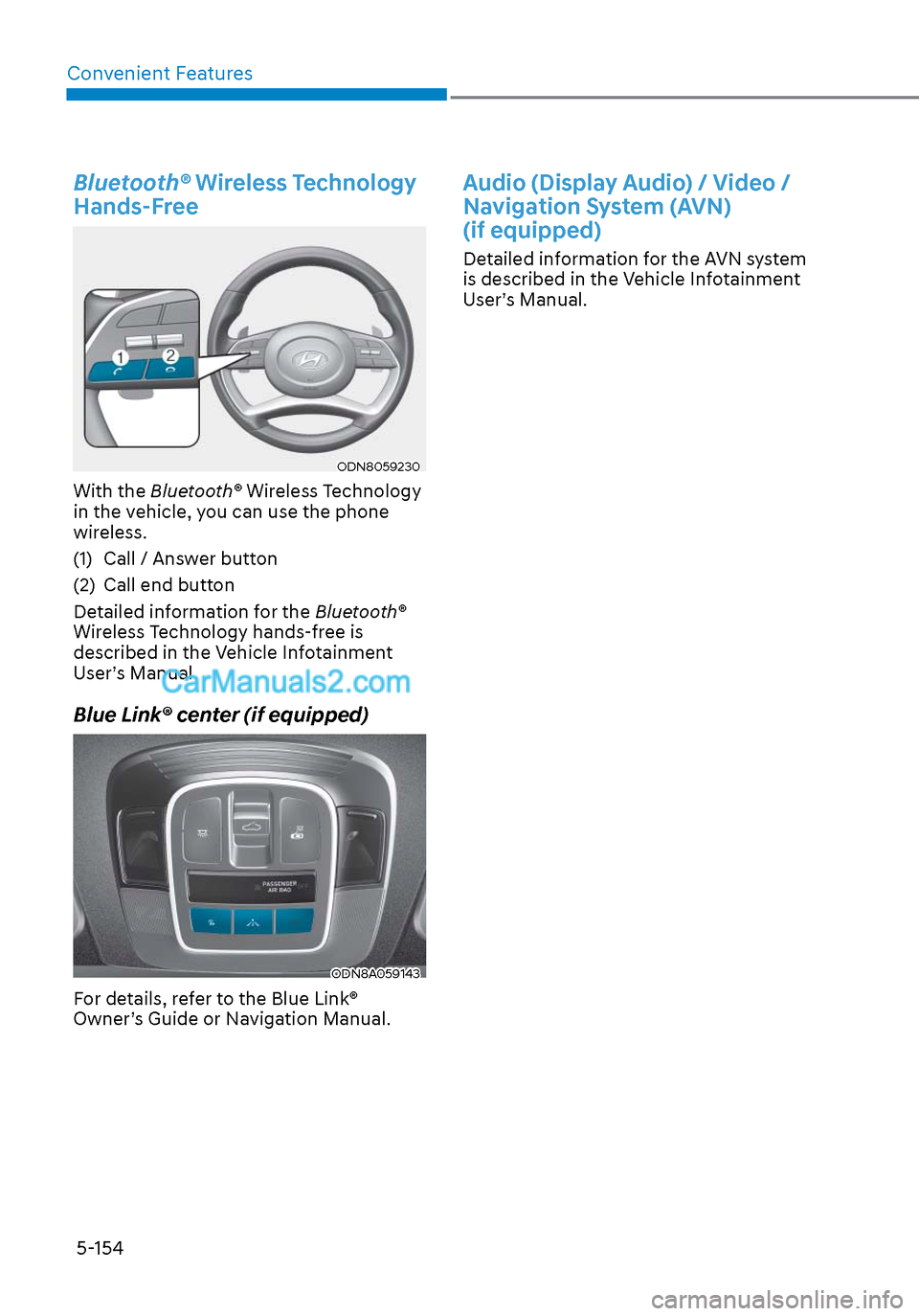
Bluetooth® Wireless Technology
Hands-Free
ODN8059230ODN8059230
With the Bluetooth® Wireless Technology
in the vehicle, you can use the phone
wireless.
(1) Call / Answer button
(2) Call end button
Detailed information for the Bluetooth®
Wireless Technology hands-free is
described in the Vehicle Infotainment
User’s Manual.
Blue Link® center (if equipped)
ODN8A059143ODN8A059143
For details, refer to the Blue Link®
Owner’s Guide or Navigation Manual.
Audio (Display Audio) / Video /
Navigation System (AVN)
(if equipped)
Detailed information for the AVN system
is described in the Vehicle Infotainment
User’s Manual.
Page 287 of 537

Navigation-Based Smart Cruise Control ................................................. 6-105System Setting and Operation ........................................................................\
.... 6-106
Lane Following Assist (LFA) ....................................................................... 6-109LFA Operation ........................................................................\
................................. 6-111
Warning Message ........................................................................\
........................... 6-111
Limitations of the System ........................................................................\
............. 6-113
Highway Driving Assist (HDA) .................................................................... 6-115System Setting and Operation ........................................................................\
..... 6-116
Warning Message ........................................................................\
.......................... 6-118
Rear Cross-Traffic Collision Warning (RCCW) /
Rear Cross-Traffic Collision-Avoidance Assist (RCCA) ............................ 6-121
System Description ........................................................................\
....................... 6-121
System Setting and Activation ........................................................................\
..... 6-122
Warning and System Control ........................................................................\
........6-124
Detecting Sensors ........................................................................\
......................... 6-127
Limitations of the System ........................................................................\
.............6-128
Special Driving Conditions ........................................................................\
.6-133Hazardous Driving Conditions ................................................\
.............................6-133
Rocking the Vehicle .................................................................\
.............................6-133
Smooth Cornering ........................................................................\
.........................6-134
Driving at Night ........................................................................\
.............................6-134
Driving in the Rain ........................................................................\
.........................6-134
Driving in Flooded Areas ........................................................................\
...............6-135
Highway Driving ........................................................................\
............................6-135
Winter Driving ........................................................................\
.................... 6-136Snow or Icy Conditions ........................................................................\
................ 6-136
Winter Precautions ........................................................................\
........................ 6-137
Vehicle load limit.......................................................\
................................. 6-139Tire Loading Information Label ........................................................................\
... 6-139
Trailer Towing ........................................................................\
..................... 6-144
6
6. While Driving
Page 320 of 537
![Hyundai Sonata 2020 Owners Manual While Driving6-36
Battery Sensor Deactivation
ODN8A069204ODN8A069204
[A] : Battery sensor
The battery sensor is deactivated, when
the battery is disconnected from the
negative pole for maintenance p](/manual-img/35/16773/w960_16773-319.png "Hyundai Sonata 2020 Owners Manual While Driving6-36
Battery Sensor Deactivation
ODN8A069204ODN8A069204
[A] : Battery sensor
The battery sensor is deactivated, when
the battery is disconnected from the
negative pole for maintenance p")
While Driving6-36
Battery Sensor Deactivation
ODN8A069204ODN8A069204
[A] : Battery sensor
The battery sensor is deactivated, when
the battery is disconnected from the
negative pole for maintenance purpose.
In this case, the ISG system is limitedly
operated due to the battery sensor
deactivation. Thus, the driver needs
to take the following procedures to
reactivate the battery sensor after
disconnecting the battery.
Prerequisites to reactivate the
battery sensor
Switch "ON" and "OFF" the ignition one
time. Park the vehicle for a minimum of 4
hours with the hood and all doors closed.
Pay extreme caution not to connect any
accessories (i.e. navigation and black
box) to the vehicle with the engine in the
OFF status. If not, the battery sensor may
not be reactivated.
Information
The ISG system may not operate in the
following situations. - There is a malfunction with the ISG
system.
- The battery is weak.
- The brake vacuum pressure is low.
If this occurs, have the ISG system
checked by an authorized HYUNDAI
dealer.
NOTICE
• Use only a genuine HYUNDAI
Absorbent Glass Mat (AGM) battery
for replacement. If not, the ISG
system may not operate normally.
• Do not recharge the Absorbent Glass
Mat (AGM) battery with a general
battery charger. It may damage or
explode the Absorbent Glass Mat
(AGM) battery.
• Do not remove the battery cap. The
battery electrolyte, which is harmful
to the human body, may leak out.