2020 HYUNDAI SONATA LIMITED windshield wiper
[x] Cancel search: windshield wiperPage 15 of 546
2-2
Vehicle Information
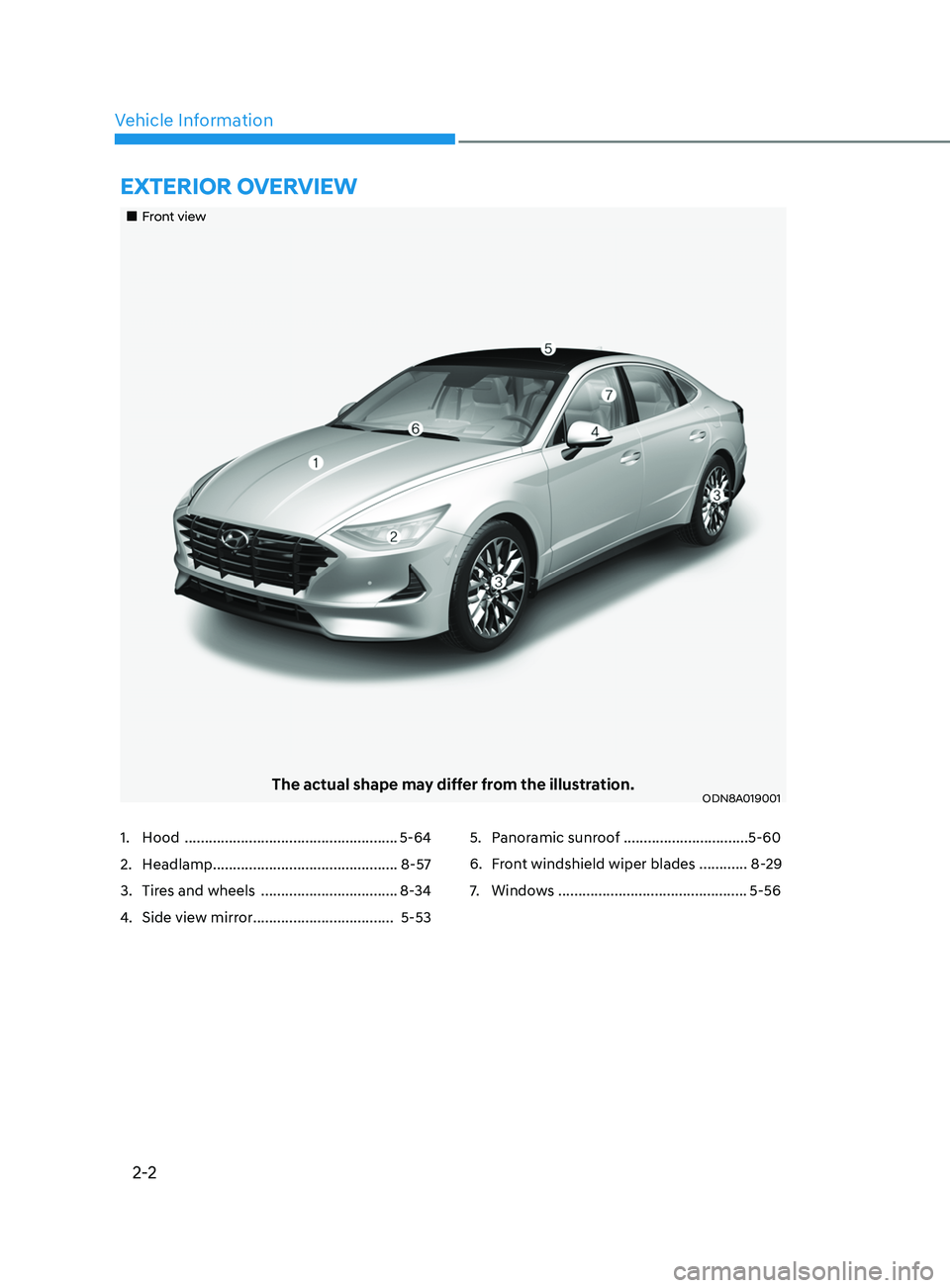
ExtErior ovE rvi E w
„„Front view
The actual shape may differ from the illustration.ODN8A019001
1. Hood ..................................................... 5-64
2.
H
eadlamp .............................................. 8-57
3.
Tir
es and wheels ..................................8-34
4.
Side vie
w mirror ................................... 5-535.
P anoramic sunroof ...............................5-60
6.
F
ront windshield wiper blades ............ 8-29
7.
Windo
ws ...............................................5-56
Page 132 of 546
 ........................................................................\
......5- 72
Lighting ........................................................................\
....")
5
Head Up Display (HUD) ........................................................................\
......5- 72
Lighting ........................................................................\
................................. 5 -74
Exterior Lights ........................................................................\
.................................5 -74
Interior Lights ........................................................................\
................................. 5-80
Welcome System
........................................................................\
........................... 5-83
Wipers and Washers ........................................................................\
............5-84Windshield Wipers ........................................................................\
......................... 5-84
Windshield W ashers ........................................................................\
....................... 5-85
Rear View Monitor (RVM) ........................................................................\
...5-86Rear View Monitor with Parking Guidance ...........................................................5-86
R ear View Monitor - Top View ........................................................................\
....... 5-86
Surround View Monitor (SVM) ...................................................................5-88
R everse Parking Collision-Avoidance Assist ..............................................5-89
System Setting and Operation ........................................................................\
...... 5-89
W arning and System Control ........................................................................\
......... 5-90
Detecting Sensor
........................................................................\
............................ 5-92
System Malfunction
........................................................................\
....................... 5-93
Limitations of the System
........................................................................\
.............. 5-93
Reverse Parking Distance Warning (PDW) ................................................5-95Operation of Reverse Parking Distance Warning System ....................................5-95
T o Turn Off Reverse Parking Distance Warning System .....................................5-97
Non-Operational Conditions of Reverse Parking Distance Warning System
.....5-97
Reverse Parking Distance Warning System Precautions
.....................................5-98
Forward/Reverse Parking Distance Warning (PDW) ................................5-99Operation of Forward/Reverse Parking Distance Warning System ..................5- 100
Non-Operational Conditions of Forward/Reverse Parking Distance Warning
System
........................................................................\
............................................ 5-102
Forward/Reverse Parking Distance Warning System Precautions
....................5-103
Remote Smart Parking Assist (RSPA) ....................................................... 5- 104Operating Condition ........................................................................\
.....................5- 105
How Remote Smart Parking Assist System Works .............................................5-108
Additional Instructions
........................................................................\
................... 5-113
Display Operation Status
........................................................................\
.............. 5-114
How the Remote Moving Forward/Backward System Works
.............................5-115
Manual Climate Control System ............................................................... 5- 118Heating and Air Conditioning ........................................................................\
.......5- 119
System Operation ........................................................................\
.......................... 5-124
System Maintenance
........................................................................\
.................... 5-125
Page 133 of 546
5
Automatic Climate Control System ...........................................................5- 127Automatic Heating and Air Conditioning ............................................................5- 128
Manual Temperature Control Mode ..................................................................... 5-129
System Operation
........................................................................\
.......................... 5-135
System Maintenance
........................................................................\
.................... 5-136
Windshield Defrosting and Defogging ......................................................5- 138Manual Climate Control System........................................................................\
...5-138
Automatic Climate Control System......................................................................5-139
Defogging Logic
........................................................................\
.......................... 5-140
Auto Defogging System (Only for Automatic Climate Control System)
............5-141
Defroster
........................................................................\
........................................ 5-142
Climate Control Additional Features .........................................................5- 143Sunroof Inside Air Recirculation ........................................................................\
..5- 143
Automatic Ventilation ........................................................................\
................... 5-143
Storage Compartment ........................................................................\
........5- 144Center Console Storage ........................................................................\
................5- 144
Glove Box ........................................................................\
....................................... 5-144
Interior Features ........................................................................\
..................5- 145Cup Holder ........................................................................\
.....................................5- 145
Sunvisor ........................................................................\
......................................... 5-146
Power Outlet
........................................................................\
.................................. 5-146
USB Charger
........................................................................\
................................. 5-147
Wireless Cellular Phone Charging System
..........................................................5-148
Clock
........................................................................\
.............................................. 5-150
Clothes Hanger
........................................................................\
.............................. 5-150
Floor Mat Anchor(S)
........................................................................\
....................... 5-151
Infotainment System ........................................................................\
..........5- 152USB And Ipod® Port ........................................................................\
.......................5- 152
Antenna ........................................................................\
.......................................... 5-152
Steering Wheel Audio Control
........................................................................\
...... 5-153
Bluetooth® Wireless Technology Hands-Free
.....................................................5-154
Audio (Display Audio) / Video / Navigation System (AVN)
................................5-154
Head Up Display (HUD) ........................................................................\
...... 5-72
Lighting ........................................................................\
................................. 5 -74
Exterior Lights ........................................................................\
................................. 5 -74
Interior Lights ........................................................................\
................................. 5-80
Welcome System ........................................................................\
........................... 5-83
Wipers and Washers ........................................................................\
............5-84Windshield Wipers ........................................................................\
......................... 5-84
Windshield Washers ........................................................................\
....................... 5-85
Rear View Monitor (RVM) ........................................................................\
... 5-86Rear View Monitor with Parking Guidance ........................................................... 5-86
Rear View Monitor - Top View ........................................................................\
....... 5-86
Surround View Monitor (SVM) ................................................................... 5-88
Reverse Parking Collision-Avoidance Assist .............................................. 5-89
System Setting and Operation ........................................................................\
...... 5-89
Warning and System Control ........................................................................\
......... 5-90
Detecting Sensor ........................................................................\
............................ 5-92
System Malfunction ........................................................................\
....................... 5-93
Limitations of the System ........................................................................\
.............. 5-93
Reverse Parking Distance Warning (PDW) ................................................5-95Operation of Reverse Parking Distance Warning System .................................... 5-95
To Turn Off Reverse Parking Distance Warning System ..................................... 5-97
Non-Operational Conditions of Reverse Parking Distance Warning System ..... 5-97
Reverse Parking Distance Warning System Precautions ..................................... 5-98
Forward/Reverse Parking Distance Warning (PDW) ................................5-99Operation of Forward/Reverse Parking Distance Warning System .................. 5-100
Non-Operational Conditions of Forward/Reverse Parking Distance Warning
System ........................................................................\
............................................ 5-102
Forward/Reverse Parking Distance Warning System Precautions .................... 5-103
Remote Smart Parking Assist (RSPA) .......................................................5-104Operating Condition ........................................................................\
..................... 5-105
How Remote Smart Parking Assist System Works ............................................. 5-108
Additional Instructions ........................................................................\
................... 5-113
Display Operation Status ........................................................................\
.............. 5-114
How the Remote Moving Forward/Backward System Works ............................. 5-115
Manual Climate Control System ............................................................... 5-118Heating and Air Conditioning ........................................................................\
....... 5-119
System Operation ........................................................................\
.......................... 5-124
System Maintenance ........................................................................\
.................... 5-125
5. Convenient Features
Page 214 of 546
Convenient Features5-84
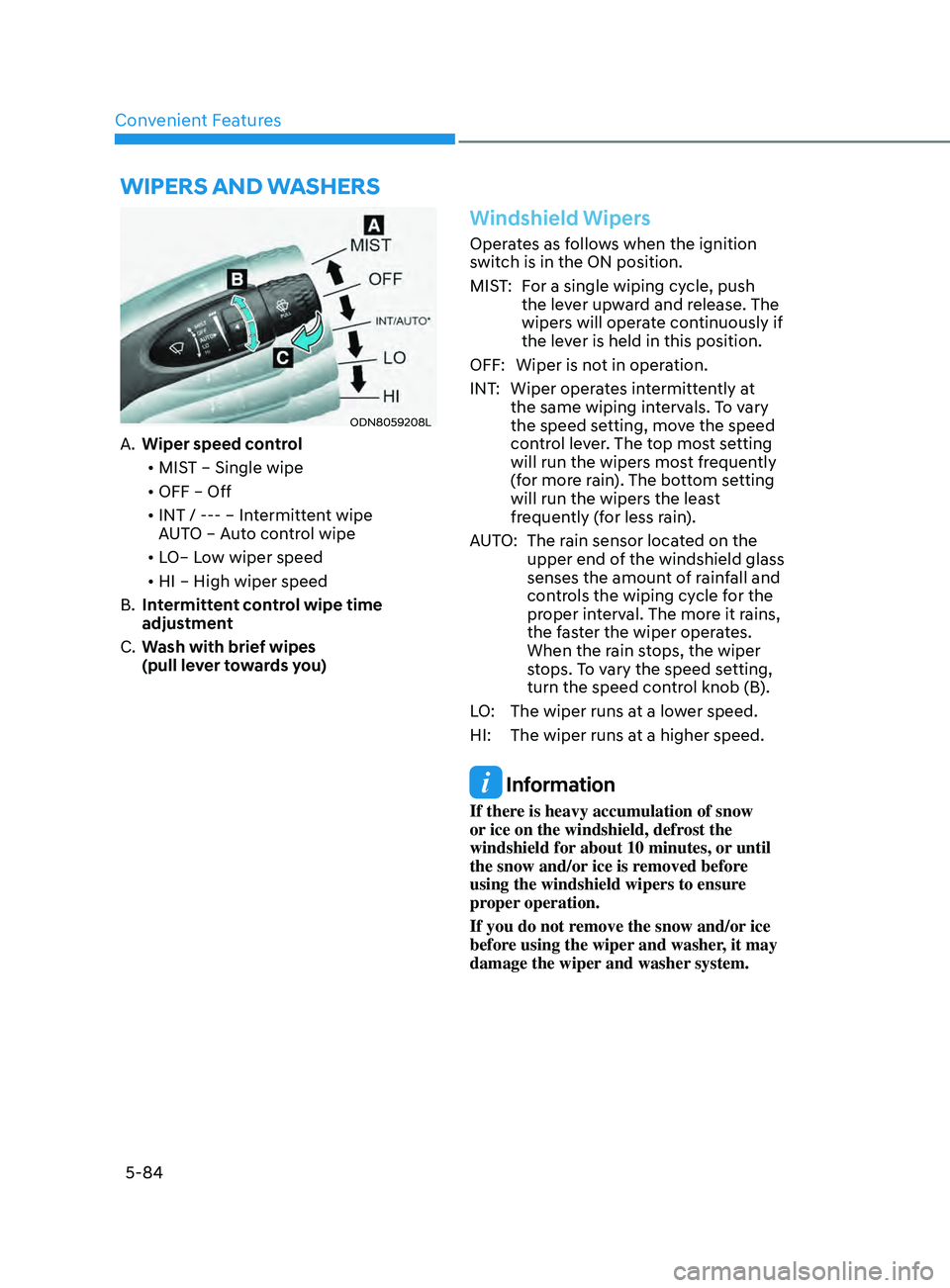
Wipers AnD WAsher s
ODN8059208L
A. Wiper speed control
• MIST – Single wipe
• OFF – Off
• INT / --- – Intermittent wipe
AUTO – Auto control wipe
• LO– Low wiper speed
• HI – High wiper speed
B.
In
termittent control wipe time
adjustment
C.
W
ash with brief wipes
(pull lever towards you)
Windshield Wipers
Operates as follows when the ignition
switch is in the ON position.
MIST: For a single wiping cycle, push the lever upward and release. The
wipers will operate continuously if
the lever is held in this position.
OFF: Wiper is not in operation.
INT: Wiper operates intermittently at the same wiping intervals. To vary
the speed setting, move the speed
control lever. The top most setting
will run the wipers most frequently
(for more rain). The bottom setting
will run the wipers the least
frequently (for less rain).
AUTO: The rain sensor located on the upper end of the windshield glass
senses the amount of rainfall and
controls the wiping cycle for the
proper interval. The more it rains,
the faster the wiper operates.
When the rain stops, the wiper
stops. To vary the speed setting,
turn the speed control knob (B).
LO: The wiper runs at a lower speed.
HI: The wiper runs at a higher speed.
Information
If there is heavy accumulation of snow
or ice on the windshield, defrost the
windshield for about 10 minutes, or until
the snow and/or ice is removed before
using the windshield wipers to ensure
proper operation.
If you do not remove the snow and/or ice
before using the wiper and washer, it may
damage the wiper and washer system.
Page 215 of 546
05
5-85
Information
If the wiper switch is set in AUTO mode
when Engine Start/Stop button is in the
ON position, the wiper will operate once to
perform a self-check of the system. Set the
wiper to the OFF position when the wiper
is not in use.
WARNING
To avoid personal injury from the
windshield wipers, when the engine
is running and the windshield wiper
switch is placed in the AUTO mode:
•
Do no
t touch the upper end of the
windshield glass facing the rain
sensor.
•
Do no
t wipe the upper end of the
windshield glass with a damp or wet
cloth.
•
Do no
t put pressure on the
windshield glass.
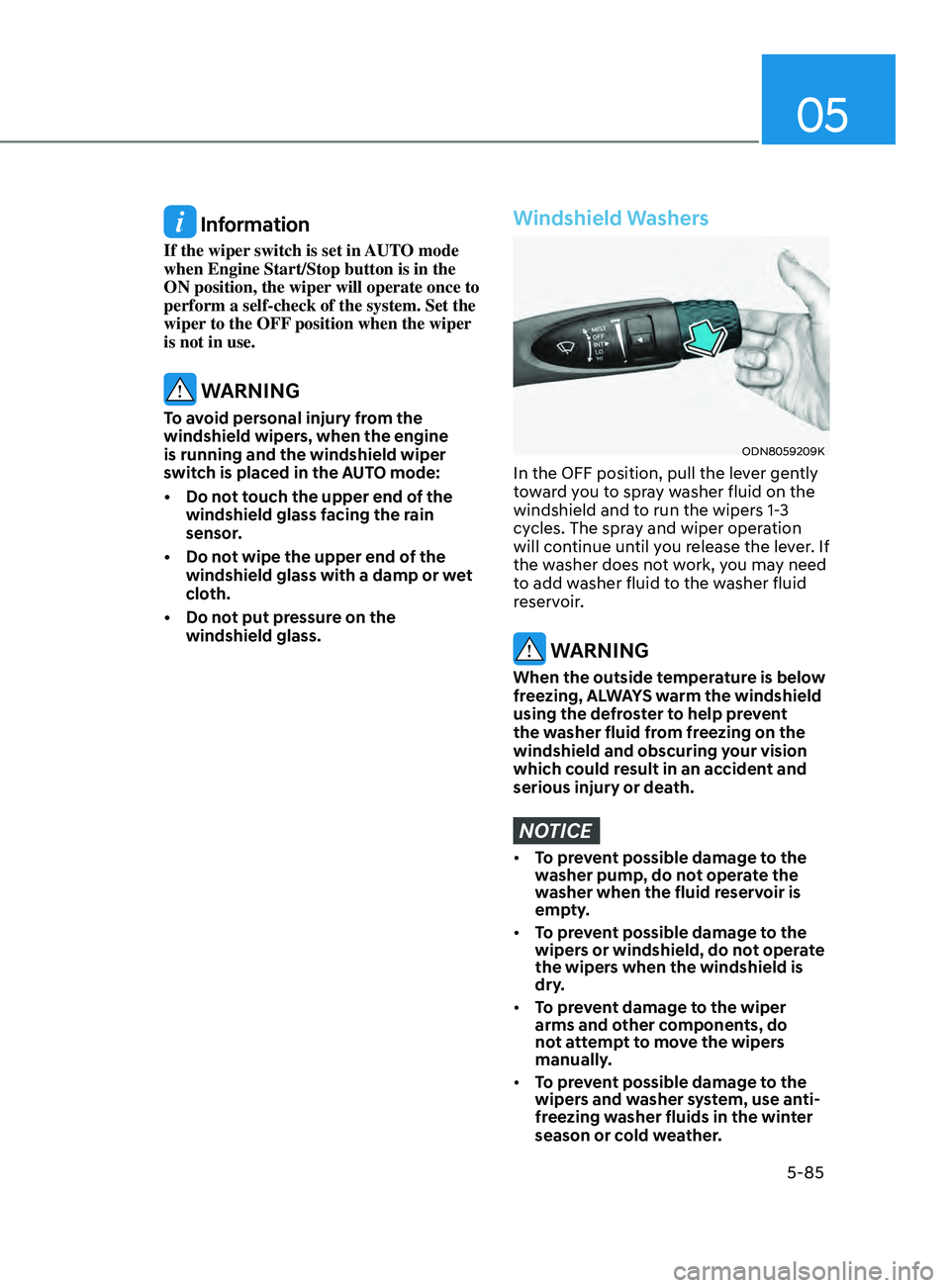
Windshield Washers
ODN8059209K
In the OFF position, pull the lever gently
toward you to spray washer fluid on the
windshield and to run the wipers 1-3
cycles. The spray and wiper operation
will continue until you release the lever. If
the washer does not work, you may need
to add washer fluid to the washer fluid
reservoir.
WARNING
When the outside temperature is below
freezing, ALWAYS warm the windshield
using the defroster to help prevent
the washer fluid from freezing on the
windshield and obscuring your vision
which could result in an accident and
serious injury or death.
NOTICE
• To prevent possible damage to the
washer pump, do not operate the
washer when the fluid reservoir is
empty.
• To prevent possible damage to the
wipers or windshield, do not operate
the wipers when the windshield is
dry.
• To prevent damage to the wiper
arms and other components, do
not attempt to move the wipers
manually.
• To prevent possible damage to the
wipers and washer system, use anti-
freezing washer fluids in the winter
season or cold weather.
Page 425 of 546
06
6-141
Smooth Cornering
Avoid braking or gear changing in
corners, especially when roads are wet.
Ideally, corners should always be taken
under gentle acceleration.
Driving at Night
Night driving presents more hazards than
driving in the daylight. Here are some
important tips to remember:
• Slow down and keep more distance
between you and other vehicles, as it
may be more difficult to see at night,
especially in areas where there may
not be any street lights.
• Adjust your mirrors to reduce the glare
from other driver's headlamps.
• Keep your headlamps clean and
properly aimed. Dirty or improperly
aimed headlamps will make it much
more difficult to see at night.
• Avoid staring directly at the
headlamps of oncoming vehicles. You
could be temporarily blinded, and it
will take several seconds for your eyes
to readjust to the darkness.
Driving in the Rain
Rain and wet roads can make driving
dangerous. Here are a few things to
consider when driving in the rain or on
slick pavement:
• Slow down and allow extra following
distance. A heavy rainfall makes
it harder to see and increases the
distance needed to stop your vehicle.
• Turn OFF your Cruise Control.
• Replace your windshield wiper blades
when they show signs of streaking or
missing areas on the windshield.
• Tires should be properly maintained
with at least 2/32nds of an inch of
tread depth. If your tires do not have
enough tread, making a quick stop on
wet pavement can cause a skid and
possibly lead to an accident. See "Tire
Tread" in chapter 8.
• Turn on your headlamps to make it
easier for others to see you.
• Driving too fast through large puddles
can affect your brakes. If you must go
through puddles, try to drive through
them slowly.
• If you believe your brakes may be wet,
apply them lightly while driving until
normal braking operation returns.
Hydroplaning
If the road is wet enough and you are
going fast enough, your vehicle may
have little or no contact with the road
surface and actually ride on the water.
The best advice is SLOW DOWN when
the road is wet.
The risk of hydroplaning increases as
the depth of tire tread decreases, refer
to "Tire Tread" in chapter 8.
Page 460 of 546
Maintenance
8-6
While operating your vehicle:
• Note any changes in the sound of the
exhaust or any smell of exhaust fumes
in the vehicle.
• Check for vibrations in the steering
wheel. Notice if there is any increased
steering effort or looseness in the
steering wheel, or change in its
straight-ahead position.
• Notice if your vehicle constantly turns
slightly or “pulls” to one side when
traveling on smooth, level road.
• When stopping, listen and check for
unusual sounds, pulling to one side,
increased brake pedal travel or “hard-
to-push” brake pedal.
• If any slipping or changes in the
operation of your transmission occurs,
check the transmission fluid level.
• Check the automatic transmission P
(Park) function.
• Check the parking brake.
• Check for fluid leaks under your
vehicle (water dripping from the air
conditioning system during or after
use is normal).
At least monthly:
• Check coolant level in the engine
coolant reservoir.
• Check the operation of all exterior
lights, including the brake lights, turn
signals and hazard warning flashers.
• Check the inflation pressures of all
tires including the spare for tires that
are worn, show uneven wear, or are
damaged.
• Check for loose wheel lug nuts.
At least twice a year:
(i.e., every Spring and Autumn)
• Check radiator, heater and air
conditioning hoses for leaks or
damage.
• Check windshield washer spray and
wiper operation. Clean wiper blades
with a clean cloth dampened with
washer a fluid.
• Check headlamp alignment.
• Check muffler, exhaust pipes, shields
and clamps.
• Check the seat belts for wear and
function.
At least once a year:
• Clean body and door drain holes.
• Lubricate door hinges and hood
hinges.
• Lubricate door and hood locks and
latches.
• Lubricate door rubber weather strips.
• Lubricate door checker.
• Check the air conditioning system.
• Inspect and lubricate automatic
transmission linkage and controls.
• Clean the battery and terminals.
• Check the brake fluid level.
Page 483 of 546
08
8-29
wipEr BladES
Blade Inspection
Contamination of either the windshield
or the wiper blades with foreign matter
can reduce the effectiveness of the
windshield wiper functionality. Common
sources of contamination are insects,
tree sap, and hot wax treatments used
by some commercial car washes. If the
blades are not wiping properly, clean
both the window and the blades with a
clean cloth dampened with washer fluid.
NOTICE
To prevent damage to the wiper blades,
arms or other components, do not:
• Use gasoline, kerosene, paint
thinner, or other solvents on or near
them.
• Attempt to move the wipers
manually.
• Use non-specified wiper blades.
Information
Commercial hot waxes applied by
automatic car washes have been known to
make the windshield difficult to clean.
Blade Replacement
When the wipers no longer clean
adequately, the blades may be worn or
cracked, and require replacement.
NOTICE
• In order to prevent damage to the
hood and the wiper arms, the wiper
arms should only be lifted when in
the top wiping position.
• Always return the wiper arms to the
windshield before driving.
NOTICE
The use of a non-specified wiper blade
could result in wiper malfunction and
failure.
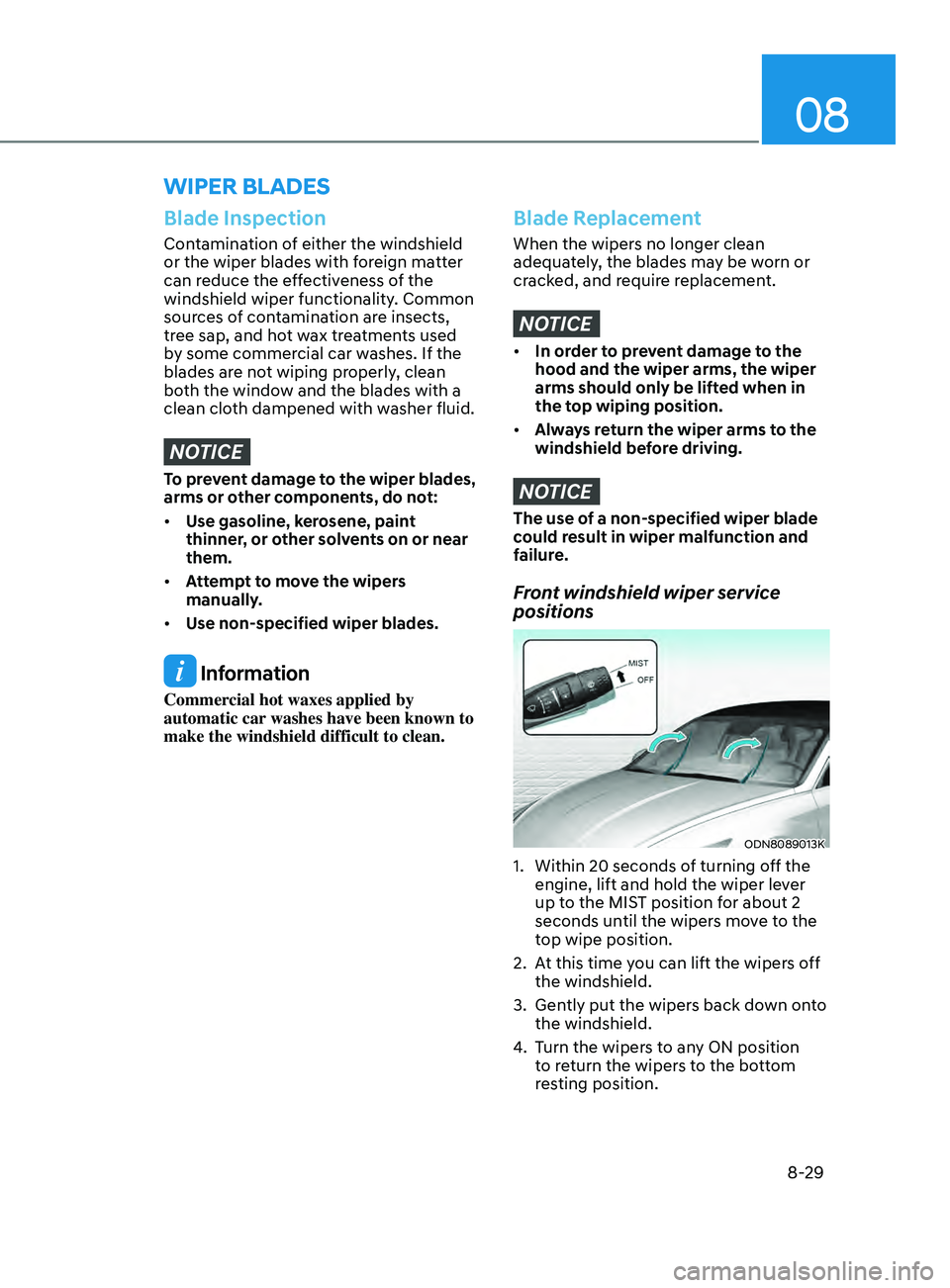
Front windshield wiper service
positions
ODN8089013K
1. Within 20 seconds o f turning off the
engine, lift and hold the wiper lever
up to the MIST position for about 2
seconds until the wipers move to the
top wipe position.
2.
A
t this time you can lift the wipers off
the windshield.
3.
Gen
tly put the wipers back down onto
the windshield.
4.
T
urn the wipers to any ON position
to return the wipers to the bottom
resting position.