2020 Hyundai Santa Fe Surround view
[x] Cancel search: Surround viewPage 16 of 557

I
IN
N S
ST
T R
R U
U M
M E
EN
N T
T
P
P A
A N
N E
EL
L
O
O V
VE
ER
R V
V I
IE
E W
W
(
( I
I)
)
The actual shape may differ from the illustration.
1-5
Your vehicle at a glance
11. Instrument cluster ....................................3-66
2. Horn ........................................................3-28
3. Driver’s front air bag ................................2-51
4. Key ignition switch/ ....................................5-6
Engine Start/Stop button ............................5-9
5. Hazard warning flasher switch ..................6-2
6. Audio system/Navigation system ..............4-4
7. Manual climate control system/ ............3-137 Automatic climate control system ..........3-146
8. Heated steering wheel ............................3-29
9. Seat warmer ............................................2-21
10. Air ventilation seat ................................2-22
11. Power outlet ........................................3-168
12. Aux, USB and USB port ..........................4-2
13. USB charger ........................................3-170
14. Wireless cellular phone charging system ..................................3-170
15. Passenger’s front air bag ......................2-51
16. Glove box ............................................3-165
17. Automatic transmission shift lever ........5-14
18. Drive mode button ................................5-51
19. Idle Stop and Go(ISG) OFF button ......5-46
20. Downhill Brake Control (DBC) ..............5-36
21. Reverse Parking Distance Warning OFF button ..........................................3-133
22. Surround view monitor button ............3-129
23. Electronic Parking Brake (EPB) ............5-21
24. Auto Hold switch ....................................5-27
25. AC inverter ..........................................3-171
OTMA018004
Page 91 of 557

LCD Display ...........................................................3-91
LCD Display Control ........................................................3-91
LCD Display Modes .........................................................3-92
Trip Computer .....................................................3-106
Head Up Display (HUD).....................................3-110
Lighting................................................................3-112
Exterior Lights ...............................................................3-112
Interior Lights ................................................................3-120
Welcome System ...........................................................3-123
Wipers And Washers .........................................3-124
Front Windshield Wipers .............................................3-124
Front Windshield Washers ..........................................3-126
Rear Window Wiper and Washer..............................3-127
Driver Assist System .........................................3-128
Rear view monitor ........................................................3-128
Surround View Monitoring .........................................3-129
Blind-spot View Monitor system ..............................3-131
Reverse Parking Distance Warning system............3-133
Manual Climate Control System.......................3-137
Heating and Air Conditioning .....................................3-138
System Operation .........................................................3-142
System Maintenance....................................................3-144
Automatic Climate Control System ..................3-146
Automatic Temperature Control Mode ....................3-147
Manual Temperature Control Mode .........................3-148
System Operation .........................................................3-155
System Maintenance....................................................3-156
Windshield Defrosting and Defogging ............3-158
Auto Defogging System ..............................................3-160
Rear Window Defroster ..............................................3-162
Climate Control Additional Features ...............3-163
Cluster ionizer ................................................................3-163
Automatic Ventilation ...................................................3-163
Sunroof Inside Air Recirculation ...............................3-164
Auto comfort control ...................................................3-164
Storage Compartment .......................................3-165
Center Console Storage ..............................................3-165
Glove Box ........................................................................\
3-165
Sunglass Holder.............................................................3-166
Tray......................................................................\
.............3-166
Luggage Tray .................................................................3-167
3
Page 218 of 557
3-129
Convenient features of your vehicle
3
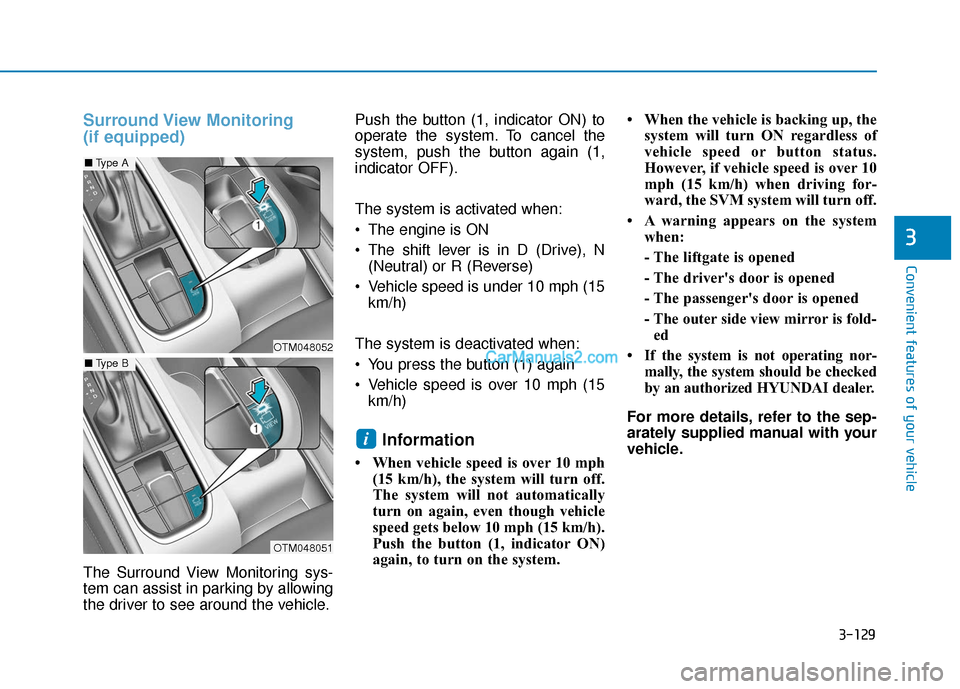
Surround View Monitoring
(if equipped)
The Surround View Monitoring sys-
tem can assist in parking by allowing
the driver to see around the vehicle.Push the button (1, indicator ON) to
operate the system. To cancel the
system, push the button again (1,
indicator OFF).
The system is activated when:
The engine is ON
The shift lever is in D (Drive), N
(Neutral) or R (Reverse)
Vehicle speed is under 10 mph (15 km/h)
The system is deactivated when:
You press the button (1) again
Vehicle speed is over 10 mph (15 km/h)
Information
• When vehicle speed is over 10 mph (15 km/h), the system will turn off.
The system will not automatically
turn on again, even though vehicle
speed gets below 10 mph (15 km/h).
Push the button (1, indicator ON)
again, to turn on the system. • When the vehicle is backing up, the
system will turn ON regardless of
vehicle speed or button status.
However, if vehicle speed is over 10
mph (15 km/h) when driving for-
ward, the SVM system will turn off.
• A warning appears on the system when:
- The liftgate is opened
- The driver's door is opened
- The passenger's door is opened
- The outer side view mirror is fold-ed
• If the system is not operating nor- mally, the system should be checked
by an authorized HYUNDAI dealer.
For more details, refer to the sep-
arately supplied manual with your
vehicle.
i
OTM048052
OTM048051
■ Type A
■Type B
Page 219 of 557
3-130
Convenient features of your vehicle
Always keep the camera lens
clean. The camera may not work
normally if the lens is covered
with foreign material.
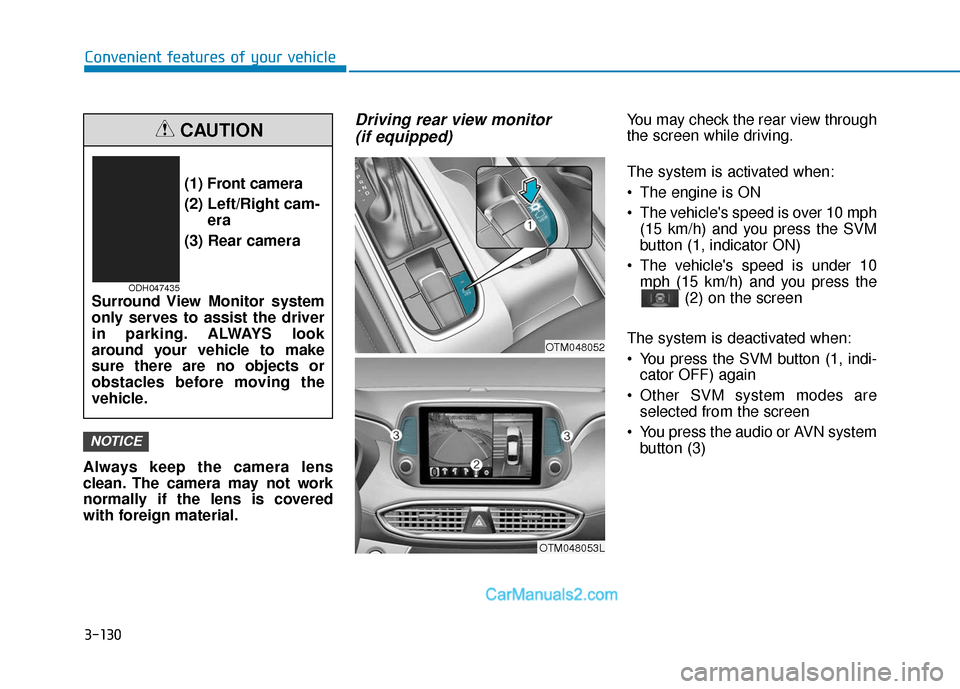
Driving rear view monitor (if equipped)You may check the rear view through
the screen while driving.
The system is activated when:
The engine is ON
The vehicle's speed is over 10 mph
(15 km/h) and you press the SVM
button (1, indicator ON)
The vehicle's speed is under 10 mph (15 km/h) and you press the (2) on the screen
The system is deactivated when:
You press the SVM button (1, indi- cator OFF) again
Other SVM system modes are selected from the screen
You press the audio or AVN system button (3)
NOTICE
(1) Front camera
(2) Left/Right cam- era
(3) Rear camera
Surround View Monitor system
only serves to assist the driver
in parking. ALWAYS look
around your vehicle to make
sure there are no objects or
obstacles before moving the
vehicle.
CAUTION
ODH047435
OTM048053L
OTM048052
Page 340 of 557

5-66
Driving your vehicle
Detecting pedestrians
The sensor may be limited when:
The pedestrian is not fully detect-ed by the camera recognition sys-
tem, for example, if the pedestrian
is leaning over or is not fully walk-
ing upright
The pedestrian is moving very quickly or appears abruptly in the
camera detection area
The pedestrian is wearing clothing that easily blends into the back-
ground, making it difficult to be
detected by the camera recogni-
tion system
The outside lighting is too bright (e.g. when driving in bright sun-
light or in sun glare) or too dark
(e.g. when driving on a dark rural
road at night)
It is difficult to detect and distin- guish the pedestrian from other
objects in the surroundings, for
example, when there is a group of
pedestrians or a large crowd
There is an item similar to a per- son's body structure
The pedestrian is small The pedestrian has impaired
mobility
The radar sensor or camera is blocked with a foreign object or
debris
The camera lens is contaminated due to tinted, filmed or coated
windshield, damaged glass, or
piece of foreign matter (sticker,
bug, etc.) on the glass
The brightness outside is too low such as when the headlamps are
not on at night or the vehicle is
going through a tunnel
Inclement weather such as heavy rain or snow obscures the field of
view of the radar sensor or camera
When light coming from a street light or an oncoming vehicle is
reflected on a wet road surface
such as a puddle in the road
The field of view in front is obstructed by sun glare
The windshield glass is fogged up; a clear view of the road is
obstructed The adverse road conditions
cause excessive vehicle vibrations
while driving
The sensor recognition changes suddenly when passing over a
speed bump
You are on a roundabout
Page 347 of 557

5-73
Driving your vehicle
5
Blind-Spot Collision-AvoidanceAssist (BCA) system
The Blind-Spot Collision-Avoidance
Assist (BCA) system may apply brak-
ing power, when an approaching
vehicle is detected within a certain
distance next to or behind your vehi-
cle.
It gently applies braking power on
the tire, which is located in the oppo-
site side of the possibly-colliding
point. The instrument cluster will
inform the driver of the system acti-
vation.
The warning light on the outer
side view mirror will illumi-
nate whenever a vehicle is
detected at the rear side by
the system.
To avoid accidents, do not
focus only on the warning
light and neglect to see the
surrounding of the vehicle.
Drive safely even though the
vehicle is equipped with a
Blind-Spot Collision Warning
(BCW) system. Do not solely
rely on the system but check
your surrounding before
changing lanes or backing the
vehicle up.
The system may not alert the
driver in some conditions so
always check your surround-
ings while driving.
WARNING
The driver should always use
extreme caution while operat-
ing the vehicle, whether or not
the warning light on the outer
side view mirror illuminates or
there is a warning alarm.
Playing the vehicle audio sys-
tem at high volume may offset
the Blind-Spot Collision
Warning system warning
sounds.
If any other warning sound
such as seat belt warning
chime is already generated,
the Blind-Spot Collision
Warning (BCW) system warn-
ing may not sound.
CAUTION
OTM058084L/OTM058083L
Page 360 of 557
5-86
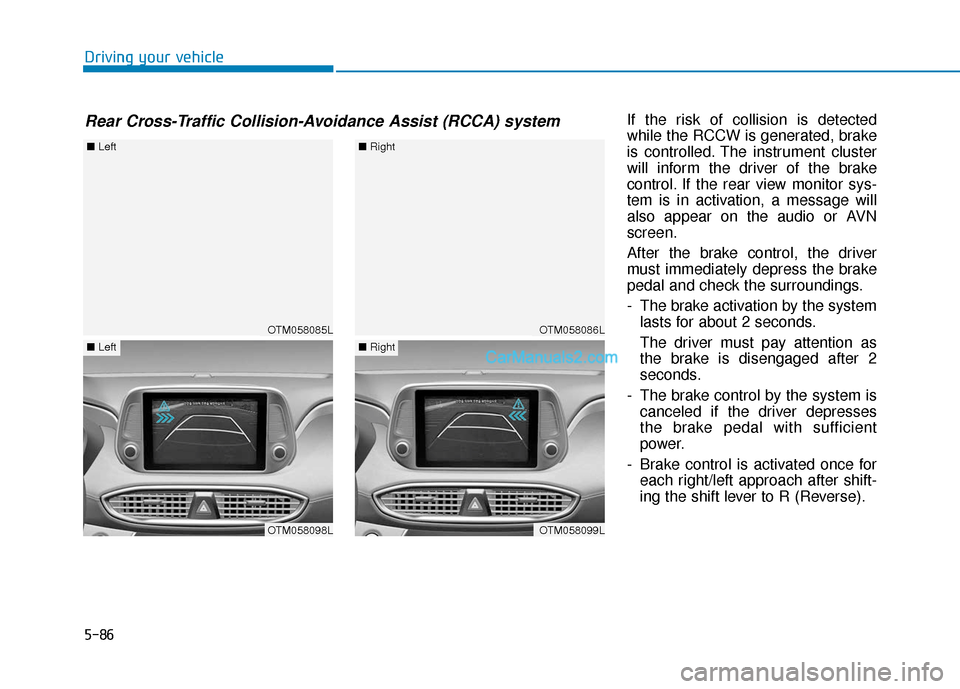
Driving your vehicleIf the risk of collision is detected
while the RCCW is generated, brake
is controlled. The instrument cluster
will inform the driver of the brake
control. If the rear view monitor sys-
tem is in activation, a message will
also appear on the audio or AVN
screen.
After the brake control, the driver
must immediately depress the brake
pedal and check the surroundings.
- The brake activation by the systemlasts for about 2 seconds.
The driver must pay attention as
the brake is disengaged after 2
seconds.
- The brake control by the system is canceled if the driver depresses
the brake pedal with sufficient
power.
- Brake control is activated once for each right/left approach after shift-
ing the shift lever to R (Reverse).
Rear Cross-Traffic Collision-Avoidance Assist (RCCA) system
OTM058085L
■ Left
OTM058098L
■Left
OTM058086L
■Right
OTM058099L
■Right
Page 361 of 557

5-87
Driving your vehicle
5
The brake control may not operate
properly according to the status of
the ESC (Electronic Stability
Control). The same warning mes-
sage is displayed on the instrument
cluster for this case also.
- When the ESC (Electronic StabilityControl) warning light is on.
- When the ESC (Electronic Stability Control) is engaged in a different
function.
The driver should always use
extreme caution while operat-
ing the vehicle, whether or not
the warning light on the outer
side view mirror illuminates or
there is a warning alarm.
Playing the vehicle audio sys-
tem at high volume may offset
the system's warning sounds.
If any other warning sound
such as seat belt warning
chime is already generated,
the Rear Cross-Traffic Collision
Warning system warning may
not sound.
Drive safely even though the
vehicle is equipped with a
Rear Cross-Traffic Collision
Warning system and Rear
Cross-Traffic Collision-Avoidance
Assist system. Do not solely
rely on the system but check
your surrounding when back-
ing the vehicle up.
The driver is responsible for
accurate brake control.
Always pay extreme caution
while driving. The Rear Cross-
Traffic Collision Warning sys-
tem and Rear Cross-Traffic
Collision-Avoidance Assist
system may not operate prop-
erly or unnecessarily operate
in accordance with your driv-
ing situations.
The Rear Cross-Traffic
Collision-Avoidance Assist
system is not a substitute for
safe driving practices, but a
convenience function only. It
is the responsibility of the
driver to always drive cau-
tiously to prevent unexpected
and sudden situations from
occurring. Pay attention to the
road conditions at all times.
WARNING
When the operation condition
of the Rear Cross-Traffic
Collision Warning system is
satisfied, the warning will
occur every time a vehicle
approaches the side or rear
of your stopped (0 mph vehi-
cle speed) vehicle.
The system's warning may
not operate properly if the left
or right of your vehicle's rear
bumper is blocked by a vehi-
cle or obstacle.
CAUTION