2020 Hyundai Santa Fe aware
[x] Cancel search: awarePage 330 of 557

5-56
- Later :When this condition is selected,
the initial Forward Collision
Warning is activated later than
normal. This setting reduces the
amount of distance between the
vehicle or pedestrian ahead
before the initial warning occurs.
Select 'Later' when traffic is light
and when driving speed is slow.
Information
If you change the warning timing, the
warning time of other systems may
change. Always be aware before
changing the warning timing.
Prerequisite for activation
The FCA system is on and ready
when FCA is selected on the LCD
display and when the following pre-
requisites are satisfied:
- The ESC (Electronic StabilityControl) is on.
- Driving speed exceeds approxi- mately 6mph (10km/h) (The FCA
is only activated within a certain
speed range.).
- The system detects a pedestrian or a vehicle in front, which may
collide with your vehicle. (The FCA
may not be activated or may
sound a warning alarm in accor-
dance with the driving situation or
vehicle condition.)
i
Driving your vehicle
Completely stop the vehicle
on a safe location before
operating the switch on the
steering wheel to activate
/deactivate the FCA system.
The FCA automatically acti-
vates upon placing the igni-
tion switch to the ON position.
The driver can deactivate the
FCA by canceling the system
setting on the LCD display.
The FCA automatically deacti-
vates upon canceling the ESC
(Electronic Stability Control).
When the ESC is canceled,
the FCA cannot be activated
on the LCD display. The FCA
warning light will illuminate
which is normal.
WARNING
Page 343 of 557

5-69
Driving your vehicle
5
System Setting and Activation
System setting
The driver can activate the systemby placing the ignition switch to the
ON position and by selecting 'User
Settings →Driver Assistance →
Blind-Spot Safety'
- BCA and BCW turn on and are ready to be activated when
'Active Assist' is selected. Then,
if a vehicle approaches the dri-
ver's blind spot area a warning
sounds or braking power is
applied.
The Blind-Spot Collision
Warning (BCW) system and
Blind-Spot Collision-
Avoidance Assist (BCA) sys-
tem may not detect every
object alongside the vehicle.
Always be aware of road con-
ditions while driving and be
alert for unexpected situa-
tions even though the Blind-
Spot Collision Warning sys-
tem and Blind-Spot Collision-
Avoidance Assist system are
operating.
The Blind-Spot Collision
Warning (BCW) system and
Blind-Spot Collision-
Avoidance Assist (BCA) sys-
tem are supplemental sys-
tems to assist you. Do not
entirely rely on the systems.
Always pay attention, while
driving, for your safety.
The Blind-Spot Collision
Warning (BCW) system and
Blind-Spot Collision-
Avoidance Assist (BCA) sys-
tem are not substitutes for
proper and safe driving.
Always drive safely and use
caution when changing lanes
or backing up the vehicle.
WARNING
OTMA058088
Page 345 of 557

5-71
Driving your vehicle
5
The options for the initial Blind-Spot Collision Warning includes
the following:
- Normal:
When this condition is selected,
the initial Blind-Spot Collision
Warning is activated normally. If
this setting feels sensitive,
change the option to 'Later'.
The warning activation time may
feel late if a vehicle at the side or
rear abruptly accelerates.
- Later: Select this warning activation
time when the traffic is light and
you are driving in a low speed.
Information
If you change the warning timing, the
warning time of other systems may
change. Always be aware before
changing the warning timing. The driver can select the warning
volume of Blind-Spot Collision
Warning in the User Settings in the
LCD display by selecting 'User
Settings →Driver Assistance →
Warning Volume →High/Medium/
Low'.
For more details, refer to "LCD
Display" in chapter 3.
Information
If you change the warning volume, the
warning volume of other systems may
change. Always be aware before
changing the warning volume.
Operating Conditions
The system enters the ready status,
when 'Active Assist' or 'Warning
Only' is selected and the following
conditions are satisfied:
Active Assist
1) The Blind-Spot Collision-Avoidance Assist system will activate when :
- Vehicle speed is between 40mph and 110 mph (60 km/h and
180 km/h).
- The system detects both of the lane lines.
- An approaching vehicle is detect- ed next to or behind your vehicle.
2) The Blind-Spot Collision Warning system will activate when :
The vehicle speed is above
approximately 20 mph (30 km/h).
Warning Only
1) The Blind-Spot Collision Warning system will activate when :
- The vehicle speed is approxi-mately 20 mph (30 km/h).
❈ The Blind-Spot Collision-Avoidance
Assist system is not activated.
i
i
OTMA058094
Page 356 of 557

5-82
Driving your vehicle
System Description
Rear Cross-Traffic CollisionWarning (RCCW) system
The Rear Cross-Traffic Collision
Warning (RCCW) system uses radar
sensors to monitor the approaching
cross traffic from the left and right
side of the vehicle when your vehicle
is in reverse.
The blind spot detection range varies
relative to the approaching vehicle
speed.
Rear Cross-Traffic Collision-Avoidance Assist (RCCA) sys-tem
The Rear Cross-Traffic Collision-
Avoidance Assist (RCCA) system
monitors approaching cross traffic
from the left and right side of the
vehicle when your vehicle is in
reverse.
The Rear Cross-Traffic Collision-
Avoidance Assist (RCCA) system
may activate the Electronic Stability
Control (ESC) in accordance with a
possible collision with an approach-
ing vehicle. It is to lower the possible
collision risk or mitigate the possible
collision damage.
R R E
EA
A R
R
C
C R
R O
O S
SS
S-
-T
T R
R A
A F
FF
FI
IC
C
C
C O
O L
LL
LI
IS
S I
IO
O N
N
W
W A
AR
RN
N I
IN
N G
G
(
( R
R C
CC
CW
W )
)
/
/
R
R E
EA
A R
R
C
C R
R O
O S
SS
S-
-T
T R
R A
A F
FF
FI
IC
C
C
C O
O L
LL
LI
IS
S I
IO
O N
N-
-
A
A V
VO
O I
ID
D A
A N
N C
CE
E
A
A S
SS
SI
IS
S T
T
(
( R
R C
CC
CA
A )
)
OTM058092
Always be aware of road con-
ditions while driving and be
alert for unexpected situa-
tions even though the Rear
Cross-Traffic Collision Warning
system and Rear Cross-Traffic
Collision-Avoidance Assist
system are operating.
The Rear Cross-Traffic
Collision Warning system and
Rear Cross-Traffic Collision-
Avoidance Assist system are
supplemental systems to
assist you. Do not entirely rely
on the systems. Always pay
attention, while driving, for
your safety.
The Rear Cross-Traffic
Collision Warning system and
Rear Cross-Traffic Collision-
Avoidance Assist system are
not substitutes for proper and
safe driving. Always drive
safely and use caution when
backing up the vehicle.
WARNING
Page 358 of 557

5-84
Driving your vehicle
- Normal:
When this condition is selected, the
initial Rear Cross-Traffic Collision
Warning is activated normally. If this
setting feels sensitive, change the
option to 'Later'.
The warning activation time may feel
late if the a vehicle at the side or rear
abruptly accelerates.
- Later:
Select this warning activation time
when the traffic is light and you are
driving in a low speed.
Information
If you change the warning timing, the
warning time of other systems may
change. Always be aware before
changing the warning timing. The driver can select the warning
volume of the Rear Cross-Traffic
Collision Warning by selecting 'User
Settings
→Driver Assistance →
Warning Volume →High/Medium/
Low'.
Information
If you change the warning volume, the
warning volume of other systems may
change. Always be aware before
changing the warning volume.
For more details, refer to "LCD
Display" in chapter 3.
Operating conditions
To operate:
Go to the 'User Settings → Driver
Assistance →Blind-Spot Safety →
Rear Cross-Traffic Safety' on the
LCD display. The system will turn on
and standby to activate.
The system will activate when vehi-
cle speed is below 6 mph (10 km/h)
and with the shift lever in R
(Reverse).
* The system will not activate when the vehicle speed exceeds 6 mph
(10 km/h). The system will activate
again when the speed is below 6
mph (10 km/h).
The system's detecting range is
approximately 1 – 65 ft. (0.5 – 20 m).
An approaching vehicle will be
detected if the vehicle speed is with-
in 5 – 22.5 mph (8 – 36 km/h).
Note that the detecting range may
vary under certain conditions. As
always, use caution and pay close
attention to your surroundings when
backing up your vehicle.
i
i
OTMA058094
Page 367 of 557
5-93
Driving your vehicle
5
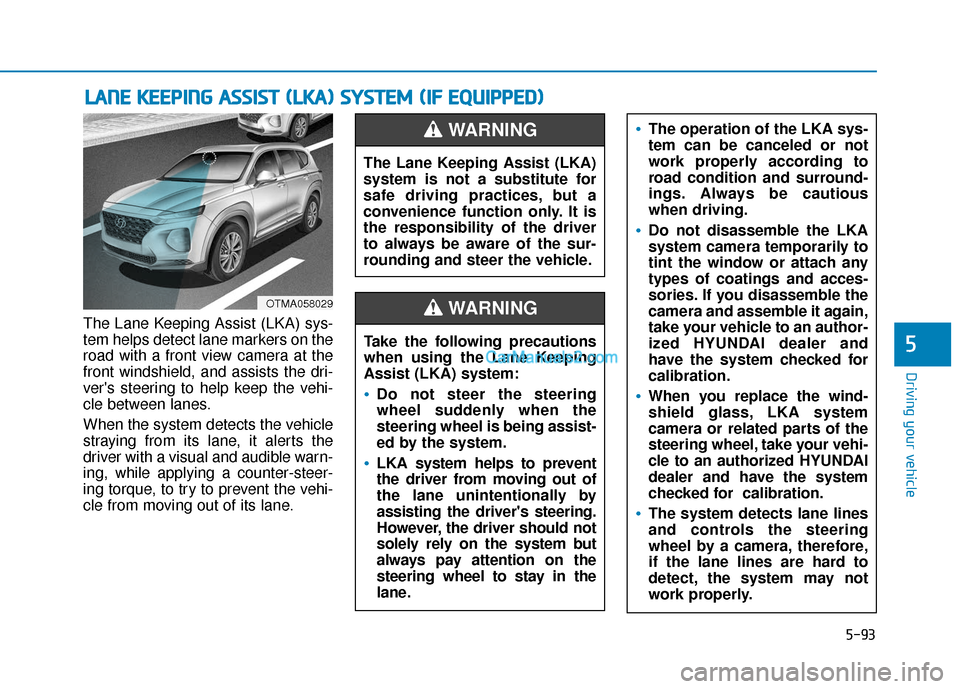
The Lane Keeping Assist (LKA) sys-
tem helps detect lane markers on the
road with a front view camera at the
front windshield, and assists the dri-
ver's steering to help keep the vehi-
cle between lanes.
When the system detects the vehicle
straying from its lane, it alerts the
driver with a visual and audible warn-
ing, while applying a counter-steer-
ing torque, to try to prevent the vehi-
cle from moving out of its lane.
L LA
A N
N E
E
K
K E
EE
EP
P I
IN
N G
G
A
A S
SS
SI
IS
S T
T
(
( L
L K
K A
A )
)
S
S Y
Y S
ST
T E
EM
M
(
( I
IF
F
E
E Q
Q U
UI
IP
P P
PE
ED
D )
)
OTMA058029
The Lane Keeping Assist (LKA)
system is not a substitute for
safe driving practices, but a
convenience function only. It is
the responsibility of the driver
to always be aware of the sur-
rounding and steer the vehicle.
WARNING
Take the following precautions
when using the Lane Keeping
Assist (LKA) system:
•Do not steer the steering
wheel suddenly when the
steering wheel is being assist-
ed by the system.
LKA system helps to prevent
the driver from moving out of
the lane unintentionally by
assisting the driver's steering.
However, the driver should not
solely rely on the system but
always pay attention on the
steering wheel to stay in the
lane.
WARNING
The operation of the LKA sys-
tem can be canceled or not
work properly according to
road condition and surround-
ings. Always be cautious
when driving.
Do not disassemble the LKA
system camera temporarily to
tint the window or attach any
types of coatings and acces-
sories. If you disassemble the
camera and assemble it again,
take your vehicle to an author-
ized HYUNDAI dealer and
have the system checked for
calibration.
When you replace the wind-
shield glass, LKA system
camera or related parts of the
steering wheel, take your vehi-
cle to an authorized HYUNDAI
dealer and have the system
checked for calibration.
The system detects lane lines
and controls the steering
wheel by a camera, therefore,
if the lane lines are hard to
detect, the system may not
work properly.
Page 396 of 557
5-122
Driving your vehicle
Information
The Smart Cruise Control system
may not operate temporarily due to:
• Electrical interference
• Modifying the suspension
• Differences of tire abrasion or tirepressure
• Installing different type of tires
Information
This device complies with Part 15 of
the FCC rules.
Operation is subject to the following
three conditions:
1. This device may not cause harmful interference, and
2. This device must accept any inter- ference received, including inter-
ference that may cause undesired
operation.
3. Changes or modifications not expressly approved by the party
responsible for compliance could
void the user's authority to operate
the device.
Information
Radio frequency radiation exposure
information:
This equipment complies with FCC
radiation exposure limits set forth for
an uncontrolled environment.
This equipment should be installed
and operated with minimum distance
of 8 in. (20 cm) between the radiator
(antenna) and your body.
This transmitter must not be co-locat-
ed or operating in conjunction with
any other antenna or transmitter.
i
i
iVehicles moving in front of
you with a frequent lane
change may cause a delay in
the system's reaction or may
cause the system to react to a
vehicle actually in an adjacent
lane. Always drive cautiously
to prevent unexpected and
sudden situations from occur-
ring.
Always be aware of the select-
ed speed and vehicle to vehi-
cle distance. The driver
should not solely rely on the
system but always pay atten-
tion to driving conditions and
control your vehicle speed.
The Smart Cruise Control sys-
tem may not recognize com-
plex driving situations so
always pay attention to driv-
ing conditions and control
your vehicle speed.
Page 507 of 557
L
LI
IG
G H
H T
T
B
B U
U L
LB
B S
S
Consult an authorized HYUNDAI
dealer to replace most vehicle light
bulbs. It is difficult to replace vehicle
light bulbs because other parts of the
vehicle must be removed before you
can get to the bulb. This is especially
true for removing the headlamp
assembly to get to the bulb(s).
Removing/installing the headlamp
assembly can result in damage to
the vehicle.
Information
The headlamp and tail lamp lenses
could appear frosty if the vehicle is
washed after driving or the vehicle is
driven at night in wet weather. This
condition is caused by temperature
difference between the lamp inside
and outside and, it does not indicate a
problem with your vehicle. When
moisture condenses in the lamp, it will
be removed after driving with the
headlamp on. The removable level
may differ depending on lamp size,
lamp position and environmental con-
dition. However, if moisture is not
removed, we recommend that your
vehicle is inspected by an authorized
HYUNDAI dealer.
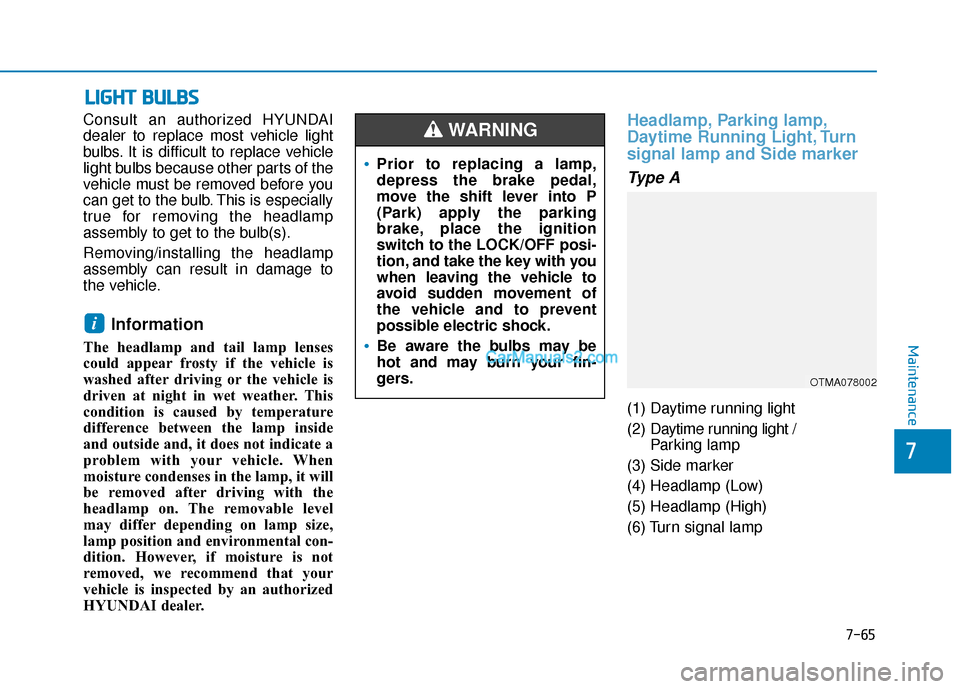
Headlamp, Parking lamp,
Daytime Running Light, Turn
signal lamp and Side marker
Type A
(1) Daytime running light
(2) Daytime running light /
Parking lamp
(3) Side marker
(4) Headlamp (Low)
(5) Headlamp (High)
(6) Turn signal lamp
i
•Prior to replacing a lamp,
depress the brake pedal,
move the shift lever into P
(Park) apply the parking
brake, place the ignition
switch to the LOCK/OFF posi-
tion, and take the key with you
when leaving the vehicle to
avoid sudden movement of
the vehicle and to prevent
possible electric shock.
Be aware the bulbs may be
hot and may burn your fin-
gers.
WARNING
OTMA078002
Maintenance
7-65
7