Page 114 of 635
3-22
Convenient features of your vehicle
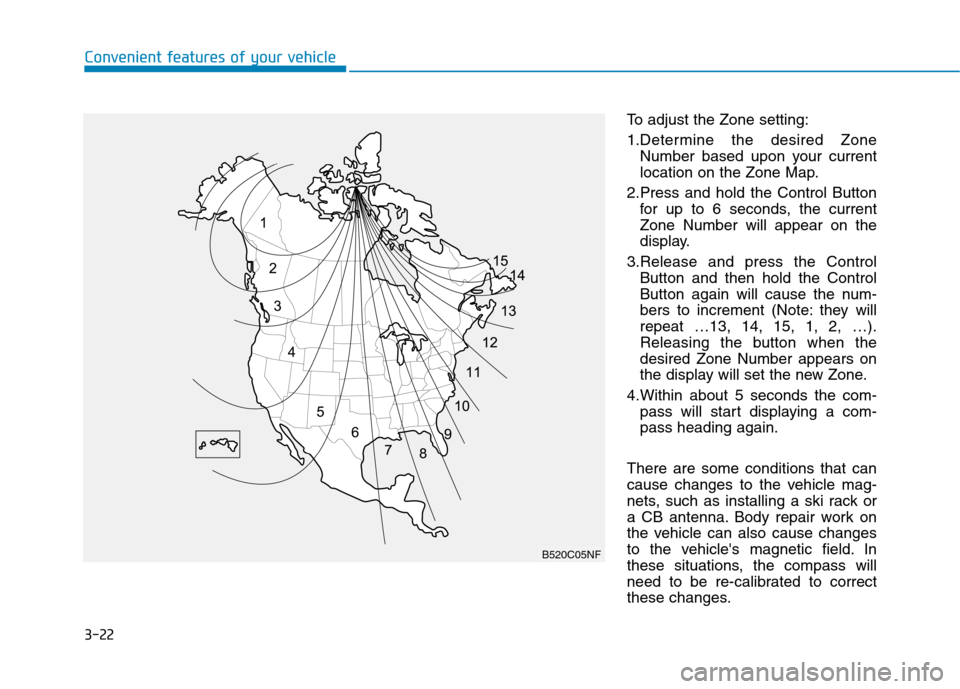
To adjust the Zone setting:
1.Determine the desired Zone
Number based upon your current
location on the Zone Map.
2.Press and hold the Control Button
for up to 6 seconds, the current
Zone Number will appear on the
display.
3.Release and press the Control
Button and then hold the Control
Button again will cause the num-
bers to increment (Note: they will
repeat …13, 14, 15, 1, 2, …).
Releasing the button when the
desired Zone Number appears on
the display will set the new Zone.
4.Within about 5 seconds the com-
pass will start displaying a com-
pass heading again.
There are some conditions that can
cause changes to the vehicle mag-
nets, such as installing a ski rack or
a CB antenna. Body repair work on
the vehicle can also cause changes
to the vehicle's magnetic field. In
these situations, the compass will
need to be re-calibrated to correct
these changes.
B520C05NF
Page 124 of 635
3-32
Convenient features of your vehicle
To adjust the Zone setting:
1. Determine the desired Zone
Number based upon your current
location on the Zone Map.
2. Press and hold the button for
more than 3 but less than 6 sec-
onds, the current Zone Number
will appear on the display.
3. Pressing and holding the button
again will cause the numbers to
increment (Note: they will repeat
…13, 14, 15, 1, 2, …). Releasing
the button when the desired Zone
Number appears on the display
will set the new Zone.
4. Within about 5 seconds the com-
pass will start displaying a com-
pass heading again.
There are some conditions that can
cause changes to the vehicle mag-
nets, such as installing a ski rack or
a CB antenna. Body repair work on
the vehicle can also cause changes
to the vehicle's magnetic field. In
these situations, the compass will
need to be re-calibrated to quickly
correct these changes.If you need to recalibrate the com-
pass:
1. Press and hold the button for
more than 6 seconds. When the
compass memory is cleared a "C"
will appear in the display.
2. Drive the vehicle in 2 complete cir-
cles at less than 5 mph (8 km/h).
Integrated HomeLink®Wireless
Control System
The HomeLink®Wireless Control
System can replace up to three hand-
held radio-frequency (RF) transmit-
ters with a single built-in device. This
innovative feature will learn the radio
frequency codes of most current
transmitters to operate devices such
as gate operators, garage door open-
ers, entry door locks, security sys-
tems, even home lighting. Both stan-
dard and rolling code-equipped trans-
mitters can be programmed by fol-
lowing the outlined procedures.
Additional HomeLink
®information
can be found at: www.homelink.com
or by calling 1-800-355-3515.
Retain the original transmitter of the
RF device you are programming for
use in other vehicles as well as for
future HomeLink
®programming. It is
also suggested that upon the sale of
the vehicle, the programmed
HomeLink
®buttons be erased for
security purposes.
Page 156 of 635
3-64
Convenient features of your vehicle
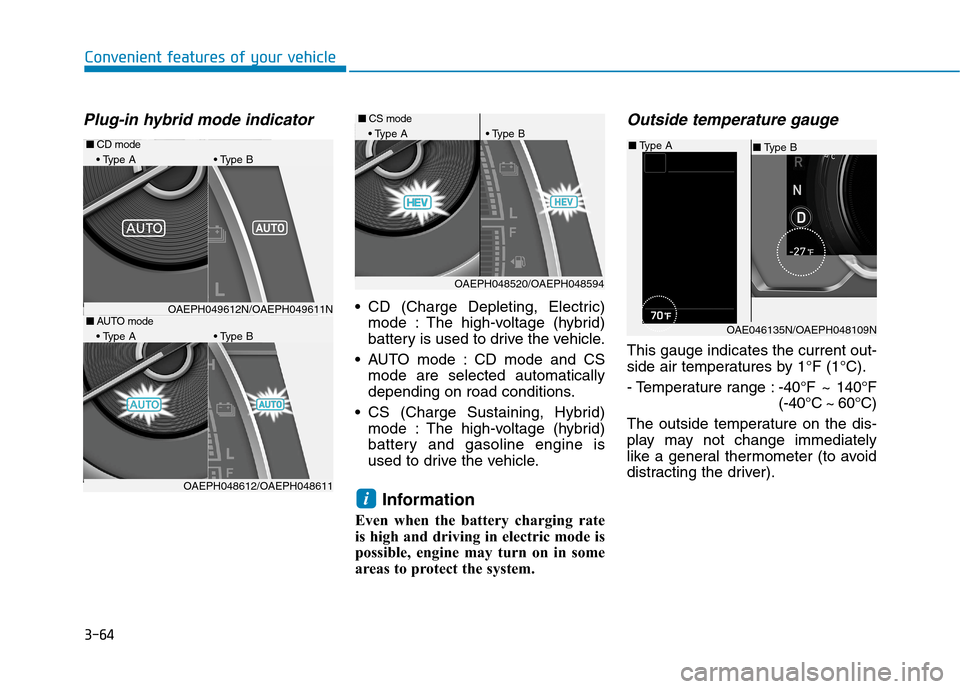
Plug-in hybrid mode indicator
CD (Charge Depleting, Electric)
mode : The high-voltage (hybrid)
battery is used to drive the vehicle.
AUTO mode : CD mode and CS
mode are selected automatically
depending on road conditions.
CS (Charge Sustaining, Hybrid)
mode : The high-voltage (hybrid)
battery and gasoline engine is
used to drive the vehicle.
Information
Even when the battery charging rate
is high and driving in electric mode is
possible, engine may turn on in some
areas to protect the system.
Outside temperature gauge
This gauge indicates the current out-
side air temperatures by 1°F (1°C).
- Temperature range :-40°F ~ 140°F
(-40°C ~ 60°C)
The outside temperature on the dis-
play may not change immediately
like a general thermometer (to avoid
distracting the driver).
i
OAE046135N/OAEPH048109N
■Type B ■Type A
■AUTO mode
A B
OAEPH048520/OAEPH048594
■CS mode
A B
OAEPH048612/OAEPH048611
■CD mode
A B
OAEPH049612N/OAEPH049611N
Page 178 of 635
3-86
Convenient features of your vehicle
Parking Distance Warning sys-
tem malfunction
(if equipped)
This warning is displayed if there is a
problem with Parking Distance
Warning system. Have the vehicle
inspected by an authorized dealer of
HYUNDAI.
For more information, refer to
"Reverse Parking Distance
Warning (PDW)" in chapter 3.
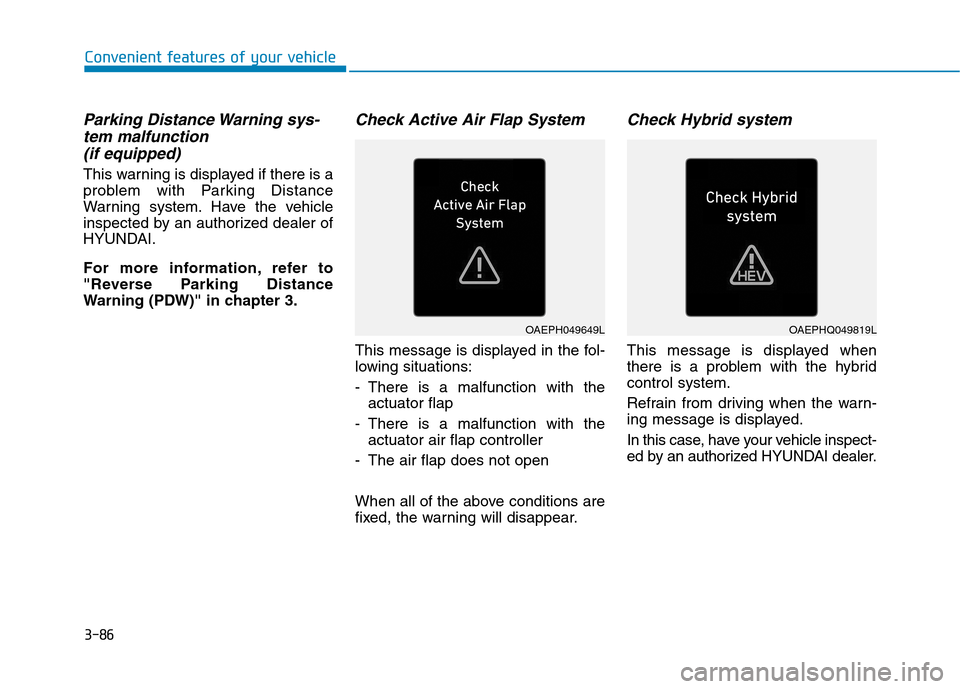
Check Active Air Flap System
This message is displayed in the fol-
lowing situations:
- There is a malfunction with the
actuator flap
- There is a malfunction with the
actuator air flap controller
- The air flap does not open
When all of the above conditions are
fixed, the warning will disappear.
Check Hybrid system
This message is displayed when
there is a problem with the hybrid
control system.
Refrain from driving when the warn-
ing message is displayed.
In this case, have your vehicle inspect-
ed by an authorized HYUNDAI dealer.
OAEPH049649LOAEPHQ049819L
Page 185 of 635
3-93
Convenient features of your vehicle
3
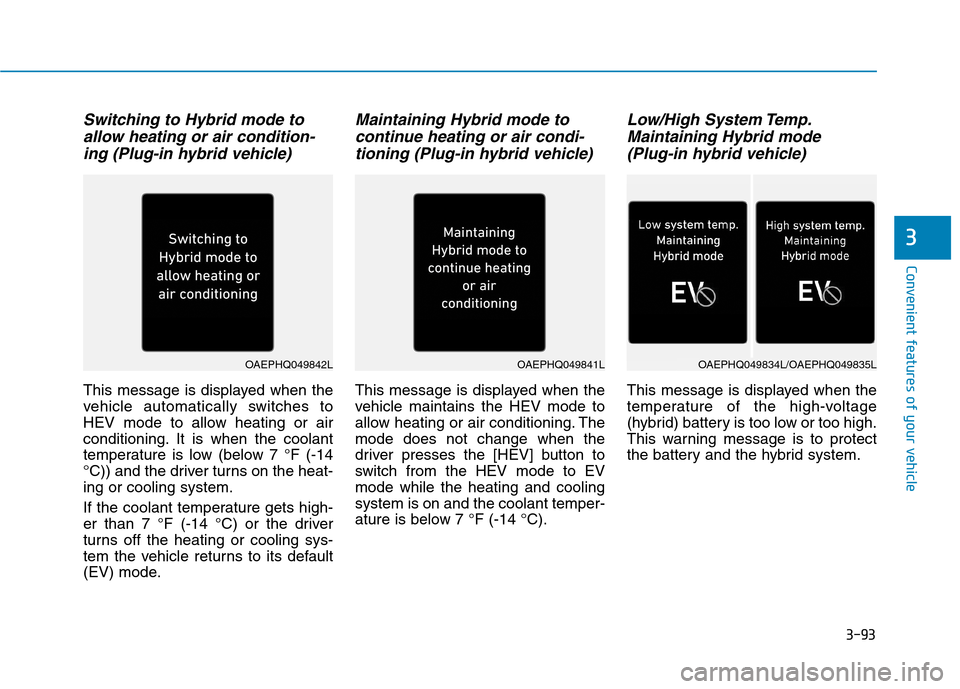
Switching to Hybrid mode to
allow heating or air condition-
ing (Plug-in hybrid vehicle)
This message is displayed when the
vehicle automatically switches to
HEV mode to allow heating or air
conditioning. It is when the coolant
temperature is low (below 7 °F (-14
°C)) and the driver turns on the heat-
ing or cooling system.
If the coolant temperature gets high-
er than 7 °F (-14 °C) or the driver
turns off the heating or cooling sys-
tem the vehicle returns to its default
(EV) mode.
Maintaining Hybrid mode to
continue heating or air condi-
tioning (Plug-in hybrid vehicle)
This message is displayed when the
vehicle maintains the HEV mode to
allow heating or air conditioning. The
mode does not change when the
driver presses the [HEV] button to
switch from the HEV mode to EV
mode while the heating and cooling
system is on and the coolant temper-
ature is below 7 °F (-14 °C).
Low/High System Temp.
Maintaining Hybrid mode
(Plug-in hybrid vehicle)
This message is displayed when the
temperature of the high-voltage
(hybrid) battery is too low or too high.
This warning message is to protect
the battery and the hybrid system.
OAEPHQ049841LOAEPHQ049842LOAEPHQ049834L/OAEPHQ049835L
Page 215 of 635
3-123
Convenient features of your vehicle
3
The driver must be cautious in
the below situations may not
work properly when recognition
of light from on-coming or front
vehicle is poor or limited:
� �
When the light from on-com-
ing or front vehicle is poor
When the light from the on-
coming or front vehicle is not
detected because of lamp
damage, hidden from sight,
etc.
When the lamp of the on-com-
ing or front vehicle is covered
with dust, snow or water.
When the front vehicle's head-
lamps are off but the fog
lamps on and etc.
(Continued)
(Continued)
� �
When external condition is
intervened
When there is a similar shape
lamp with the front vehicle's
lamps.
When the headlamp is not
repaired or replaced at an
authorized dealer.
When headlamp aiming is not
properly adjusted.
When driving on a narrow
curved road, rough road,
downhill or uphill.
When only part of the vehicle
in front is visible on a cross-
road or curved road.
When there is a traffic light,
reflecting sign, flashing sign
or mirror ahead.
When there is a temporary
reflector or flash ahead (con-
struction area).
When the road conditions are
bad such as being wet, iced or
covered with snow.
(Continued)
(Continued)
When a vehicle suddenly
appears from a curve.
When the vehicle is tilted from
a flat tire or being towed.
When LKA (Lane Keeping
Assist) system failure indica-
tor (yellow) illuminates (if
equipped) and etc.
� �
When front visibility is poor
When the lamp of the on-com-
ing or front vehicle is covered
with dust, snow or water.
When the light from the on-
coming or front vehicle is not
detected because of exhaust
fume, smoke, fog, snow, etc.
When the front window is cov-
ered with foreign matters.
When it is hard to see
because of fog, heavy rain or
snow and etc.
(Continued)
WARNING
Page 232 of 635

3-140
Convenient features of your vehicle
Non-operational conditions of
Forward/Reverse Parking
Distance Warning system
Forward/Reverse Parking Distance
Warning may not operate when:
Moisture is frozen to the sensor. (It
will operate normally when the ice
melts.)
Sensor is covered with foreign mat-
ter, such as snow or water, or the
sensor cover is blocked. (It will
operate normally when the materi-
al is removed or the sensor is no
longer blocked.)
Parking Distance Warning button is
off.
There is a possibility of
Forward/Reverse Parking Distance
Warning system malfunction when:
Driving on uneven road surfaces
such as unpaved roads, gravel,
bumps, or gradient.
Objects generating excessive
noise such as vehicle horns, loud
motorcycle engines, or truck air
brakes can interfere with the sen-
sor.
Heavy rain or water spray is pres-
ent.
Wireless transmitters or mobile
phones present near the sensor.
The sensor is covered with snow
Any non-factory equipment or
accessories have been installed,
or if the vehicle bumper height or
sensor installation has been modi-
fied.
Detecting range may decrease
when:
Outside air temperature is
extremely hot or cold.
The sensor is covered with foreign
matter such as snow or water. (The
sensing range will return to normal
when removed.)
The following objects may not be
recognized by the sensor:
Sharp or slim objects such as
ropes, chains or small poles.
Objects, which tend to absorb sen-
sor frequency such as clothes,
spongy material or snow.
Undetectable objects smaller than
40 in (100 cm) and narrower than
5.5 in (14 cm) in diameter.
Page 235 of 635
3-143
Convenient features of your vehicle
3
A AU
UT
TO
OM
MA
AT
TI
IC
C
C
CL
LI
IM
MA
AT
TE
E
C
CO
ON
NT
TR
RO
OL
L
S
SY
YS
ST
TE
EM
M
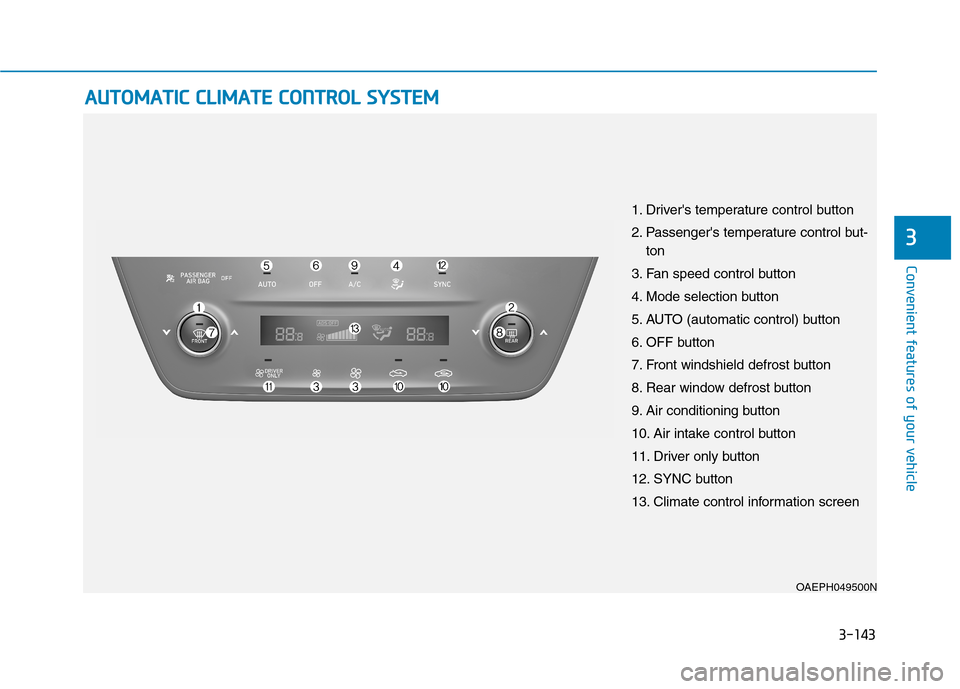
OAEPH049500N
1. Driver's temperature control button
2. Passenger's temperature control but-
ton
3. Fan speed control button
4. Mode selection button
5. AUTO (automatic control) button
6. OFF button
7. Front windshield defrost button
8. Rear window defrost button
9. Air conditioning button
10. Air intake control button
11. Driver only button
12. SYNC button
13. Climate control information screen