2020 Hyundai Ioniq Electric Climate control system
[x] Cancel search: Climate control systemPage 414 of 561
7-8
Maintenance
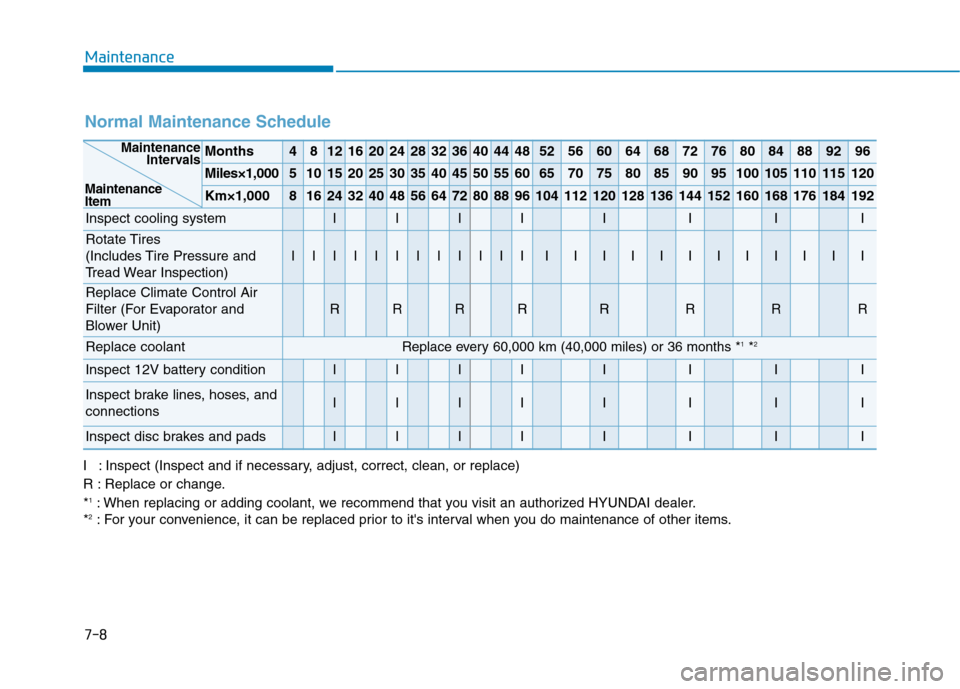
Normal Maintenance Schedule
Months4812162024283236404448525660646872768084889296
Miles×1,0005101520253035404550556065707580859095100105110115120
Km×1,00081624324048566472808896104112120128136144152160168176184192
Inspect cooling systemIIIIIIII
Rotate Tires
(Includes Tire Pressure and
Tread Wear Inspection)
IIIIIIIIIIIIIIIIIIIIIIII
Replace Climate Control Air
Filter (For Evaporator and
Blower Unit)
RRRRRRRR
Replace coolant Replace every 60,000 km (40,000 miles) or 36 months *1*2
Inspect 12V battery conditionIIIIIIII
Inspect brake lines, hoses, and
connectionsIIIIIIII
Inspect disc brakes and padsIIIIIIII
Maintenance
Intervals
Maintenance
Item
I : Inspect (Inspect and if necessary, adjust, correct, clean, or replace)
R : Replace or change.
*
1: When replacing or adding coolant, we recommend that you visit an authorized HYUNDAI dealer.
*2: For your convenience, it can be replaced prior to it's interval when you do maintenance of other items.
Page 428 of 561
7-22
Maintenance
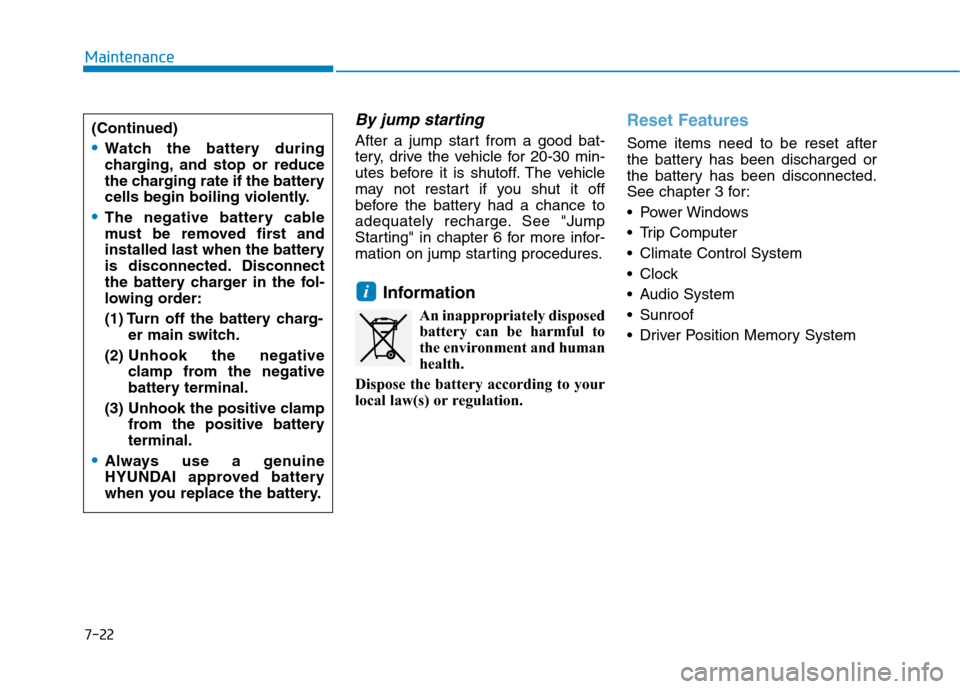
By jump starting
After a jump start from a good bat-
tery, drive the vehicle for 20-30 min-
utes before it is shutoff. The vehicle
may not restart if you shut it off
before the battery had a chance to
adequately recharge. See "Jump
Starting" in chapter 6 for more infor-
mation on jump starting procedures.
Information
An inappropriately disposed
battery can be harmful to
the environment and human
health.
Dispose the battery according to your
local law(s) or regulation.
Reset Features
Some items need to be reset after
the battery has been discharged or
the battery has been disconnected.
See chapter 3 for:
Power Windows
Trip Computer
Climate Control System
Clock
Audio System
Sunroof
Driver Position Memory System
i
(Continued)
Watch the battery during
charging, and stop or reduce
the charging rate if the battery
cells begin boiling violently.
The negative battery cable
must be removed first and
installed last when the battery
is disconnected. Disconnect
the battery charger in the fol-
lowing order:
(1) Turn off the battery charg-
er main switch.
(2) Unhook the negative
clamp from the negative
battery terminal.
(3) Unhook the positive clamp
from the positive battery
terminal.
Always use a genuine
HYUNDAI approved battery
when you replace the battery.
Page 489 of 561
E El
le
ec
ct
tr
ri
ic
c
V
Ve
eh
hi
ic
cl
le
e
S
Sy
ys
st
te
em
m
O
Ov
ve
er
rv
vi
ie
ew
w
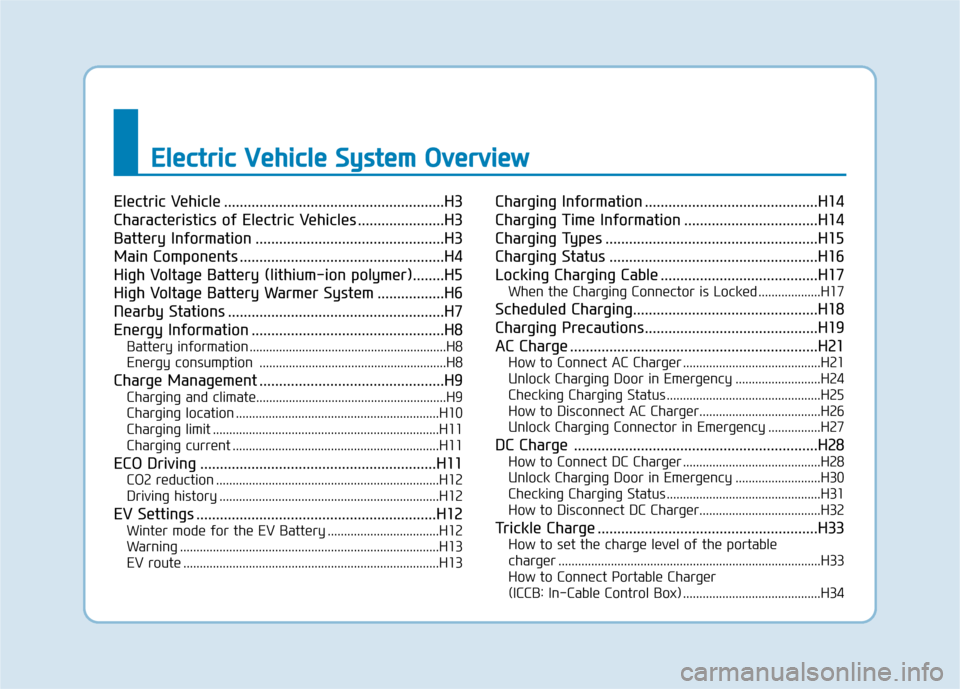
Electric Vehicle ........................................................H3
Characteristics of Electric Vehicles ......................H3
Battery Information ................................................H3
Main Components ....................................................H4
High Voltage Battery (lithium-ion polymer)........H5
High Voltage Battery Warmer System .................H6
Nearby Stations .......................................................H7
Energy Information .................................................H8
Battery information ............................................................H8
Energy consumption .........................................................H8
Charge Management ...............................................H9
Charging and climate..........................................................H9
Charging location ..............................................................H10
Charging limit .....................................................................H11
Charging current ...............................................................H11
ECO Driving ............................................................H11
CO2 reduction ....................................................................H12
Driving history ...................................................................H12
EV Settings .............................................................H12
Winter mode for the EV Battery ..................................H12
Warning ...............................................................................H13
EV route ..............................................................................H13
Charging Information ............................................H14
Charging Time Information ..................................H14
Charging Types ......................................................H15
Charging Status .....................................................H16
Locking Charging Cable ........................................H17
When the Charging Connector is Locked ...................H17
Scheduled Charging...............................................H18
Charging Precautions............................................H19
AC Charge ...............................................................H21
How to Connect AC Charger ..........................................H21
Unlock Charging Door in Emergency ..........................H24
Checking Charging Status ...............................................H25
How to Disconnect AC Charger.....................................H26
Unlock Charging Connector in Emergency ................H27
DC Charge ..............................................................H28
How to Connect DC Charger ..........................................H28
Unlock Charging Door in Emergency ..........................H30
Checking Charging Status ...............................................H31
How to Disconnect DC Charger.....................................H32
Trickle Charge ........................................................H33
How to set the charge level of the portable
charger ................................................................................H33
How to Connect Portable Charger
(ICCB: In-Cable Control Box) ..........................................H34
Page 496 of 561
H8
E EV
V
M
MO
OD
DE
E
(
(C
CO
ON
NT
T.
.)
)
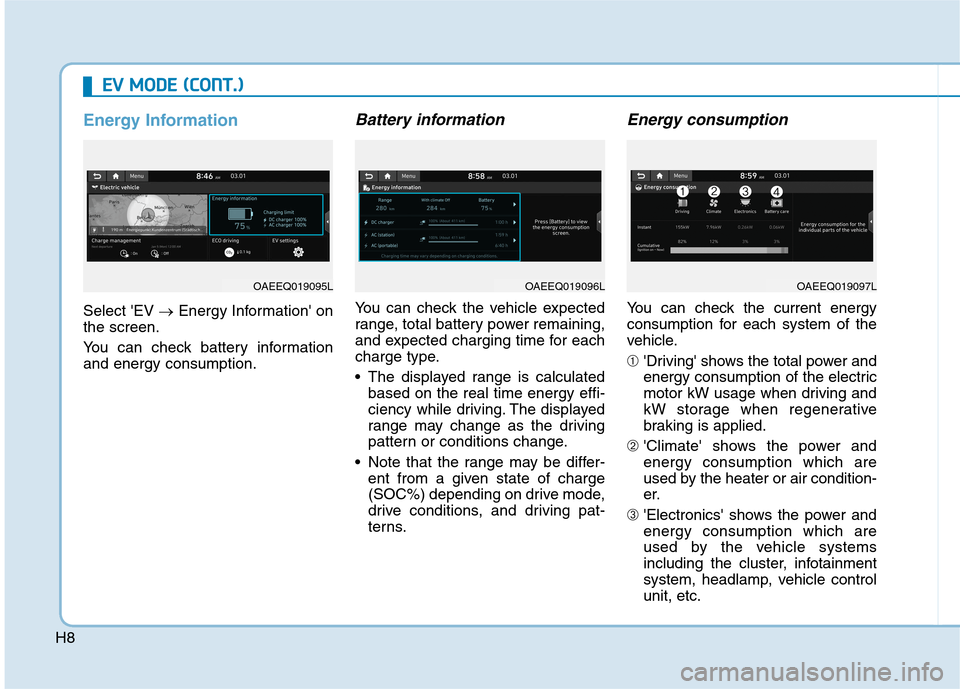
Energy Information
Select 'EV →Energy Information' on
the screen.
You can check battery information
and energy consumption.
Battery information
You can check the vehicle expected
range, total battery power remaining,
and expected charging time for each
charge type.
The displayed range is calculated
based on the real time energy effi-
ciency while driving. The displayed
range may change as the driving
pattern or conditions change.
Note that the range may be differ-
ent from a given state of charge
(SOC%) depending on drive mode,
drive conditions, and driving pat-
terns.
Energy consumption
You can check the current energy
consumption for each system of the
vehicle.
➀'Driving' shows the total power and
energy consumption of the electric
motor kW usage when driving and
kW storage when regenerative
braking is applied.
➁'Climate' shows the power and
energy consumption which are
used by the heater or air condition-
er.
➂'Electronics' shows the power and
energy consumption which are
used by the vehicle systems
including the cluster, infotainment
system, headlamp, vehicle control
unit, etc.
OAEEQ019095LOAEEQ019096LOAEEQ019097L
Page 555 of 561
I-2
Accessing your vehicle .....................................................3-3
Immobilizer System .....................................................3-8
Smart Key ....................................................................3-3
Air bag - Advanced Supplemental Restraint System .....2-47
Additional Safety Precautions ....................................2-69
Air Bag Warning Labels.............................................2-70
How Does the Air Bag System Operate? ...................2-53
Occupant Classification System (OCS) .....................2-58
SRS Care ....................................................................2-68
What to Expect After an Air Bag Inflates ..................2-57
Where Are the Air Bags? ...........................................2-49
Why Didn't My Air Bag Go Off in a Collision?........2-63
Air Conditioning System ..................................................8-5
Appearance Care .............................................................7-63
Exterior Care ..............................................................7-63
Interior Care ...............................................................7-69
Automatic climate control system ................................3-119
Automatic Heating and Air Conditioning ................3-120
Manual Heating and Air Conditioning .....................3-121
System Maintenance ................................................3-130
System Operation .....................................................3-128Battery(12V) ...................................................................7-20
Battery Recharging .....................................................7-21
For Best Battery Service ............................................7-21
Reset Features ............................................................7-22
Before driving ...................................................................5-3
Before Entering the Vehicle .........................................5-3
Before Starting .............................................................5-3
Blind-spot Collision Warning (BCW) ...........................5-71
Declaration of conformity .........................................5-82
System description .....................................................5-71
System setting and operation .....................................5-72
Warning message and system control ........................5-74
Brake Fluid .....................................................................7-13
Checking the Brake Fluid Level ................................7-13
Braking system ..............................................................5-26
Anti-lock Brake System (ABS)..................................5-36
Auto Hold ...................................................................5-32
Disc Brake Wear Indicator .........................................5-27
Electronic Parking Brake (EPB) ................................5-27
Electronic Stability Control (ESC).............................5-38
Good Braking Practices..............................................5-44
Hill-Start Assist Control (HAC) .................................5-43
Power Brakes..............................................................5-26
Vehicle Stability Management (VSM) .......................5-42
Bulb Wattage .....................................................................8-3
Index
AB
Page 556 of 561
I-3
California Perchlorate Notice .........................................7-72
Child Restraint System (CRS) ........................................2-36
Children Always in the Rear ......................................2-36
Installing a Child Restraint System (CRS) ................2-39
Selecting a Child Restraint System (CRS).................2-37
Climate control additional features...............................3-135
Automatic Ventilation...............................................3-135
Climate Control Air Filter...............................................7-15
Filter Inspection..........................................................7-15
Consumer Information ......................................................8-9
Coolant ............................................................................7-12
Defroster........................................................................3-118
Rear Window Defroster ............................................3-118
Dimensions .......................................................................8-2
Distance.........................................................................5-100
Limitations of the system .........................................5-105
Sensor to detect distance to the vehicle ahead .........5-103
Door locks .........................................................................3-9
Auto Door Lock/Unlock Features ..............................3-12
Child-Protector Rear Door locks................................3-12
Operating Door Locks from Inside the Vehicle ........3-10
Operating Door Locks from Outside the Vehicle .......3-9Drive Mode Integrated Control System ........................5-45
Drive mode .................................................................5-45
Initial setting for each Drive Mode ............................5-45
Driver Attention Warning (DAW) .................................5-84
Leading Vehicle Departure Alert................................5-90
Resetting the system ..................................................5-87
System malfunction ....................................................5-87
System setting and operation .....................................5-84
System standby...........................................................5-87
Driver position memory system .....................................3-14
Easy Access Function .................................................3-15
Recalling positions from memory ..............................3-15
Storing Positions into Memory .................................3-14
Electric Vehicle Specifications .........................................8-2
Explanation of Scheduled Maintenance Items ...............7-11
Exterior features..............................................................3-49
Charging Door ............................................................3-53
Hood ...........................................................................3-49
Liftgate .......................................................................3-51
Exterior Overview.............................................................1-2
I
Index
C
DE