2020 Hyundai Elantra camera
[x] Cancel search: cameraPage 187 of 535

3-103
Convenient features of your vehicle
3
The system may not operate nor-
mally if any of the following con-
ditions should occur:
1) When the illumination froman on-coming vehicle or a
vehicle in front is dim. Such
examples may include:
When the headlamps of an on-
coming vehicle or the tail
lamps of a vehicle in front is
covered with dust, snow, or
water.
When the headlamps on an on-
coming vehicle are OFF, but the
fog lamps are ON.
2) When the High Beam Assist camera is adversely affected
by an external condition.
Such examples may include:
When the vehicle's head-
lamps have been damaged or
not repaired properly.
When the vehicle headlamps
are not aimed properly.
When the vehicle is driven on
a narrow curved road or rough
road
When the vehicle is driven on
an uphill road or downhill
road
When only part of the vehicle in
front is visible on a crossroad
or curved road.
When there is a traffic light,
reflecting sign, flashing sign or
mirror.
When the road conditions are
bad such as being wet or cov-
ered with snow.
When a vehicle suddenly
appears from a curve.
When the vehicle is tilted from
a flat tire or being towed.
When the Lane Keeping Assist
(LKA) system warning light
illuminates.
When the light from the on-
coming or front vehicle is not
detected because of exhaust
fume, smoke, fog, snow, etc.
When the front window is cov-
ered with foreign matters such
as ice, dust, fog, or is damaged.
3) When the forward visibility is poor. Such examples may
include:
When the headlamps of an on-
coming vehicle or a vehicle in
front is not detected due to
poor outside visibility (smog,
smoke, dust, fog, heavy rain,
snow, etc.).
When the lamp of the on-com-
ing or front vehicle is covered
with dust, snow or water.
When the windshield visibility
is poor.
WARNING
Page 188 of 535

3-104
Convenient features of your vehicle
Turn signals and lane changesignals
To signal a turn, push down on the
lever for a left turn or up for a right
turn in position (A).
If an indicator stays on and does not
flash or if it flashes abnormally, one
of the turn signal bulbs may be
burned out and will require replace-
ment.
Onetouch turn signal function
To activate the One Touch Turn
Signal function, push the turn signal
lever up or down to position (B) and
then release it.
OOS047410N
Do not attempt to disassem-
ble the front view camera
without the assistance of an
authorized HYUNDAI dealer
technician. If camera is
removed for any reason, the
system may need to be re-cal-
ibrated. Have the system
inspected by an authorized
HYUNDAI dealer.
If the windshield of your vehi-
cle is replaced, most likely the
front view camera will need to
be re-calibrated. If this occurs,
have your vehicle inspected
and have the system re-cali-
brated by an authorized
HYUNDAI dealer.
Be careful that water doesn't
get into the High Beam Assist
(HBA) unit and do not remove
or damage related parts of the
High Beam Assist (HBA) sys-
tem.
Do not place objects on the
crash pad that reflect light
such as mirrors, white paper,
etc. The system may malfunc-
tion if sunlight is reflected.
At times, the High Beam
Assist (HBA) may not work
properly. The system is for
your convenience only. It is
the responsibility of the driver
for safe driving practices and
always check the road condi-
tions for your safety.
When the system does not
operate normally, change the
headlamp position manually
between the high beam and
low beam.
WARNING
Page 196 of 535
3-112
Convenient features of your vehicle
Rear View Monitor
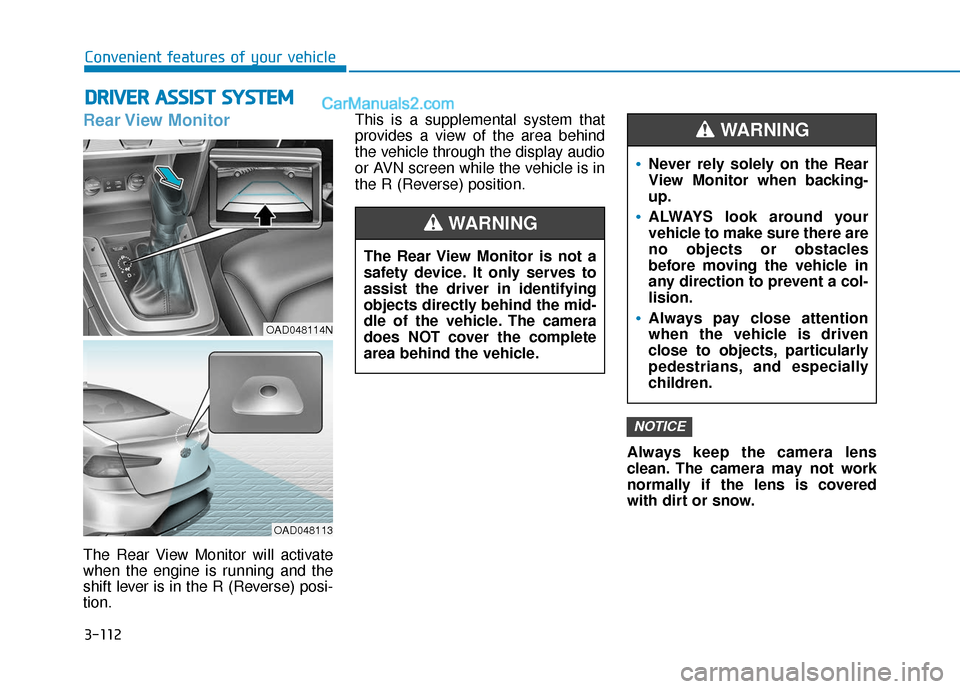
The Rear View Monitor will activate
when the engine is running and the
shift lever is in the R (Reverse) posi-
tion.This is a supplemental system that
provides a view of the area behind
the vehicle through the display audio
or AVN screen while the vehicle is in
the R (Reverse) position.
Always keep the camera lens
clean. The camera may not work
normally if the lens is covered
with dirt or snow.
NOTICE
D DR
RI
IV
V E
ER
R
A
A S
SS
SI
IS
S T
T
S
S Y
Y S
ST
T E
EM
M
The Rear View Monitor is not a
safety device. It only serves to
assist the driver in identifying
objects directly behind the mid-
dle of the vehicle. The camera
does NOT cover the complete
area behind the vehicle.
WARNING
Never rely solely on the Rear
View Monitor when backing-
up.
ALWAYS look around your
vehicle to make sure there are
no objects or obstacles
before moving the vehicle in
any direction to prevent a col-
lision.
Always pay close attention
when the vehicle is driven
close to objects, particularly
pedestrians, and especially
children.
WARNING
OAD048114N
OAD048113
Page 238 of 535

5
Forward Collision Avoidance (FCA) System
(with hyundai smart sense)................................5-86
System Setting and Activation.....................................5-86
FCA Warning Message and System Control ............5-89
FCA Sensor (Front Radar/Front Camera) .................5-91
System Malfunction .......................................................5-92
Limitations of the System .............................................5-94
Lane Keeping Assist (LKA) System .................5-100
LKA System Operation.................................................5-101
Warning Light and Message ......................................5-103
Limitations of the System...........................................5-106
LKA System Function Change ...................................5-108
Driver Attention Warning (DAW) System .......5-109
System Setting and Operation...................................5-109
Resetting the System ...................................................5-110
System Standby.............................................................5-111
System Malfunction .....................................................5-111
Cruise Control .....................................................5-113
Cruise Control Operation ............................................5-113
Smart Cruise Control System ...........................5-118
Smart Cruise Control Switch ......................................5-119
Smart Cruise Control Speed .......................................5-120
Smart Cruise Control Vehicle-to-Vehicle
Distance ........................................................................\
...5-124
Sensor to Detect Distance to the
Vehicle Ahead ................................................................5-126
To Adjust the Sensitivity of
Smart Cruise Control ....................................................5-128
To Convert to Cruise Control Mode .........................5-129
Limitations of the System...........................................5-129
Special Driving Conditions ................................5-134
Hazardous Driving Conditions....................................5-134
Rocking the Vehicle ......................................................5-134
Smooth Cornering .........................................................5-135
Driving at Night .............................................................5-135
Driving in the Rain ........................................................5-135
Driving in Flooded Areas.............................................5-136
Highway Driving ............................................................5-136
Winter Driving ....................................................5-137
Snow or Icy Conditions................................................5-137
Winter Precautions .......................................................5-139
Vehicle Load Limit..............................................5-141
Tire Loading Information Label .................................5-142
Trailer Towing .....................................................5-146
Page 309 of 535

5-73
Driving your vehicle
5
The Forward Collision-Avoidance
Assist (FCA) system is designed to
help detect and monitor the vehicle
ahead in the roadway through cam-
era recognition to warn the driver
that a collision is imminent, and if
necessary, apply emergency brak-
ing.
The camera type FCA system
detects the vehicle ahead in the
roadway through camera.System Setting and Activation
System setting
Setting Forward Safety functionThe driver can activate the FCA by
placing the ignition switch to the
ON position and by selecting:
'User Settings → Driver Assistance
→ Forward Safety'
- If you select "Active Assist", the FCA system activates. The FCA
produces warning messages and
warning alarms in accordance
with the collision risk levels.
Braking assist will be applied in
accordance with the collision risk.
F FO
O R
RW
W A
AR
RD
D
C
C O
O L
LL
LI
IS
S I
IO
O N
N
A
A V
VO
O I
ID
D A
A N
N C
CE
E
(
( F
F C
C A
A )
)
S
S Y
Y S
ST
T E
EM
M
(
( I
IF
F
E
E Q
Q U
UI
IP
P P
PE
ED
D )
)
Take the following precautions
when using the Forward
Collision- Avoidance Assist
(FCA) system:
This system is only a supple-
mental system and it is not
intended to, nor does it
replace the need for extreme
care and attention of the driv-
er. The sensing range and
objects detectable by the sen-
sors are limited. Pay attention
to the road conditions at all
times.
Drive at posted speed limits
and accordance to road con-
ditions.
Always drive cautiously to
prevent unexpected and sud-
den situations from occur-
ring. The Forward Collision-
Avoidance system may not
always stop the vehicle com-
pletely and is only intended to
help mitigate a collision that
is imminent.
WARNING
OTMA058186
Page 314 of 535

5-78
Driving your vehicle
FCA Sensor
In order for the FCA system to oper-
ate properly, always make sure the
camera is clean and free of dirt,
snow, and debris.
Dirt, snow, or foreign substances on
the sensor cover or sensor may
adversely affect the sensing perform-
ance of the sensor. NEVER install any accessories
or stickers on the front wind-
shield, or tint the front wind-
shield.
NEVER place any reflective objects (i.e. white paper, mirror)
over the crash pad. Any light
reflection may prevent the sys-
tem from functioning properly.
Pay extreme caution to keep the camera dry.
NEVER disassemble the camera assembly, or apply any impact
on the camera assembly.
If the sensor is forcibly moved out of proper alignment, the FCA
system may not operate correct-
ly. In this case, a warning mes-
sage may not be displayed. Have
the vehicle inspected by an
authorized HYUNDAI dealer.
Information
Have the system checked by an
authorized HYUNDAI dealer when:
• The windshield glass is replaced.
iNOTICE
OAD058023
Page 315 of 535

5-79
Driving your vehicle
5
Warning message and warninglight
Forward Collision Avoidance Assist
(FCA) system disabled.
Camera obscured
When the front camera is blocked
with dirt, snow, or debris, the FCA
system operation not be able to
detect other vehicles. If this occurs, a
warning message will appear on the
LCD display. The system will operate
normally when such dirt, snow or
debris is removed. FCA may not properly operate in an
area (e.g. open terrain) where any
objects or vehicles are not detected
after turning on the engine.
System Malfunction
Check Forward Collision Avoidance
Assist system
When FCA is not working properly,
the FCA warning light ( ) will illu-
minate and the warning message
will appear for a few seconds. After
the message disappears, the mas-
ter warning light ( ) will illumi-
nate. In this case, have the vehicle
inspected by an authorized
HYUNDAI dealer.
The FCA warning message may appear along with the illumination
of the ESC (Electronic Stability
Control) warning light.
OAD058172L
OAD058171L/OIK057091L
■ Type A■ Type B
Page 316 of 535
5-80
Driving your vehicleBoth FCA warning light and warn-
ing message will disappear once
the ESC warning light issue is
resolved.
FCA is only a supplemental
system for the driver's con-
venience. It is the driver's
responsibility to control the
vehicle operation. Do not
solely depend on the FCA
system. Rather, maintain a
safe braking distance, and, if
necessary, depress the brake
pedal to reduce the driving
speed or to stop the vehicle.
In certain instances and
under certain driving condi-
tions, the FCA system may
activate prematurely. This ini-
tial warning message appears
on the LCD display with a
warning chime.
WARNING
Also due to sensing limita-
tions, in certain situations, the
front camera recognition sys-
tem may not detect the vehi-
cle ahead. The FCA system
may not activate and the
warning message may not be
displayed.
If there is a malfunction with
the FCA system, the Forward
Collision avoidance assist
system is not applied even
though the braking system is
operating normally.
If the vehicle in front stops
suddenly, you may have less
control of the brake system.
Therefore, always keep a safe
distance between your vehicle
and the vehicle in front of you.
The FCA system may activate
during braking and the vehi-
cle may stop suddenly shift-
ing loose objects toward the
passengers. Always keep
loose objects secured.
The FCA system may not acti-
vate if the driver applies the
brake pedal to avoid collision.
The brake control may be
insufficient, possibly causing
a collision, if a vehicle in front
abruptly stops. Always pay
extreme caution.
The FCA system may not acti-
vate according to the road
conditions, inclement weath-
er, driving conditions or traffic
conditions.
Occupants may get injured, if
the vehicle abruptly stops by
the activated FCA system. Pay
extreme caution.
The FCA system does not
detect all vehicles.