2020 Hyundai Elantra fca
[x] Cancel search: fcaPage 330 of 535

5-94
Driving your vehicle
Limitations of the System
The Forward Collision Avoidance
Assist (FCA) system is designed to
monitor the vehicle ahead or a
pedestrian on the roadway through
radar signals and camera recogni-
tion to warn the driver that a collision
is imminent, and if necessary, apply
emergency braking.
In certain situations, the radar sen-
sor or the camera may not be able to
detect the vehicle or pedestrian
ahead. In these cases, the FCA sys-
tem may not operate normally. The
driver must pay careful attention in
the following situations where the
FCA operation may be limited.
Detecting vehicles
The sensor may be limited when:
The radar sensor or camera isblocked with a foreign object or
debris
Inclement weather such as heavy rain or snow obscures the field of
view of the radar sensor or camera
There is interference by electro- magnetic waves
In these cases, you must main-
tain a safe braking distance,
and if necessary, depress the
brake pedal to reduce the driv-
ing speed in order to maintain a
safe distance or to stop the
vehicle.
The FCA system operates
only to detect vehicles or
pedestrians in front of the
vehicle.
The FCA system does not
operate when the vehicle is in
reverse.
The FCA system is not
designed to detect other
objects on the road such as
animals.
The FCA system does not
detect vehicles in the oppo-
site lane.
The FCA system does not
detect cross traffic vehicles
that are approaching.
The FCA system cannot
detect the driver approaching
the side view of a parked vehi-
cle (for example on a dead
end street).
WARNING
Page 332 of 535

5-96
Driving your vehicle
Driving on a curve The performance of the FCA sys-
tem may be limited when driving
on a curved road.
This may cause the alarm or brak-
ing to activate or not activate
improperly.
Also, in certain instances the front
radar sensor or camera recognition
system may not detect the vehicle
traveling on a curved road.
In these cases, the driver must
maintain a safe braking distance,
and if necessary, depress the
brake pedal to reduce your driving
speed in order to maintain a safe
distance. The FCA system may recognize a
vehicle in the next lane when driv-
ing on a curved road.
In this case, the system may
unnecessarily alarm the driver and
apply the brake.
Always pay attention to road and
driving conditions, while driving. If
necessary, depress the brake
pedal to reduce your driving speed
in order to maintain a safe dis-
tance.
Also, when necessary depress the
accelerator pedal to prevent the
system from unnecessarily decel-
erating your vehicle.
Check the road conditions for safe
operation of the FCA system. Driving on a slope
The performance of the FCA
decreases while driving upward or
downward on a slope, not recog-
nizing the vehicle in front in the
same lane. It may unnecessarily
produce the warning message and
the warning alarm, or it may not
produce the warning message and
the warning alarm at all.
When the FCA suddenly recog-
nizes the vehicle in front while
passing over a slope, you may
experience sharp deceleration.
OAD058166LOAD058165LOAD058124N
Page 333 of 535
5-97
Driving your vehicle
5
Always keep your eyes forward
while driving upward or downward
on a slope, and, if necessary,
depress the brake pedal to reduce
your driving speed in order to
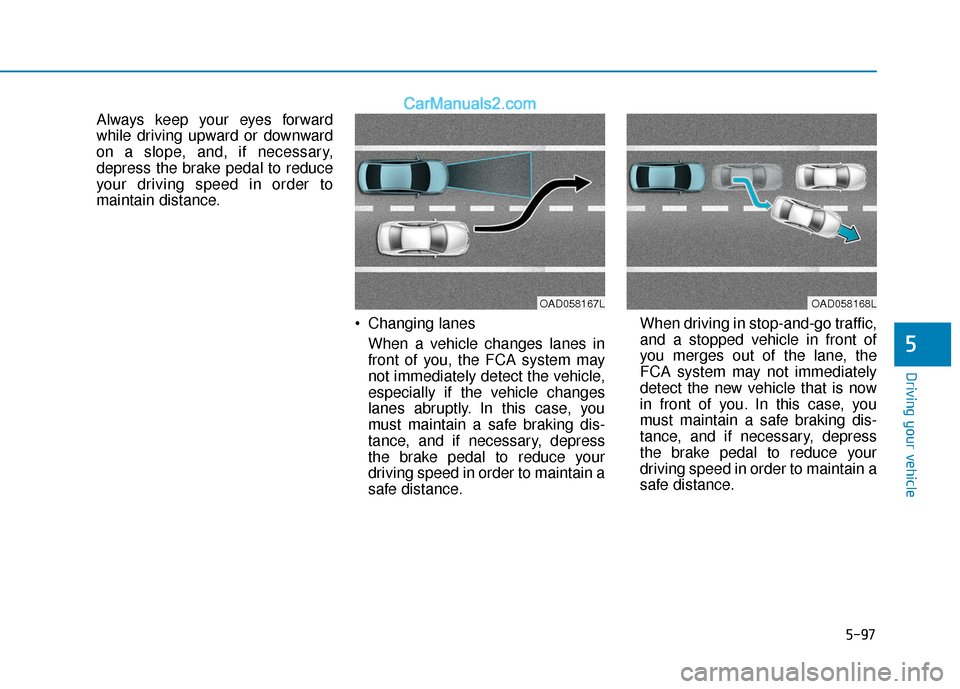
maintain distance. Changing lanesWhen a vehicle changes lanes in
front of you, the FCA system may
not immediately detect the vehicle,
especially if the vehicle changes
lanes abruptly. In this case, you
must maintain a safe braking dis-
tance, and if necessary, depress
the brake pedal to reduce your
driving speed in order to maintain a
safe distance. When driving in stop-and-go traffic,
and a stopped vehicle in front of
you merges out of the lane, the
FCA system may not immediately
detect the new vehicle that is now
in front of you. In this case, you
must maintain a safe braking dis-
tance, and if necessary, depress
the brake pedal to reduce your
driving speed in order to maintain a
safe distance.
OAD058167LOAD058168L
Page 334 of 535

5-98
Driving your vehicle
Detecting the vehicle in front of you If the vehicle in front of you has
cargo that extends rearward from
the cab, or when the vehicle in
front of you has higher ground
clearance, additional special atten-
tion is required. The FCA system
may not be able to detect the cargo
extending from the vehicle. In
these instances, you must main-
tain a safe braking distance from
the rearmost object, and if neces-
sary, depress the brake pedal to
reduce your driving speed in order
to maintain distance.
Detecting pedestrians
The sensor may be limited when:
The pedestrian is not fully detectedby the camera recognition system,
for example, if the pedestrian is
leaning over or is not fully walking
upright
The pedestrian is moving very quickly or appears abruptly in the
camera detection area
The pedestrian is wearing clothing that easily blends into the back-
ground, making it difficult to be
detected by the camera recogni-
tion system
If the bicycle material is not reflect- ed well on the radar
When the pedestrian or cyclist suddenly interrupts in front of the
vehicle
When there is any other electro- magnetic interference
The outside lighting is too bright (e.g. when driving in bright sunlight
or in sun glare) or too dark (e.g.
when driving on a dark rural road
at night) It is difficult to detect and distin-
guish the pedestrian from other
objects in the surroundings, for
example, when there is a group of
pedestrians or a large crowd
There is an item similar to a per- son's body structure
The pedestrian is small
The pedestrian has impaired mobility
The sensor recognition is limited
The radar sensor or camera is blocked with a foreign object or
debris
The camera lens is contaminated due to tinted, filmed or coated
windshield, damaged glass, or
stuck of foreign matter (sticker,
bug, etc.) on the glass
The brightness outside is too low such as when the headlamps are
not on at night or the vehicle is
going through a tunnel
Inclement weather such as heavy rain or snow obscures the field of
view of the radar sensor or camera
OAD058195
Page 335 of 535

5-99
Driving your vehicle
5
When light coming from a streetlight or an oncoming vehicle is
reflected on a wet road surface
such as a puddle in the road
The field of view in front is obstructed by sun glare
The windshield glass is fogged up; a clear view of the road is obstruct-
ed
The adverse road conditions cause excessive vehicle vibrations while
driving
The sensor recognition changes suddenly when passing over a
speed bump
You are on a roundabout
Information
In some instances, the FCA system
may be canceled when subjected to
electromagnetic interference.
Information
This device complies with Part 15 of
the FCC rules.
Operation is subject to the following
two conditions:
1. This device may not cause harmful interference.
2. This device must accept any inter- ference received, including interfer-
ence that may cause undesired
operation.
i
i
Do not use the Forward
Collision Avoidance Assist
(FCA) system when towing a
vehicle. Application of the
FCA system while towing may
adversely affect the safety of
your vehicle or the towing
vehicle.
Use extreme caution when the
vehicle in front of you has
cargo that extends rearward
from the cab, or when the
vehicle in front of you has
higher ground clearance.
The FCA system is designed
to detect and monitor the
vehicle ahead or detect a
pedestrian in the roadway
through radar signals and
camera recognition. It is not
designed to detect bicycles,
motorcycles, or smaller
wheeled objects such as lug-
gage bags, shopping carts, or
strollers.
Never try to test the operation
of the FCA system. Doing so
may cause severe injury or
death.
If the front bumper, front
glass, radar or camera have
been replaced or repaired,
have the vehicle inspected by
an authorized HYUNDAI deal-
er.
WARNING
Page 348 of 535

5-112
Driving your vehicle
The Driver Attention Warning sys-
tem utilizes the camera sensor on
the front windshield for its opera-
tion. To keep the camera sensor in
the best condition, you should
observe the followings:
NEVER install any accessories or stickers on the front wind-
shield, or tint the front wind-
shield.
NEVER place any reflective objects (i.e. white paper, mirror)
over the crash pad. Any light
reflection may prevent the sys-
tem from functioning properly.
Pay extreme caution to keep the camera sensor dry.
Never disassemble the camera assembly, or apply any impact
on the camera assembly.
If the sensor is forcibly moved
out of proper alignment, the sys-
tem may not operate correctly.
Take your vehicle to an author-
ized HYUNDAI dealer and have
the system checked for calibra-
tion.
NOTICE
The Driver Attention Warning
(DAW) system may not provide
alerts in the following situa-
tions:
The lane detection perform-
ance is limited. (For more
details, refer to "Lane Keeping
Assist (LKA) system" in this
chapter.)
The vehicle is erratically driv-
en or is abruptly turned for
obstacle avoidance (e.g. con-
struction area, other vehicles,
fallen objects, bumpy road).
Forward drivability of the vehi-
cle is severely undermined
(possibly due to wide variation
in tire pressures, uneven tire
wear-out, toe-in/toe-out align-
ment).
The vehicle drives on a curvy
road.
The vehicle drives on a bumpy
road.
The vehicle drives through a
windy area.
The vehicle is controlled by the
following driving assist sys-
tems:
- Lane Keeping Assist (LKA)System
- Forward Collision-Avoidance Assist (FCA) System
- Blind-Spot Collision Warning (BCW)
- Smart Cruise Control (SCC) System
CAUTION
Playing the vehicle audio sys-
tem at high volume may prevent
occupants from hearing the
Driver Attention Warning (DAW)
system warning sounds.
CAUTION
Page 359 of 535
5-123
Driving your vehicle
5
The driver starts driving by pushingthe toggle switch up (RES+)/down
(SET-) or depressing the accelera-
tor pedal, after stopping the vehicle
with a vehicle stopped far away in
front.
The Forward Collision-Avoidance Assist (FCA) is activated.
The engine is stopped by ISG (Idle Stop and Go) system (if equipped).
Each of these actions will cancel the
Smart Cruise Control operation. The
Set Speed and Vehicle-to-Vehicle
Distance on the cluster LCD display
will go off.
In a condition the Smart Cruise
Control is cancelled automatically,
the Smart Cruise Control will not
resume even though the RES+ or
SET- toggle switch is pushed.
Also, if the Smart Cruise Control is
canceled automatically while the
vehicle is at a standstill, EPB
(Electronic Parking Brake) will be
applied.Information
If the Smart Cruise Control is can-
celed during a situation that is not
described, have the system checked by
an authorized HYUNDAI dealer.
Smart Cruise Control canceled
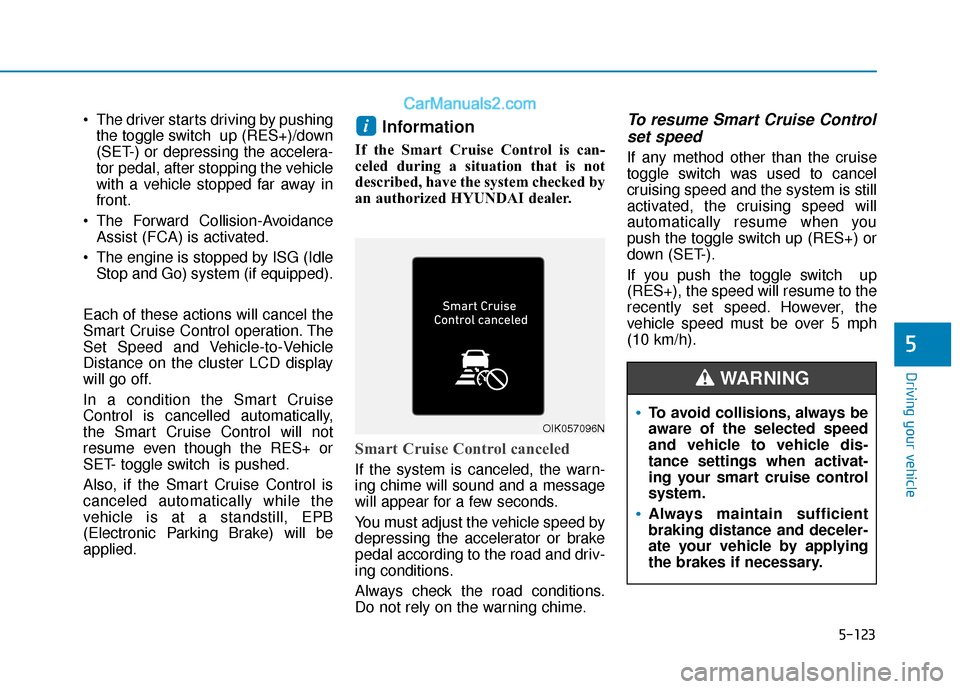
If the system is canceled, the warn-
ing chime will sound and a message
will appear for a few seconds.
You must adjust the vehicle speed by
depressing the accelerator or brake
pedal according to the road and driv-
ing conditions.
Always check the road conditions.
Do not rely on the warning chime.
To resume Smart Cruise Control set speed
If any method other than the cruise
toggle switch was used to cancel
cruising speed and the system is still
activated, the cruising speed will
automatically resume when you
push the toggle switch up (RES+) or
down (SET-).
If you push the toggle switch up
(RES+), the speed will resume to the
recently set speed. However, the
vehicle speed must be over 5 mph
(10 km/h).
i
OIK057096NTo avoid collisions, always be
aware of the selected speed
and vehicle to vehicle dis-
tance settings when activat-
ing your smart cruise control
system.
Always maintain sufficient
braking distance and deceler-
ate your vehicle by applying
the brakes if necessary.
WARNING
Page 482 of 535

7-60
Maintenance
Fuse Name Fuse rating Protected Component
PDM 2 7.5A Smart Key Control Module, Immobilizer Module
START 7.5A W/O Smart Key : Transmission Range Switch, Ignition Lock Switch
With Smart Key :Transmission Range Switch, PCM
A/C7.5A Ionizer, A/C Control Module, E/R Junction Block (A/Con Relay, Blower Relay), Gasoline PTC Relay
AIR BAG 15A SRS Control Module, Passenger Occupant Detection Sensor
MODULE 3 10A Stop Lamp Switch, BCM, Sport Mode Switch, Driver/Passenger Door Module
IG1 25A PCB Block (Fuse : ABS3, ECU5, TCU2)
PDM 1 15A Smart Key Control Module
HEATED STEERING 15A BCM
MODULE 6 7.5A BCM, Smart Key Control Module
MODULE 5 10A Crash Pad Switch, Electro Chromic Mirror, A/T Shift Lever Indicator, A/V & Navigation Head Unit,
Audio, A/C Control Module, Console Switch LH/RH, Head Lamp Leveling Device LH/RH,
Front Seat Warmer Control Module, Rear Seat Warmer Control Module, Driver IMS Module
FCA10A FCA Module
A/CON 2 10A E/R Junction Block (Blower Relay), Blower Motor, Blower Resistor, A/C Control Module
WIPER 1 25A Wiper Motor, PCB Block (Front Wiper (Low) Relay)
WASHER 15A Multifunction Switch
MODULE 4 10A Lane keeping Assist System, Parking Assist Buzzer, BCM
SPARE 2 10A -
MODULE 2 10A E/R Junction Block (Power Outlet Relay), USB Charging Connector, Smart Key Control Module,
BCM, Audio, A/V & Navigation Head Unit, CD Player, Power Outside Mirror Switch, AMP,
Driver Door Module, Digital Clock, Console Switch