2020 Hyundai Elantra lane assist
[x] Cancel search: lane assistPage 188 of 535

3-104
Convenient features of your vehicle
Turn signals and lane changesignals
To signal a turn, push down on the
lever for a left turn or up for a right
turn in position (A).
If an indicator stays on and does not
flash or if it flashes abnormally, one
of the turn signal bulbs may be
burned out and will require replace-
ment.
Onetouch turn signal function
To activate the One Touch Turn
Signal function, push the turn signal
lever up or down to position (B) and
then release it.
OOS047410N
Do not attempt to disassem-
ble the front view camera
without the assistance of an
authorized HYUNDAI dealer
technician. If camera is
removed for any reason, the
system may need to be re-cal-
ibrated. Have the system
inspected by an authorized
HYUNDAI dealer.
If the windshield of your vehi-
cle is replaced, most likely the
front view camera will need to
be re-calibrated. If this occurs,
have your vehicle inspected
and have the system re-cali-
brated by an authorized
HYUNDAI dealer.
Be careful that water doesn't
get into the High Beam Assist
(HBA) unit and do not remove
or damage related parts of the
High Beam Assist (HBA) sys-
tem.
Do not place objects on the
crash pad that reflect light
such as mirrors, white paper,
etc. The system may malfunc-
tion if sunlight is reflected.
At times, the High Beam
Assist (HBA) may not work
properly. The system is for
your convenience only. It is
the responsibility of the driver
for safe driving practices and
always check the road condi-
tions for your safety.
When the system does not
operate normally, change the
headlamp position manually
between the high beam and
low beam.
WARNING
Page 238 of 535

5
Forward Collision Avoidance (FCA) System
(with hyundai smart sense)................................5-86
System Setting and Activation.....................................5-86
FCA Warning Message and System Control ............5-89
FCA Sensor (Front Radar/Front Camera) .................5-91
System Malfunction .......................................................5-92
Limitations of the System .............................................5-94
Lane Keeping Assist (LKA) System .................5-100
LKA System Operation.................................................5-101
Warning Light and Message ......................................5-103
Limitations of the System...........................................5-106
LKA System Function Change ...................................5-108
Driver Attention Warning (DAW) System .......5-109
System Setting and Operation...................................5-109
Resetting the System ...................................................5-110
System Standby.............................................................5-111
System Malfunction .....................................................5-111
Cruise Control .....................................................5-113
Cruise Control Operation ............................................5-113
Smart Cruise Control System ...........................5-118
Smart Cruise Control Switch ......................................5-119
Smart Cruise Control Speed .......................................5-120
Smart Cruise Control Vehicle-to-Vehicle
Distance ........................................................................\
...5-124
Sensor to Detect Distance to the
Vehicle Ahead ................................................................5-126
To Adjust the Sensitivity of
Smart Cruise Control ....................................................5-128
To Convert to Cruise Control Mode .........................5-129
Limitations of the System...........................................5-129
Special Driving Conditions ................................5-134
Hazardous Driving Conditions....................................5-134
Rocking the Vehicle ......................................................5-134
Smooth Cornering .........................................................5-135
Driving at Night .............................................................5-135
Driving in the Rain ........................................................5-135
Driving in Flooded Areas.............................................5-136
Highway Driving ............................................................5-136
Winter Driving ....................................................5-137
Snow or Icy Conditions................................................5-137
Winter Precautions .......................................................5-139
Vehicle Load Limit..............................................5-141
Tire Loading Information Label .................................5-142
Trailer Towing .....................................................5-146
Page 290 of 535

5-54
Driving your vehicle
System Description
Blind-Spot Collision Warning(BCW)
The Blind-Spot Collision Warning
(BCW) system uses radar sensors in
the rear bumper to monitor and warn
the driver of an approaching vehicle
in the driver's blind spot area.
1) Blind-Spot Area
The blind spot detection range varies
relative to vehicle speed.
Note that if your vehicle is traveling
much faster than the vehicles around
you, the warning will not occur. 2) Closing at high speed
The Lane Change Assist feature will
alert you when it detects a vehicle is
approaching in an adjacent lane at a
high rate of speed. If the driver acti-
vates the turn signal when the sys-
tem detects an oncoming vehicle,
the system sounds an audible alert.
B B
L
LI
IN
N D
D-
-S
S P
P O
O T
T
C
C O
O L
LL
LI
IS
S I
IO
O N
N
W
W A
AR
RN
N I
IN
N G
G
(
( B
B C
CW
W )
)
(
( I
IF
F
E
E Q
Q U
UI
IP
P P
PE
ED
D )
)
OAD058153L
OAD058154L
Always be aware of road con-
ditions while driving and be
alert for unexpected situa-
tions even though the Blind-
Spot Collision Warning (BCW)
system is operating.
The Blind-Spot Collision
Warning (BCW) system is
supplemental systems to
assist you. Do not entirely rely
on the systems. Always pay
attention, while driving, for
your safety.
The Blind-Spot Collision
Warning (BCW) system is not
substitutes for proper and
safe driving. Always drive
safely and use caution when
changing lanes or backing up
the vehicle.
The Blind-Spot Collision
Warning (BCW) system may
not detect every object along-
side the vehicle.
WARNING
Page 317 of 535

5-81
Driving your vehicle
5
Limitations of the System
The Forward Collision Avoidance
Assist (FCA) system is designed to
monitor the vehicle ahead on the
roadway through camera recognition
to warn the driver that a collision is
imminent, and if necessary, apply
emergency braking.
In certain situations, the camera may
not be able to detect the vehicle
ahead. In these cases, the FCA sys-
tem may not operate normally. The
driver must pay careful attention in
the following situations where the
FCA operation may be limited.
Detecting vehicles
The sensor may be limited when:
The camera is blocked with a for-eign object or debris
Inclement weather such as heavy rain or snow obscures the field of
view of the camera
There is interference by electro- magnetic waves
The vehicle is on unpaved or uneven rough surfaces, or road
with sudden gradient changes.
The vehicle drives through a con- struction area, on an unpaved
road, or above metal materials,
such as a railway
The vehicle in front is too small to be detected (for example a motor-
cycle or a bicycle, etc.)
The camera's field of view is not well illuminated (either too dark or
too much reflection or too much
backlight that obscures the field of
view)
The camera does not recognize the entire vehicle in front.
The FCA system operates
only to detect vehicles in front
of the vehicle.
The FCA system does not
operate when the vehicle is in
reverse.
The FCA system is not
designed to detect other
objects on the road such as
animals.
The FCA system does not
detect vehicles in the oppo-
site lane.
The FCA system does not
detect cross traffic vehicles
that are approaching.
The FCA system cannot detect
the driver approaching the side
view of a parked vehicle (for
example on a dead end street).
In these cases, you must main-
tain a safe braking distance,
and if necessary, depress the
brake pedal to reduce the driv-
ing speed in order to maintain a
safe distance or to stop the
vehicle.
WARNING
Page 330 of 535

5-94
Driving your vehicle
Limitations of the System
The Forward Collision Avoidance
Assist (FCA) system is designed to
monitor the vehicle ahead or a
pedestrian on the roadway through
radar signals and camera recogni-
tion to warn the driver that a collision
is imminent, and if necessary, apply
emergency braking.
In certain situations, the radar sen-
sor or the camera may not be able to
detect the vehicle or pedestrian
ahead. In these cases, the FCA sys-
tem may not operate normally. The
driver must pay careful attention in
the following situations where the
FCA operation may be limited.
Detecting vehicles
The sensor may be limited when:
The radar sensor or camera isblocked with a foreign object or
debris
Inclement weather such as heavy rain or snow obscures the field of
view of the radar sensor or camera
There is interference by electro- magnetic waves
In these cases, you must main-
tain a safe braking distance,
and if necessary, depress the
brake pedal to reduce the driv-
ing speed in order to maintain a
safe distance or to stop the
vehicle.
The FCA system operates
only to detect vehicles or
pedestrians in front of the
vehicle.
The FCA system does not
operate when the vehicle is in
reverse.
The FCA system is not
designed to detect other
objects on the road such as
animals.
The FCA system does not
detect vehicles in the oppo-
site lane.
The FCA system does not
detect cross traffic vehicles
that are approaching.
The FCA system cannot
detect the driver approaching
the side view of a parked vehi-
cle (for example on a dead
end street).
WARNING
Page 336 of 535

5-100
Driving your vehicle
The Lane Keeping Assist (LKA) sys-
tem helps detect lane markers on the
road with a front view camera at the
front windshield, and assists the dri-
ver's steering to help keep the vehi-
cle between lanes.
When the system detects the vehicle
straying from its lane, it alerts the
driver with a visual and audible warn-
ing, while applying a counter-steer-
ing torque, to try to prevent the vehi-
cle from moving out of its lane.
L L A
A N
N E
E
K
K E
EE
EP
P I
IN
N G
G
A
A S
SS
SI
IS
S T
T
(
( L
L K
K A
A )
)
S
S Y
Y S
ST
T E
EM
M
(
( I
IF
F
E
E Q
Q U
UI
IP
P P
PE
ED
D )
)
OAD058023
The Lane Keeping Assist (LKA)
system is not a substitute for
safe driving practices, but a
convenience function only. It is
the responsibility of the driver
to always be aware of the sur-
roundings and steer the vehicle.
WARNING
Take the following precautions
when using the Lane Keeping
Assist (LKA) system:
Do not turn the steering wheel
suddenly when the steering
wheel is being assisted by the
system.
LKA system helps to prevent
the driver from moving out of
the lane unintentionally by
assisting the driver's steering.
However, the driver should not
solely rely on the system but
always pay attention on the
steering wheel to stay in the
lane.
WARNING
The operation of the LKA sys-
tem can be canceled or not
work properly according to
road condition and surround-
ings. Always be cautious
when driving.
Do not disassemble the LKA
system camera temporarily to
tint the window or attach any
types of coatings and acces-
sories. If you disassemble the
camera and assemble it again,
take your vehicle to an author-
ized HYUNDAI dealer and
have the system checked for
calibration.
When you replace the wind-
shield glass, LKA system
camera or related parts of the
steering wheel, take your
vehicle to an authorized
HYUNDAI dealer and have the
system checked for calibra-
tion.
Page 337 of 535
5-101
Driving your vehicle
5
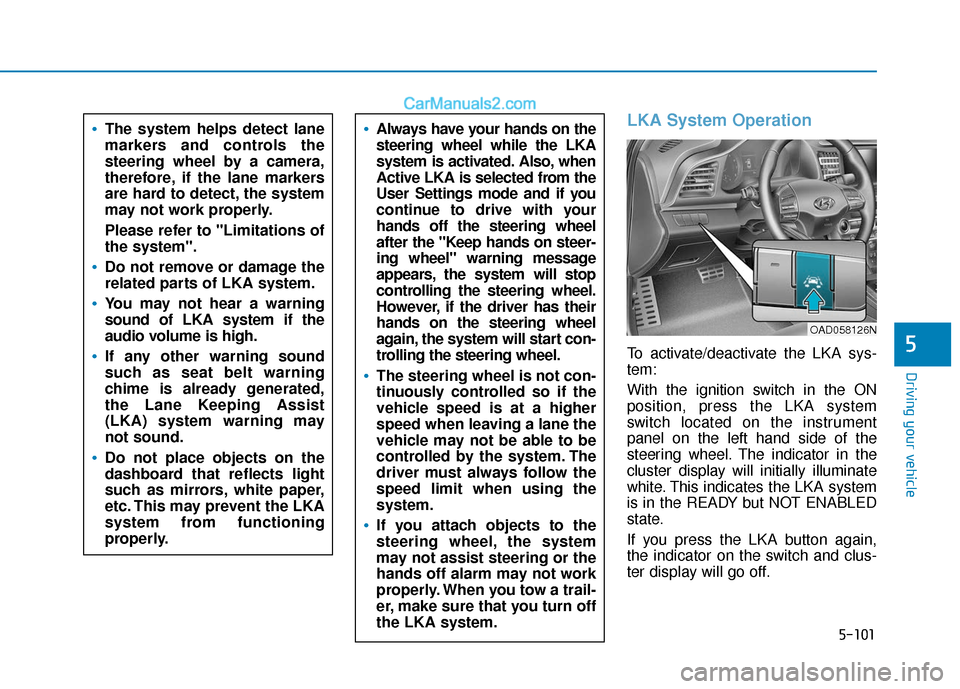
LKA System Operation
To activate/deactivate the LKA sys-
tem:
With the ignition switch in the ON
position, press the LKA system
switch located on the instrument
panel on the left hand side of the
steering wheel. The indicator in the
cluster display will initially illuminate
white. This indicates the LKA system
is in the READY but NOT ENABLED
state.
If you press the LKA button again,
the indicator on the switch and clus-
ter display will go off.
Always have your hands on the
steering wheel while the LKA
system is activated. Also, when
Active LKA is selected from the
User Settings mode and if you
continue to drive with your
hands off the steering wheel
after the "Keep hands on steer-
ing wheel" warning message
appears, the system will stop
controlling the steering wheel.
However, if the driver has their
hands on the steering wheel
again, the system will start con-
trolling the steering wheel.
The steering wheel is not con-
tinuously controlled so if the
vehicle speed is at a higher
speed when leaving a lane the
vehicle may not be able to be
controlled by the system. The
driver must always follow the
speed limit when using the
system.
If you attach objects to the
steering wheel, the system
may not assist steering or the
hands off alarm may not work
properly. When you tow a trail-
er, make sure that you turn off
the LKA system.
The system helps detect lane
markers and controls the
steering wheel by a camera,
therefore, if the lane markers
are hard to detect, the system
may not work properly.
Please refer to "Limitations of
the system".
Do not remove or damage the
related parts of LKA system.
You may not hear a warning
sound of LKA system if the
audio volume is high.
If any other warning sound
such as seat belt warning
chime is already generated,
the Lane Keeping Assist
(LKA) system warning may
not sound.
Do not place objects on the
dashboard that reflects light
such as mirrors, white paper,
etc. This may prevent the LKA
system from functioning
properly.
OAD058126N
Page 338 of 535

5-102
Driving your vehicleNote that the vehicle
speed must be at least
approximately 40 mph
(64 km/h) to ENABLE the
LKA system. The indicator in the
cluster will illuminate green.
The color of indicator will change
depending on the condition of LKA
system.
- White : Sensor does not detect
lane markers or vehicle
speed is under 40 mph (64
km/h).
- Green : Sensor detects lane mark- ers and the system is able
to control vehicle steering.
Information
If the indicator (white) is activated
from the previous ignition cycle, the
system will turn ON without any addi-
tional control. If you press the LKA
switch again, the indicator on the clus-
ter goes off.
LKA system operation
To see the LKA system screen onthe LCD display in the cluster,
select Assist mode ( ). For more
details, refer to "LCD Display
Modes" in chapter 3. If vehicle speed is over 40 mph (64
km/h) and the system detects lane
markers, the color changes from
gray to white.
Both lane markers must be detect- ed for the system to fully activate.
i
OAD058127N
■Lane marker undetected■Lane marker detected
OAD058127N/OAD058128N