2020 Hyundai Accent lock
[x] Cancel search: lockPage 65 of 445

2-38
Safety system of your vehicle
5. Remove as much slack from the
belt as possible by pushing down
on the child restraint system while
feeding the shoulder belt back into
the retractor.
6. Push and pull on the child restraint
system to confirm that the seat
belt is holding it firmly in place. If it
is not, release the seat belt and
repeat steps 2 through 6.
7. Double check that the retractor is
in the "Automatic Locking" mode
by attempting to pull more of the
seat belt out of the retractor. If you
cannot, the retractor is in the
"Automatic Locking" mode.
If your CRS manufacturer instructs or
recommends you to use a tether
anchor with the lap/shoulder belt,
refer to the previous pages for more
information.When the seat belt is allowed to
retract to its fully stowed position,
the retractor will automatically
switch from the "Automatic
Locking" mode to the emergency
lock mode for normal adult usage.To remove the child restraint, press
the release button on the buckle and
then pull the lap/shoulder belt out of
the restraint and allow the seat belt
to retract fully.
NOTICE
If the retractor is not in the
"Automatic Locking" mode, the
child restraint can move when
your vehicle turns or stops sud-
denly. A child can be seriously
injured or killed if the child
restraint is not properly anchored
in the car, including manually
pulling the seat belt all the way
out to shift the rectractor to the
"Automatic Locking" mode.
WARNING
HCa HMA 2.QXP 5/7/2018 12:02 PM Page 38
Page 70 of 445

2-43
Safety system of your vehicle
2
Curtain air bags
Curtain air bags are located along
both sides of the roof rails above the
front and rear doors. (Continued)
Do not allow passengers to
lean their heads or bodies
onto doors, put their arms on
the doors, stretch their arms
out of the window, or place
objects between the doors
and seats.
Hold the steering wheel at the
9 o'clock and 3 o'clock posi-
tions, to minimize the risk of
injuries to your hands and
arms.
Do not use any accessory
seat covers. This could reduce
or prevent the effectiveness
of the system.
Do not place any objects over
the air bag or between the air
bag and yourself. Also, do not
attach any objects around the
area the air bag inflates such
as the door, side door glass,
front and rear pillar.
(Continued)
(Continued)
Do not place any objects
between the door and the
seat. They may become dan-
gerous projectiles if the side
air bag inflates.
Do not install any accessories
on the side or near the side air
bags.
Do not put any objects
between the side airbag label
and seat cushion. It could
cause harm if the vehicle is in
a crash severe enough to
cause the air bags to deploy.
Do not cause impact to the
doors when the ignition
switch button is in the ON
position as this may cause the
side air bags to inflate.
If the seat or seat cover is
damaged, have the vehicle
checked and repaired by an
authorized HYUNDAI dealer.
OHCR036011
OHCR036019
HCa HMA 2.QXP 5/7/2018 12:02 PM Page 43
Page 74 of 445
2-47
Safety system of your vehicle
2
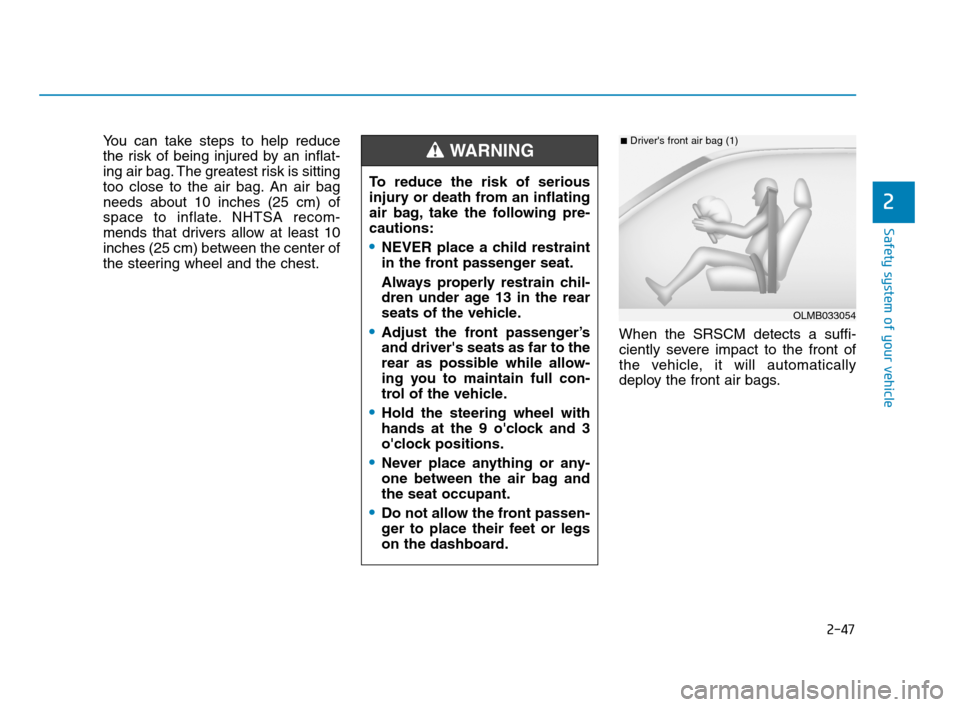
You can take steps to help reduce
the risk of being injured by an inflat-
ing air bag. The greatest risk is sitting
too close to the air bag. An air bag
needs about 10 inches (25 cm) of
space to inflate. NHTSA recom-
mends that drivers allow at least 10
inches (25 cm) between the center of
the steering wheel and the chest.
When the SRSCM detects a suffi-
ciently severe impact to the front of
the vehicle, it will automatically
deploy the front air bags.
OLMB033054
■Driver's front air bag (1)
To reduce the risk of serious
injury or death from an inflating
air bag, take the following pre-
cautions:
NEVER place a child restraint
in the front passenger seat.
Always properly restrain chil-
dren under age 13 in the rear
seats of the vehicle.
Adjust the front passenger’s
and driver's seats as far to the
rear as possible while allow-
ing you to maintain full con-
trol of the vehicle.
Hold the steering wheel with
hands at the 9 o'clock and 3
o'clock positions.
Never place anything or any-
one between the air bag and
the seat occupant.
Do not allow the front passen-
ger to place their feet or legs
on the dashboard.
WARNING
HCa HMA 2.QXP 5/7/2018 12:02 PM Page 47
Page 82 of 445

2-55
Safety system of your vehicle
2
Why Didn't My Air Bag Go Off
in a Collision?
Air bags are not designed to inflate in
every collision.There are certain
types of accidents in which the air bag
would not be expected to provide
additional protection. These include
rear impacts, second or third colli-
sions in multiple impact accidents, as
well as low speed impacts. Damage
to the vehicle indicates a collision
energy absorption, and is not an indi-
cator of whether or not an air bag
should have inflated.
Air bag collision sensors
NEVER place a rear-facing or
front-facing child restraint in
the front passenger's seat of
the vehicle.
An inflating frontal air bag
could forcefully strike a child
resulting in serious injury or
death.
Always properly restrain chil-
dren in an appropriate child
restraint in the rear seat of the
vehicle.
WARNING
To reduce the risk of an air bag
deploying unexpectedly and
causing serious injury or death:
Do not hit or allow any objects
to impact the locations where air
bags or sensors are installed.
(Continued)
WARNING
(Continued)
Do not perform maintenance
on or around the air bag sen-
sors. If the location or angle of
the sensors is altered, the air
bags may deploy when they
should not or may not deploy
when they should.
Do not install bumper guards
or replace the bumper with a
non-genuine HYUNDAI parts.
This may adversely affect the
collision and air bag deploy-
ment performance.
Place the ignition switch in
the LOCK/OFF or ACC posi-
tion when the vehicle is being
towed to prevent inadvertent
air bag deployment.
Have all air bag repairs conduct-
ed by an authorized HYUNDAI
dealer.
HCa HMA 2.QXP 5/7/2018 12:03 PM Page 55
Page 89 of 445

Convenient features of your vehicle
Accessing Your Vehicle .........................................3-3
Remote Key.........................................................................3-3
Smart Key ............................................................................3-6
Immobilizer System .........................................................3-11
Door Locks ............................................................3-12
Operating Door Locks from Outside the Vehicle ....3-12
Operating door locks from inside the vehicle .........3-13
Auto Door Lock/Unlock Features ...............................3-16
Child-Protector Rear Door Locks ...............................3-16
Theft-Alarm System ............................................3-17
Steering Wheel .....................................................3-17
Electric Power Steering (EPS) .....................................3-17
Tilt Steering / Telescope Steering ..............................3-18
Heated steering wheel ...................................................3-19
Horn ....................................................................................3-19
Mirrors ...................................................................3-20
Inside Rearview Mirror ..................................................3-20
Side View Mirrors ...........................................................3-28
Windows ................................................................3-32
Power Windows ...............................................................3-32
Manual windows ..............................................................3-35
Sunroof..................................................................3-36
Sunroof opening and closing .......................................3-37
Sliding the sunroof .........................................................3-37
Tilting the sunroof ..........................................................3-37
Sunshade ...........................................................................3-38
Resetting the sunroof ....................................................3-38
Exterior Features .................................................3-41
Hood ...................................................................................3-41
Trunk ..................................................................................3-42
Smart Trunk ......................................................................3-44
Fuel Filler Door ................................................................3-48
Instrument Cluster ...............................................3-51
Instrument Cluster Control............................................3-52
Gauges and Meters ........................................................3-53
Transmission shift indicator .........................................3-56
Warning and Indicator Lights .......................................3-58
LCD Display Messages ...................................................3-68
LCD Display ...........................................................3-72
LCD Display Control ........................................................3-72
LCD Display Modes .........................................................3-72
Trip Computer .......................................................3-77
Type A ................................................................................3-77
Type B ................................................................................3-81
3
HCa HMA 3a(~84).qxp 4/9/2019 2:58 PM Page 1
Page 90 of 445

Lighting..................................................................3-85
Exterior Lights .................................................................3-85
Interior Lights...................................................................3-90
Welcome System .............................................................3-91
Wipers and Washers ............................................3-92
Windshield Wipers...........................................................3-92
Windshield Washers .......................................................3-93
Driver Assist System ...........................................3-94
Rear View Monitor..........................................................3-94
Manual Climate Control System.........................3-95
Heating and Air Conditioning .......................................3-96
System Operation .........................................................3-100
System Maintenance....................................................3-102
Automatic Climate Control System ..................3-104
Automatic Heating and Air Conditioning.................3-105
Manual Heating and Air Conditioning......................3-106
System Operation .........................................................3-111
System Maintenance....................................................3-113
Windshield Defrosting and Defogging ............3-115
Auto Defogging System
(Only for Automatic Climate Control System) .......3-118
Rear Window Defroster ..............................................3-119
Storage Compartment .......................................3-120
Center Console Storage ..............................................3-120
Sliding Armrest ..............................................................3-120
Glove Box ........................................................................3-121
Sunglass Holder.............................................................3-121
Multi Box .........................................................................3-122
Interior Features ................................................3-123
Cup Holder ......................................................................3-123
Sunvisor ...........................................................................3-124
Power Outlet ..................................................................3-125
Clock .................................................................................3-127
Clothes Hanger ..............................................................3-127
Floor Mat Anchor(s).....................................................3-128
Luggage Net Holder .....................................................3-1283
HCa HMA 3a(~84).qxp 4/9/2019 2:58 PM Page 2
Page 91 of 445

3-3
Convenient features of your vehicle
Remote Key (if equipped)
Your HYUNDAI uses a remote key,
which you can use to lock or unlock
a door (and trunk) and even start the
engine.
1. Door Lock
2. Door Unlock
3. Trunk Unlock
4. Panic
Locking
To lock :
1. Close all doors, engine hood and
trunk.
2. Press the Door Lock button (1) on
the remote key.
3. The hazard warning lights will
blink and the chime will sound
once if the lock button is pressed
again within four seconds.
4. Make sure the doors are locked by
checking the position of the door
lock button inside the vehicle.
Information
After locking the doors, if you press
the Door Lock button again within
four seconds, the hazard warning
lights will blink and the horn will
sound one time to confirm that the
doors are locked.
i
A AC
CC
CE
ES
SS
SI
IN
NG
G
Y
YO
OU
UR
R
V
VE
EH
HI
IC
CL
LE
E
3
OHCA047001
Do not leave the keys in your
vehicle with unsupervised chil-
dren. Unattended children
could place the key in the igni-
tion switch and may operate
power windows or other con-
trols, or even make the vehicle
move, which could result in
serious injury or death.
WARNING
HCa HMA 3a(~84).qxp 4/9/2019 2:58 PM Page 3
Page 92 of 445

3-4
Unlocking
To unlock:
1. Press the Door Unlock button (2)
on the remote key.
2. The driver's door will unlock. The
hazard warning lights will blink two
times.
Two press unlock setting:
If you press the Door Unlock but-
ton on the remote key again with-
in four seconds, then all the doors
will unlock.
Two press unlock setting can be
changed according to owner's pref-
erence in the cluster User Settings
mode or with the remote key.
• User settings mode method:
Select or deselect the 'Two Press
Unlock' feature in the User
Settings mode on the cluster LCD
display (User Settings ➞Door ➞
Two Press Unlock).
Press and hold both Door Lock (1)
and Door Unlock (2) buttons at the
same time until the hazard warn-
ing lights blink.Now all doors will unlock when the
Door Unlock button is pressed one
time. To change the setting back,
repeat this procedure.
Information
After unlocking the doors, the doors
will lock automatically after 30 sec-
onds unless a door is opened.
Trunk unlocking
To unlock:
1. Press and hold the Trunk Unlock
button (3) on the remote key for
more than one second.
2. The hazard warning lights will
blink two times and the trunk will
be unlocked.
Once the trunk is opened and then
closed, the trunk will lock automati-
cally.
Information
The word "HOLD" is written on the
button to inform you that you must
press and hold the button for more
than one second.
Panic button (if equipped)
Press and hold the Panic button (4)
for more than one second. The horn
sounds and hazard warning lights
flash for about 30 seconds.
To cancel the panic mode, press any
button on the remote key.
Start-up
For information, refer to the "Key
Ignition Switch" section in chapter 5.
To prevent damaging the remote
key:
• Keep the remote key away from
water or any liquid and fire.
Internal circuits may malfunc-
tion if the inside of the remote
key gets damp (from liquids or
moisture) or if it is heated. This
can exclude the remote key from
warranty coverage.
Avoid dropping or throwing the
remote key.
Protect the remote key from
extreme temperatures.
NOTICE
i
i
Convenient features of your vehicle
HCa HMA 3a(~84).qxp 4/9/2019 2:58 PM Page 4