Page 556 of 743
554
uuWhen Driving uAgile Handling Assist
Driving
Agile Handling Assist
Lightly brakes each of the front and rear wheels, as needed, when you turn the
steering wheel, and helps support the vehi cle’s stability and performance during
cornering.1 Agile Handling Assist
The agile handling assist ca nnot enhance stability in
all driving situations. You still need to drive and
corner at speeds appropriate for the conditions and
always leave a sufficient margin of safety.
When the VSA ® system indicator comes on and stays
on while driving, the agil e handling assist does not
activate.
You may hear a sound coming from the engine
compartment while the agile handling assist is
activated. This is normal.
20 PILOT-31TG76401.book 554 ページ 2019年7月24日 水曜日 午後3時32分
Page 571 of 743

Continued569
uuHonda Sensing ®u Collision Mitigation Braking SystemTM (CMBSTM)
Driving
■When the system activates
At system’s earliest collision alert st age, you can change the distance (Long/
Normal /Short ) between vehicles at which alerts will come on through the driver
information interface or the audio/ information screen setting options.
2Customized Features P. 125, 433
■Vibration alert on the steering wheel
When a potential coll ision to an oncoming detected vehicle is determined, the
system alerts you with rapid vibration on th e steering wheel, in addition to visual and
audible alerts. u Take appropriate action to prevent a col lision (apply the brakes, operate the
steering wheel, etc.).
1 When the system activates
The camera in the CMBS
TM is also designed to detect
pedestrians.
However, this pedestrian detection feature may not
activate or may not detect a pedestrian in front of
your vehicle under certain conditions.
Refer to the ones indicating the pedestrian detection
limitations from the list. 2 CMBS
TM Conditions and Limitations P. 572
The system provides visual, audible and tactile alerts of a possible collision, and
stops if the collision is avoided.
u Take appropriate action to prevent a collision (apply the brakes, change
lanes, etc.)
Beep Visual Alerts
Audible Alert
Tactile Alert
1 Vibration alert on the steering wheel
Vibration alert function is disabled when the electric
power steering (EPS) system indicator comes on. 2 Driver Information Interface Warning and
Information Messages P. 96
20 PILOT-31TG76401.book 569 ページ 2019年7月24日 水曜日 午後3時32分
Page 576 of 743

574
uuHonda Sensing ®u Collision Mitigation Braking SystemTM (CMBSTM)
Driving
■Detection limitations
• A vehicle or pedestrian suddenly crosses in front of you.
• The distance between your vehicle and the vehicle or pedestrian ahead of you is
too short.
• A vehicle cuts in front of you at a slow speed, and it brakes suddenly.
• When you accelerate rapidly and approach the vehicle or pedestrian ahead of you
at high speed.
• The vehicle ahead of you is a motorcycle, bicycle, mobility scooter or other small
vehicle.
• When there are animals in front of your vehicle.
• When you drive on a cu rved, winding or undulating road that makes it difficult for
the sensor to properly detect a vehicle in front of you.
• The speed difference between your vehicle an d a vehicle or pedestrian in front of
you is significantly large.
• An oncoming vehicle suddenly comes in front of you.
• Another vehicle suddenly comes in front of you at an intersection, etc.
• Your vehicle abruptly crosses over in front of an oncoming vehicle.
• When driving through a narrow iron bridge.
• When the lead vehicle suddenly slows down.
20 PILOT-31TG76401.book 574 ページ 2019年7月24日 水曜日 午後3時32分
Page 582 of 743

580
uuHonda Sensing ®u Adaptive Cruise Control (ACC)
Driving
Adaptive Cruise Control (ACC)
Helps maintain a constant vehicle speed an d a set following-interval behind a vehicle
detected ahead of yours, without you havi ng to keep your foot on the brake or the
accelerator.1 Adaptive Cruise Control (ACC)
ACC can not be activated if Intelligent Traction
Management settin g is snow, sand
* or mud*.
3WARNING
Improper use of ACC can lead to a crash.
Use ACC only when driving on expressways
or freeways and in good weather
conditions.
3WARNING
ACC has limited braking capability.
When your vehicle speed drops below
22 mph (35 km/h), ACC will automatically
cancel and no longer will apply your
vehicle's brakes.
Always be prepared to apply the brake
pedal when conditions require.
When to use
■Vehicle speed for adaptive crui se control: Desired speed in a
range above roughly 25 mph (40 km/h) ~
■Gear positions for adapti ve cruise control: In (D or (S*
The radar sensor is behind
the emblem.
The camera is located
behind the rearview
mirror.
* Not available on all models
20 PILOT-31TG76401.book 580 ページ 2019年7月24日 水曜日 午後3時32分
Page 584 of 743

uuHonda Sensing ®u Adaptive Cruise Control (ACC)
582
Driving
Take your foot off the pedal and press the –/SET button when you reach the desired
speed. The moment you release the –/SET button, the set speed is fixed, and ACC
begins.
When ACC starts operating, the vehicle icon,
distance bars and set speed appear on the
driver information interface.
■To Set the Vehicle Speed1Adaptive Cruise Control (ACC)
ACC may not work properly under certain conditions.
2 ACC Conditions and Limitations P. 585
When not using ACC: Turn off adaptive cruise by
pressing the MAIN button. This also will turn off the
Lane Keeping Assist System (LKAS).
When the MAIN button is pressed, ACC and Lane
Keeping Assist System (LKAS) are both turned on or
off.
You can switch the displayed set speed
measurements on the driver information interface
between mph and km/h.
2 Units P. 120
Do not use ACC under the following conditions:
•On roads with heavy traf fic or while driving in
continuous stop and go traffic.
•On roads with sharp turns.•On roads with steep downhill sections, as the set
vehicle speed can be exceeded by coasting. In such
cases, ACC will not apply the brakes to maintain
the set speed.
•On roads with toll collection facilities or other
objects between lanes of traffic, or in parking
areas, or faci lities with driv e through access.
On when
adaptive cruise
control begins
Press and release–/SET
Button
Set Vehicle
Interval
Set Vehicle
Speed
20 PILOT-31TG76401.book 582 ページ 2019年7月24日 水曜日 午後3時32分
Page 588 of 743
586
uuHonda Sensing ®u Adaptive Cruise Control (ACC)
Driving
■Detection limitations
• A vehicle suddenly crosses in front of you.
• The interval between your vehicle and the vehicle ahead of you is too short.
• A vehicle cuts in front of you at a slow speed, and it brakes suddenly.
• When you accelerate rapidly and approach the vehicle ahead of you at high
speed.
• The vehicle ahead of you is a motorcycle, bicycle, mobility scooter, or other small
vehicle.
• When there are animals in front of your vehicle.
• When you drive on a curved or winding or undulating road that makes it difficult
for the sensor to properly dete ct a vehicle in front of you.
• The speed difference between your vehicl e and a vehicle in front of you is
significantly large.
• An oncoming vehicle suddenly comes in front of you.
• Your vehicle abruptly crosses over in front of an oncoming vehicle.
20 PILOT-31TG76401.book 586 ページ 2019年7月24日 水曜日 午後3時32分
Page 589 of 743
587
uuHonda Sensing ®u Adaptive Cruise Control (ACC)
Continued
Driving
• When driving through a narrow iron bridge.
• When the vehicle ahead of you brakes suddenly.
• When the vehicle ahead of you has a unique shape.
• When your vehicle or the vehicle ahead of you is driving on one edge of the lane.
Radar detects upper section of
an empty carrier truck. Panel truck,
tanker truck,
etc.
20 PILOT-31TG76401.book 587 ページ 2019年7月24日 水曜日 午後3時32分
Page 612 of 743
610
Driving
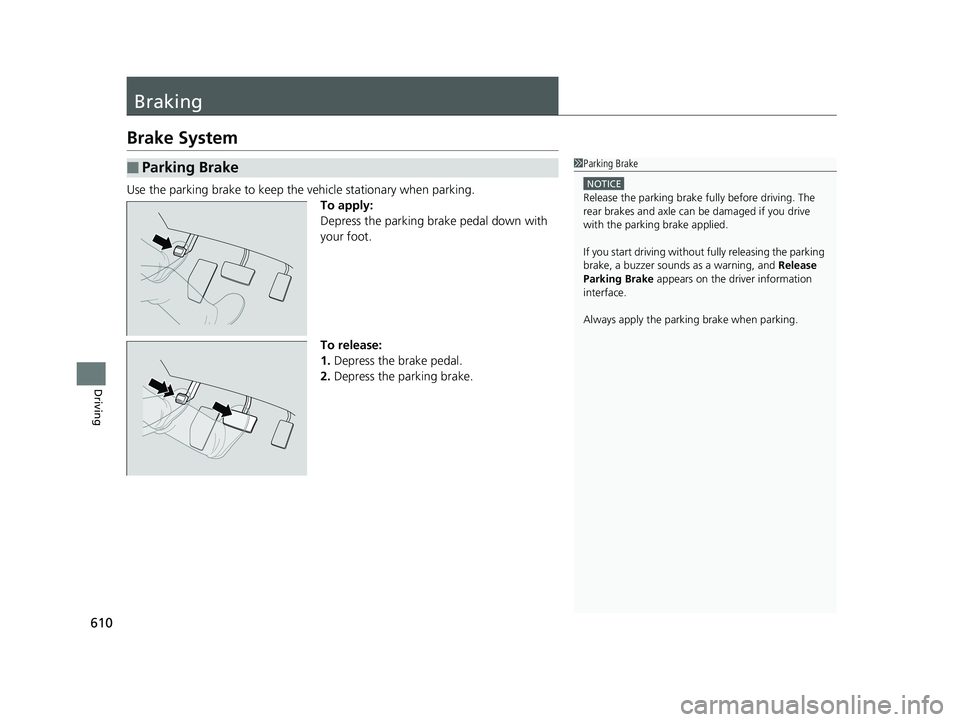
Braking
Brake System
Use the parking brake to keep the vehicle stationary when parking.To apply:
Depress the parking brake pedal down with
your foot.
To release:
1.Depress the brake pedal.
2. Depress the parking brake.
■Parking Brake1Parking Brake
NOTICE
Release the parking brake fu lly before driving. The
rear brakes and axle can be damaged if you drive
with the parki ng brake applied.
If you start driving without fully releasing the parking
brake, a buzzer sounds as a warning, and Release
Parking Brake appears on the driver information
interface.
Always apply the parking brake when parking.
20 PILOT-31TG76401.book 610 ページ 2019年7月24日 水曜日 午後3時32分