Page 156 of 639
154
uuLocking and Unlocking the Doors uCustomizing the Auto Door Locking/Unlocking Setting*
Controls
*1:Default setting
*2:Models with the smart entry system have an ENGINE START/STOP button instead of an ignition switch.
■Customizing Flow for Auto Door Locking Options
StepsDrive Lock Mode*1Off
1Apply the parking brake.
2The driver’s door must be closed at this stage.Open the driver’s door.
3Turn the ignition switch to ON (w*2.
4
Press and hold the front of the master door lock switch on the dr iver’s door. You will hear a click more than five seconds elap sed.
Release the switch.
5
Turn the ignition switch to OFF (0 within 20 seconds*2.
u Customization is completed.
u All doors unlock and all turn signals blink three times.
20 HR-V HDMC HDMG-31T7A6400.book 154 ページ 2019年8月8日 木曜日 午後3時52分
Page 157 of 639

155
uuLocking and Unlocking the Doors uCustomizing the Auto Door Locking/Unlocking Setting*
Controls
*1:Default setting
*2:Models with the smart entry system have an ENGINE START/STOP button instead of an ignition switch.
■Customizing Flow for Auto Door Unlocking Options
StepsDriver Door Open Unlock Mode*1Park Unlock ModeOff
1
Apply the parking brake.
Move the shift lever out of
(P with the
brake pedal depressed.Apply the parking brake.
Move the shift lever to
(P.
Apply the parking brake.
Move the shift lever to
(P.
2The driver’s door must be closed at this stage.Open the driv er’s door.
3Turn the ignition switch to ON (w*2.
4
Press and hold the rear of the master door lock switch on the dr iver’s door. You will hear a click more than five seconds elapsed.
Release the switch.
5
Turn the ignition switch to OFF (0 within 20 seconds*2.
u Customization is completed.
u All doors lock and all turn signals blink three times.
20 HR-V HDMC HDMG-31T7A6400.book 155 ページ 2019年8月8日 木曜日 午後3時52分
Page 161 of 639

159Continued
Controls
Security System
Immobilizer System
The immobilizer system prevents a key that has not been pre-registered from
starting the engine. Each key contains electronic transmitters that use electronic
signals to verify the key.
Pay attention to the following when insert ing the key into the ignition switch or
pressing the ENGINE START/STOP button:
• Do not allow objects that emit strong ra dio waves near the ignition switch or the
ENGINE START/STOP button.
• Make sure the key is not covered by or touching a metal object.
• Do not bring a key from another vehicle’s immobilizer system near the ignition
switch or the ENGINE START/STOP button.
• Do not put the key near magnetic items. El ectronic device, such as televisions and
audio systems emit strong magnetic fiel ds. Note that even a key chain can
become magnetic.
Security System Alarm
The security system alarm activates when the tailgate, hood or doors are forcibly
opened. The alarm does not activate if the tailgate or doors are opened with the key,
remote transmitter or smart entry system
*.
However, the alarm activates if a door is opened with the key and then the
transmission is taken out of
(P or the hood is opened before the ignition switch is
turned to ON
(w*1.
■When the security system alarm activates
The horn sounds intermittently and all of the exterior lights flash.
*1: Models with the smart entry system have an ENGINE START/STOP button instead of an
ignition switch.
1 Immobilizer System
NOTICE
Leaving the key in the vehicl e can result in theft or
accidental movement of the vehicle.
Always take the key with you whenever you leave the
vehicle unattended.
Do not alter the system or add other devices to it.
Doing so may damage the system and make your
vehicle inoperable.
1 Security System Alarm
The security alarm continues for a maximum of two
minutes until the security system alarm deactivates.
* Not available on all models
20 HR-V HDMC HDMG-31T7A6400.book 159 ページ 2019年8月8日 木曜日 午後3時52分
Page 172 of 639
170
uuOperating the Switches Around the Steering Wheel uTurn Signals
Controls
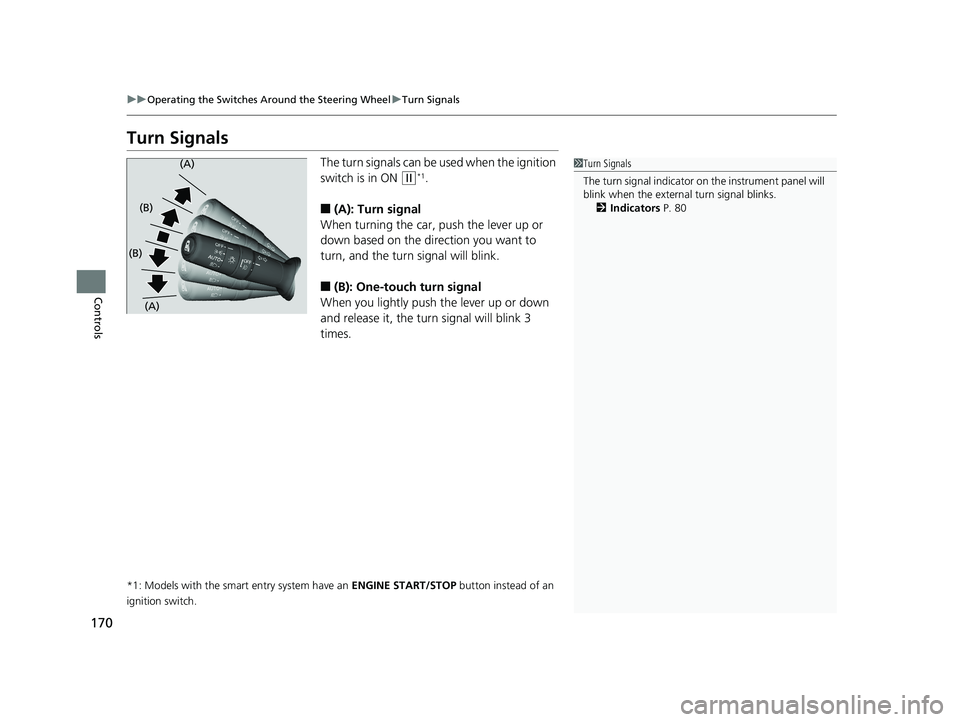
Turn Signals
The turn signals can be used when the ignition
switch is in ON
(w*1.
■(A): Turn signal
When turning the car, push the lever up or
down based on the direction you want to
turn, and the turn signal will blink.
■(B): One-touc h turn signal
When you lightly push the lever up or down
and release it, the turn signal will blink 3
times.
*1: Models with the smart entry system have an ENGINE START/STOP button instead of an
ignition switch.
1 Turn Signals
The turn signal indicator on the instrument panel will
blink when the external turn signal blinks.
2 Indicators P. 80(A)
(A)
(B)
(B)
20 HR-V HDMC HDMG-31T7A6400.book 170 ページ 2019年8月8日 木曜日 午後3時52分
Page 243 of 639
241
uuAudio System Basic Operation uPlaying AM/FM Radio
Continued
Features
Playing AM/FM Radio
RADIO Button
Press to select a band.
(Back) Button
Press to go back to the previous
display or cancel a setting.
/ (Seek/Skip) Buttons
Press or to search up and down
the selected band for a station with a strong
signal.
VOL/ (Power/volume) Knob
Press to turn the audio system
on and off.
Turn to adjust the volume.
Preset Buttons (1-6)
To store a station:
1. Tune to the selected station.
2. Pick a preset button and hold it until you hear a beep.
To listen to a stored station, select a band, then press the preset button. Selector Knob
Turn to tune the radio frequency.
Press, and then turn to select an
item. After that, press again to
make your selection.
MENU/CLOCK Button
Press to display the menu items.
Audio/Information Screen
20 HR-V HDMC HDMG-31T7A6400.book 241 ページ 2019年8月8日 木曜日 午後3時52分
Page 244 of 639

uuAudio System Basic Operation uPlaying AM/FM Radio
242
Features
Provides text data information related to your selected RDS capable FM station.
■To find an RDS station from Station List
1. Press while listening to an FM station.
2. Rotate to select the station, then press .
■Update List
Updates your available station list at any time.
1. Press while listening to an FM station.
2. Rotate to select Update List, then press .
■Radio text
Displays the radio text informat ion of the selected RDS station.
1. Press the MENU/CLOCK button.
2. Rotate to select Settings, then press .
3. Rotate to select RDS Settings, then press .
4. Rotate to select Radio Text, then press .
■Scan
Samples each of the strongest stations on the selected band for 10 seconds.
1. Press the MENU/CLOCK button.
2. Rotate to select Scan, then press .
To turn off scan, press .
■Radio Data System (RDS)1 Playing AM/FM Radio
The ST indicator appears on the display indicating
stereo FM broadcasts.
Stereo reproduction in AM is not available.
You can store 6 AM stations and 12 FM stations into
the preset memory.
Switching the Audio Mode
Press the SOURCE button on the steering wheel.
2 Audio Remote Controls P. 231
1Radio Data System (RDS)
When you select an RDS-capable FM station, the RDS
automatically turns on, and the frequency display
changes to the station name. However, when the
signals of that station become weak, the display
changes from the statio n name to the frequency.
20 HR-V HDMC HDMG-31T7A6400.book 242 ページ 2019年8月8日 木曜日 午後3時52分
Page 280 of 639
278
uuAudio System Basic Operation uPlaying AM/FM Radio
Features
Playing AM/FM Radio
*1:Some or all of the lists may not be displayed.
(Back)
Select to go back to the previous display.
Seek Icons
Select or to search up and
down the selected band for a
station with a strong signal.
VOL/ (Power/volume) Knob
Press to turn the a udio system on and off.
Turn to adjust the volume.
(Menu)
Select to display the menu items.
Tune Icons
Select or to tune the radio frequency.
Scan Icon
Select to scan each station with a strong signal. Preset Icons
Tune the radio frequency for
preset memory.
Select and hold the preset
icon to store that station.
Select to display preset 7
onwards.
20 HR-V HDMC HDMG-31T7A6400.book 278 ページ 2019年8月8日 木曜日 午後3時52分
Page 282 of 639

uuAudio System Basic Operation uPlaying AM/FM Radio
280
Features
Samples each of the strongest stations on th e selected band for 10 seconds. To turn
off scan, select Cancel or .
Displays the subchannel list when an HD Radio
TM station is selected while listening to
an FM station.
1. Select .
2. Select HD Subchannel.
3. Select the channel number.
Provides text data information related to your selected RDS-capable FM station.
■To find an RDS station from Station List
1. Select the open/close icon to display a list while listening to an FM station.
2. Select the Station List tab.
3. Select the station.
■Manual update
Updates your available station list at any time.
1. Select the open/close icon to display a list while listening to an FM station.
2. Select the Station List tab.
3. Select Refresh .
■Scan
■HD Subchannel
■Radio Data System (RDS)
Models with HD RadioTM
1Radio Data System (RDS)
When you select an RDS-capable FM station, the RDS
automatically turns on, and the frequency display
changes to the station name. However, when the
signals of that station become weak, the display
changes from the statio n name to the frequency.
20 HR-V HDMC HDMG-31T7A6400.book 280 ページ 2019年8月8日 木曜日 午後3時52分