2020 HONDA FIT reverse
[x] Cancel search: reversePage 23 of 599

21
Quick Reference Guide
Driving (P399)
Depress the brake pedal and press
the release button to move out of (P.
Manual Transmission* (P423)
Continuously Variable Transmission*
(P417, 419)
● Shift to
(P and depress the brake pedal when starting the engine.
Shifting
Reverse
Used when reversing.
Neutral
Transmission is not locked.
Drive
Normal driving.
On models with paddle shifters,
7-speed mode can be used
temporarily. Drive (S)
●Better acceleration●Used to increase engine braking●Used when going up or down hills
Low
●Used to further increase engine braking●Used when going up or down hills
Drive (S)
7-speed manual shift mode can
be used. Move the shift lever without
pressing the release button.
Press the release button to move
the shift lever.
7-Speed Manual Shift Mode* (P421)
● Allows you to manually shift the transmission up or
down without removing yo ur hands from the steering
wheel.
When the shift lever is in (S● Pulling a paddle shifter changes the mode from
continuously variable transmission to 7-speed manual
shift mode.
● The M indicator and the selected speed number are
displayed in the shift indicator.
When the shift lever is in (D● Pulling a paddle shifter temporarily changes the mode
from continuously variable transmission to 7-speed
manual shift mode. The selected speed number is
displayed in the shift indicator.
Shift Down
Paddle Shifter
Shift Up
Paddle Shifter M Indicator
Models with
paddle shiftersModels without
paddle shifters
Shift Lever
Release
Button
Shift Indicator
Park
Turn off or start the engine.
Transmission is locked.
Models with paddle shifters
Models without paddle shifters
* Not available on all models
20 FIT-31T5A6500.book 21 ページ 2019年9月26日 木曜日 午後4時41分
Page 153 of 599

151Continued
Controls
Opening and Closing the Windows
Opening/Closing the Power Windows
The power windows can be opened and clos ed when the ignition switch is in ON
(w*1, using the switches on the doors.
The driver’s side switches can be used to open and close all of the windows.
The power window lock button on the driver’s side must be switched off (not
pushed in, indicator off) to open and cl ose the windows from anywhere other than
the driver’s seat.
When the power window lock button is pushed in, the indicator comes on and you
can only operate the driver’s window. Turn the power window lock button on if a
child is in the vehicle.
■Manual operation
To open: Push the switch down lightly, and
hold it until the desired position is reached.
To close: Pull the switch up lightly, and hold it
until the desired position is reached.
■Automatic operation*
To open: Push the switch down firmly.
To close: Pull the switch up firmly.
The window opens or closes completely. To
stop the window at any time, push or pull the
switch briefly.
*1 : Models with the smart entry system have an ENGINE START/STOP button instead of an ignition switch.
■Opening/Closing Windows with Auto-Open/Close Function*
1Opening/Closing the Power Windows
The power windows can be operated for up to 10
minutes after you turn the ignition switch to LOCK
( 0*1. Opening either front door cancels this function.
Auto Reverse
*
If a power window senses resistance when closing
automatically, it will stop closing and reverse
direction.
The driver’s window auto re verse function is disabled
when you continuously pull up the switch.
The auto reverse function stops sensing when the
window is almost closed to en sure that it fully closes.
3WARNING
Closing a power window on someone’s
hands or fingers can cause serious injury.
Make sure your passengers are away from
the windows before closing them.
Models with auto-open/close function
Power Window
Lock ButtonDriver’s
Window
Switch
Off
On
Indicator
* Not available on all models
20 FIT-31T5A6500.book 151 ページ 2019年9月26日 木曜日 午後4時41分
Page 155 of 599

153
Controls
Opening and Closing the Moonroof*
You can only operate the moonroof when the ignition switch is in ON (w*1. Use the
switch in the front of the ceiling to open and close the moonroof.
■Automatic operation
To open: Pull the switch back firmly.
To close: Push the switch forward firmly.
The moonroof will automatically open or close
all the way. To stop the moonroof midway,
push the switch briefly.
■Manual operation
To open: Pull the switch back lightly, and
hold it until the desired position is reached.
To close: Push the switch fo rward lightly, and
hold it until the desired position is reached.
■Tilting the moonroof up
To tilt: Push on the center of the moonroof
switch.
To close: Push the switch forward firmly,
then release.
*1 : Models with the smart entry system have an ENGINE START/STOP button instead of an ignition switch.
■Opening/Closing the Moonroof
1Opening and Closing the Moonroof*
NOTICE
Opening the moonroof in below freezing
temperature or when it is covered with snow or ice
can damage the moonr oof panel or motor.
The power moonroof can be operated for up to 10
minutes after you turn the ignition switch to LOCK
( 0*1. Opening either front door cancels this function.
When resistance is detected, the auto reverse
function causes the moonroof to change directions,
then stop. Auto reverse stops sensing when the
moonroof is almost closed to ensure that it fully
closes. Make sure that al l objects, including fingers,
are clear of the moonroof.
3WARNING
Opening or closing the moonroof on
someone's hands or fingers can cause
serious injury.
Make sure all hands and fingers are clear of
the moonroof before opening or closing it.Open
CloseTilt
* Not available on all models
20 FIT-31T5A6500.book 153 ページ 2019年9月26日 木曜日 午後4時41分
Page 171 of 599

169
uuOperating the Switches Around the Steering Wheel uWipers and Washers
Controls
The rear wiper and washer can be used when
the ignition switch is in ON
(w*1.
■Wiper switch (OFF, INT, ON)
Change the wiper switch setting according to
the amount of rain.
■Washer ( )
Sprays while you rotate the switch to this
position.
Hold it to activate th e wiper and to spray the
washer. Once released , it stops operating
after a few more sweeps.
■Operating in reverse
When you shift the transmission to
(R with the windshield wipers activated, the rear
wiper operates automati cally as follows even if its switch is off.
*1 : Models with the smart entry system have an ENGINE START/STOP button instead of an ignition switch.
■Rear Wiper/Washer1Wipers and Washers
If the wiper stops operating due to an obstacle such
as the build-up of snow, pa rk the vehicle in a safe
place.
Rotate the wiper switch to OFF, and turn the ignition
switch to ACCESSORY
( q or LOCK (0*1, then
remove the obstacle.
The wiper motor may stop motor operation
temporarily to prevent an overload. Wiper operation
will return to normal within a few minutes, once the
circuit has returned to normal.
INT: Intermittent
ON : Continuous wipe
OFF
Washer
Front Wiper PositionRear Wiper Operation
INT (Intermittent)Intermittent
LO (Low speed wipe)
HI (High speed wipe)Continuous
20 FIT-31T5A6500.book 169 ページ 2019年9月26日 木曜日 午後4時41分
Page 179 of 599
177
uuAdjusting the Seats uFront Seats
Controls
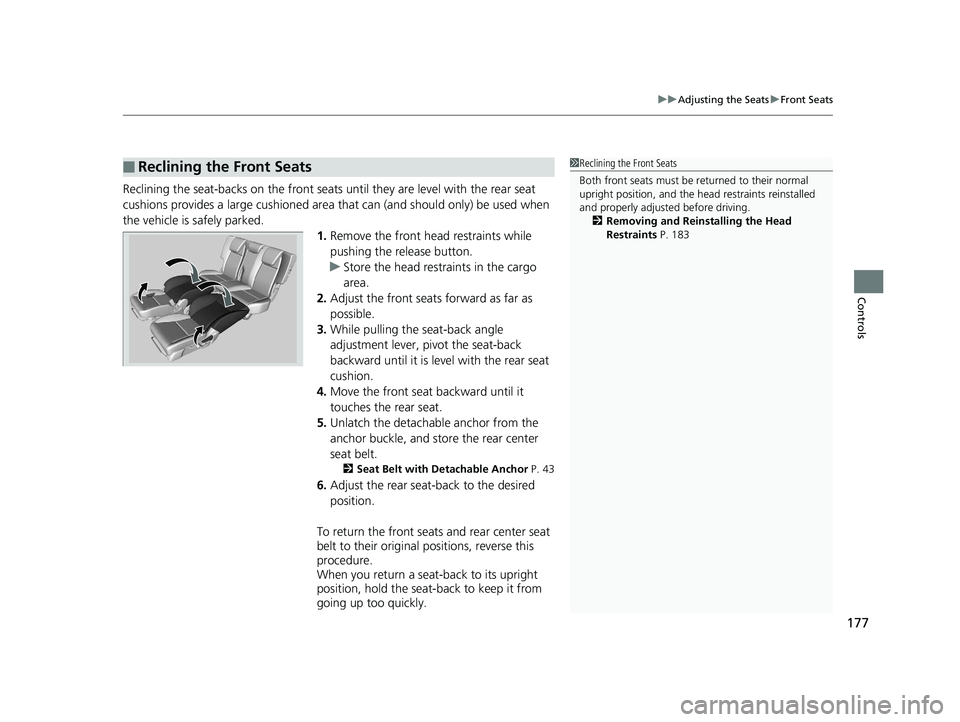
Reclining the seat-backs on the front seats until they are level with the rear seat
cushions provides a large cushioned area that can (and should only) be used when
the vehicle is safely parked. 1.Remove the front head restraints while
pushing the release button.
u Store the head restraints in the cargo
area.
2. Adjust the front seats forward as far as
possible.
3. While pulling the seat-back angle
adjustment lever, pivot the seat-back
backward until it is level with the rear seat
cushion.
4. Move the front seat backward until it
touches the rear seat.
5. Unlatch the detachable anchor from the
anchor buckle, and store the rear center
seat belt.
2 Seat Belt with Detachable Anchor P. 43
6.Adjust the rear seat -back to the desired
position.
To return the front seats and rear center seat
belt to their original positions, reverse this
procedure.
When you return a seat-back to its upright
position, hold the seat-back to keep it from
going up too quickly.
■Reclining the Front Seats1 Reclining the Front Seats
Both front seats must be returned to their normal
upright position, and the head restraints reinstalled
and properly adjusted before driving.
2 Removing and Reinstalling the Head
Restraints P. 183
20 FIT-31T5A6500.book 177 ページ 2019年9月26日 木曜日 午後4時41分
Page 196 of 599
uuInterior Lights/Interior Convenience Items uInterior Convenience Items
194
Controls
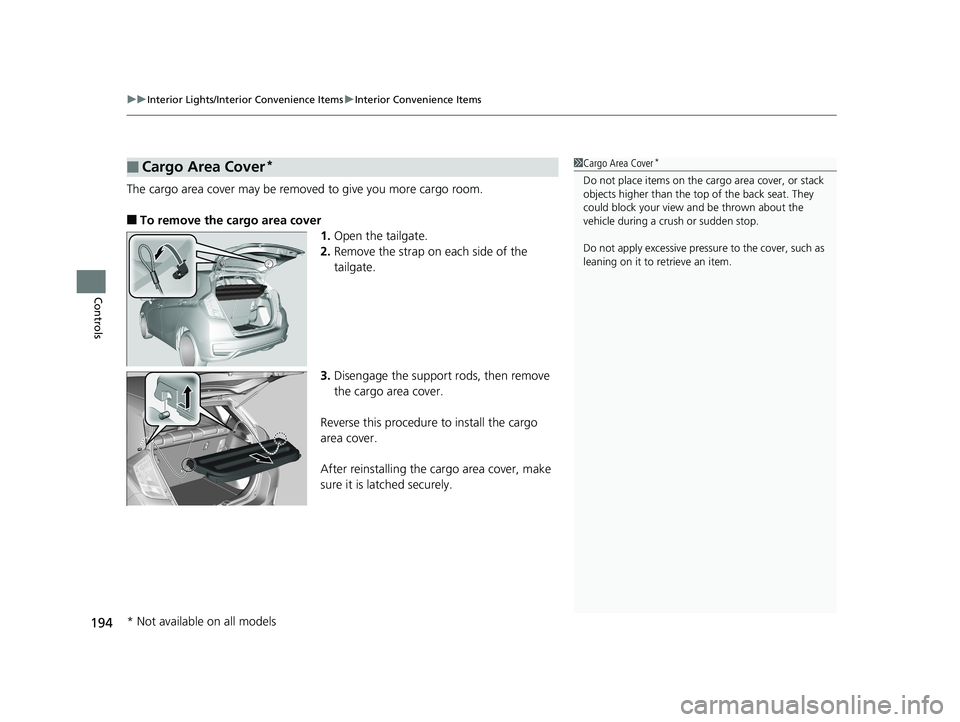
The cargo area cover may be removed to give you more cargo room.
■To remove the cargo area cover
1.Open the tailgate.
2. Remove the strap on each side of the
tailgate.
3. Disengage the support rods, then remove
the cargo area cover.
Reverse this procedure to install the cargo
area cover.
After reinstalling the cargo area cover, make
sure it is latched securely.
■Cargo Area Cover*1 Cargo Area Cover*
Do not place items on the cargo area cover, or stack
objects higher than the top of the back seat. They
could block your view and be thrown about the
vehicle during a crush or sudden stop.
Do not apply excessive pressure to the cover, such as
leaning on it to retrieve an item.
* Not available on all models
20 FIT-31T5A6500.book 194 ページ 2019年9月26日 木曜日 午後4時41分
Page 301 of 599

299
uuAudio System Basic Operation uHonda App License Agreement
Continued
Features
(b) Restrictions on Use. The licenses grante d under this AGREEMENT do not permit you to use the SOFTWARE or SERVICES on a device
other than your VEHICLE. As a condition of using the SOFTWA RE and SERVICES, you agree that you may not and will not:
6. Intellectual Property Rights. All title and intellectual property rights in and to the SOFTWA RE and SERVICES, the accompanying
DOCUMENTATION, and all copies of the SOFTWARE or SERVICES are owned by HONDA, PROVIDERS, or their suppliers or licensors. This
AGREEMENT does not grant you any rights in c onnection with any trademarks or service marks of HONDA, PROVIDERS, or their licens ors,
affiliates, or suppliers. (1) copy, download, distribute, modify, publish, sell, rent, leas
e, lend, license, sublicense, reuse, or create derivative works of the
SOFTWARE or SERVICES or any of the content or other material within the SOFTWARE or SERVICES, including without limitation,
HONDA or PROVIDER names, logos, or any other trademarks of HONDA or PROVIDERS or used in association with the SOFTWARE
or any SERVICES, except as requ ired to use the SOFTWARE or SERVICES in acco rdance with this AGREEMENT, any applicable
PROVIDER TERMS, and the DOCUMENTATION;
(2) access or use the SOFTWARE or SERVICES in any manner intend ed to damage or impair the operation of the SOFTWARE or
SERVICES or interfere with anyone else’s us e and enjoyment of the SOFTWARE or SERVICES;
(3) access or attempt to access any system or server on which the SOFTWARE or SERVICES is hosted or modify or alter the
SOFTWARE or SERVICES in any way;
(4) use the SOFTWARE or SERVICES for any unlawful pu rpose, or in violation of any third party rights;
(5) use the SOFTWARE or SERVICES in violat ion of any applicable traffic regulations, rules or laws, including but not limited to any
driver distraction laws, rules or regulations;
(6) violate the terms of this AGREEMEN T, any HONDA TERMS, any PROVIDER TERMS or other applicable third-party terms,
conditions, and privacy policies; or
(7) reverse engineer, decompile, disassemble, attempt to derive the source code of, nor permit others to reverse engineer,
decompile, or disassemble, or attempt to de rive the source code of the SOFTWARE or SERVICES, except and only to the extent that
such activity is expressly permitted (a) by applicable law notwi thstanding this limitation or (b) the terms of applicable free or
opensource software licenses.
20 FIT-31T5A6500.book 299 ページ 2019年9月26日 木曜日 午後4時41分
Page 419 of 599

417
uuWhen Driving uShifting
Continued
Driving
Shifting
Change the shift position in accordance with your driving needs.
■Shift lever positions
*1 : Models with the smart entry system have an ENGINE START/STOP button instead of an ignition switch.
Continuously variable transmission models without paddle shifters
1Shifting
You cannot turn the ignition switch to LOCK
(0*1
and remove the key unless the shift lever is in ( P.
The vehicle may move forward very slightly even in
(N while the engine is cold.
Depress the brake pe dal firmly and, when necessary,
apply the parking brake.
When shifting positions in extremely low
temperatures (-22°F/-30°C), there may be a short
delay before the shift posit ion is displayed. Always
confirm you are in the corr ect shift position before
driving.Park
Used when parking or starting the engine
Reverse
Used when reversing
Neutral
Transmission is not locked
Drive
Used for normal driving
Drive (S)
Used:
●For better acceleration●To increase engine braking●When going up or down hills
Release Button
Low
●Used to further increase engine braking●Used when going up or down hills
20 FIT-31T5A6500.book 417 ページ 2019年9月26日 木曜日 午後4時41分